Introducció
Thank you for choosing the Yaheetech Multistore 2002 Computer Desk. This manual provides detailed instructions for assembly, operation, maintenance, and troubleshooting to ensure safe and efficient use of your new desk. Please read this manual thoroughly before beginning assembly or use, and retain it for future reference.
Informació de seguretat
- Mantingueu totes les peces i els materials d'embalatge fora de l'abast dels nens.
- Munta l'escriptori sobre una superfície suau i neta per evitar ratllades.
- Assegureu-vos que tots els cargols i elements de fixació estiguin ben ajustats abans d'utilitzar-los. Comproveu-los periòdicament i torneu-los a apretar segons calgui.
- Do not overload the desk. Refer to the "Specifications" section for weight capacities.
- Avoid placing hot items directly on the desk surface.
- Use caution when moving the desk, especially on uneven surfaces. Ensure casters are unlocked if moving.
Llista de peces
Abans del muntatge, verifiqueu que tots els components que s'enumeren a continuació siguin presents i no estiguin danyats. Si hi ha alguna peça que falti o que estigui danyada, poseu-vos en contacte amb el servei d'atenció al client.

Figura 1: Explotat view of the desk showing main components and their names. This image highlights the heavy MDF boards, thickened frame, smooth steel ball drawer, open middle shelf, open bottom shelf, and lockable casters.
- A: Top Board (1 pc)
- B: Middle Shelf (1 pc)
- C: Bottom Shelf (1 pc)
- D: Side Frames (2 pcs)
- E: Drawer Front (1 pc)
- F: Drawer Sides (2 pcs)
- G: Drawer Back (1 pc)
- H: Drawer Bottom (1 pc)
- I: Drawer Slides (2 sets)
- J: Casters (4 pcs, 2 lockable)
- K: Hardware Pack (Screws, bolts, Allen wrench)
Instruccions de muntatge
Seguiu aquests passos amb cura per a un muntatge correcte. Es recomana que hi hagi dues persones per al muntatge.
- Step 1: Attach Casters to Side Frames.
Carefully attach the four casters (J) to the bottom of the two side frames (D). Ensure the two lockable casters are placed on the front side for easy access. Tighten securely with the provided wrench.

Figura 2: Detail of a caster wheel attached to the desk's metal frame. This shows the sturdy connection point and the wheel's design.
- Pas 2: Muntar el marc principal.
Connect the bottom shelf (C) and middle shelf (B) to the side frames (D) using the appropriate screws from the hardware pack (K). Do not fully tighten screws until all parts are aligned.
- Pas 3: Muntar el calaix.
Assemble the drawer components (E, F, G, H) using the provided screws. Ensure the drawer bottom (H) slides into the grooves correctly. Attach the drawer slides (I) to the sides of the assembled drawer.

Figura 3: The desk's pull-out drawer, shown partially open, revealing its interior space. This image demonstrates the drawer's functionality and capacity.
- Step 4: Install Drawer Slides to Desk Frame.
Attach the other part of the drawer slides (I) to the designated points on the desk's main frame, just below where the top board will sit. Ensure they are level and aligned.

Figura 4: Un detallat view of the smooth steel ball drawer slide mechanism. This highlights the quality of the sliding components for the drawer.
- Step 5: Attach the Top Board.
Place the top board (A) onto the assembled frame and secure it with screws. Ensure all pre-drilled holes align.
- Step 6: Insert the Drawer.
Carefully slide the assembled drawer into the installed drawer slides until it clicks into place.
- Pas 7: Ajustament final.
Once all components are in place and aligned, fully tighten all screws and fasteners. Do not overtighten.
Instruccions de funcionament
The Yaheetech Multistore 2002 Computer Desk is designed for versatile use in various settings, including home offices, living rooms, or bedrooms.

Figura 5: The computer desk positioned next to a sofa in a living room, demonstrating its compact size and suitability for small spaces. A laptop is placed on the top surface.
- Col·locació: Position the desk on a flat, stable surface. If using on carpet, ensure the casters can move freely.
- Mobilitat: To move the desk, unlock the two lockable casters by flipping their levers. Push or pull the desk gently to its desired location. Once in place, lock the casters to prevent accidental movement.
- Emmagatzematge:
- The top surface is suitable for laptops, monitors, or writing.
- The pull-out drawer provides enclosed storage for small items like pens, notebooks, or external hard drives.
- The open middle shelf is ideal for books, documents, or small electronic devices.
- The open bottom shelf can accommodate larger items such as a CPU tower, printer, or storage boxes.
- Capacitat de pes: Adhere to the maximum weight capacities specified in the "Specifications" section to prevent damage.
Manteniment
Regular maintenance will help prolong the life and appearance of your Yaheetech Multistore 2002 Computer Desk.
- Neteja: Netegeu les superfícies amb un suau, damp drap. Eviteu utilitzar productes químics agressius, netejadors abrasius o poliments que puguin danyar l'acabat.
- Vessaments: Clean up spills immediately to prevent staining or damage to the MDF boards.
- Elements de fixació: Reviseu periòdicament tots els cargols i elements de fixació per assegurar-vos que romanen ajustats. Torneu a apretar-los si cal per mantenir l'estabilitat.
- Rodes: Keep casters free of debris (hair, dust, etc.) to ensure smooth movement.
- Llum solar/calor: Eviteu l'exposició prolongada a la llum solar directa o a la calor extrema, ja que poden causar decoloració o deformació.
Resolució de problemes
Si teniu algun problema amb el vostre escriptori, consulteu els següents problemes i solucions habituals:
| Problema | Causa possible | Solució |
|---|---|---|
| L'escriptori està inestable. | Fixacions fluixes; terra irregular. | Ensure all screws are fully tightened. Move desk to a level surface or use shims if necessary. |
| El calaix no llisca sense problemes. | Guies del calaix desalineades; restes a les guies. | Check that drawer slides are correctly installed and aligned. Clean tracks of any dust or debris. |
| Les rodes no giren lliurement. | Casters locked; debris in wheels. | Unlock casters if they are engaged. Remove any hair or debris from the wheels. |
| Falten peces després de desembalar. | Error d'embalatge. | Contact Yaheetech customer support with your purchase details and the specific missing parts. |
Especificacions
Detailed dimensions and material information for the Yaheetech Multistore 2002 Computer Desk.
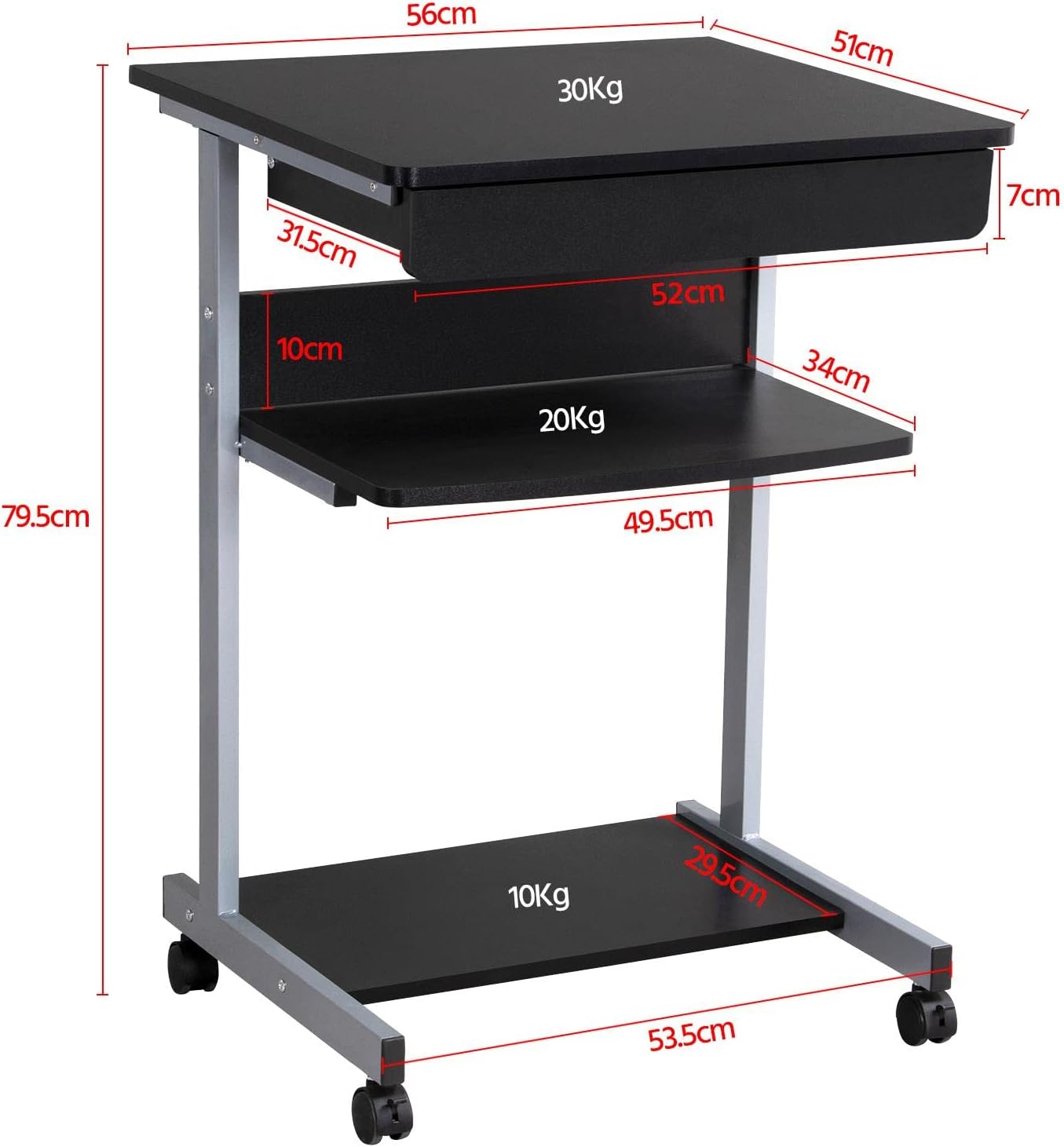
Figura 6: Detailed dimensional drawing of the desk, including measurements for overall height, width, depth, and individual shelf and drawer dimensions. Also shows weight capacities for each surface.
| Característica | Detall |
|---|---|
| Número de model | YA-00097936 |
| Dimensions totals (L x A x A) | 56 x 51 x 79.5 cm (22 x 20.1 x 31.3 polzades) |
| Top Board Dimensions | 56 x 51 cm (22 x 20.1 polzades) |
| Drawer Dimensions (Inner) | 45 x 30 x 6 cm (17.7 x 11.8 x 2.4 polzades) |
| Middle Shelf Dimensions | 50 x 34 cm (19.7 x 13.4 polzades) |
| Bottom Shelf Dimensions | 50 x 30.5 cm (19.7 x 12 polzades) |
| Material | MDF (Medium Density Fiberboard) with Metal Frame |
| Color | Negre |
| Pes net | Aprox. 10.9 kg (24 lliures) |
| Max. Load Capacity (Top Board) | 30 kg (66 lliures) |
| Capacitat de càrrega màxima (prestatge del mig) | 20 kg (44 lliures) |
| Capacitat de càrrega màxima (prestatge inferior) | 10 kg (22 lliures) |
| Rodes | 4 (2 with locking mechanism) |
Garantia i Suport
Yaheetech products are manufactured to high-quality standards. For specific warranty information, please refer to the warranty card included with your product or visit the official Yaheetech website. If you have any questions, require assistance with assembly, or need to report missing/damaged parts, please contact our customer support team:
- Weblloc: www.yaheetech.com (Si us plau, consulteu les regions) webllocs)
- Correu electrònic: Consulteu la documentació de la compra per obtenir el correu electrònic del servei d'atenció al client.
- Telèfon: Consulteu la documentació de compra per obtenir el número de telèfon d'atenció al client.
When contacting support, please have your model number (YA-00097936) and purchase date ready.


