1. Introducció
Gràcies per la compraasing the auna V-20 Vertical Stereo System. This manual provides essential information for the safe and efficient operation of your device. Please read it thoroughly before use and keep it for future reference.
2. Instruccions de seguretat
- Llegiu atentament totes les instruccions abans d'utilitzar el dispositiu.
- Manteniu el dispositiu allunyat de l'aigua, la humitat i les temperatures extremes.
- No obstruïu cap obertura de ventilació.
- Utilitzeu només accessoris/accessoris especificats pel fabricant.
- Desconnecteu el dispositiu durant les tempestes amb llamps o quan no l'utilitzeu durant llargs períodes.
- Demaneu tot el servei a personal de servei qualificat.
- No obriu la c.asing; no hi ha peces a l'interior que l'usuari pugui reparar.
3. Contingut del paquet
Si us plau, comproveu que hi hagi tots els elements:
- 1 x auna V-20 Vertical Stereo System
- 1 x Remote Control (including 2 x 1.5V AAA batteries)
- 1 x adaptador de corrent
- 1 x Removable Stand Base
- 1 x Wire Antenna
- User Manual (English and German)
4. Producte acabatview
The auna V-20 is a versatile micro stereo system featuring a vertical design. It includes a CD player, DAB+ and FM radio, Bluetooth, NFC, USB, and AUX connectivity. The system can be used with its stand or mounted on a wall.

Figure 4.1: The auna V-20 Vertical Stereo System shown with its remote control in a modern living room environment.
Controls i pantalla del panell frontal
The front panel features a sleek design with a motorized CD drive cover and an LED display that shows time and operational information. Control buttons are located on the top edge of the unit.
Connexions del panell posterior
The rear panel provides various connection ports for external devices and power.
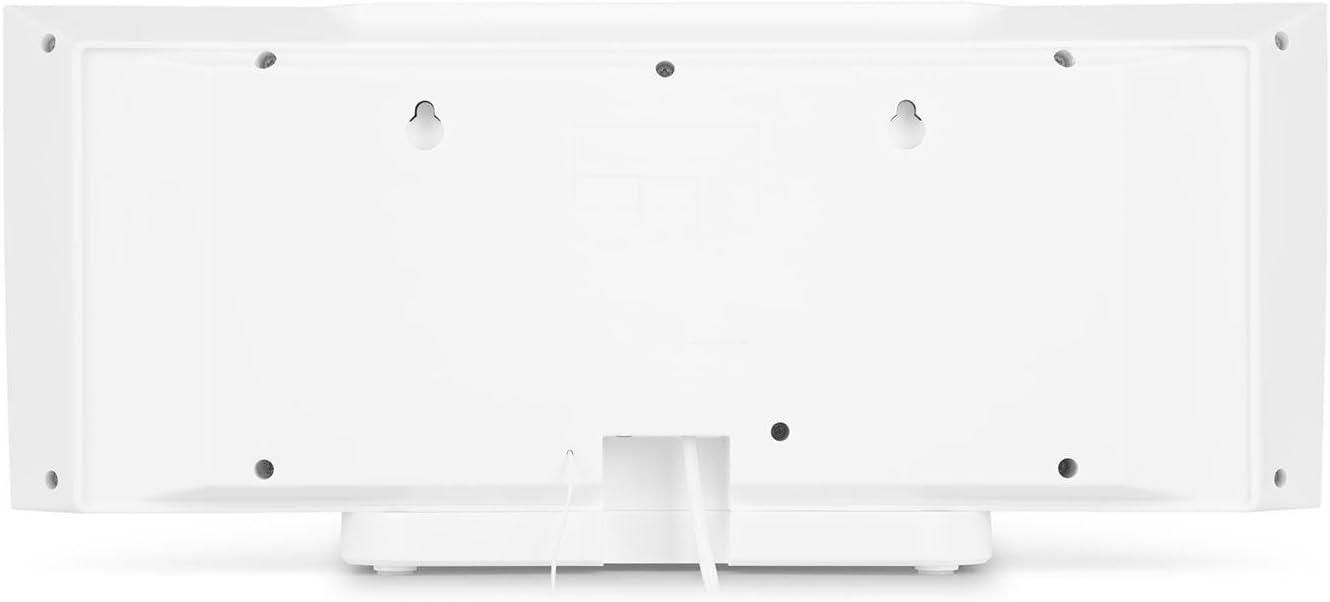
Figura 4.2: posterior view of the auna V-20, highlighting the USB port and AUX input.
Control remot
The included remote control allows for convenient operation of all functions from a distance.

Figura 4.3: Detallada view of the remote control for the auna V-20 stereo system.
5. Configuració
5.1 Opcions de col·locació
The auna V-20 offers flexible placement:
- Muntatge de suport: Attach the removable stand base for desktop or shelf placement. Ensure the unit is stable on a flat surface.
- Muntatge a la paret: The unit can be mounted on a wall to save space. Use appropriate wall mounting hardware (not included) and ensure the wall can support the unit's weight.

Figura 5.1: posterior view illustrating the wall mounting points and the stand attachment area.
5.2 Connexió d'alimentació
Connect the provided power adapter to the DC IN port on the rear of the unit, then plug it into a standard wall outlet (AC 230V, 50 Hz).
5.3 Connexió de l'antena
Extend the wire antenna for optimal DAB+ and FM radio reception. Adjust its position for the best signal quality.
6. Instruccions de funcionament
6.1 Engegada/Apagada i espera
Premeu el botó EN ESPERA button on the unit or remote control to switch the system on or put it into standby mode.
6.2 Selecció del mode
Premeu el botó FUNCIÓ button on the unit or the dedicated mode buttons (FM/DAB, USB, CD, AUDIO IN, BLUETOOTH) on the remote control to switch between different audio sources.
6.3 Control de volum
Ajusteu el volum amb el botó VOL+ i VOL- buttons on the unit or remote control. The LED display will show the current volume level.
6.4 Configuració de l'equalitzador
The system features a 2-band equalizer and equalizer presets. Use the EQ button on the remote control to cycle through presets or adjust bass/treble. The X-BASS function can be activated for enhanced bass.
7. Connectivitat Bluetooth i NFC
7.1 Vinculació Bluetooth
To stream music wirelessly from your smartphone, tablet, or laptop:
- Switch the stereo system to Bluetooth mode. The LED display will indicate pairing mode.
- Activeu el Bluetooth al vostre dispositiu mòbil i cerqueu els dispositius disponibles.
- Select "auna V-20" from the list to pair. Once connected, you can play audio from your device.

Figure 7.1: A smartphone being used to connect to the auna V-20 via Bluetooth.
7.2 Connexió NFC
For intuitive pairing with NFC-enabled devices:
- Assegureu-vos que l'NFC estigui activat al vostre dispositiu mòbil.
- Gently swipe your NFC-enabled device over the NFC sensor on the auna V-20.
- The devices will automatically pair via Bluetooth.

Figura 7.2: Primer pla view of the NFC sensor for quick device pairing.
8. Funcionament del reproductor de CD
The auna V-20 features an MP3-compatible CD player with a motorized drive.

Figure 8.1: The motorized CD player mechanism with a disc inserted.
8.1 Càrrega d'un CD
- Premeu el botó OBRIR/TANCAR button to open the motorized CD cover.
- Carefully place a CD (CD, CD-R/RW, MP3-CD) onto the spindle with the label side facing you.
- Premeu OBRIR/TANCAR again to close the cover. The system will automatically switch to CD mode and begin playback.
8.2 Controls de reproducció
- Reproduir/pausa: Premeu REPRODUCCIÓ/PAUSA per iniciar o pausar la reproducció.
- Omet les pistes: Utilitza el Saltar endavant or SALTAR ENRERE botons per navegar entre pistes.
- Atura: Premeu el botó STOP botó per finalitzar la reproducció.
- Repetició/Aleatori: Utilitza el REPETIR i ALEATÒRIA buttons on the remote for playback options.
- Reproducció programable: The system supports programmable title display for custom playlists.
9. Radio Operation (DAB+/FM)
The auna V-20 features both DAB+ digital radio and analog FM radio with RDS function.
9.1 Selecting Radio Mode
Premeu el botó FM/DAB button on the remote control to switch between FM and DAB+ modes.
9.2 Escaneig automàtic d'emissores
In either FM or DAB+ mode, press the ESCANEAR button on the remote control to automatically scan and store available stations. The system can store up to 20 presets per reception type.
9.3 Manual Tuning and Presets
- Sintonització manual: Utilitza el TUNE +/- buttons on the remote control for fine-tuning.
- Desant els valors predefinits: Once a station is found, press the PRESET button, then use the number buttons (0-9, 10+) to assign a preset number. Press ENTRAR per confirmar.
- Recordant presets: Press the corresponding number button on the remote control to quickly access a saved station.
- Botó d'informació: En mode DAB+, premeu el botó INFO button to display additional information such as artist, title, album, or news.
10. Reproducció USB
The auna V-20 allows playback of MP3 audio files directament des d'una memòria USB.
10.1 Connectar un dispositiu USB
- Insert your USB stick into the USB port on the rear of the unit.
- Switch the stereo system to USB mode using the USB botó del comandament a distància.
- The system will automatically detect and begin playing MP3 files.
10.2 USB Playback Controls
Playback controls (Play/Pause, Skip, Stop, Repeat, Random) are similar to CD player operation. Use the CARPETA button on the remote to navigate through folders on the USB device.
11. Entrada AUX
Connect external audio devices such as MP3 players, CD players, or computers using the AUX input.
11.1 Connexió d'un dispositiu extern
- Connect a 3.5mm audio cable (not included) from the headphone jack or audio output of your external device to the AUX IN port on the rear of the auna V-20.
- Switch the stereo system to AUDIO IN mode using the AUDIO IN botó del comandament a distància.
- Play audio from your external device. The sound will be output through the auna V-20 speakers.
12. Manteniment
12.1 Neteja
- Desendolleu sempre el dispositiu de la presa de corrent abans de netejar-lo.
- Utilitzeu un drap suau i sec per netejar les superfícies exteriors.
- No utilitzeu netejadors abrasius, ceres o dissolvents, ja que poden danyar l'acabat.
- Per a la lent del CD, feu servir un netejador de lents de CD especialitzat si cal.
12.2 Atenció general
- Eviteu col·locar objectes pesats a la unitat.
- Mantingueu la unitat allunyada de la llum solar directa i de les fonts de calor.
- Assegureu-vos una ventilació adequada al voltant de la unitat per evitar el sobreescalfament.
13. Solució De Problemes
| Problema | Causa possible | Solució |
|---|---|---|
| Sense poder | Cable d'alimentació no connectat; presa de corrent defectuosa | Comproveu la connexió del cable d'alimentació; proveu una presa de corrent diferent |
| Sense so | Volume too low; incorrect source selected; mute activated | Increase volume; select correct source; deactivate mute |
| El CD no es reprodueix | CD inserted incorrectly; CD dirty/scratched; unsupported format | Reinsert CD correctly; clean or replace CD; ensure CD is compatible (CD, CD-R/RW, MP3-CD) |
| Mala recepció de ràdio | Antenna not extended; weak signal | Extend and adjust antenna position; try moving the unit to a different location |
| L'aparellament de Bluetooth falla | Device too far; Bluetooth not enabled; incorrect pairing procedure | Ensure devices are close; enable Bluetooth on mobile device; follow pairing instructions (Section 7.1) |
14. Especificacions
| Característica | Detall |
|---|---|
| Marca | auna |
| Model | V-20 |
| Número de part | AUVZ-1100-ghfr |
| Dimensions del producte | 51 x 25 x 16 cm |
| Pes | 2.6 kg |
| Font d'alimentació | Elèctric |
| Wattage | 27 watts |
| Mode de sortida d'àudio | estèreo |
| Configuració dels altaveus | 2.0 |
| Formats d'àudio compatibles | MP3 |
| Tipus de suport | CD, MP3 |
| Tipus de connectors | Bluetooth, NFC, USB, AUX |
| Compatible amb Bluetooth | Sí |
| Versió Bluetooth | 2.1+EDR |
| Bluetooth Profile | A2DP |
| Dispositius compatibles | Smartphone, tablet, MP3 player |
| Característiques especials | Fàcil d'utilitzar |
| Bateries de comandament a distància | 2 x 1.5 V AAA (inclosos) |
| Interval de freqüència DAB+ | 174 - 240 MHz (Band III) |
15. Garantia i Suport
This product is covered by a manufacturer's warranty. For detailed warranty information, please refer to the documentation provided at the time of purchase or contact auna customer support.
If you encounter any issues not covered in the troubleshooting section, or require further assistance, please contact auna customer service through their official weblloc web o el vostre minorista.


