1. Instruccions de seguretat importants
Please read these instructions carefully before using the device and retain them for future reference. Incorrect use may result in electric shock or fire.
- No exposeu el dispositiu a degoteigs o esquitxades d'aigua.
- No col·loqueu objectes plens de líquids, com ara gerros, al dispositiu.
- Ensure proper ventilation around the device. Do not block ventilation openings.
- No instal·leu a prop de cap font de calor com ara radiadors, registres de calor, estufes o altres aparells (inclosos amplificadors) que produeixen calor.
- Utilitzeu només accessoris/accessoris especificats pel fabricant.
- Desendolleu aquest aparell durant les tempestes amb llamps o quan no l'utilitzeu durant llargs períodes.
- Demaneu tot el servei a personal de servei qualificat.
2. Producte acabatview
The Thomson CR221I is a versatile alarm clock radio featuring dual alarms, an FM radio, a wireless charging pad, and USB charging ports. Its clear LED display and intuitive controls make it an ideal bedside companion.

Figura 1: Frontal view of the Thomson CR221I, highlighting the LED display and control panel.

Figura 2: Angle view of the device, illustrating the wireless charging area and speaker grille.
Components principals:
- Pantalla LED: Mostra l'hora, l'estat de l'alarma i la freqüència de ràdio.
- Botons de control: For setting time, alarms, radio, volume, snooze, and dimmer.
- Coixinet de càrrega sense fil: Located on top for compatible smartphones.
- Ports de càrrega USB: For charging other devices (cable not included).
- Entrada AUX: Per connectar fonts d'àudio externes.
- Antena FM: Per a la recepció de ràdio.
3. Configuració
3.1 Connexió d'alimentació
- Unpack the Thomson CR221I and its power adapter.
- Connect the power adapter cable to the DC IN port on the back of the alarm clock.
- Plug the power adapter into a standard 230V AC wall outlet.
- The display will light up, and the clock will be ready for initial setup.
Nota: This device operates on corded electric power. No user-replaceable batteries are required for primary operation.
4. Instruccions de funcionament
4.1 Configuració de l'hora
- Manteniu premut el botó CLK/MEM fins que els dígits de les hores parpellegin.
- Utilitza el SALT + or OMET- botons per ajustar l'hora.
- Premeu CLK/MEM de nou per confirmar l'hora i passar a la configuració dels minuts.
- Utilitza el SALT + or OMET- botons per ajustar els minuts.
- Premeu CLK/MEM per estalviar temps.
4.2 Configuració d'alarmes (alarma 1 i alarma 2)
El dispositiu admet dues alarmes independents.
- Manteniu premut el botó AL1 or AL2 fins que els dígits de l'hora de l'alarma parpellegin.
- Utilitza el SALT + or OMET- botons per configurar l'hora d'alarma desitjada.
- Premeu AL1 or AL2 de nou per confirmar l'hora i passar a la configuració dels minuts.
- Utilitza el SALT + or OMET- botons per configurar els minuts d'alarma desitjats.
- Premeu AL1 or AL2 again to select the alarm source (Buzzer or FM Radio).
- Premeu AL1 or AL2 one more time to save the alarm setting. The corresponding alarm indicator (AL1 or AL2) will appear on the display.
4.3 Funcionament de la ràdio FM
- Premeu el botó FM botó per encendre la ràdio.
- To automatically scan and save stations: Press and hold the FM button. The radio will scan for available stations and store up to 30 presets.
- To manually tune: Briefly press SALT + or OMET- to adjust the frequency step by step.
- Per recuperar les emissores desades: premeu breument CLK/MEM to cycle through the preset stations.
- Ajusteu el volum amb el botó VOL + / VOL- botons.
- Premeu el botó FM de nou el botó per apagar la ràdio.
4.4 Càrrega sense fil
The device features an induction charging pad for compatible smartphones.
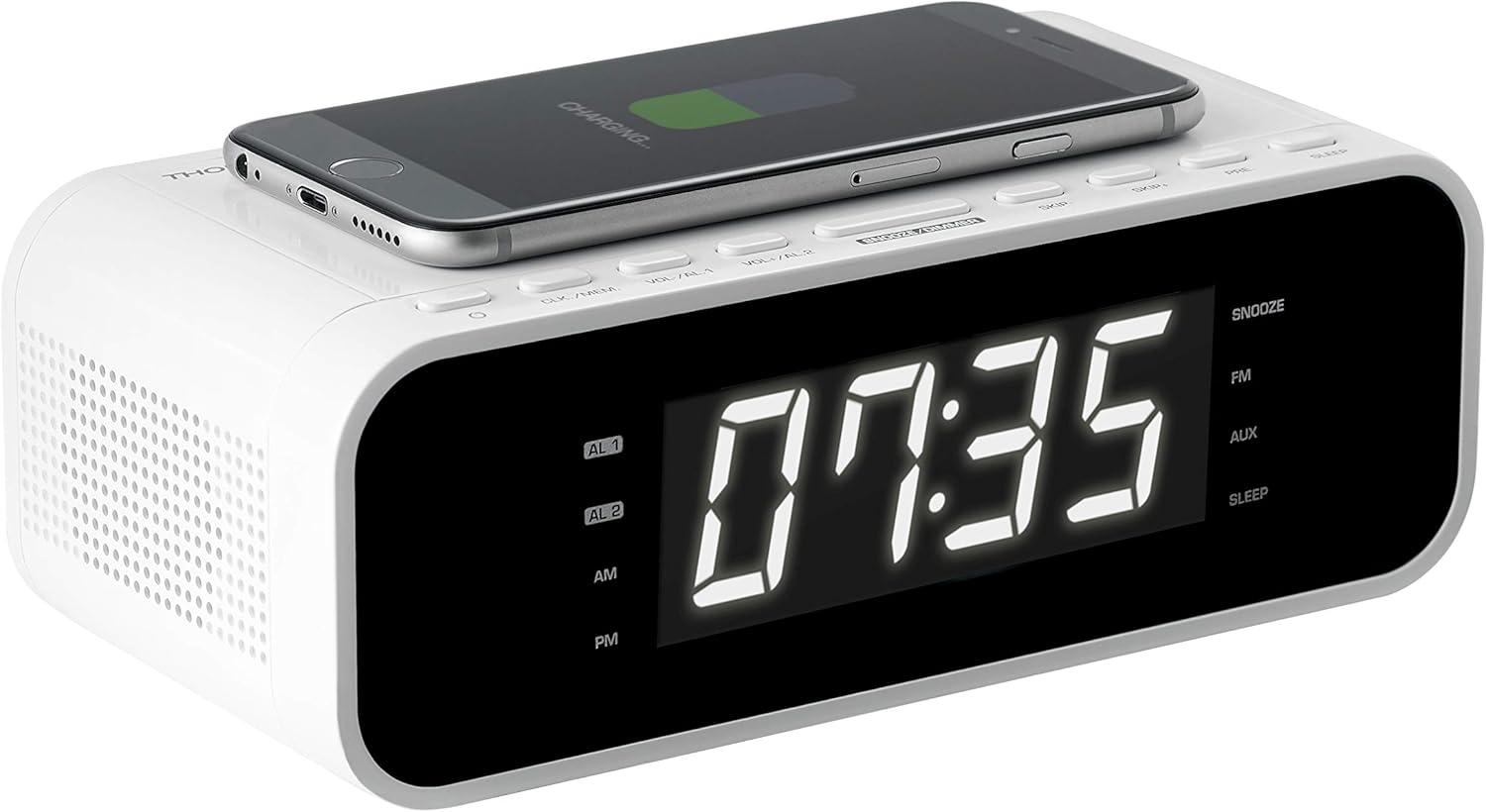
Figure 3: Smartphone placed on the wireless charging pad for inductive charging.
- Place your Qi-compatible smartphone directly onto the wireless charging pad located on the top surface of the alarm clock.
- Ensure the phone is centered on the charging symbol for optimal connection.
- The phone's display should indicate that charging has begun.
- Remove the phone once fully charged or when no longer needed.
Nota: Charging speed may vary depending on the phone model and its alignment on the pad. Remove any thick phone cases that may interfere with wireless charging.
4.5 Càrrega USB
Two USB ports are available on the back of the unit for charging other devices.
- Connect your device's USB charging cable (not included) to one of the USB ports on the alarm clock.
- Connecteu l'altre extrem del cable al vostre telèfon intel·ligent, tauleta o altre dispositiu alimentat per USB.
- Charging will begin automatically. The USB ports provide up to 1A output.
4.6 Display Dimmer Function
The display intensity can be adjusted to suit your preference.
- Premeu el botó DIMMER button repeatedly to cycle through brightness levels: 100% (bright), 50% (medium), and 0% (off).
4.7 Snooze, Sleep, and Timer Functions
- Dormitar: Quan soni una alarma, premeu el botó DORMITAR button to temporarily silence the alarm for a short period (e.g., 9 minutes). The alarm will sound again after the snooze period.
- Temporitzador de son: Premeu el botó DORMIR button to set a sleep timer for the radio. The radio will play for the set duration and then automatically turn off. Press repeatedly to cycle through available sleep times.
- Temporitzador: The device may include a separate timer function for specific durations. Refer to the on-screen prompts or specific button labels for activation.
4.8 Entrada AUX
Connecteu dispositius d'àudio externs mitjançant l'entrada AUX de 3.5 mm.
- Connect a 3.5mm audio cable (not included) from your external audio device (e.g., MP3 player, laptop) to the AUX port on the back of the alarm clock.
- Premeu el botó AUX button on the alarm clock to switch to AUX input mode.
- Control playback from your external device and adjust volume using the alarm clock's VOL + / VOL- botons.
5. Manteniment
5.1 Neteja
- Desendolleu sempre el dispositiu de la presa de corrent abans de netejar-lo.
- Feu servir un drap suau i sec per netejar les superfícies exteriors.
- No utilitzeu netejadors abrasius, ceres o dissolvents, ja que poden danyar l'acabat.
5.2 Emmagatzematge
- If storing the device for an extended period, unplug it and store it in a cool, dry place away from direct sunlight and extreme temperatures.
6. Solució De Problemes
If you encounter issues with your Thomson CR221I, please refer to the following common problems and solutions:
| Problema | Causa possible | Solució |
|---|---|---|
| El dispositiu no s'encén. | L'adaptador de corrent no està connectat o la presa de corrent està defectuosa. | Ensure the power adapter is securely connected to the device and a working wall outlet. |
| La càrrega sense fil no funciona. | Phone not Qi-compatible, not aligned, or thick case. | Verify your phone supports Qi wireless charging. Reposition the phone on the charging pad. Remove any thick phone cases. |
| Display is too bright, even at lowest setting. | User preference or environmental factors. | Utilitza el DIMMER button to cycle through 100%, 50%, and 0% brightness levels. If 0% is still too bright, consider placing the unit further away or using a light-blocking cover. |
| Mala recepció de ràdio FM. | Posició de l'antena o interferències. | Extend and reposition the FM antenna for better signal. Move the unit away from other electronic devices that may cause interference. |
| L'alarma no sona. | L'alarma no està configurada o el volum és massa baix. | Ensure the alarm is activated (AL1/AL2 indicator on display). Check the alarm volume setting. |
7. Especificacions
- Marca: THOMSON
- Model: CR221I
- Font d'alimentació: Electric Corded (230 Volt)
- Tipus de visualització: Digital LED, 1 Inch screen size
- Bandes de ràdio admeses: FM (AM Tuner Technology listed, but FM is primary for radio bands)
- Presets de ràdio: Up to 30 FM stations
- Característiques especials: Dual Alarm, Snooze, Sleep Timer, Dimmer, Wireless Charging, USB Charging
- Sortida de càrrega sense fils: Tecnologia d'inducció
- Sortida de càrrega USB: 1A
- Entrada d'àudio: 3.5 mm AUX
- Speaker Max Power: 5 watts
- Interfície de maquinari: 3.5 mm audio, USB
- Dispositius compatibles: Smartphone, laptop, MP3-player, headphones, speaker, tablet
- Dimensions del producte: 19 x 11 x 6 cm
- Pes del producte: 500 g
- Components inclosos: Charging cable (Note: 'Battery' listed in source may refer to internal memory battery, not user-replaceable primary power)
8. Garantia i Suport
For warranty information or technical support, please refer to the documentation provided with your purchase or contact the retailer where the product was acquired. You may also visit the official THOMSON or Bigben Interactive weblloc web per obtenir més ajuda i dades de contacte.


