1. Introducció
This manual provides detailed instructions for the installation, operation, and maintenance of your EBTOOLS 12V/24V 50A Solar Charge Controller. This intelligent regulator is designed to manage power flow from your solar panel to your battery and load, ensuring efficient and safe charging. It features dual USB ports, PWM/MPPT auto-parameter adjustment, and an LCD display for monitoring system status.
2. Informació de seguretat
Please read all instructions carefully before installation and operation. Failure to follow these instructions may result in damage to the controller, battery, or other components, and may cause personal injury.
- Ensure all connections are correct and secure before applying power.
- Connect the battery first, then the solar panel, and finally the load. Disconnect in the reverse order.
- Do not connect the solar panel to the AC power supply.
- The controller is designed for indoor use. Avoid exposure to direct sunlight, high temperatures, and moisture.
- Ensure adequate ventilation around the controller.
- Use appropriate wire gauges for all connections to prevent overheating.
- Aquest dispositiu no és una joguina. Mantenir fora de l'abast dels nens.
3. Producte acabatview
The EBTOOLS Solar Charge Controller integrates advanced charging technology to optimize battery life and system performance. Key components include the LCD display, control buttons, connection terminals, and USB output ports.
3.1 Tauler frontal
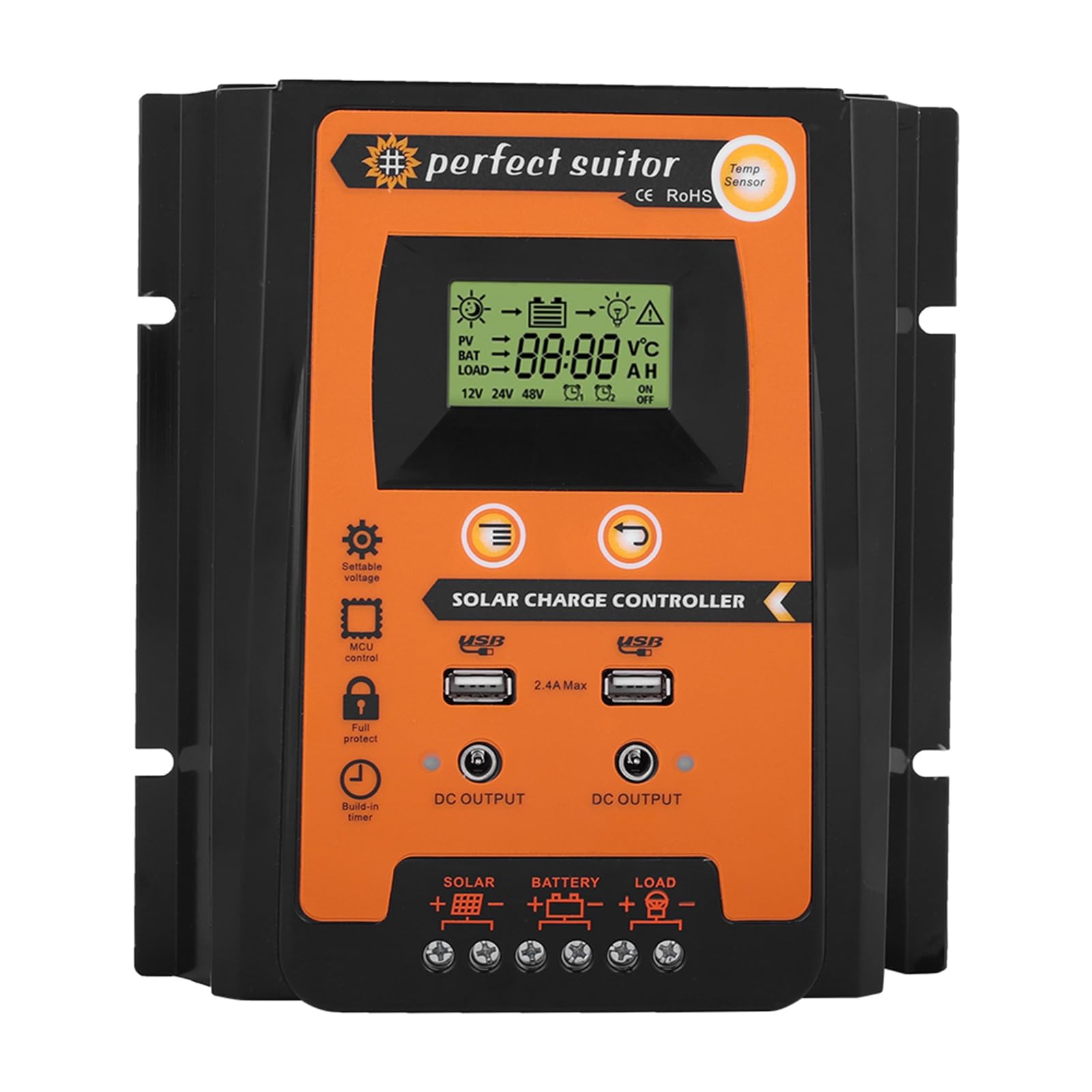
Figura 3.1: Frontal view of the EBTOOLS Solar Charge Controller. This image displays the LCD screen, control buttons, dual USB output ports, and indicators for solar, battery, and load connections.
3.2 Panell posterior

Figura 3.2: posterior view of the EBTOOLS Solar Charge Controller. The rear panel features heat sink fins for efficient heat dissipation.
3.3 Dimensions

Figure 3.3: Dimensions of the EBTOOLS Solar Charge Controller. The unit measures approximately 21cm (8.3 inches) in length, 19.2cm (7.6 inches) in width, and 5.5cm (2.2 inches) in height.
4. Configuració i instal·lació
Follow these steps for proper installation of the solar charge controller. Ensure all power sources are disconnected before making any connections.
4.1 Connection Sequence
- Connecteu la bateria: Connect the battery to the controller's battery terminals (+ and -). The LCD display will light up.
- Connecteu el panell solar: Connect the solar panel to the controller's solar panel terminals (+ and -).
- Connect the Load: Connect the load to the controller's load terminals (+ and -).
Important: Always connect the battery first, then the solar panel, and finally the load. Disconnect in the reverse order: load, then solar panel, then battery.

Figure 4.1: Controller Connection Method. This diagram illustrates the correct wiring sequence from the solar panel to the controller, then to the battery, and finally to the load.
4.2 Muntatge
Mount the controller on a vertical surface in a well-ventilated area, away from direct sunlight, high temperatures, and moisture. Ensure there is sufficient space around the controller for air circulation.
5. Instruccions de funcionament
The controller automatically detects 12V or 24V system voltage. The LCD display provides real-time information about your solar system.
5.1 Pantalla LCD
The LCD displays various parameters including battery voltage, panell solar voltage, load current, battery charge status, and error codes.
5.2 botons de control
- Botó de menú: Press to cycle through display modes and enter setting menus.
- Botons amunt / avall: Used to adjust parameters within the setting menus.
- Botó Enter: Confirma les seleccions i desa la configuració.
5.3 Sortida USB
The dual USB ports provide a 5V/2.4A output for charging mobile devices. These ports are active when the controller is powered.
6. Manteniment
Un manteniment regular garanteix un rendiment òptim i una llarga vida útil del controlador de càrrega solar.
- Comproveu les connexions: Periodically inspect all wiring connections for tightness and corrosion.
- Controlador net: Mantingueu el controlador net i lliure de pols i brutícia. Feu servir un drap sec per netejar-lo.
- Ventilació: Assegureu-vos que les obertures de ventilació no estiguin bloquejades.
- Inspecció de la bateria: Regularly check the battery terminals for corrosion and ensure the battery is in good condition.
7. Solució De Problemes
This section addresses common issues you might encounter with your solar charge controller.
| Problema | Causa possible | Solució |
|---|---|---|
| La pantalla LCD està apagada | Bateria no connectada o de baix volumtage | Check battery connections; charge battery if voltage és massa baixa. |
| La bateria no es carrega | Solar panel not connected, insufficient sunlight, or faulty panel/wiring | Check solar panel connections; ensure adequate sunlight; test solar panel output. |
| La càrrega no funciona | Load not connected, overload, or battery low voltage protecció | Check load connections; reduce load; charge battery. |
| Sobrevoltage protecció | Bateria voltage massa alt | Controller will automatically stop charging. Check battery health. |
8. Especificacions
Technical specifications for the EBTOOLS 12V/24V 50A Solar Charge Controller.
| Característica | Detall |
|---|---|
| Model | PVSC50A |
| Volum del sistematage | 12V/24V Auto-sensing |
| Corrent de càrrega nominal | 50A |
| Corrent nominal de descàrrega | 50A |
| Entrada solar màxima | Menys de 50 V |
| Sortida USB | Dual USB 5V/2.4A (Max) |
| Material | Plàstic |
| Dimensions del producte | 6.89 x 5.51 x 1.57 polzades (17.5 x 14 x 4 cm) |
| Pes de l'article | 1.06 lliures (0.48 kg) |
9. Garantia i Suport
EBTOOLS products are designed for reliability and performance. For warranty information or technical support, please refer to the documentation provided with your purchase or contact your retailer. Keep your purchase receipt for warranty claims.
