Introducció
Thank you for choosing the auna Streetstar 2.0 15 Mobile PA System. This portable audio system is designed to deliver powerful sound with versatile connectivity options, including Bluetooth, USB/SD playback, and FM radio. It features a robust design with integrated trolley function for easy transport and comes with a wireless microphone for various applications.
This manual provides important information regarding the safe operation, setup, and maintenance of your device. Please read it thoroughly before first use and keep it for future reference.

Image: The auna Streetstar 2.0 15 Mobile PA System, showcasing its main unit and included wireless microphone.
Instruccions de seguretat
Per garantir un funcionament segur i evitar danys, observeu les següents precaucions de seguretat:
- Font d'alimentació: Only connect the device to a power outlet with the specified voltage (220 volts).
- Ventilació: Assegureu-vos que hi hagi una ventilació adequada. No bloquegeu les obertures de ventilació.
- Humitat: Do not expose the device to rain or moisture. Do not place objects filled with liquids, such as vases, on the device.
- Calor: Mantingueu el dispositiu allunyat de fonts de calor com ara radiadors, registres de calor, estufes o altres aparells (inclosos amplificadors) que produeixen calor.
- Neteja: Unplug the device from the power outlet before cleaning. Use a dry cloth for cleaning.
- Manteniment: No intenteu atendre aquest producte vosaltres mateixos. Consulteu tots els serveis a personal de servei qualificat.
- Col·locació: Place the unit on a stable, flat surface. Avoid placing it in direct sunlight or near strong magnetic fields.
- Cura de la bateria: If the unit has an internal battery, avoid fully discharging it for extended periods. Charge regularly to maintain battery health.
Contingut del paquet
Si us plau, comproveu que tots els elements siguin presents i en bon estat:
- auna Streetstar 2.0 15 Mobile PA System
- Micròfon sense fil
- Cable d'alimentació
- Control remot
- Manual d'usuari (aquest document)
Producte acabatview i Controls
Familiarize yourself with the various parts and controls of your PA system.

Imatge: Detallada view of the control panel, showing inputs, outputs, and adjustment knobs.
Característiques del tauler de control:
- MEDIAPLAYER: Digital display for USB/SD playback and mode selection.
- Port USB: Per connectar unitats flaix USB.
- Ranura SD: Per inserir targetes de memòria SD.
- Botó MODE: Canvia entre els modes Bluetooth, USB, SD, FM i AUX.
- NIVELL DE MIC: Ajusta el volum de l'entrada del micròfon.
- ECO MIC: Ajusta l'efecte d'eco del micròfon.
- AGUTS / BAIXS: Tone controls for adjusting high and low frequencies.
- MIC IN: 6.3mm jack inputs for wired microphones.
- ENTRADA AUX: RCA (L/R) inputs for external audio devices.
- LINE IN / OUT: RCA (L/R) connections for linking multiple PA systems.
- Interruptor d'alimentació: Encén o apaga la unitat.
- UHF MICROPHONE Volume: Adjusts the volume of the wireless microphone.
- Indicadors: PWR (Power), CHARGE (Charging status), LOW (Low battery).
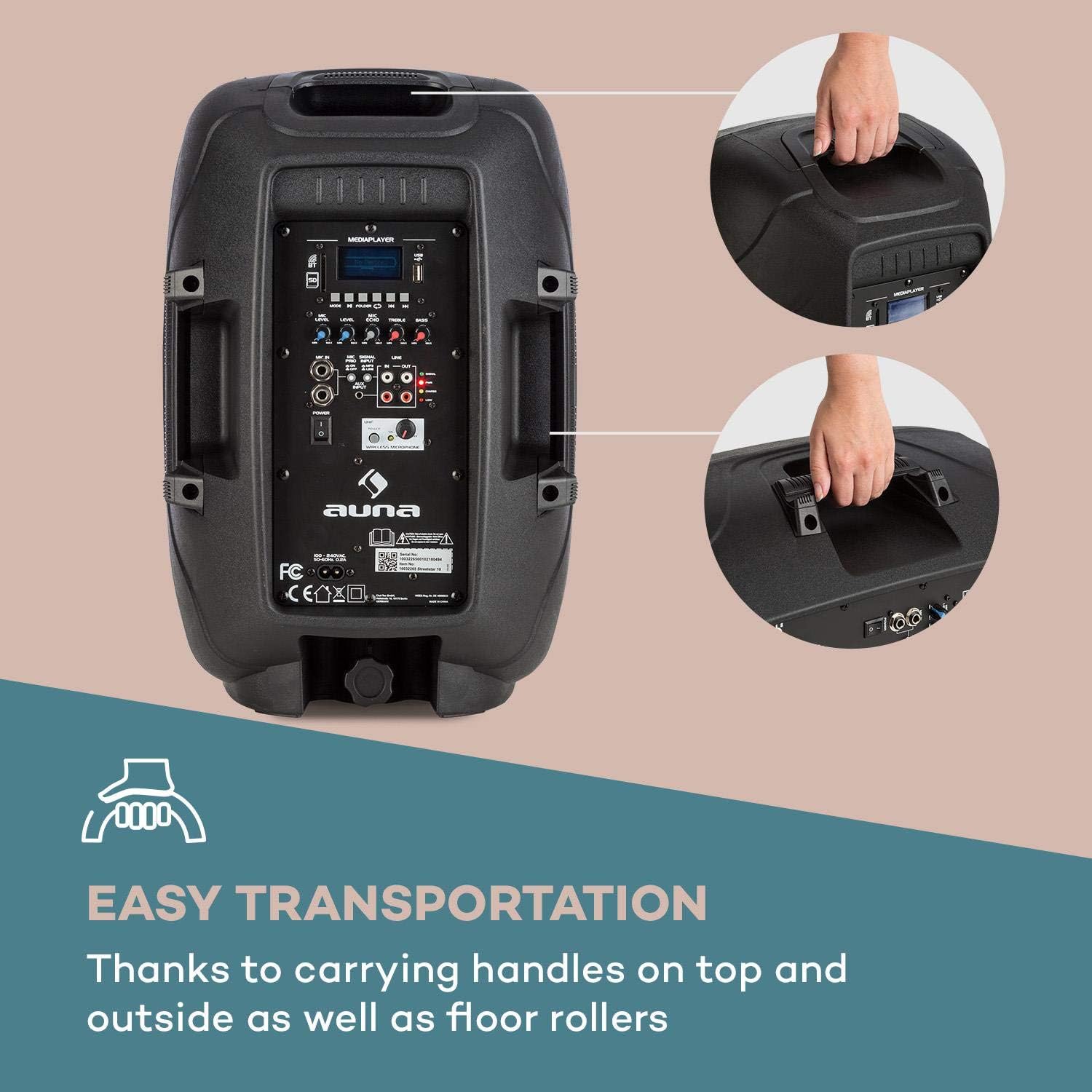
Image: The integrated carrying handles on top and side, along with floor rollers, facilitate easy transportation of the unit.
Configuració
- Desembalatge: Carefully remove the PA system and all accessories from the packaging. Retain the packaging for future transport or storage.
- Connexió d'alimentació: Connect the supplied power cable to the AC IN port on the unit and then to a suitable 220V AC power outlet. The unit can operate on AC power and simultaneously charge its internal battery.
- Càrrega inicial: For first use, it is recommended to fully charge the internal battery. The CHARGE indicator will illuminate during charging and turn off when fully charged.
- Col·locació: Place the PA system on a stable, flat surface. It can be used upright or on its side as a stage monitor.
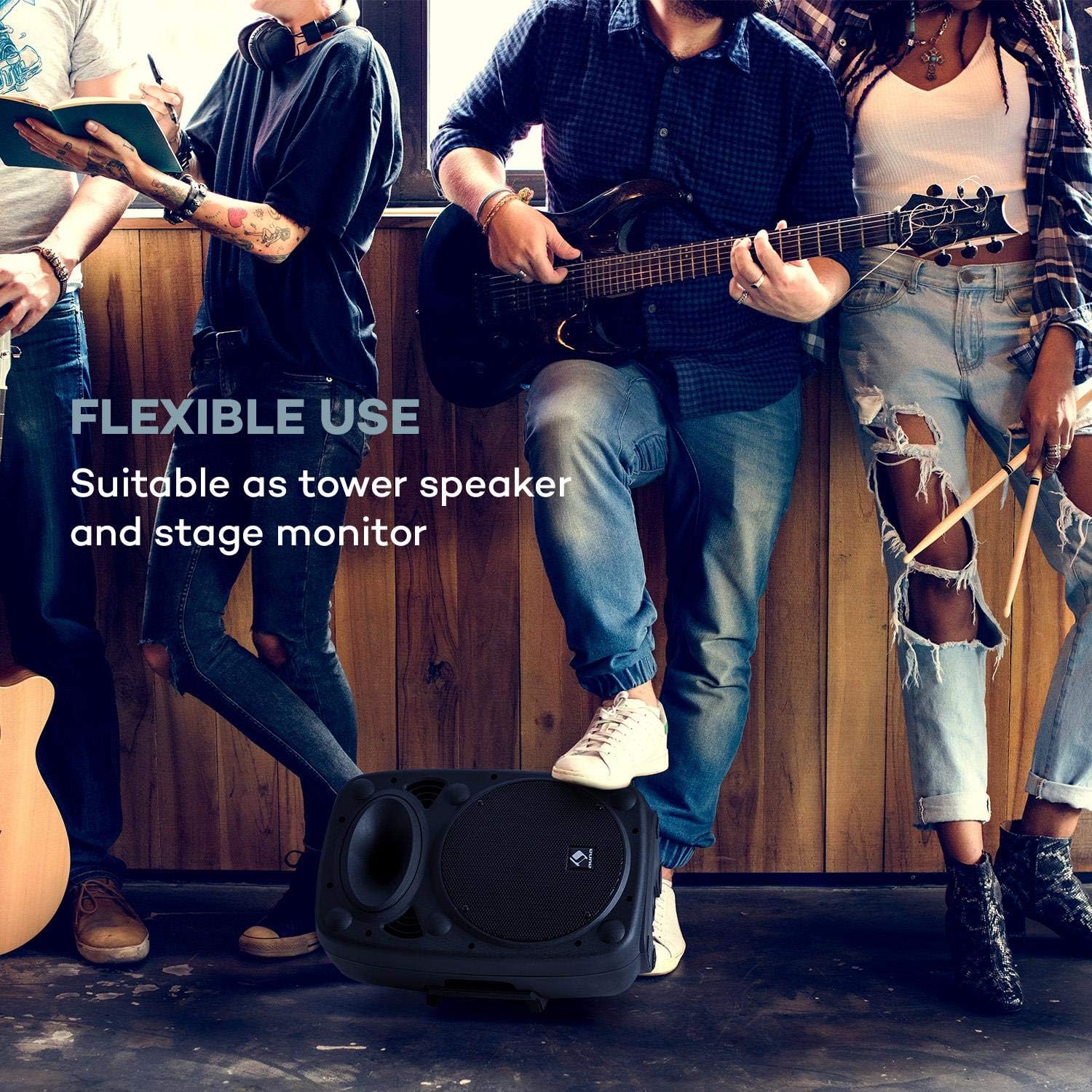
Image: The PA system positioned on its side, demonstrating its flexible use as a stage monitor.
- Connexió de micròfons:
- Micròfon sense fils: Ensure the wireless microphone has fresh batteries. Turn on the microphone. The PA system will automatically connect to the included wireless microphone. Adjust its volume using the UHF MICROPHONE knob.
- Micròfons amb cable: Connect wired microphones to the MIC IN 6.3mm jack inputs. Adjust their volume using the MIC LEVEL knob.

Image: A user engaging with the wireless microphone, highlighting the system's karaoke and vocal performance capabilities.
- Connecting External Audio Devices: Use the AUX INPUT (RCA L/R) to connect devices like CD players, laptops, or other audio sources.
- Expanding the System: To connect multiple auna Streetstar PA systems, use the LINE OUT of one unit and connect it to the LINE IN of another unit using RCA cables.

Image: An illustration demonstrating how multiple PA systems can be linked together via line input/output for an expanded audio setup.
Instruccions de funcionament
Encès/apagat:
Flip the POWER switch to the "ON" position to turn on the unit. The PWR indicator will light up. Flip to "OFF" to power down.
Selecció del mode:
Press the MODE button on the control panel or remote control to cycle through available input modes: Bluetooth, USB, SD, FM Radio, and AUX.

Image: The PA system alongside its remote control, illustrating convenient wireless operation.
Emparellament Bluetooth:
- Select Bluetooth mode using the MODE button. The display will show "BT" and flash, indicating it's ready for pairing.
- On your smartphone or other Bluetooth device, enable Bluetooth and search for "auna Streetstar".
- Select "auna Streetstar" to pair. Once connected, the "BT" indicator will stop flashing.
- You can now play audio from your device wirelessly through the PA system.
Reproducció USB/SD:
- Insert a USB flash drive into the USB port or an SD card into the SD slot.
- El sistema canviarà automàticament al mode USB o SD i començarà a reproduir àudio compatible. files (MP3).
- Use the media player controls (Play/Pause, Next/Previous, Folder) on the unit or remote to navigate and control playback. The display supports ID3 tag information for artist, song or album.
Ràdio FM:
- Select FM mode using the MODE button.
- Press the Play/Pause button to initiate an automatic station scan. The system will scan and save available FM stations.
- Use the Next/Previous buttons to switch between saved stations.
Ajust d'àudio:
- Volum: Use the main volume knob to adjust the overall output volume.
- Volum del micròfon: Adjust MIC LEVEL for wired microphones and UHF MICROPHONE for the wireless microphone.
- Efecte d'eco: Use the MIC ECHO knob to add or remove echo from microphone inputs.
- Control de tons: Adjust the TREBLE and BASS knobs to fine-tune the sound output to your preference.
Manteniment
- Neteja: Always unplug the unit before cleaning. Use a soft, dry cloth to wipe the exterior. Do not use liquid cleaners or aerosols.
- Emmagatzematge: When not in use for extended periods, store the unit in a cool, dry place, preferably in its original packaging.
- Cura de la bateria: If the unit is not used regularly, charge the battery at least once every three months to prolong its lifespan. Avoid storing the unit with a completely depleted battery.
- Protecció: The sturdy ABS casing provides good protection, but avoid dropping or subjecting the unit to strong impacts.

Imatge: Un primer pla view of the speaker's horn and the robust ABS casing, emphasizing its durable construction.
Resolució de problemes
| Problema | Causa possible | Solució |
|---|---|---|
| Sense poder | Power cable not connected; Unit not switched on; Battery depleted. | Ensure power cable is securely connected and plugged into a live outlet. Flip POWER switch to ON. Charge the battery. |
| Sense sortida de so | Volume too low; Incorrect input mode selected; Audio source not playing or connected incorrectly. | Increase main volume. Press MODE to select the correct input. Check audio source connection and playback. |
| Bluetooth no emparellat | PA system not in pairing mode; Device too far; Bluetooth disabled on source device. | Ensure PA system is in BT mode and flashing. Move source device closer. Enable Bluetooth on your device. |
| El micròfon no funciona | Microphone volume too low; Microphone not switched on; Batteries dead (wireless mic). | Increase MIC LEVEL or UHF MICROPHONE volume. Ensure microphone is switched on. Replace batteries in wireless microphone. |
| Distorted sound / High-frequency noise | Volume too high; Input signal too strong; Interference. | Reduce volume. Check input signal level. Move unit away from other electronic devices that may cause interference. |
Especificacions
Key technical specifications for the auna Streetstar 2.0 15 Mobile PA System:
- Número de model: Sky2-90400-asmg
- Potència de sortidatage: 400 watts (màx.)
- Mida de l'altaveu: 10 polzades (25.5 cm)
- Font d'alimentació: Corded Electric (220 Volts) / Internal Battery
- Connectivitat: Bluetooth, USB, SD, AUX (RCA), MIC IN (6.3mm), LINE IN/OUT (RCA)
- Canals: 2
- Pes de l'article: 6 kg
- Dimensions del producte (L x A x A): 26 x 33.5 x 49.5 cm
- Tipus de muntatge: Terra de peu
- CasinMaterial: ABS
- Dispositius compatibles: Portàtil, Smartphone

Imatge: Una imatge detallada view of the 10-inch active PA speaker, highlighting its powerful design and XMR Bass Technology.
Garantia i Suport
This auna product comes with a standard manufacturer's warranty. Please refer to the warranty card included in your package for specific terms and conditions, including warranty period and coverage details.
For technical support, service, or spare parts, please contact your retailer or the official AUNA customer service. Keep your purchase receipt as proof of purchase for warranty claims.
Fabricant: auna
Data de primera disponibilitat: 23 de desembre de 2018