1. Introducció
The NUX B-3 is a robust 2.4GHz wireless microphone system designed to convert your favorite wired microphone into a wireless one. This system consists of a transmitter and a receiver, both powered by rechargeable batteries. It connects quickly and easily to microphones and XLR input jacks, eliminating the need for cables and disposable batteries. The units are fully USB rechargeable and offer up to 5 hours of operation. A low-power sleep mode activates when the microphone is turned off and the B-3 is running, conserving battery life.
2. Producte acabatview
The NUX B-3 system provides reliable wireless audio transmission for various applications. It operates on the 2.4GHz frequency band, offering six selectable channels to minimize interference.

Image 1: The NUX B-3 wireless microphone system, showing both the transmitter (left) and receiver (right) units. Both units feature a black casing with a silver-colored XLR connector and a white LED indicator strip.
Característiques principals:
- Tecnologia sense fil digital de 2.4 GHz
- High-Quality Audio Transmission
- 6 canals seleccionables
- Rechargeable Lithium-Ion Batteries
- Fins a 5 hores de durada de la bateria
- Low-Power Sleep Mode
- Connectivitat XLR
- Disseny compacte i durador
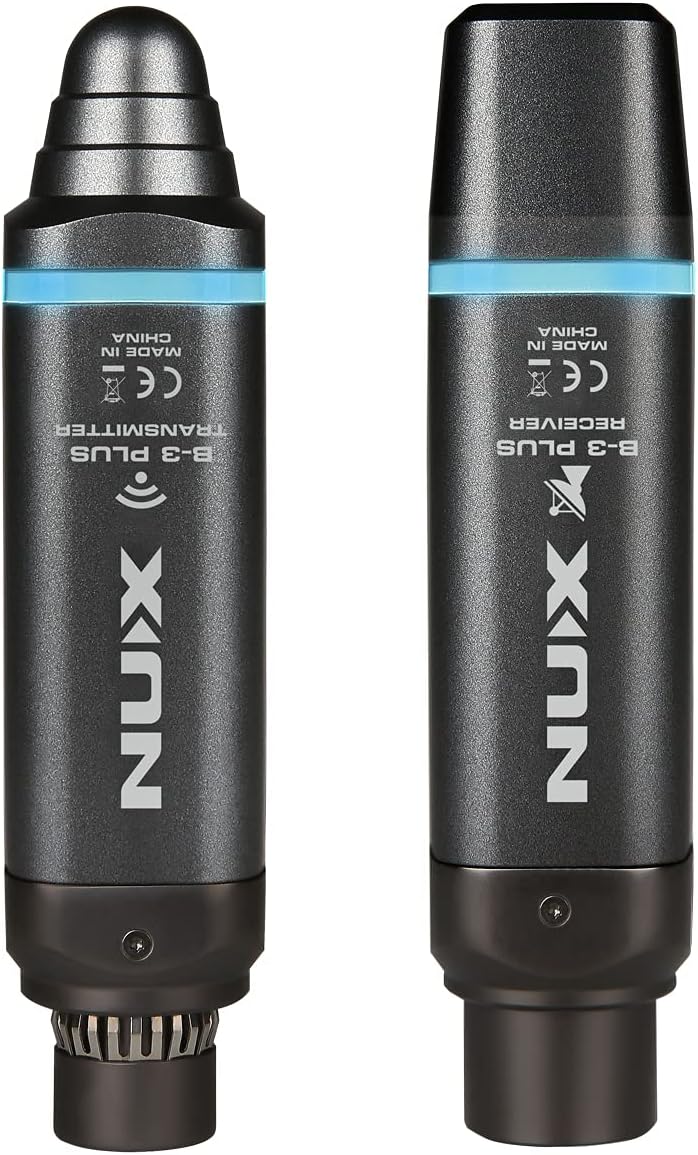
Imatge 2: posterior view of the NUX B-3 units, clearly labeled as 'B-3 PLUS TRANSMITTER' and 'B-3 PLUS RECEIVER', indicating their respective functions.
3. Instruccions de configuració
3.1 Càrrega de les unitats
Before initial use, fully charge both the transmitter and receiver units. Use a standard USB cable (not explicitly listed as included, but implied by 'USB rechargeable') to connect each unit to a USB power source (e.g., computer, USB wall adapter). The battery indicator LEDs will show charging status.
3.2 Connexió del transmissor
- Connect the NUX B-3 transmitter directly to the XLR output of your microphone. Ensure a secure connection.
- Important: The NUX B-3 does not provide phantom power. Do not use with microphones that require phantom power.

Imatge 3: Una imatge detallada view of the NUX B-3 transmitter unit, showing the XLR connector, power button, channel indicators, and a slide switch labeled "ON" and "MUTE".
3.3 Connexió del receptor
- Connect the NUX B-3 receiver to an XLR input on your mixer, audio interface, or powered speaker.
- Assegureu-vos que la connexió sigui ferma.
3.4 Engegada i emparellament
- Press and hold the power button on both the transmitter and receiver units until the indicator lights illuminate.
- The units will automatically attempt to pair. The channel indicator LEDs will flash during pairing and become solid when a connection is established.
- If pairing does not occur automatically, briefly press the power button on both units to cycle through available channels until they connect. Both units must be on the same channel for operation.

Image 4: The NUX B-3 wireless system in use, with the transmitter connected to a microphone and the receiver mounted on a camera hot shoe, demonstrating a typical setup for video recording.

Image 5: The NUX B-3 wireless system configured for smartphone use, with the receiver connected to a smartphone via an adapter (not included) and the transmitter attached to a microphone, suitable for mobile content creation.
4. Instruccions de funcionament
4.1 Selecció de canals
The NUX B-3 offers 6 channels. To change the channel, briefly press the power button on either the transmitter or receiver. The corresponding channel LED will light up. Ensure both units are set to the same channel for proper operation.

Imatge 6: Primer pla view of the NUX B-3 transmitter and receiver units, highlighting the channel indicator LEDs (numbered 1-6) and the power/pairing button. A blue LED strip is also visible, indicating power status.
4.2 Funció de silenci
The transmitter unit features a mute switch. Slide the switch to the "MUTE" position to temporarily silence the microphone output without powering down the unit. Slide it back to "ON" to resume audio transmission.
4.3 Indicador de bateria
The units display battery level via indicator LEDs. Refer to the specific LED pattern for remaining battery life. When the battery is low, the indicator will typically flash or change color.
4.4 Apagat
To power off, press and hold the power button on each unit until the indicator lights turn off.
5. Charging and Battery Management
The NUX B-3 system is equipped with internal rechargeable Lithium-Ion batteries. Each unit requires 2 Lithium Ion batteries (included and integrated).
- Càrrega: Use a standard USB power adapter (not included) and a USB cable to charge the units.
- Durada de la bateria: Una càrrega completa proporciona fins a 5 hores d'ús continu.
- Low-Power Sleep Mode: When the connected microphone is turned off, the B-3 system automatically enters a low-power sleep mode to conserve battery.
- Temps de càrrega: Allow sufficient time for a full charge before extended use.
6. Solució De Problemes
6.1 Sense sortida de so
- Ensure both transmitter and receiver are powered on and fully charged.
- Verify that both units are paired and on the same channel.
- Comproveu totes les connexions XLR per seguretat.
- Confirm the microphone is working and not muted.
- Ensure the receiver is connected to an active input on your mixer/speaker and its volume is up.
- Remember, the NUX B-3 does not provide phantom power.
6.2 Interference or Dropouts
- Prova de canviar a un canal diferent tant al transmissor com al receptor.
- Ensure there are no large metal objects or other 2.4GHz devices (Wi-Fi routers, other wireless systems) in close proximity that could cause interference.
- Maintain a clear line of sight between the transmitter and receiver if possible.
- Operating range is up to 30 meters (approximately 100 feet) in optimal conditions. Obstacles can reduce this range.
6.3 Units Not Powering On
- Ensure the units are fully charged. Connect them to a USB power source and check if the charging indicators light up.
- If units still do not power on after charging, contact NUX support.
7. Especificacions
| Característica | Detall |
|---|---|
| Número de model | NUX-B3 |
| Freqüència sense fil | 2.4 GHz |
| Nombre de canals | 6 |
| Tecnologia de connectivitat | XLR |
| Tipus de connector | XLR |
| Font d'alimentació | Alimentat per piles (2 piles de liti-ió incloses) |
| Durada de la bateria | Fins a 5 hores |
| Ràtio senyal / soroll | 75 dB |
| Sensibilitat d'àudio | 108 decibels |
| Patró polar | Omnidirectional (Microphone System) |
| Dimensions de l'article (L x A x A) | 4.21 x 0.98 x 1.02 polzades |
| Pes de l'article | 16 unces |
| Dispositius compatibles | Camera, Smartphone, Speaker (via appropriate adapters, not included) |
| Característiques especials | Rechargeable, USB, Wireless, XLR |
8. Informació de seguretat
- Do not expose the units to water, moisture, or extreme temperatures.
- Avoid dropping or subjecting the units to severe impact.
- Do not attempt to open or modify the units. This will void the warranty and may cause damage.
- Feu servir només el cable de càrrega especificat.
- Mantenir fora de l'abast dels nens.
9. Garantia i Suport
For warranty information and technical support, please visit the official NUX website or contact your local NUX distributor. Keep your proof of purchase for warranty claims.
També podeu visitar el NUX Store on Amazon per obtenir més informació sobre el producte.


