Introducció
This manual provides comprehensive instructions for the setup, operation, and maintenance of your Apple iPhone XS. Please read this manual thoroughly before using the device to ensure proper function and safety.
Configuració
1. Unboxing i Inspecció Inicial
Traieu amb cura tots els components de l'embalatge. Verifiqueu que tots els elements que figuren a la secció "Què hi ha a la caixa" siguin presents i no estiguin danyats.
- 1
2. Instal·lació de la targeta SIM
Locate the SIM tray on the side of the device. Use the provided SIM ejector tool to open the tray. Insert your nano-SIM card into the tray with the gold contacts facing down. Gently push the tray back into the device until it clicks into place.
Imatge: Lateral view of the iPhone XS, highlighting the SIM card tray and volume buttons.
3. Assistent d'encesa inicial i configuració
Press and hold the Side button until the Apple logo appears. Follow the on-screen instructions to complete the initial setup, including language selection, Wi-Fi connection, and Face ID configuration.

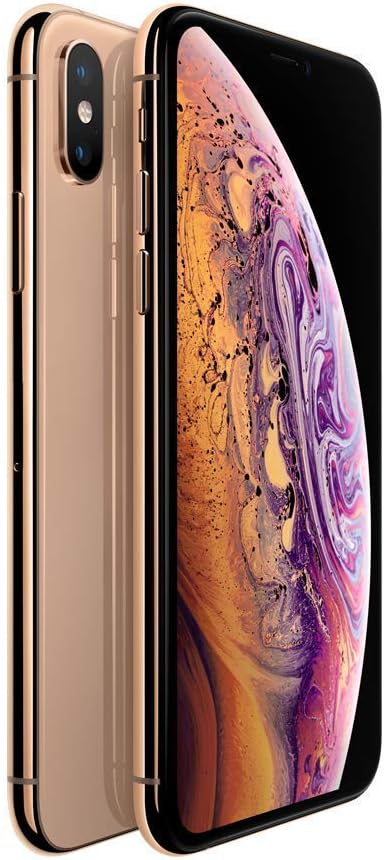
Imatge: Anvers i revers view of the iPhone XS in Gold, showcasing el seu disseny.
Operating Your iPhone XS
1. Navegació bàsica
- Pantalla d'inici: Llisca cap amunt des de la vora inferior de la pantalla per tornar a la pantalla d'inici.
- Commutador d'aplicacions: Llisca cap amunt des de la vora inferior i pausa al mig de la pantalla per view aplicacions utilitzades recentment.
- Centre de control: Llisca cap avall des de la cantonada superior dreta de la pantalla per accedir al Centre de control per a la configuració ràpida.
- Notificacions: Llisca cap avall des de la cantonada superior esquerra o del centre de la pantalla per view notificacions.
2. Identificació facial
Face ID allows you to securely unlock your iPhone, log in to apps, and make purchases with a glance. Ensure your face is clearly visible to the TrueDepth camera.
3. Característiques de la càmera
The iPhone XS features a breakthrough 12MP dual-camera system. Utilize Portrait mode for stunning depth-of-field effects, Portrait Lighting for studio-quality lighting, and Depth Control to adjust the background blur after taking a photo.

Imatge: Anvers i revers view of the iPhone XS, displaying the vibrant Super Retina display.
4. Càrrega sense fil
The iPhone XS supports wireless charging using Qi-certified chargers. Simply place your iPhone face up on a compatible wireless charging mat.
Manteniment
1. Neteja del dispositiu
Feu servir un drap suau i sense borrissol per netejar l'iPhone. Eviteu materials abrasius o productes químics agressius. Per a taques difícils, netegeu-lo lleugerament.ampen el drap amb aigua.
2. Estat de la bateria
To optimize battery longevity, avoid extreme temperatures. Regularly check your battery health in Settings > Battery > Battery Health. The device is guaranteed to have a minimum battery capacity of 80%.
3. Resistència a l'aigua i a la pols
The iPhone XS is water resistant, but this is not a permanent condition and resistance might decrease as a result of normal wear. Do not attempt to charge a wet iPhone. Liquid damage is not covered under warranty.
Resolució de problemes
| Problema | Causa possible | Solució |
|---|---|---|
| El dispositiu no s'encén | Low battery, software issue | Charge the device. Perform a force restart (press and quickly release Volume Up button, then Volume Down button, then press and hold the Side button until the Apple logo appears). |
| No hi ha servei mòbil | SIM card issue, network settings | Ensure SIM card is correctly inserted. Toggle Airplane Mode on/off. Reset Network Settings (Settings > General > Transfer or Reset iPhone > Reset > Reset Network Settings). |
| Distorted sound during calls | Speaker obstruction, software glitch | Clean the speaker grille. Restart the iPhone. |
Especificacions
- Nom del model: iPhone XS
- Capacitat d'emmagatzematge: 64 GB
- Visualització: 5.8-inch Super Retina OLED
- Processador: A12 Bionic chip with Next-Generation Neural Engine
- Càmera posterior: Dual 12MP Wide and Telephoto cameras
- Càmera frontal: 7MP TrueDepth camera
- Sistema operatiu: iOS
- Dimensions: 7 x 5 x 4 polzades
- Pes: 7 unces
- Color: Or
- Bateria: Built-in rechargeable lithium-ion battery (minimum 80% capacity)
- Resistència a l'aigua: Yes (IP68 rated, but not permanent)
- Càrrega sense fils: Yes (Qi-compatible)
- Connectivitat: GSM, LTE
Garantia i Suport
Informació de la garantia
This renewed iPhone XS comes with a 90-day refund/replacement return policy. The device is inspected and guaranteed to have minimal cosmetic damage. Battery health is guaranteed to have a minimum capacity of 80%.
Atenció al client
Per obtenir més ajuda o suport tècnic, visiteu el Botiga renovada d'Amazon or contact your seller, Hybrid IT, directly through Amazon's platform.


