Introducció
This manual provides essential information for the installation, operation, and maintenance of your SilverStone SST-ST65F-GS 650W 80 Plus Gold Fully Modular ATX Power Supply. The SST-ST65F-GS is designed to meet the demands of modern desktop computers, offering a compact, fully modular design with 80 PLUS Gold level efficiency. It features a 650W maximum DC output, strict voltage regulation, low ripple and noise, and a silent 120mm fan for continuous 24/7 operation at 40°C.
Informació de seguretat
- Always disconnect the AC power cord from the wall outlet before installing, removing, or cleaning the power supply unit (PSU).
- The PSU contains high voltage components. Do not open the PSU casing. No hi ha peces que l'usuari pugui reparar a l'interior.
- Ensure the PSU is installed in a well-ventilated area. Do not block the fan or ventilation openings.
- Use only the modular cables provided with this power supply. Using third-party cables may cause damage to the PSU or connected components.
- Connect the correct cables to the appropriate ports on the PSU and your system components. Incorrect connections can cause severe damage.
- Aquest producte està dissenyat per al seu ús en sistemes informàtics personals. No l'utilitzeu per a cap altre propòsit.
- Mantingueu la font d'alimentació allunyada de l'aigua, la humitat i les temperatures extremes.
Contingut del paquet
Verify that all items are present in the package before installation.
- SilverStone SST-ST65F-GS 650W Power Supply Unit
- Modular Cable Set (including ATX 24-pin, EPS/ATX 8-pin, PCIe 6+2-pin, SATA, Peripheral 4-pin cables)
- Cable d'alimentació CA
- Cargols de muntatge
- Cable Ties / Velcro Straps
- Manual d'usuari / Informació de garantia

Image: The SilverStone SST-ST65F-GS power supply unit shown with its full set of modular cables, mounting screws, and documentation.
Producte acabatview
The SilverStone SST-ST65F-GS is a high-performance, fully modular power supply designed for reliability and efficiency. Key features include:
- 650 Watt Maximum DC Output: Proporciona ample power for most gaming and workstation systems.
- Disseny compacte: With a depth of 140mm, it allows for easy integration into various PC cases.
- Cables 100% modulars: Enables users to connect only the necessary cables, reducing clutter and improving airflow.
- 80 PLUS Gold Certification: Ensures high power efficiency, reducing heat generation and operating costs.
- Class-Leading Single +12V Rail: Delivers stable and reliable power to demanding components.
- Strict Voltage Reglament: Maintains output voltages within 3% of the nominal value.
- Baixa ondulació i soroll: Ensures clean power delivery to sensitive components.
- 24/7 Continuous Power Output: Capable of sustained operation at 40°C ambient temperature.
- Ventilador silenciós de 120 mm: Operates with a minimum noise level of 18dBA for quiet performance.
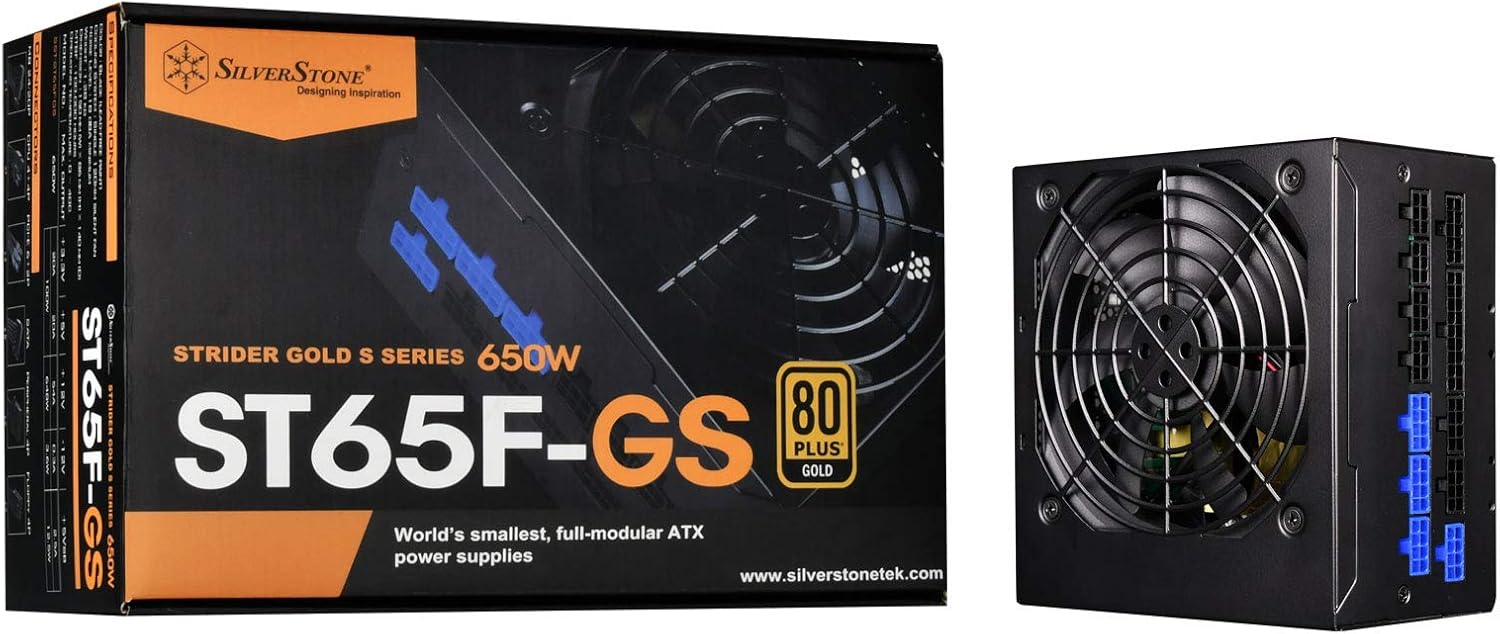
Image: The SilverStone SST-ST65F-GS power supply unit alongside its retail packaging, highlighting its compact size and 80 PLUS Gold certification.

Imatge: Un angle view of the SilverStone SST-ST65F-GS power supply, showing the fan grill and modular cable connectors.

Imatge: Primer pla view of the fully modular cable connection panel on the SilverStone SST-ST65F-GS, with blue connectors for main power and black for peripherals.

Imatge: De dalt a baix view of the 120mm cooling fan and grill on the SilverStone SST-ST65F-GS power supply.

Imatge: Part posterior view of the SilverStone SST-ST65F-GS power supply, showing the AC power inlet, ventilation grille, and the main power switch.
Configuració i instal·lació
- Prepareu el vostre sistema: Ensure your computer is completely powered off and unplugged from the wall outlet. Open your computer case to access the PSU mounting area.
- Traieu la font d'alimentació antiga (si escau): Disconnect all cables from your old power supply and remove its mounting screws. Carefully slide the old PSU out of the case.
- Muntar la nova font d'alimentació: Slide the SilverStone SST-ST65F-GS into the designated PSU bay in your computer case. Align the screw holes and secure the PSU with the provided mounting screws. Ensure the fan is facing the correct direction for optimal airflow (typically facing down if there's a bottom vent, or up if there isn't).
- Connecteu els cables modulars:
- Main ATX Power (20+4 pin): Connect the 24-pin cable to the corresponding port on the PSU and the motherboard.
- CPU Power (4+4 pin EPS/ATX): Connect the 8-pin (or 4+4 pin) CPU power cable to the PSU and the motherboard's CPU power connector.
- PCIe Power (6+2 pin): Connect the necessary PCIe cables to the PSU and your graphics card(s). Each 6+2 pin connector can be used for either 6-pin or 8-pin PCIe power.
- Alimentació SATA: Connecteu els cables d'alimentació SATA als vostres SSD, HDD i unitats òptiques.
- Peripheral (Molex) Power: Connect peripheral cables for case fans, older drives, or other accessories as needed.
Important: Ensure all cable connections are firm and correctly oriented. Do not force connectors.
- Gestió de cables: Route cables neatly to improve airflow and aesthetics within your case. Use the provided cable ties or Velcro straps.
- Tanqueu la carcassa i connecteu l'alimentació de CA: Once all internal connections are made, close your computer case. Connect the AC power cord to the PSU's inlet and then to a wall outlet or surge protector.
- Encès: Flip the power switch on the back of the PSU to the "I" (On) position. Then, power on your computer.
Instruccions de funcionament
The SilverStone SST-ST65F-GS power supply operates automatically once installed and powered on. It is designed for continuous operation under normal computing loads.
- Encès/apagat: Use the main power switch on the back of the PSU to completely cut power to the unit. For daily use, power your computer on and off via the operating system or case power button.
- Funcionament del ventilador: The integrated 120mm fan will automatically adjust its speed based on the PSU's internal temperature and load to maintain optimal cooling and quiet operation.
- Eficiència: The 80 PLUS Gold certification indicates high efficiency, meaning less power is wasted as heat, contributing to lower energy consumption and a cooler system.
Manteniment
Un manteniment adequat garanteix la longevitat i el rendiment òptim de la vostra font d'alimentació.
- Neteja de pols: Periodically (e.g., every 6-12 months), disconnect the PSU from AC power and use compressed air to gently clean dust from the fan grille and ventilation openings. Do not open the PSU casing.
- Assegureu-vos el flux d'aire: Make sure that the PSU's intake and exhaust vents are not obstructed by cables, dust, or other components within the PC case. Good airflow is crucial for cooling.
- Inspecció del cable: Occasionally check that all modular cables are securely connected to both the PSU and your components.
Resolució de problemes
Si teniu problemes amb la font d'alimentació, consulteu els passos habituals següents per a la resolució de problemes:
- Sense energia:
- Assegureu-vos que el cable d'alimentació de CA estigui connectat correctament tant a la font d'alimentació com a la presa de corrent.
- Check that the power switch on the back of the PSU is in the "I" (On) position.
- Verify all modular cables are correctly and firmly seated in the PSU and connected components (motherboard, CPU, GPU).
- Proveu la presa de corrent amb un altre dispositiu per assegurar-vos que tingui corrent.
- Inestabilitat/Avaries del sistema:
- Assegureu-vos que els requisits d'alimentació del vostre sistema no superin la capacitat de 650 W de la font d'alimentació.
- Comproveu si hi ha connexions de cable soltes.
- Monitor system temperatures to ensure components are not overheating, which can be exacerbated by poor PSU performance or airflow.
- Soroll fort del ventilador:
- Clean any dust buildup from the PSU fan and vents.
- Ensure adequate airflow within the PC case.
- If the noise is excessive and persistent even under low load, contact SilverStone support.
If these steps do not resolve your issue, please contact SilverStone customer support for further assistance.
Especificacions
| Característica | Especificació |
|---|---|
| Marca | SilverStone |
| Número de model | SST-ST65F-GS |
| Sèrie | Strider Gold S |
| Maximum DC Output | 650W |
| Certificació 80 PLUS | Or |
| Factor de forma | ATX |
| Tipus Modular | Totalment Modular |
| Mètode de refrigeració | 120mm Fan (Silent running, 18dBA minimum) |
| Voltage Reglament | Strict 3% |
| Onda i soroll | Baix 3% |
| Continuous Output Temperature | 40°C (24/7 operation) |
| Dimensions (LxWxH) | 5.91 x 5.51 x 3.39 polzades (150 x 140 x 86 mm) |
| Pes de l'article | 2.83 lliures (1.28 kg) |
| Dispositius compatibles | Ordinador personal |
| Tipus de connector | ATX |
Garantia i Suport
SilverStone Technology provides a limited warranty for its power supply units. Please refer to the warranty information included in your product package for specific terms and conditions, including warranty duration and coverage details. You can also visit the official SilverStone Technology website for the most up-to-date warranty policy and to access customer support resources.
For technical support, troubleshooting assistance beyond this manual, or warranty claims, please contact SilverStone Technology customer service through their official weblloc:


