Introducció
This manual provides detailed instructions for the installation, operation, and maintenance of your Defiant Electronic Deadbolt Door Lock. Please read this manual thoroughly before installation and use to ensure proper function and safety.
The Defiant Electronic Deadbolt offers convenient keyless access with a touch keypad, along with the security of a traditional mechanical key. It is designed for use on garage, entry, home office, computer room, or utility room doors.
Informació de seguretat
Always follow basic safety precautions when installing and operating this product to reduce the risk of injury or damage.
- Do not attempt to disassemble or modify the lock beyond the instructions provided in this manual.
- Use only the specified battery type (not included).
- Guardeu les claus en un lloc segur lluny del pany.
- Assegureu-vos que tots els components estiguin ben fixats durant la instal·lació.
Contingut del paquet
Verifiqueu que hi hagi totes les peces abans de començar la instal·lació:
- Muntatge de teclat exterior
- Interior Assembly with Thumb Turn
- Pestillo de cèrcol
- Placa de vaga
- Cargols de muntatge
- Claus (2)
- Plantilla d'instal·lació (si escau)

Image: Included components such as keys, strike plate, and the cylinder housing.
Guia d'instal·lació
Eines necessàries: Philips screwdriver (included), measuring tape, pencil.
- Prepara la porta: Ensure your door has the standard bore holes for a deadbolt. If not, use the provided template (if applicable) to drill necessary holes.
- Instal·leu el tancament: Insert the deadbolt latch into the edge of the door. Ensure the "UP" arrow on the latch is pointing upwards. Secure with screws.
- Instal·leu el teclat exterior: Feed the cable from the exterior keypad through the cross bore hole. Align the keypad with the latch and press it firmly against the door.
- Instal·lació del conjunt interior: Connect the cable from the exterior keypad to the interior assembly. Align the interior assembly with the mounting posts from the exterior keypad and secure with screws. Ensure the thumb turn operates smoothly.
- Instal·leu la placa de tancament: Install the strike plate on the door frame, aligning it with the deadbolt latch. Secure with screws.
- Insereix les piles: Open the battery cover on the interior assembly and insert 4 AA batteries (not included), observing polarity.
- Prova de funcionament: Test the lock with the mechanical key and by entering a default code (if any) or a newly programmed code.
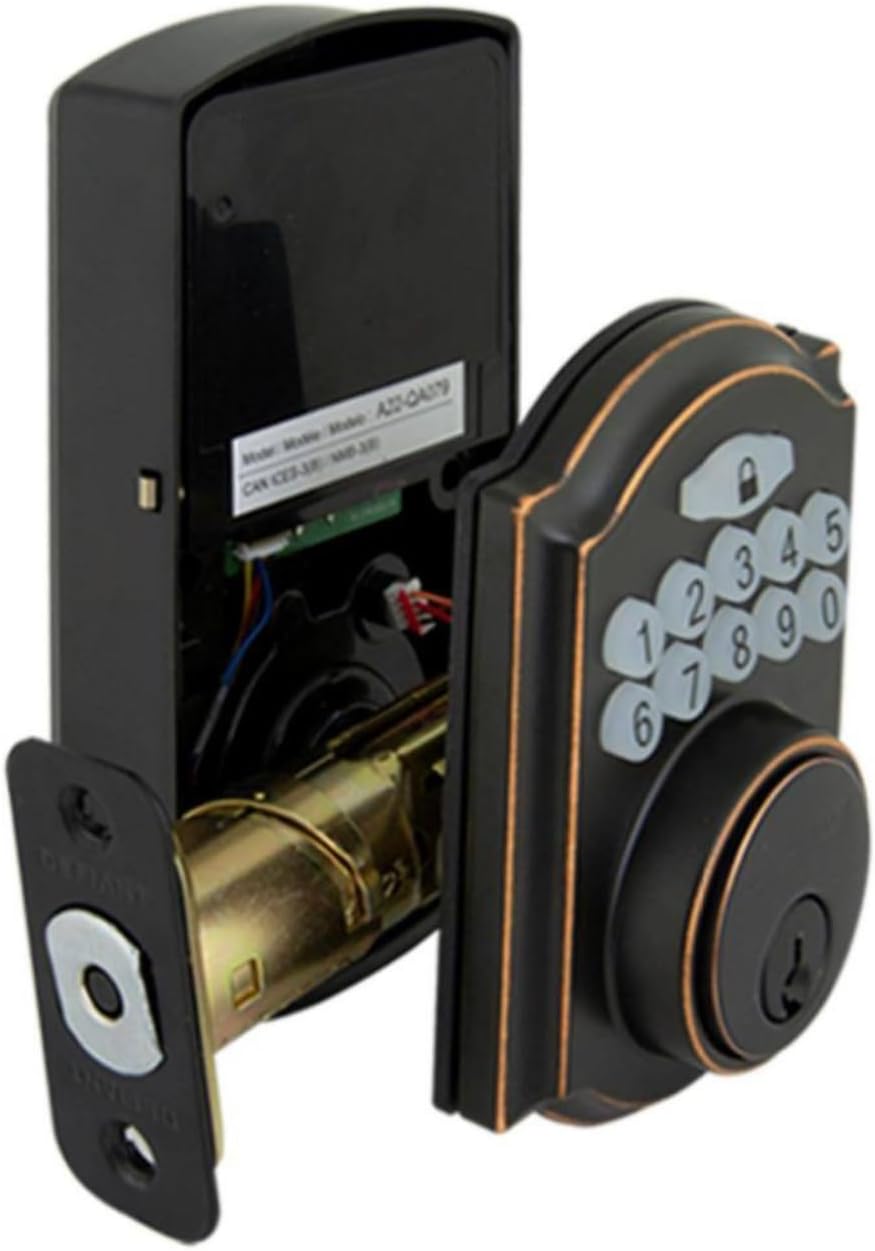
Image: The electronic deadbolt assembly, showing the interior mechanism and exterior keypad.

Imatge: Exterior view of the electronic deadbolt installed on a door, showcasing the keypad.
Instruccions de funcionament
Programació de codis d'usuari
The lock can hold up to 10 user codes and 5 single-entry codes.
- Introduïu el mode de programació: Locate the program button on the interior assembly (usually on the battery cover or near the battery compartment). Press it once. The keypad will illuminate.
- Afegeix un codi d'usuari nou: Enter your desired 4-digit user code. Press the Lock button (padlock icon) to confirm. The lock will beep to confirm successful programming.
- Suprimeix el codi d'usuari: Enter programming mode. Enter the 4-digit user code you wish to delete. Press the Lock button. The lock will beep to confirm deletion.
Bloqueig i desbloqueig
- Per desbloquejar: Enter your 4-digit user code on the keypad. The keypad will illuminate, and the deadbolt will retract after a few seconds.
- To Lock (from outside): Press the Lock button (padlock icon) on the keypad. The deadbolt will extend after a few seconds.
- To Lock (from inside): Turn the thumb turn on the interior assembly to the locked position.
Funció de bloqueig automàtic
The lock features an auto-lock function with an adjustable delay from 10 to 99 seconds. Refer to the full programming guide (usually a separate sheet or detailed section in the manual) for instructions on enabling and adjusting this feature.

Image: Close-up of the electronic keypad for code entry.
Manteniment
- Neteja: Netegeu el pany amb un drap suauamp drap. Eviteu productes de neteja abrasius o dissolvents que puguin danyar l'acabat o els components electrònics.
- Substitució de la bateria: When the battery indicator light flashes or the lock makes a low battery warning sound, replace all four AA batteries. Use only new, high-quality alkaline batteries.
- Lubricació: Periodically lubricate the deadbolt mechanism with a silicone-based lubricant to ensure smooth operation. Do not lubricate the keypad.
Resolució de problemes
| Problema | Causa possible | Solució |
|---|---|---|
| El teclat no s'encén. | Piles gastades o instal·lació incorrecta de les piles. | Canvieu les piles, assegurant-vos de la polaritat correcta. |
| Lock does not respond to code. | Incorrect code entered, code not programmed, or lock is jammed. | Verify code, reprogram code, check for obstructions in door frame or latch. |
| El forrellat no s'estén/es retreu completament. | Misalignment of strike plate or latch, low battery. | Adjust strike plate, replace batteries. |
| El bloqueig sona contínuament. | Avís de bateria baixa. | Substituïu les piles immediatament. |
Especificacions
- Marca: Desafiant
- Número de model: 9a843b7d-eaac-472e-b6d2-4b1006f6f6a5
- Tipus de bloqueig: Pegat electrònic
- Material: Bronze
- Estil: Modern
- Característica especial: Keyless Entry, Back-up Mechanical Key
- Codis d'usuari: Fins a 10
- Single Entry Codes: Fins a 5
- Retard de bloqueig automàtic: 10-99 segons (ajustable)
- Font d'alimentació: 4 piles AA (no incloses)
- Pes de l'article: 2.26 lliures
- Dimensions del paquet: 7.48 x 5.51 x 4.61 polzades
- UPC: 050134991163
Garantia i Suport
For warranty information or technical support, please refer to the official Defiant weblloc web o poseu-vos en contacte amb el servei d'atenció al client. Conserveu el rebut de compra per a reclamacions de garantia.
Recursos en línia: Visit the Defiant weblloc web per a preguntes freqüents, guies addicionals i registre de productes.
Atenció al client: Contact Defiant customer support for assistance with installation, programming, or troubleshooting issues.


