Introducció
This manual provides comprehensive instructions for the setup, operation, maintenance, and troubleshooting of your Monoprice SB-100 2.1-channel Soundbar. Please read this manual thoroughly before using the product to ensure proper functionality and longevity.
The Monoprice SB-100 is designed to enhance your home entertainment experience with powerful and clear audio. It features 80 watts of power, two dynamic drivers, and two integrated bass drivers for superior sound quality. Its versatile design allows for flexible placement options, including beneath a TV or wall-mounted.

Figura 1: Frontal view of the Monoprice SB-100 Soundbar.
Contingut del paquet
Verify that all items are present and in good condition upon opening the package. If any items are missing or damaged, please contact Monoprice customer support.
- Monoprice SB-100 2.1-ch Soundbar
- Control remot
- Adaptador d'alimentació
- Manual d'usuari (aquest document)
- Ferramenteria de muntatge a la paret (cargols, ancoratges)
Configuració
Opcions d'ubicació
The SB-100 offers flexible placement to suit your home theater setup:
- Col·locació de la taula: Position the soundbar directly beneath your television on a flat, stable surface. Ensure there is adequate space for ventilation.
- Muntatge a la paret: The soundbar includes built-in mounting brackets for easy wall installation. Use appropriate screws and anchors for your wall type. Ensure the soundbar is level and securely fastened.

Figure 2: Soundbar positioned beneath a television.
Connexió de la barra de so
The SB-100 provides multiple connectivity options for various devices:

Figure 3: Rear panel of the soundbar with input ports.
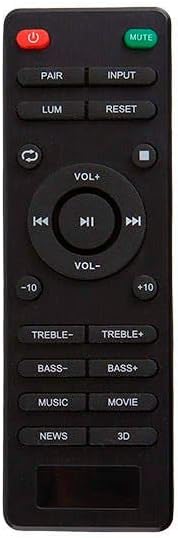
Figura 4: Detallada view of the soundbar's input connections.
- Entrada òptica: For the best audio quality, connect an optical cable (not included) from your TV's optical audio output to the soundbar's "OPTICAL" input. Select "OPTICAL" as the input source on the soundbar.
- Entrada coaxial: Connect a coaxial audio cable (not included) from your TV's coaxial audio output to the soundbar's "COAXIAL" input. Select "COAXIAL" as the input source.
- Entrada AUX de 3.5 mm: Use a 3.5mm audio cable (not included) to connect devices with a headphone jack or analog audio output to the soundbar's "AUX" input. Select "AUX" as the input source.
- Connexió Bluetooth: For wireless audio streaming from mobile devices, refer to the "Bluetooth Pairing" section under Operating Instructions.
Connexió d'alimentació
Connect the provided power adapter to the DC IN port on the soundbar's rear panel, then plug the adapter into a standard AC power outlet. The soundbar will enter standby mode.
Instruccions de funcionament
Controls
The soundbar can be controlled using the side panel buttons or the included remote control.

Figure 5: Side panel controls (Power, Volume Up/Down, USB port).

Figure 6: Included remote control.
Funcions de control remot:
- Botó d'encesa: Encén/apaga la barra de so.
- Botó de silenci: Silencia o activa l'àudio.
- Botó PAIR: Inicia el mode d'emparellament Bluetooth.
- Botó INPUT: Cycles through input sources (Optical, Coaxial, AUX, Bluetooth).
- VOL+/- Buttons: Ajusta el nivell de volum principal.
- TREBLE+/- Buttons: Ajusta els nivells d'aguts.
- BASS+/- Buttons: Ajusta els nivells de greus.
- DSP Modes (NEWS, MOVIE, MUSIC): Selecciona els modes d'equalitzador preestablerts.
- Botó de reset: Restableix la configuració d'àudio als valors predeterminats.
- USB Playback Controls: Play/Pause, Skip Forward/Backward (for USB drive playback).
Emparellament Bluetooth
- Assegureu-vos que la barra de so estigui encès.
- Premeu el botó ENTRADA button on the remote or the side panel until "BT" (Bluetooth) is displayed on the soundbar's indicator.
- The soundbar will automatically enter pairing mode, indicated by a flashing "BT" light.
- Al dispositiu mòbil (telèfon intel·ligent, tauleta, ordinador portàtil), activeu el Bluetooth i cerqueu els dispositius disponibles.
- Select "Monoprice SB-100" from the list of devices.
- Once paired, the "BT" light will become solid, and you can now stream audio wirelessly.
Note: The soundbar remembers only one paired device. If you wish to connect a new device, you may need to unpair the previous device or initiate pairing mode again.
DSP Listening Modes
The SB-100 features three Digital Signal Processing (DSP) modes to optimize audio for different content types:
- NEWS Mode: Enhances clarity of spoken word and compresses dynamics, ideal for news broadcasts or podcasts.
- MOVIE Mode: Provides richer bass, expands the soundstage, and enhances dialogue intelligibility for an immersive cinematic experience.
- MUSIC Mode: Emphasizes bass response and adds clarity to the high frequencies, suitable for general music listening.
Press the corresponding button (NEWS, MOVIE, MUSIC) on the remote control to switch between these modes.
Manteniment
- Neteja: Use a soft, dry cloth to clean the soundbar's exterior. Do not use liquid cleaners or abrasive chemicals, as they may damage the finish.
- Ventilació: Ensure the soundbar has adequate airflow around it. Do not block ventilation openings.
- Emmagatzematge: If storing the soundbar for an extended period, disconnect it from power and store it in a cool, dry place away from direct sunlight and extreme temperatures.
- Comandament a distància: Replace batteries in the remote control when its range decreases or it becomes unresponsive. Use the specified battery type.
Resolució de problemes
| Problema | Causa possible | Solució |
|---|---|---|
| Sense poder | Cable d'alimentació no connectat; Presa de corrent no activa. | Assegureu-vos que el cable d'alimentació estigui ben connectat. Proveu la presa de corrent amb un altre dispositiu. |
| Sense so | Incorrect input source selected; Volume too low; Cables not connected properly; TV audio output settings. | Select the correct input source (Optical, Coaxial, AUX, BT). Increase volume. Check all cable connections. Ensure TV audio output is set to external speakers or PCM. |
| Problemes de vinculació de Bluetooth | Soundbar not in pairing mode; Device too far; Previous device still connected. | Ensure soundbar is in BT pairing mode (flashing BT). Move device closer. Disconnect/unpair from previous device. |
| El comandament a distància no funciona | Dead batteries; Obstruction between remote and soundbar; Remote sensor blocked. | Replace remote batteries. Remove any obstructions. Ensure remote sensor on soundbar is clear. |
| Distorsió del so | Volume too high; Poor audio source quality; Incorrect EQ settings. | Lower the volume. Try a different audio source. Adjust DSP modes or Bass/Treble settings. |
Especificacions
| Característica | Detall |
|---|---|
| Número de model | 134710 |
| Tipus d'altaveu | Soundbar with Built-in Subwoofer |
| Canals | 2.1-cap |
| Potència de sortida | 80 watts (màx.) |
| Connectivitat | Bluetooth, Optical, Coaxial, 3.5mm AUX |
| Interval Bluetooth | Fins a 10 peus (3 metres) |
| Dimensions del producte (L x A x A) | 35.4" x 3" x 2.8" (900 mm x 76 mm x 71 mm) |
| Pes de l'article | 5.05 lliures (2.29 kg) |
| Tipus de muntatge | Taula, muntatge a la paret |
| Color | Negre |
| Font d'alimentació | Elèctric amb cable |
| Components inclosos | 2.1-ch Soundbar |
Garantia i Suport
Garantia limitada
The Monoprice SB-100 Soundbar comes with a limited warranty. For specific terms and conditions of your warranty, please refer to the warranty information provided with your purchase or visit the official Monoprice weblloc.
Atenció al client
For technical assistance, troubleshooting, or warranty inquiries, please contact Monoprice Customer Support. You can find contact information and additional resources on the official Monoprice weblloc:


