Introducció
This manual provides comprehensive instructions for the safe and effective use of your Sharper Image Tranquility Spa White Noise Sound Machine. Please read all instructions carefully before operation and retain this manual for future reference.
Informació de seguretat
Keep out of reach of children due to potential choking hazard from small parts.
Contingut del paquet
- Sharper Image Tranquility Spa White Noise Sound Machine (Model: Soother)
- Cable USB
- Manual d'usuari (aquest document)
Note: 4 AA batteries are required for battery-powered operation and are not included.
Configuració
- Remove the sound machine from its packaging.
- For battery operation, open the battery compartment and insert 4 AA batteries (not included), ensuring correct polarity.
- Alternatively, connect the included USB cable to the device and a compatible USB power adapter (not included) or USB port for power.

Imatge: Part posterior view of the sound machine showing the USB port and the battery compartment with 4 AA batteries inserted.
Instruccions de funcionament
Encès/Apagat
Premeu el botó Botó d'encesa (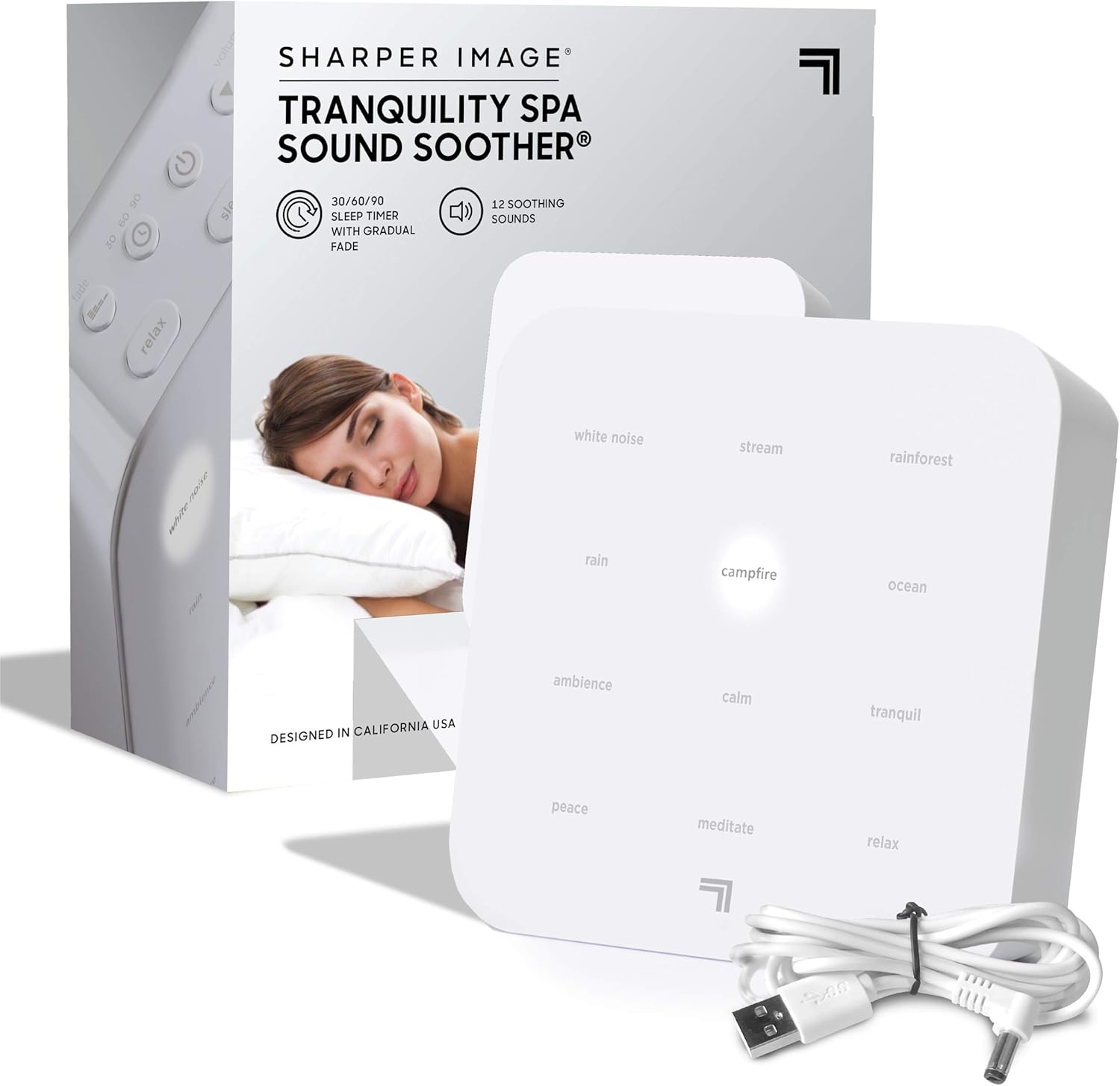 ) per encendre o apagar el dispositiu.
Selecting Soundscapes
The device offers 12 diverse soothing soundscapes. These are categorized into 'Relax', 'Sleep', and 'Renew' modes. Press the corresponding mode button (Relaxa't, Dormir, o Renovar) to cycle through the available sounds within that category.
- Relaxa't: White Noise, Rain, Ambience, Peace
- Dormir: Stream, Campfire, Calm, Meditate
- Renovar: Rainforest, Ocean, Tranquil, Relax

Imatge: Superior view of the sound machine highlighting the sound selection buttons and backlit display.
Ajust de volum
Utilitza el Puja el volum () i Baixa el volum () buttons to set your desired sound level.
Configuració del temporitzador d'apagat automàtic
Premeu el botó Botó del temporitzador () to set the device to automatically power off after 30, 60, or 90 minutes. The volume will gradually decrease during the last 10 minutes of the program for a gentle transition.
Ajust de la brillantor de la llum de fons
Control the backlit brightness of the display to your preference using the dedicated control buttons (refer to device diagram for exact location).
Ús d'auriculars
For a personal listening experience, plug your headphones into the headphone jack located on the device.
Producte acabatview

Imatge: Frontal view of the sound machine with key features labeled, including power options, earphone access, volume, backlight, and timer.
Imatge: Anglesa view of the sound machine showing the automatic timer, backlit display, and the 12 restful sound options.
Vídeos oficials de productes
Sharper Image Brand Video 2022
Video Description: An official brand video from Sharper Image, showcasing various products including the sound machine. This video provides an overview of the brand's offerings and design philosophy.
Sleep Therapy Sound Soother USB
Video Description: A short video demonstrating the Sleep Therapy Sound Soother, focusing on its USB power option and compact design.
SHARPER IMAGE Ultimate Sleep White Noise Sound Machine for Adults and Baby
Video Description: A brief preview video highlighting the Sharper Image Ultimate Sleep White Noise Sound Machine, suitable for both adults and babies. This video is 9 seconds long and provides a quick visual overview.
Manteniment
To maintain your sound machine, wipe the exterior with a soft, dry cloth. Do not use abrasive cleaners or immerse the device in water. Keep the device away from excessive heat or moisture.
Resolució de problemes
| Problema | Solució |
|---|---|
| El dispositiu no s'encén. | Ensure the USB cable is securely connected to both the device and a working power source. If using batteries, check that they are inserted correctly and are not depleted. |
| No es produeix cap so. | Check the volume level and increase it using the Volume Up button. Ensure headphones are not plugged in if you intend to use the built-in speaker. |
| La qualitat del so és deficient o distorsionada. | Adjust the volume to a lower setting. Ensure the device is placed on a stable, flat surface and not obstructed. |
Especificacions
- Nom del model: Molt
- Profunditat de l'element: 2 polzades
- Font d'alimentació: Battery Powered (4 AA batteries, not included) or USB Powered
- Marca: Imatge més nítida
- Color: Blanc/Gris
- Fabricant: MerchSource
- Dimensions del paquet: 6.22 x 5.98 x 2.64 polzades
- Pes de l'article: 15.52 unces
Garantia i Suport
For warranty information or technical support, please refer to the contact details provided on the product packaging or visit the official Sharper Image weblloc. Conserveu el rebut de compra per a reclamacions de garantia.


