1. Introducció
Thank you for choosing the Rapoo M300G Multi-Device Wireless Mouse. This manual provides detailed instructions on how to set up, operate, maintain, and troubleshoot your new mouse. Please read this manual carefully before use to ensure optimal performance and longevity of your device.
2. Producte acabatview
Característiques principals:
- Connectivitat multimodal: Supports Bluetooth 3.0, Bluetooth 4.0, and 2.4GHz wireless connections, allowing connection to up to three devices simultaneously.
- Clics silenciosos: Designed with 90% noise reduction for quiet operation.
- DPI ajustable: Four adjustable DPI levels (600/1000/1300/1600) for precise control.
- Disseny ergonòmic: Comfortable design for right-hand users, suitable for extended use.
- Llarga vida útil de la bateria: Built-in 1 AA battery provides up to 9 months of battery life under normal conditions.
- High Precision Optical Engine: Works reliably on various surfaces without a mouse pad.
Contingut del paquet:
- Rapoo M300G Multi-Device Wireless Mouse
- Receptor USB (emmagatzemat dins del ratolí)
- 1 pila alcalina AA (preinstal·lada o inclosa)
- Guia d'inici ràpid (aquest manual)
Mouse Components:

Figure 2.1: Labeled diagram of the Rapoo M300G mouse showing the scroll wheel, DPI switch button, multi-device conversion indicator, right click button, left click button, forward button, and backward button.
- Botó esquerre de clic: Funció de clic principal estàndard.
- Botó dret: Funció de clic secundari estàndard.
- Roda de desplaçament: Per a la funció de desplaçament vertical i clic amb el botó central.
- Botó de commutació de DPI: Canvia ciclísticament pels paràmetres de DPI (600/1000/1300/1600).
- Multi-device Conversion Indicator: Shows current connection mode (Bluetooth A, Bluetooth B, or 2.4GHz).
- Botó Endavant: Navega cap endavant web navegadors o file exploradors.
- Botó enrere: Navega cap enrere web navegadors o file exploradors.
3. Configuració
3.1 Instal·lació de la bateria:
The Rapoo M300G mouse uses one AA battery. The battery is typically pre-installed. If not, open the battery compartment on the bottom of the mouse, insert the AA battery with the correct polarity, and close the compartment.

Figura 3.1: A baix view of the Rapoo M300G mouse, illustrating the battery compartment, power switch, and Bluetooth pairing button.
3.2 Encès/apagat:
Locate the power switch on the bottom of the mouse. Slide it to the 'ON' position to power on the mouse. Slide it to 'OFF' when not in use to conserve battery life.
3.3 Connecting to Devices:
The M300G mouse supports three connection modes: 2.4GHz wireless via USB receiver, Bluetooth 3.0, and Bluetooth 4.0. You can switch between connected devices using the mode switch button on the bottom of the mouse.
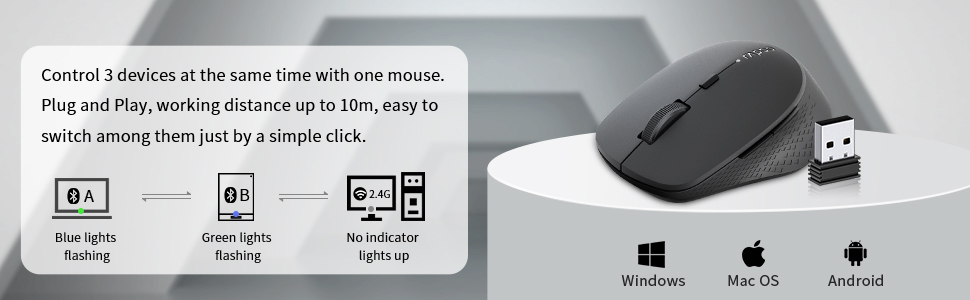
Figure 3.2: The Rapoo M300G mouse can control three devices, with easy switching. It is compatible with Windows, Mac OS, and Android operating systems.
Connexió sense fil de 2.4 GHz:
- Traieu el receptor USB del compartiment de la bateria del ratolí.
- Connecteu el receptor USB a un port USB disponible de l'ordinador.
- Turn on the mouse. The mouse will automatically connect to the receiver. No indicator light will illuminate for 2.4GHz mode.
Bluetooth Connection (Device A & B):
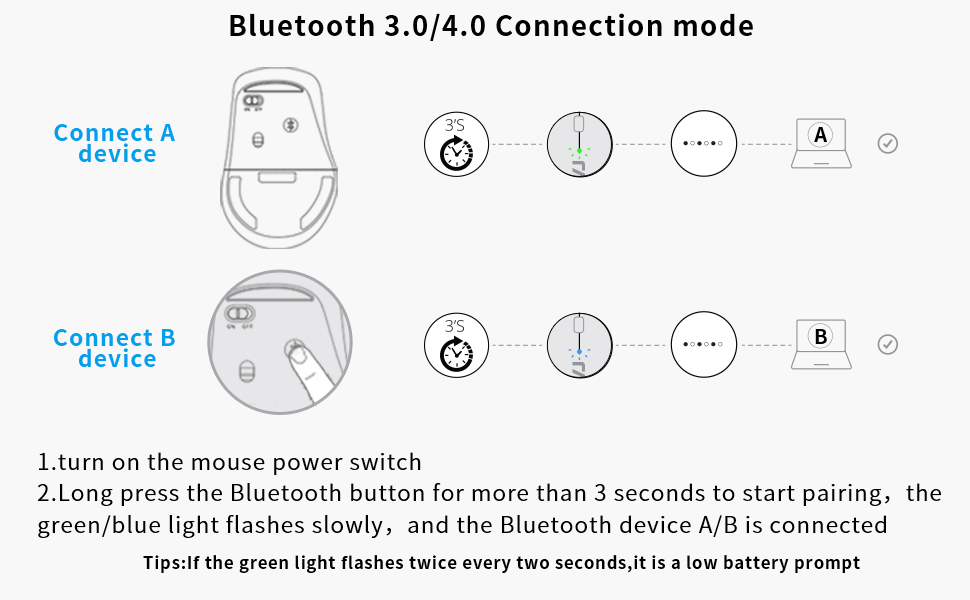
Figure 3.3: Detailed steps for connecting the mouse via Bluetooth 3.0/4.0 to Device A and Device B.
- Turn on the mouse power switch.
- Press the Bluetooth button on the bottom of the mouse to switch to Bluetooth Channel A (blue light flashing) or Bluetooth Channel B (green light flashing).
- Long press the Bluetooth button for more than 3 seconds until the blue or green light flashes slowly. This indicates the mouse is in pairing mode.
- On your device (computer, laptop, tablet), go to Bluetooth settings and search for new devices.
- Select 'Rapoo BT3.0 Mouse' or 'Rapoo BT4.0 Mouse' from the list of found devices to complete the pairing.
- Once connected, the corresponding indicator light will stop flashing and remain solid for a few seconds before turning off.
Consell: If the green light flashes twice every two seconds, it indicates a low battery.
3.4 Switching Between Devices:
Briefly press the Bluetooth button on the bottom of the mouse to cycle through the connected devices (Bluetooth A, Bluetooth B, 2.4GHz). The indicator light will briefly show the active channel.
4. Instruccions de funcionament
4.1 DPI Adjustment:
Press the DPI switch button located behind the scroll wheel to cycle through the four DPI settings: 600, 1000, 1300, and 1600 DPI. Adjust the DPI to match your preference for cursor speed and precision.
4.2 Basic Mouse Functions:
- Clic esquerre: Use for selecting items, opening files, i activant funcions.
- Clic dret: Use for accessing context menus and additional options.
- Roda de desplaçament: Rotate to scroll vertically through documents and web pages. Press down for middle-click functionality (e.g., opening links in new tabs).
- Botons Endavant/Enrere: Situats al lateral del ratolí, aquests botons permeten una navegació ràpida web navegadors i file exploradors.
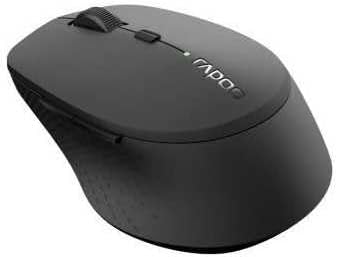
Figura 4.1: Angle view of the Rapoo M300G mouse, highlighting its ergonomic shape and button placement.
5. Manteniment
5.1 Neteja:
Per netejar el ratolí, netegeu suaument la superfície amb un drap suau.amp cloth. Do not use harsh chemicals or abrasive cleaners. Ensure no liquid enters the mouse's internal components.
5.2 Substitució de la bateria:
When the low battery indicator flashes, it's time to replace the AA battery. Open the battery compartment on the bottom of the mouse, remove the old battery, insert a new AA battery with the correct polarity, and close the compartment.
5.3 Emmagatzematge:
When not in use for an extended period, turn off the mouse to conserve battery life. Store the USB receiver inside the mouse's dedicated slot to prevent loss. Keep the mouse in a dry, cool place away from direct sunlight and extreme temperatures.
6. Solució De Problemes
If you encounter issues with your Rapoo M300G mouse, please refer to the following common problems and solutions:
| Problema | Causa possible | Solució |
|---|---|---|
| El ratolí no respon | Low battery; Mouse is off; Incorrect connection mode; USB receiver not plugged in (for 2.4GHz); Bluetooth not paired. | Replace battery; Turn on mouse; Switch to correct connection mode (2.4G, BT A, BT B); Plug in USB receiver; Re-pair Bluetooth. |
| Cursor erratic or not smooth | Sensor òptic brut; Superfície inadequada; Bateria baixa. | Clean optical sensor; Use on a flat, non-reflective surface; Replace battery. |
| No es pot connectar mitjançant Bluetooth | El ratolí no està en mode d'emparellament; el Bluetooth del dispositiu està desactivat; interferència. | Long press Bluetooth button to enter pairing mode; Ensure device Bluetooth is on; Move closer to device; Try re-pairing. |
| Side buttons not working | Application does not support forward/backward functions; Driver issue. | Test in a different application (e.g., web browser); Check for updated drivers for your operating system. |
7. Especificacions
| Característica | Especificació |
|---|---|
| Número de model | 18048 |
| Tecnologia de connectivitat | Bluetooth 3.0, Bluetooth 4.0, 2.4GHz Wireless |
| Tecnologia de detecció de moviment | Òptic |
| Nivells de DPI | 600, 1000, 1300, 1600 |
| Botons | 6 (Esquerra, Dreta, Roda de desplaçament, Interruptor DPI, Endavant, Enrere) |
| Tipus de bateria | 1 x bateria AA |
| Durada estimada de la bateria | Fins a 9 mesos |
| Dimensions del producte | 4.09 x 2.6 x 0.04 polzades |
| Pes de l'article | 2.08 unces |
| Color | NEGRE |
| Primera data disponible | 30 de novembre de 2018 |
8. Garantia i Suport
8.1 Informació sobre la garantia:
The Rapoo M300G Multi-Device Wireless Mouse comes with a Un any de garantia des de la data de compra. A més, un 30 Days Return and Refund or Replacement policy is offered. This warranty covers manufacturing defects and issues arising from normal use.
8.2 Atenció al client:
For technical support, warranty claims, or any questions regarding your Rapoo M300G mouse, please contact Rapoo customer service. Refer to the official Rapoo weblloc web o l'embalatge del producte per obtenir la informació de contacte més actualitzada.
Assistència en línia: Visiteu el Rapoo oficial weblloc web per a preguntes freqüents, descàrregues de controladors i recursos d'assistència.
Suport per correu electrònic: [Refer to Rapoo's official website for email contact]
Suport telefònic: [Refer to Rapoo's official website for phone contact]


