1. Introducció
Thank you for choosing the OneDer V5 Wireless Portable Bluetooth Speaker. This speaker is designed to provide high-quality audio with versatile connectivity options, including Bluetooth, TF card, USB drive, FM radio, and AUX input. Its portable design and built-in subwoofer make it suitable for both indoor and outdoor use. Please read this manual carefully to ensure proper operation and to maximize your listening experience.
2. Producte acabatview
The OneDer V5 speaker combines robust sound with multiple playback modes and a hands-free function. Familiarize yourself with the speaker's components and controls.
2.1 Components de l'altaveu
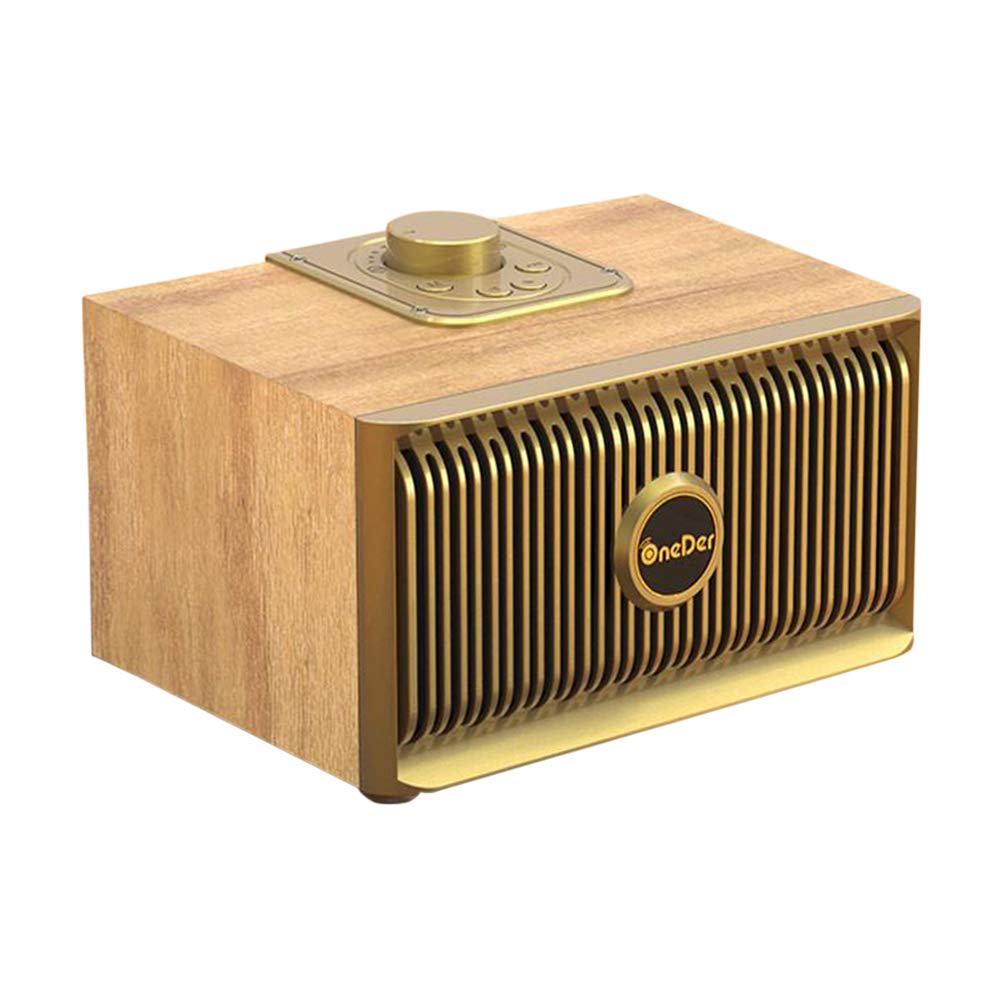
Figura 1: Davant i lateral view of the OneDer V5 speaker, showcasinel seu disseny compacte i la reixeta de l'altaveu.

Figura 2: A dalt view of the OneDer V5 speaker, highlighting the control panel with buttons for mode, volume, track control, and power.
2.2 Característiques clau
- Connectivitat sense fil Bluetooth: Seamlessly connect to your smartphone, tablet, or other Bluetooth-enabled devices.
- Múltiples modes de reproducció: Supports TF (Micro SD) card, USB drive, FM radio, and AUX input.
- Funció mans lliures: Built-in microphone for answering calls directly through the speaker.
- Bateria recarregable: Integrated Li-ion battery for portable use.
- subwoofer: Gravs millorats per a una experiència d'àudio més rica.
3. Configuració
3.1 Càrrega de l'altaveu
- Locate the Micro USB charging port on the speaker.
- Connect the provided Micro USB cable to the speaker's charging port.
- Connecteu l'altre extrem del cable USB a un adaptador de corrent USB (no inclòs) o al port USB d'un ordinador.
- El llum indicador de càrrega s'il·luminarà, normalment en vermell, durant la càrrega. S'apagarà o canviarà de color (per exemple, blau) quan estigui completament carregat.
- Normalment, una càrrega completa triga entre 2 i 3 hores.
3.2 Engegada/apagada
- Per encendre: Manteniu premut el botó d'engegada (U/I symbol) on the control panel for a few seconds until you hear an audible prompt or see an indicator light.
- Per apagar: Premeu i manteniu premut el botó d'engegada de nou durant uns segons fins que sentiu un missatge audible o l'indicador lluminós s'apagui.
3.3 Vinculació Bluetooth
- Ensure the speaker is powered on and in Bluetooth mode. If not, press the 'M' (Mode) button to switch to Bluetooth mode. The speaker will indicate it is ready for pairing (e.g., a flashing blue LED or an audible prompt).
- On your mobile device (smartphone, tablet, etc.), go to the Bluetooth settings.
- Activa el Bluetooth i cerca els dispositius disponibles.
- Select "OneDer V5" from the list of found devices.
- Once paired, the speaker will provide an audible confirmation, and the indicator light will typically stop flashing and remain solid blue.
- The speaker will automatically attempt to reconnect to the last paired device when powered on, if the device is within range and has Bluetooth enabled.
4. Instruccions de funcionament
4.1 Selecció del mode
Press the 'M' (Mode) button on the control panel to cycle through available modes: Bluetooth, TF Card, USB, FM Radio, and AUX.
4.2 Mode Bluetooth
- Reproduir/pausa: Premeu el botó Reprodueix / Pausa (►/− símbol).
- Pista següent: Press the 'Next' button (▶▶ símbol).
- Pista anterior: Press the 'Previous' button (◀◀ símbol).
- Pujar el volum: Press and hold the 'Next' button.
- Baixar el volum: Press and hold the 'Previous' button.
4.3 TF Card / USB Drive Mode
- Insert a TF (Micro SD) card or USB drive into the respective slot on the speaker.
- The speaker will automatically switch to TF/USB mode and begin playing audio files. If not, press the 'M' (Mode) button to select the correct mode.
- Use the Play/Pause, Next Track, Previous Track, and Volume buttons as described in Bluetooth mode.
4.4 Mode de ràdio FM
- Premeu el botó 'M' (Mode) per canviar al mode de ràdio FM.
- Escaneig automàtic: Press the Play/Pause button once to start an automatic scan for FM stations. The speaker will save all found stations.
- Canvi d'estació: Use the 'Next' and 'Previous' buttons to navigate through the saved FM stations.
4.5 Mode AUX
- Connecteu un extrem d'un cable d'àudio de 3.5 mm (no inclòs) al port d'entrada AUX de l'altaveu.
- Connecteu l'altre extrem del cable a la presa de sortida d'àudio del vostre dispositiu (per exemple, reproductor MP3, ordinador).
- The speaker will automatically switch to AUX mode. If not, press the 'M' (Mode) button to select AUX mode.
- Controla la reproducció i el volum directament des del dispositiu connectat.
4.6 Funció de mans lliures
- When a call comes in while connected via Bluetooth, the music will pause.
- Respon a la trucada: Press the Play/Pause button once to answer the incoming call.
- Finalitzar la trucada: Press the Play/Pause button once again to end the call.
- Rebutja la trucada: Mantingueu premut el botó Reproduir/Pausa durant uns segons per rebutjar una trucada entrant.
5. Manteniment
- Neteja: Use a soft, dry cloth to clean the speaker's surface. Do not use abrasive cleaners, alcohol, or other chemical solvents.
- Emmagatzematge: Guardeu l'altaveu en un lloc fresc i sec, allunyat de la llum solar directa i de temperatures extremes.
- Cura de la bateria: Per allargar la durada de la bateria, eviteu descarregar-la completament amb freqüència. Carregueu l'altaveu regularment, fins i tot si no l'utilitzeu durant períodes prolongats.
- Resistència a l'aigua: The speaker is indicated as waterproof. However, avoid submerging it in water or exposing it to heavy rain for prolonged periods to prevent damage.
6. Solució De Problemes
| Problema | Causa possible | Solució |
|---|---|---|
| L'altaveu no s'encén. | Bateria baixa. | Carregueu l'altaveu completament. |
| No es pot emparellar per Bluetooth. | L'altaveu no està en mode d'emparellament; el Bluetooth del dispositiu està desactivat; massa lluny de l'altaveu. | Ensure speaker is in Bluetooth pairing mode. Turn Bluetooth on/off on your device. Move device closer to speaker (within 10 meters). |
| No hi ha so de l'altaveu. | Volum massa baix; mode incorrecte; el dispositiu no reprodueix. | Increase speaker and device volume. Ensure correct mode is selected. Check if your device is playing audio. |
| La recepció de ràdio FM és deficient. | Senyal feble; interferències ambientals. | Move the speaker to a different location. Ensure no large metal objects are nearby. |
| TF card/USB drive not recognized. | Incorrecte file format; card/drive not inserted correctly; damaged media. | Assegureu-vos l'àudio files are in a compatible format (e.g., MP3, WAV). Reinsert the card/drive. Try a different card/drive. |
7. Especificacions
| Característica | Especificació |
|---|---|
| Número de model | V5 |
| Versió sense fil | 4.2 |
| abast sense fils | Fins a 10 metres (33 peus) |
| Capacitat de la bateria | 1500 mAh |
| Sortida de l'altaveu | 10W |
| Pes del producte | Aproximadament 515 g (0.515 kg) |
| Item Weight (packaged) | Aproximadament 660 g (0.66 kg) |
| Dimensions del producte (aprox.) | 150 mm x 105 mm x 100 mm |
| Font d'alimentació | Funciona amb bateria |
| Mètode de control | Tàctil/Botó |
| Característica especial | Subwoofer |
| Impermeable | Sí |
| Dispositius compatibles | Smartphone, tauleta |
| Tecnologia de connectivitat | Auxiliary, Bluetooth, USB, Wireless |
8. Garantia i Suport
8.1 Informació de la garantia
Specific warranty terms and conditions for the OneDer V5 speaker may vary depending on your region and the retailer from whom you purchased the product. Please refer to the warranty card included with your purchase or contact your retailer for detailed warranty information. Keep your proof of purchase for any warranty claims.
8.2 Atenció al client
If you encounter any issues or have questions not covered in this manual, please contact the customer support provided by your retailer or visit the official OneDer website for further assistance. Provide your product model (V5) and a detailed description of the issue when seeking support.


