1. Introducció
This manual provides detailed instructions for the TRACER GAMEZONE IGNIS AVAGO 3050 4000DPI USB Gaming Mouse. Please read this manual thoroughly before using the product to ensure proper operation and to maximize your gaming experience.
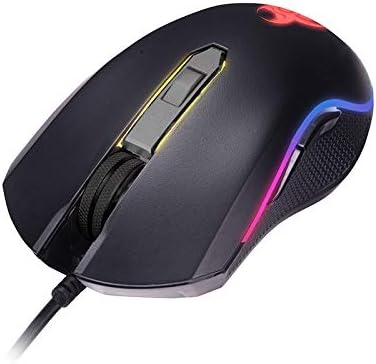
Imatge 1.1: acabatview of the TRACER GAMEZONE IGNIS AVAGO 3050 Gaming Mouse. This image shows the mouse from a slightly elevated angle, highlighting its ergonomic design, scroll wheel, and the integrated RGB lighting along its sides.
2. Contingut del paquet
Assegureu-vos que tots els elements siguin presents al paquet:
- TRACER GAMEZONE IGNIS AVAGO 3050 4000DPI USB Gaming Mouse
- Manual d'usuari (aquest document)
3. Característiques del producte
- High Precision Optical Laser: Equipped with an AVAGO 3050 optical sensor for superior tracking accuracy.
- DPI ajustable: Supports DPI switching up to 4000 DPI for customizable sensitivity.
- 6 botons personalitzables: Provides six programmable buttons for enhanced control during gameplay.
- Il·luminació RGB: Integrated internal RGB lighting for a modern and aggressive aesthetic.
- Connectivitat USB: Standard USB connection for wide compatibility with PC and Mac platforms.
- Sliding Base: Designed for smooth operation on various surfaces, including mouse mats.

Imatge 3.1: Lateral view of the gaming mouse, showcasing the ergonomic shape, textured grip on the side, and the vibrant RGB light strip running along the edge.
4. Configuració
Follow these steps to set up your TRACER GAMEZONE IGNIS AVAGO 3050 Gaming Mouse:
- Desempaqueta el ratolí: Traieu amb cura el ratolí del seu embalatge.
- Connexió a l'ordinador: Plug the USB connector of the mouse into an available USB port on your PC or Mac.
- Instal·lació del controlador: The mouse is plug-and-play. Your operating system will automatically detect and install the necessary drivers. No additional software installation is typically required for basic functionality.
- Col·locació: Place the mouse on a flat, clean surface or a mouse pad for optimal performance.

Imatge 4.1: Frontal view of the gaming mouse, showing the USB cable extending from the front, the scroll wheel, and the primary left and right click buttons.
5. Instruccions de funcionament
The TRACER GAMEZONE IGNIS AVAGO 3050 Gaming Mouse is designed for intuitive use. Here are the basic operating principles:
5.1. Funcions bàsiques del ratolí
- Clic esquerre: Botó d'acció principal.
- Clic dret: Secondary action button, often used for context menus.
- Roda de desplaçament: Used for vertical scrolling. Can also be pressed as a middle button.
5.2. Ajust de DPI
The mouse features a dedicated DPI button (usually located behind the scroll wheel) to cycle through different sensitivity settings. Press this button to instantly change the DPI (Dots Per Inch) to match your preference or game requirements. The mouse supports multiple DPI levels up to 4000 DPI.
5.3. Personalització de botons
The TRACER GAMEZONE IGNIS AVAGO 3050 mouse has 6 customizable buttons. While basic functionality is plug-and-play, advanced customization (such as remapping buttons or creating macros) typically requires third-party software compatible with generic gaming mice, as Tracer may not provide proprietary software for this model. Refer to your operating system's mouse settings or third-party utility software for advanced configuration options.
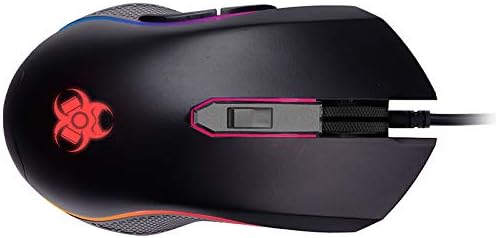
Imatge 5.1: De dalt a baix view of the gaming mouse, clearly showing the scroll wheel, the DPI adjustment button behind it, and the left and right click buttons. The Tracer logo with RGB lighting is visible at the rear.
6. Manteniment
Per garantir la longevitat i el rendiment òptim del vostre ratolí per a jocs, seguiu aquestes pautes de manteniment:
- Neteja: Feu servir un drap suau i sec per netejar la superfície del ratolí. Per a la brutícia persistent, netegeu lleugerament.ampNetegeu el drap amb aigua o una solució de neteja suau. Eviteu productes químics agressius o materials abrasius.
- Neteja del sensor: Periodically clean the optical sensor on the underside of the mouse with a cotton swab lightly dampened with rubbing alcohol. Ensure no lint is left behind.
- Cura del cable: Eviteu doblegar bruscament o estirar excessivament el cable USB per evitar danys.
- Emmagatzematge: Store the mouse in a clean, dry environment away from extreme temperatures and direct sunlight when not in use.
7. Solució De Problemes
If you encounter issues with your TRACER GAMEZONE IGNIS AVAGO 3050 Gaming Mouse, refer to the following common problems and solutions:
| Problema | Causa possible | Solució |
|---|---|---|
| El ratolí no respon | Connexió USB fluixa, port USB defectuós, problema amb el controlador. |
|
| Cursor erràtic o no es mou suaument | Sensor òptic brut, superfície inadequada, interferències de programari. |
|
| El botó DPI no canvia la sensibilitat | Button malfunction, software conflict. |
|
8. Especificacions
| Característica | Detall |
|---|---|
| Nom del model | GAMEZONE IGNIS AVAGO 3050 4000DPI |
| Número de model de l'article | TRAMYS46085 |
| Marca | Traçador |
| Tecnologia de connectivitat | USB |
| Tecnologia de detecció de moviment | Laser, Optical (AVAGO 3050) |
| Rang de DPI | Fins a 4000 DPI (ajustable) |
| Nombre de botons | 6 |
| Plataforma de maquinari | Mac, PC |
| Pes de l'article | 12.3 unces (aproximadament 348.7 grams) |
| Dimensions del paquet | 7.87 x 5.91 x 1.97 polzades |
| Fabricant | TRACTOR |
| Primera data disponible | 4 de febrer de 2019 |
9. Garantia i Suport
For warranty information and technical support, please refer to the official Tracer website or contact your local retailer where the product was purchased. Keep your proof of purchase for warranty claims.
Fabricant: TRACTOR


