Benvingut
Thank you for choosing the iTek GGC 30-inch Curved Monitor. This manual provides essential information for setting up, operating, and maintaining your new monitor. Please read it thoroughly before use to ensure optimal performance and safety.
Instruccions importants de seguretat
To prevent damage and ensure safe operation, please observe the following precautions:
- No exposeu el monitor a la pluja, la humitat ni a temperatures extremes.
- Assegureu-vos que hi hagi una ventilació adequada al voltant del monitor. No bloquegeu les obertures de ventilació.
- Feu servir només l'adaptador de corrent que s'inclou amb el monitor.
- Eviteu col·locar objectes pesats al cable d'alimentació.
- Desconnecteu l'endoll de la presa de corrent si no fareu servir el monitor durant un període llarg de temps.
- No intenteu fer la reparació del monitor vosaltres mateixos. Encarregueu-vos de totes les tasques de manteniment a personal qualificat.
- Clean the monitor screen and casinNetegeu amb un drap suau i sec. Eviteu utilitzar productes de neteja o dissolvents abrasius.
Contingut del paquet
Si us plau, comproveu el paquet per veure si hi ha els elements següents:
- iTek GGC 30-inch Curved Monitor
- Suport de monitor (base i coll)
- Adaptador d'alimentació i cable
- Cable DisplayPort
- Cable HDMI
- Manual d'usuari
- Cargols per al muntatge del suport
Producte acabatview
The iTek GGC 30-inch Curved Monitor is designed for an immersive viewing experience, ideal for gaming and professional use. It features a WFHD (2560x1080) resolution, a high 200Hz refresh rate, and a rapid 1ms MPRT response time.

Key Performance Highlights
- 200Hz Refresh Rate & AMD FreeSync Technology: Experience ultra-smooth visuals and tear-free gaming with a high refresh rate and adaptive sync technology.

Figure 2: 200Hz Refresh Rate and AMD FreeSync Technology in action. - Flicker-Free & Low Blue Light: Designed to reduce eye strain during prolonged use, providing a more comfortable viewexperiència.

Figure 3: Flicker-Free and Low Blue Light features for eye comfort. - Temps de resposta MPRT d'1 ms: Minimizes motion blur and ghosting, crucial for fast-paced games and action sequences.

Figure 4: Rapid Refresh Rate and Response Time for smooth visuals. - Pantalla corbada 1800R: The immersive curvature brings the edges of the screen closer to your field of view, enhancing depth perception and reducing distortion.

Figure 5: 1800R Curved Display for an immersive experience.
Configuració
Muntatge de l’estand
- Traieu amb cura els components del monitor i del suport de l'embalatge.
- Attach the stand neck to the monitor panel using the provided screws. Ensure it clicks securely into place or is fastened tightly.
- Attach the stand base to the stand neck, securing it with the thumb screw or screws from underneath.
- Col·loqueu el monitor muntat sobre una superfície plana i estable.
Connectant el vostre monitor
The iTek GGC monitor offers multiple connectivity options for various devices:
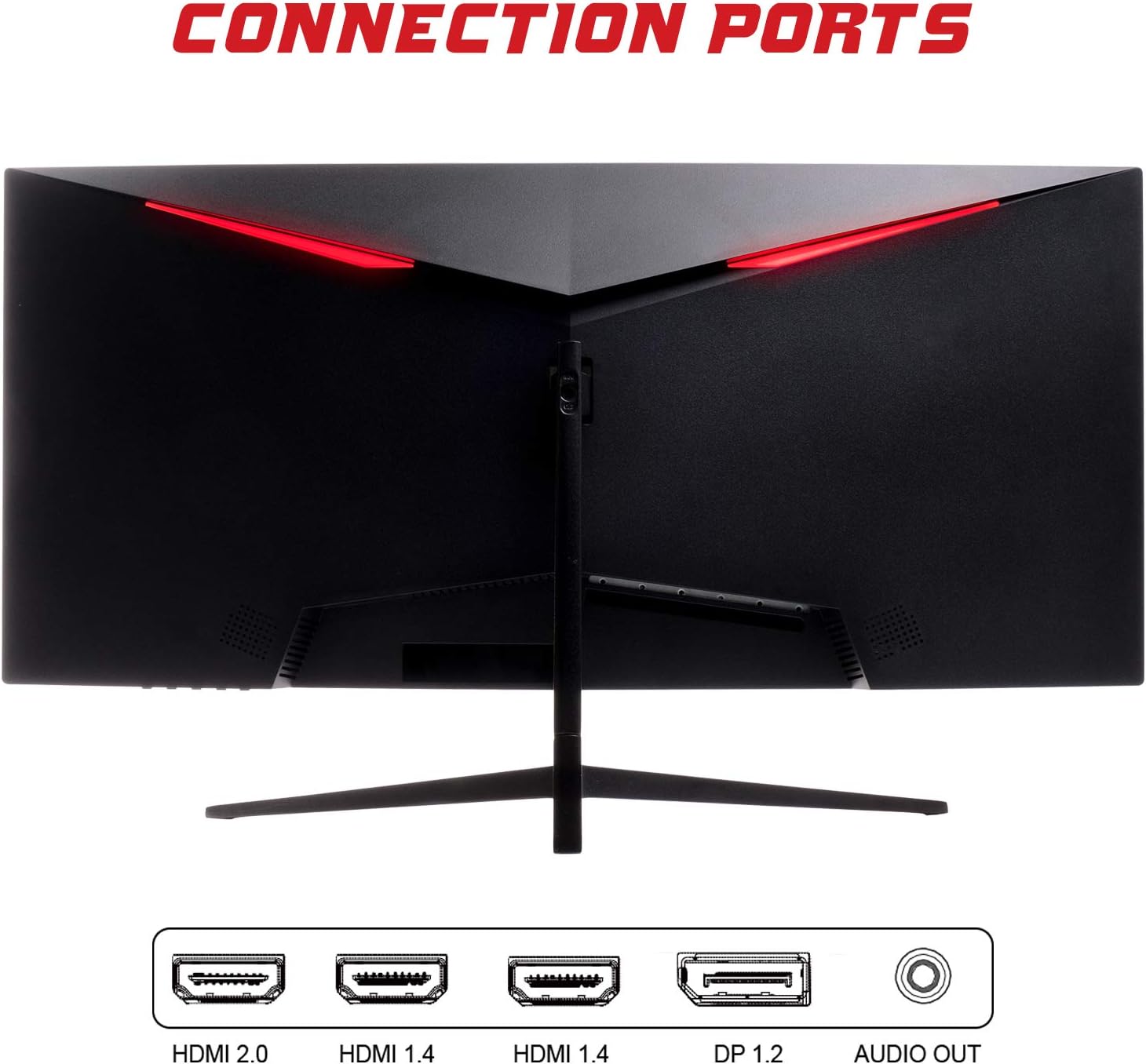
- DisplayPort (DP 1.2): For high-resolution and high-refresh-rate connections to your PC.
- HDMI (HDMI 2.0, HDMI 1.4 x2): Connect to PCs, gaming consoles, and other multimedia devices. HDMI 2.0 supports higher refresh rates at certain resolutions.
- Sortida d'àudio: Connecteu altaveus externs o auriculars.
Després de connectar el cable de vídeo, connecteu l'adaptador d'alimentació al monitor i després a una presa de corrent.
Funcionament del monitor
Encès/Apagat
Press the power button, usually located on the bottom or back of the monitor, to turn it on or off. The power indicator light will illuminate when the monitor is on.
Menú de visualització en pantalla (OSD).
The OSD menu allows you to adjust various monitor settings. Use the buttons on the monitor (typically on the back or bottom right) to navigate the menu.
- Configuració de la imatge: Adjust brightness, contrast, sharpness, and gamma.
- Configuració de color: Modifica la temperatura de color, el to i la saturació.
- Selecció d'entrada: Canvia manualment entre les entrades DisplayPort i HDMI.
- Àudio: Adjust volume for the audio output.
- Configuració del sistema: Access language, OSD timeout, and reset options.
- Característiques del joc: Enable/disable FreeSync, adjust response time overdrive, and activate crosshair overlays if available.
Manteniment
Una cura adequada garanteix la longevitat del monitor:
- Apagueu sempre el monitor i desendolleu el cable d'alimentació abans de netejar-lo.
- Feu servir un drap suau i sense borrissol per netejar suaument la pantalla. Per a marques difícils, fregueu lleugerament.ampNetegeu el drap amb aigua o un netejador de pantalles suau i no abrasiu.
- Clean the monitor casinamb un drap suau i sec.
- Avoid spraying liquids directly onto the screen or casing.
- Do not use benzene, thinner, ammonia-based cleaners, or abrasive materials.
Resolució de problemes
If you encounter issues with your monitor, please refer to the following table for common problems and solutions:
| Problema | Possible solució |
|---|---|
| Sense poder | Ensure the power cable is securely connected to the monitor and the power outlet. Check if the power outlet is working. |
| Sense senyal / Pantalla en blanc | Verify the video cable (DisplayPort or HDMI) is firmly connected to both the monitor and your computer. Select the correct input source via the OSD menu. Ensure your computer is powered on and not in sleep mode. |
| Imatge parpellejant o inestable | Check the video cable connection. Try a different cable or port. Ensure your graphics card drivers are up to date. Adjust the refresh rate in your computer's display settings. |
| Poor image quality (blurry, distorted colors) | Ajusteu la brillantor, el contrast i el color al menú OSD. Assegureu-vos que la resolució de la pantalla de l'ordinador coincideixi amb la resolució nativa del monitor (2560 x 1080). |
| No hi ha so de la sortida d'àudio | Check the audio cable connection to your speakers/headphones. Verify the volume setting in the OSD menu and on your computer. Ensure the correct audio output device is selected in your computer's sound settings. |
Especificacions tècniques
| Característica | Especificació |
|---|---|
| Marca | Itek |
| Model | ITMC30V201FHD |
| Mida de la pantalla | 30 polzades |
| Tipus de panell | VA |
| Curvatura | R1800 |
| Resolució | 2560 x 1080 (WFHD) |
| Relació d'aspecte | 21:9 |
| Freqüència d'actualització | 200 Hz |
| Temps de resposta | MPRT d'1 ms |
| Brillantor | 350 cd/m² |
| Relació de contrast | 3000:1 |
| Viewangle ing | 178° (Horitzontal/Vertical) |
| Connectivitat | 1x DisplayPort 1.2, 1x HDMI 2.0, 2x HDMI 1.4, Audio Out |
| Característiques especials | HDR Ready, FreeSync, Low Blue Light, Flicker Free, VESA Mountable |
| Dimensions del producte (amb suport) | 70.68 x 40.89 x 18.48 cm |
| Pes | 6.9 kg |
Eficiència energètica

For detailed energy consumption information and product registration, please refer to the official EPREL database:
Garantia i Suport
Your iTek GGC monitor is backed by a manufacturer's warranty. Please retain your proof of purchase for warranty claims.
- Assistència de producte garantida: This product is guaranteed to have support available until at least January 1, 2031.
- For technical support, warranty inquiries, or service requests, please contact iTek customer service through their official weblloc web o la informació de contacte proporcionada amb la compra.


