1. Introducció
This manual provides detailed instructions for the installation, setup, operation, and maintenance of the Watt Stopper WS-301-W Occupancy Sensor. This device is designed to automatically control lighting based on occupancy detection, enhancing energy efficiency and convenience in various indoor environments. Please read this manual thoroughly before installation and use to ensure proper function and safety.
2. Informació de seguretat
ADVERTIMENT: Risk of electric shock. Improper installation can lead to serious injury or death. Always turn off power at the circuit breaker before installing or servicing this device.
- La instal·lació ha de ser realitzada per un electricista qualificat d'acord amb tots els codis elèctrics nacionals i locals.
- No instal·leu el producte si sembla que està danyat.
- Assegureu-vos que totes les connexions del cablejat estiguin segures i aïllades correctament.
- Aquest dispositiu només està dissenyat per a ús interior.
3. Producte acabatview
The Watt Stopper WS-301-W is a passive infrared (PIR) occupancy sensor designed for wall-mount applications. It detects motion within a 180-degree field of view to automatically switch connected lighting loads on and off.
3.1 Característiques clau
- Muntatge: Mur
- Voltage: 120, 277, 347 Volts AC
- Color: Blanc
- Tipus de detecció: 180 Degrees, Passive Infrared (PIR)
- Optional Neutral Connection: Features a break-off tab to expose neutral terminals for installations requiring a neutral connection.
3.2 Contingut del paquet
- Watt Stopper WS-301-W Occupancy Sensor
- Cargols de muntatge
- Filferro
- Manual d'instruccions
3.3 Diagrama del producte
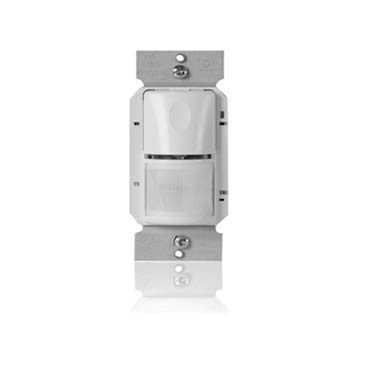
Figura 1: Un front view of the Watt Stopper WS-301-W occupancy sensor, showing its white plastic housing, passive infrared lens, and mounting tabs. The sensor is designed for wall-mount installation.
4. Instal·lació
Before beginning installation, ensure the power to the circuit is turned OFF at the circuit breaker. Follow all local and national electrical codes.
4.1 Instruccions de cablejat
- Apagueu l'alimentació a l'interruptor.
- Remove the existing wall switch or cover plate.
- Identify the Line (hot), Load, and Ground wires. If an optional neutral connection is required, identify the Neutral wire. The WS-301-W has a break-off tab to expose neutral terminals.
- Connect the sensor wires to the building wires using appropriate wire nuts:
- Connect the sensor's Line wire to the building's Line (hot) wire.
- Connect the sensor's Load wire to the building's Load wire.
- Connect the sensor's Ground wire to the building's Ground wire.
- If using the optional neutral connection, connect the sensor's Neutral wire to the building's Neutral wire.
- Assegureu-vos que totes les connexions siguin segures.
4.2 Muntatge
- Carefully push the wired sensor into the wall box.
- Secure the sensor to the wall box using the provided mounting screws.
- Install a standard decorator-style wall plate (not included) over the sensor.
- Resta l'alimentació al disjuntor.
5. Configuració i configuració
Upon initial power-up, the sensor will typically enter a calibration period. During this time, avoid motion in the detection area. The WS-301-W may include adjustable settings for time delay and sensitivity, which are usually accessible via small dials or buttons on the front face or behind the cover plate. Refer to the specific markings on your device for adjustment details.
6. Instruccions de funcionament
The Watt Stopper WS-301-W operates by detecting infrared energy emitted by occupants. When motion is detected within its 180-degree field of view, the sensor will turn on the connected lighting. If no motion is detected for a preset time delay, the lighting will automatically turn off. Some models may feature a manual override button to temporarily turn lights on or off regardless of occupancy.
7. Manteniment
The WS-301-W occupancy sensor requires minimal maintenance. To ensure optimal performance:
- Neteja: Periodically wipe the sensor lens with a soft, dry cloth to remove dust or debris. Do not use abrasive cleaners or solvents.
- Obstruccions: Assegureu-vos que el camp de sensor view is not obstructed by furniture, decorations, or other objects that could block motion detection.
- Cicle d'alimentació: If the sensor appears to be malfunctioning, try turning off the power at the circuit breaker for 30 seconds and then restoring it.
8. Solució De Problemes
If you experience issues with your WS-301-W sensor, consult the table below for common problems and solutions.
| Problema | Causa possible | Solució |
|---|---|---|
| Els llums no s'encenen amb moviment. | No power to sensor; incorrect wiring; sensor sensitivity too low; obstructed view. | Check circuit breaker; verify wiring connections; adjust sensitivity setting; clear obstructions from sensor's view. |
| Lights remain on. | Constant motion in detection area; time delay set too long; sensor malfunction. | Ensure no continuous motion; adjust time delay setting; power cycle the sensor. |
| Lights turn off too quickly. | Time delay set too short; sensor sensitivity too low. | Adjust time delay setting; increase sensitivity setting. |
| Sensor does not detect motion reliably. | Sensor sensitivity too low; obstructed view; incorrect mounting height. | Increase sensitivity; clear obstructions; verify mounting height is within recommended range. |
9. Especificacions
| Característica | Especificació |
|---|---|
| Model | WS-301-W |
| Tipus de muntatge | Muntatge de paret |
| Angle de detecció | 180 graus |
| Tipus de sensor | Infrarojos passius (PIR) |
| Vol. Operatiutage | 120, 277, 347 VAC |
| Color | Blanc |
| Font d'alimentació | Elèctric amb cable |
| Dimensions del paquet | 2 x 2 x 2 polzades (aproximadament) |
| Primera data disponible | 16 de novembre de 2018 |
10. Informació de la garantia
Watt Stopper products are typically covered by a limited warranty against defects in materials and workmanship. The specific terms and duration of the warranty may vary. Please refer to the warranty card included with your product or visit the official Watt Stopper weblloc web per obtenir informació detallada sobre la garantia i els procediments de registre. Conserveu el comprovant de compra per a reclamacions de garantia.
11. Atenció al client
For technical assistance, troubleshooting beyond this manual, or to inquire about replacement parts, please contact Watt Stopper customer support. Contact information can typically be found on the product packaging or the official Watt Stopper website. When contacting support, please have your product model number (WS-301-W) and date of purchase readily available.


