1. Introducció
This manual provides essential information for the setup, operation, and maintenance of your Blackweb BWC18SB001 2.0 Channel Google Assistant Smart Soundbar. Please read these instructions carefully before using the product to ensure proper functionality and to maximize your audio experience. This smart soundbar integrates speaker functionality with Google Assistant capabilities, enhancing your home entertainment system.
2. Què hi ha a la caixa
Verifiqueu que tots els components siguin presents en desembalar-lo:
- Negreweb BWC18SB001 2.0 Channel Google Assistant Smart Soundbar
- Control remot
- Adaptador d'alimentació
- Relevant Audio Cables (e.g., Optical, Aux)
- Manual d'usuari (aquest document)
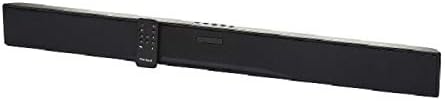
Image: The Blackweb BWC18SB001 Smart Soundbar, shown with its included remote control. The soundbar is black and rectangular, designed to sit beneath a television.
3. Característiques del producte
- Àudio de 2.0 canals: Delivers clear stereo sound for an enhanced listening experience.
- Integrated Google Assistant: Control your soundbar and smart home devices using voice commands.
- Múltiples opcions de connectivitat: Supports HDMI, Optical, AUX, and Bluetooth for versatile audio input.
- Mètodes de control: Features on-device buttons and a dedicated remote control for easy operation.
- Disseny compacte: Designed to fit seamlessly into your home theater setup.
4. Configuració
4.1 Col·locació
Place the soundbar on a stable, flat surface directly in front of your television or mount it on a wall (mounting hardware not included). Ensure there is adequate ventilation around the unit.
4.2 Connexió d'alimentació
- Connect the power adapter to the DC IN port on the back of the soundbar.
- Connecteu l'altre extrem de l'adaptador d'alimentació a una presa de corrent.
4.3 Connexió d'àudio
Choose one of the following methods to connect your soundbar to your TV or other audio source:
- HDMI (Recommended): Connect an HDMI cable (not included) from the HDMI ARC port on your TV to the HDMI ARC port on the soundbar. This allows for high-quality audio and control via your TV remote.
- Òptic: Connect an Optical cable (included) from the OPTICAL OUT port on your TV to the OPTICAL IN port on the soundbar.
- AUX: Connect a 3.5mm audio cable (included) from the AUX OUT port on your TV or audio device to the AUX IN port on the soundbar.
5. Instruccions de funcionament
5.1 Encès/Apagat
- Premeu el botó d'engegada (U) a la barra de so o al comandament a distància per encendre o apagar la unitat.
- A green indicator light on the soundbar signifies that it is powered on.
5.2 Control de volum
- Feu servir la tecla Pujar volum (VOL+) i Baixar volum (VOL-) buttons on the soundbar or remote control to adjust the volume.
- Premeu el botó Silenciar (X) on the remote to mute or unmute the sound.
5.3 Selecció d'entrada
Premeu el botó d'entrada (M) on the soundbar or the corresponding input buttons (AUX, OPTICAL, HDMI, Bluetooth) on the remote control to switch between audio sources.
6. Integració de l'Assistent de Google
Your Blackweb soundbar features integrated Google Assistant. To activate, ensure the soundbar is connected to your home Wi-Fi network (refer to the separate Google Home app setup guide for detailed instructions). Once connected, you can use voice commands:
- Say "Hey Google" or "Ok Google" followed by your command.
- Examples: "Hey Google, play music," "Ok Google, what's the weather?" "Hey Google, turn up the volume."
You can also mute the Google Assistant microphone using the dedicated button on the soundbar or remote control if you prefer privacy.
7. Connectivitat Bluetooth
Per connectar un dispositiu Bluetooth:
- Premeu el botó Bluetooth (BT) on the remote control or cycle through inputs on the soundbar until "BT" is displayed or indicated. The soundbar will enter pairing mode.
- Al dispositiu mòbil (telèfon intel·ligent, tauleta, ordinador portàtil), activeu el Bluetooth i cerqueu els dispositius disponibles.
- Select "Blackweb BWC18SB001" from the list of devices.
- Un cop emparellat, la barra de so indicarà una connexió correcta i podràs reproduir àudio des del teu dispositiu.
L'abast del Bluetooth és d'aproximadament 10 metres (33 peus).
8. Manteniment
To ensure the longevity and optimal performance of your soundbar:
- Neteja: Use a soft, dry cloth to wipe the exterior of the soundbar. Do not use liquid cleaners or abrasive materials.
- Ventilació: Assegureu-vos que les obertures de ventilació no estiguin bloquejades.
- Medi ambient: Eviteu exposar la barra de so a temperatures extremes, humitat o llum solar directa.
9. Solució De Problemes
- Sense energia: Assegureu-vos que l'adaptador de corrent estigui connectat correctament tant a la barra de so com a una presa de corrent que funcioni.
- Sense so:
- Comproveu que la barra de so estigui engegada i no silenciada.
- Verifiqueu que s'ha seleccionat la font d'entrada correcta a la barra de so.
- Ensure audio cables (HDMI, Optical, AUX) are securely connected to both the soundbar and your TV/audio source.
- Adjust the volume on both the soundbar and your TV/audio source.
- Bluetooth no connectat:
- Assegureu-vos que la barra de so estigui en mode d'emparellament Bluetooth.
- Assegureu-vos que el Bluetooth del dispositiu estigui activat i que estigui dins del seu abast.
- Prova de desvincular i tornar a vincular el dispositiu.
- L'Assistent de Google no respon:
- Comproveu la vostra connexió Wi-Fi.
- Ensure the Google Assistant microphone is not muted.
- Verify the soundbar is properly set up in the Google Home app.
10. Especificacions
| Característica | Especificació |
|---|---|
| Nom del model | BWC18SB001 |
| Tipus d'altaveu | Barra de so |
| Configuració del canal de so envoltant | 2.0 |
| Mètode de control | Voice, Remote, On-device Buttons |
| Tecnologia de connectivitat | HDMI, Optical, AUX, Bluetooth |
| Interval Bluetooth | 10 metres |
| Potència de sortida màxima dels altaveus | 150 watts |
| Mode de sortida d'àudio | Estèreo, Envoltant |
| Font d'alimentació | Elèctric amb cable |
| Dimensions del producte | 32 x 2.77 x 3.26 polzades |
| Pes de l'article | 3.97 lliures |
| UPC | 681131237703 |
11. Garantia i Suport
For warranty information and technical support, please refer to the documentation provided at the time of purchase or visit the official Blackweb weblloc web. Conserveu el comprovant de compra per a reclamacions de garantia.


