Introducció
This manual provides detailed instructions for the installation, operation, and maintenance of your FOSCAM R4S 4MP WiFi IP Camera. Designed for home security and monitoring, this camera offers advanced features such as 4MP resolution, dual-band WiFi connectivity, AI human detection, two-way audio, and night vision. Please read this manual thoroughly before using the product to ensure proper setup and functionality.

Figure 1: FOSCAM R4S 4MP WiFi IP Camera
Contingut del paquet
Verify that all items listed below are included in your package. If any items are missing or damaged, please contact FOSCAM support.
- FOSCAM R4S 4MP WiFi IP Camera
- Adaptador d'alimentació
- Cable Ethernet
- Suport de muntatge
- Cargols de muntatge i tacs de paret
- Guia de configuració ràpida
- Antena WiFi

Figure 2: FOSCAM R4S Package Contents
Producte acabatview i Característiques
The FOSCAM R4S camera is equipped with advanced technology to provide reliable surveillance and monitoring. Key features include:
- 4MP/2K Resolution: Ofereix vídeos clars i detallatstage.
- Dual-Band WiFi (2.4/5GHz): Ensures stable and flexible wireless connectivity.
- Detecció humana d'IA: Reduces false alarms by distinguishing human shapes from other movements.
- Detecció de so: T'avisa de sons inusuals.
- 33ft Night Vision: Proporciona una visibilitat clara en condicions de poca llum.
- Àudio bidireccional: Permet la comunicació en temps real a través de la càmera.
- Funcionalitat de panoràmica/inclinació: Ofereix un angle horitzontal de 360° i vertical de 100° viewrang d'ing.
- Zoom digital 20X: Enables closer inspection of details.
- Mode de privadesa: Temporarily disables recording and transmission for privacy.
- Compatibilitat: Funciona amb Amazon Alexa i Google Assistant.
- Opcions d'emmagatzematge: Supports Micro SD card (up to 256GB, not included) and cloud storage services.
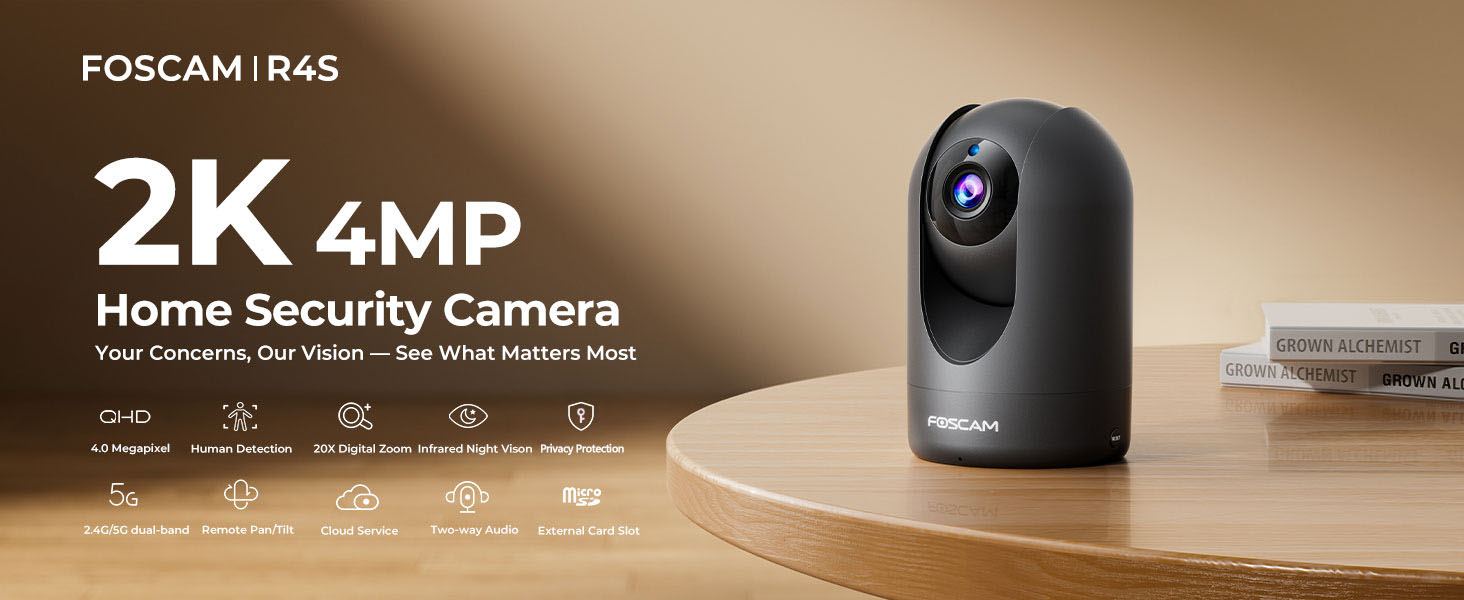
Figure 3: FOSCAM R4S Key Features
Guia de configuració
1. Col·locació física
The FOSCAM R4S camera can be placed on a flat surface or mounted to a wall or ceiling. Ensure the camera is positioned to cover the desired monitoring area.

Figure 4: Camera Placement Options
2. Connexió d'alimentació
Connect the power adapter to the camera's power input and plug it into a standard electrical outlet. The camera will power on automatically.
3. Instal·lació de l'aplicació i configuració inicial
- Download the Foscam App from your mobile device's app store (iOS or Android).
- Open the Foscam App and create an account or log in.
- Tap the "+" icon to add a new camera.
- Follow the on-screen instructions to connect your camera to your Wi-Fi network using either the sound wave or QR code setup method. Ensure your mobile device is connected to the same Wi-Fi network (2.4GHz or 5GHz) you intend to use for the camera.
- Once connected, you can name your camera and set a password.

Figure 5: Dual-Band WiFi Connection
Instruccions de funcionament
1. En directe View i control de panoràmica/inclinació
From the Foscam App, select your camera to view the live feed. Use the on-screen controls to pan (horizontal movement) and tilt (vertical movement) the camera lens to adjust your viewangle de ing.

Figure 6: Pan/Tilt Camera Control
2. Àudio bidireccional
Tap the microphone icon in the app to enable two-way audio. You can speak through your phone, and your voice will be broadcast through the camera's speaker. Similarly, you can hear audio from the camera's environment.
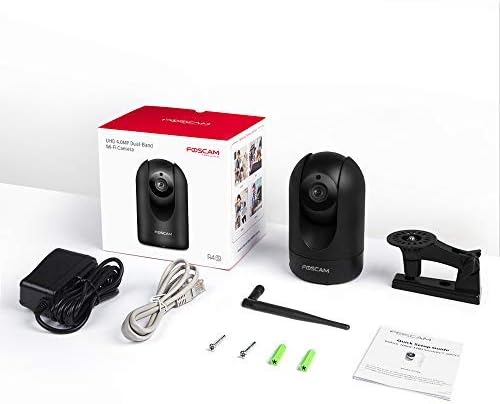
Figura 7: Comunicació d'àudio bidireccional
3. Detecció de moviment i so
Configure detection settings in the app to receive alerts for human movement or unusual sounds. You can customize sensitivity and detection zones to minimize false alarms.

Figure 8: Intelligent Human and Pet Detection
4. Visió nocturna
The camera automatically switches to night vision mode in low-light conditions, providing clear black and white images up to 33 feet.

Figura 9: Capacitat de visió nocturna
5. Mode de privadesa
Activate Privacy Mode via the app to temporarily disable video recording and transmission, ensuring your privacy when needed. The camera lens will physically retract or turn away.

Figure 10: Activating Privacy Mode
6. Storage and Playback
Recordings can be stored on a Micro SD card (up to 256GB, not included) or via FOSCAM's cloud service. Access and playback recorded footage through the Foscam App.

Figura 11: Opcions d'emmagatzematge
Manteniment
To ensure optimal performance and longevity of your FOSCAM R4S camera, follow these maintenance guidelines:
- Neteja: Netegeu suaument la lent i el cos de la càmera amb un drap suau i sec. Eviteu utilitzar productes químics agressius o materials abrasius.
- Actualitzacions de firmware: Regularly check for and install firmware updates through the Foscam App to ensure your camera has the latest features and security enhancements.
- Col·locació: Ensure the camera is placed in a stable environment, away from direct sunlight, extreme temperatures, and excessive moisture.
- Font d'alimentació: Feu servir només l'adaptador de corrent original que s'inclou amb la càmera.
Resolució de problemes
If you encounter issues with your FOSCAM R4S camera, refer to the following common troubleshooting steps:
| Problema | Causa possible | Solució |
|---|---|---|
| Càmera fora de línia | Sense electricitat, Wi-Fi desconnectat, problema amb el router. | Comproveu la connexió d'alimentació. Reinicieu la càmera i l'encaminador. Verifiqueu la intensitat del senyal Wi-Fi. |
| Poca qualitat de vídeo | Amplada de banda baixa, lent bruta, il·luminació insuficient. | Ensure stable Wi-Fi. Clean the lens. Adjust camera position or add lighting. |
| La detecció de moviment no funciona | Incorrect settings, detection zone not configured. | Check motion detection settings in the app. Ensure detection zones are active. |
| Problemes d'àudio bidireccional | Microphone/speaker muted, app permissions. | Check volume settings in the app. Ensure app has microphone permissions. |
For further assistance, please refer to the FOSCAM support weblloc o contacteu amb el servei d'atenció al client.
Especificacions
| Característica | Detall |
|---|---|
| Resolució | 4MP (2K) |
| Connectivitat | 2.4GHz & 5GHz Dual-Band Wi-Fi |
| Gamma de visió nocturna | Fins a 33 peus (10 metres) |
| Viewangle ing | 105° (diagonal) |
| Interval de panoràmica/inclinació | Horitzontal: 360°, Vertical: 100° |
| Zoom digital | 20X |
| Àudio | Two-Way Audio with built-in mic and speaker |
| Detecció | AI Human Detection, Sound Detection |
| Emmagatzematge | Targeta Micro SD (fins a 256 GB), emmagatzematge al núvol |
| Compatibilitat | Amazon Alexa, Google Assistant |
| Entrada de potència | DC 5V/2A (via power adapter) |
| Dimensions (L x A x A) | 2.91 x 3.03 x 4.69 polzades |
| Pes | 1.15 lliures |
Garantia i Suport
FOSCAM is committed to providing high-quality products and excellent customer service.
- Garantia de qualitat: 180-Day Quality Guarantee.
- Devolucions: 30-Day Free Returns.
- Suport tècnic: 24/7 Fast Reply & Lifetime Tech Support.
- Contacte: For support, please visit the official FOSCAM weblloc o poseu-vos en contacte amb el seu equip d'atenció al client.


