1. Introducció
The D-Link DWR-930M 4G/LTE Mobile Router is a portable wireless device designed to provide high-speed internet access on the go. It functions as a 4G LTE Cat4 mobile hotspot, enabling you to share a broadband wireless WAN (WWAN) connection via Wi-Fi. This device supports internet speeds up to 150Mbps for downloads and 50Mbps for uploads, allowing up to 8 Wi-Fi devices to connect simultaneously.
Its compact size and rechargeable 3000 mAh Li-ion battery make it suitable for travel and situations requiring an impromptu network. The DWR-930M incorporates a built-in firewall and supports WPA/WPA2 security protocols to protect your data. Charging is facilitated via a Micro-USB port, and device management can be performed using a mobile application.
2. Contingut del paquet
Si us plau, verifiqueu que el vostre paquet contingui els elements següents:
- D-Link DWR-930M 4G/LTE Mobile Router
- Bateria recarregable de ions de liti
- Cable de càrrega micro-USB
- Guia d'instal·lació ràpida (si s'inclou)
Si falta algun article o està malmès, poseu-vos en contacte amb el vostre distribuïdor.
3. Producte acabatview
Familiarize yourself with the physical components and indicator lights of your DWR-930M Mobile Router.
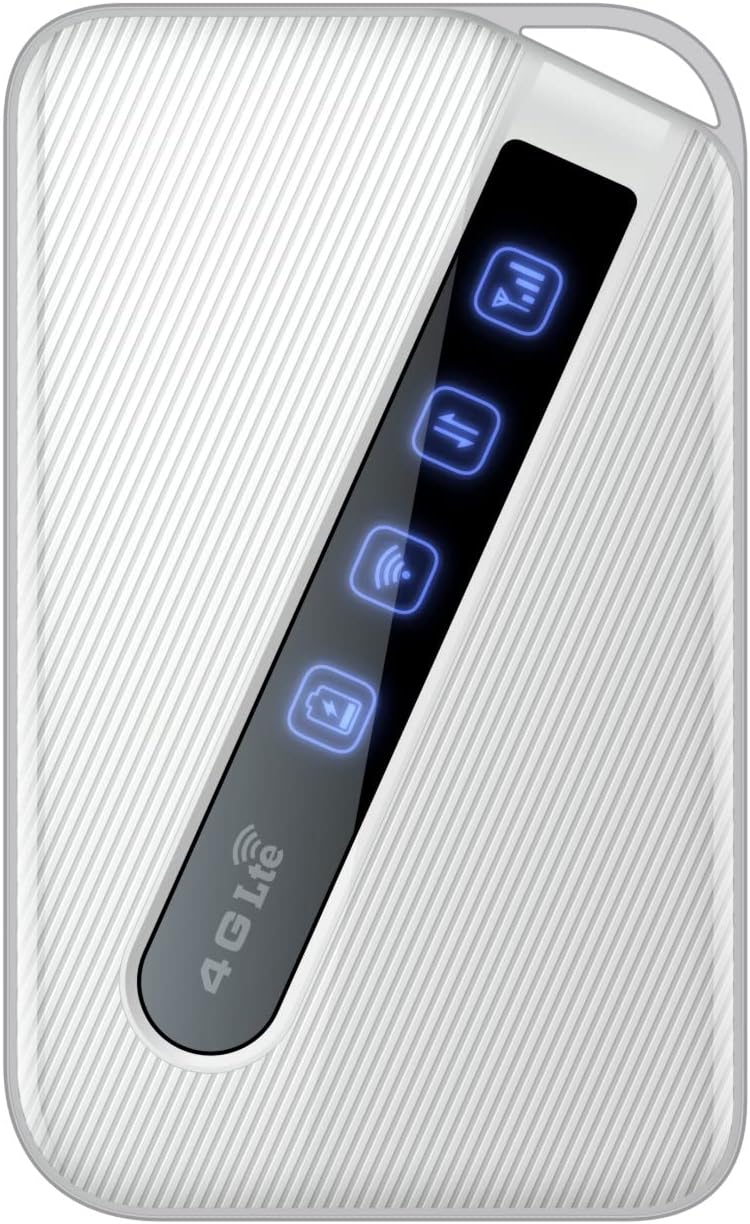
An image of the D-Link DWR-930M 4G/LTE Mobile Router, showing its compact white design and the illuminated indicator panel for signal, network, Wi-Fi, and battery status.
Llums indicadores:
- Indicador de força del senyal: Displays the strength of the 4G/LTE network signal.
- Network Type Indicator: Shows the current network connection status (e.g., 4G LTE).
- Indicador d'estat del Wi-Fi: Indicates if the Wi-Fi hotspot is active.
- Indicador d'estat de la bateria: Mostra el nivell de càrrega actual de la bateria.
Ports and Slots:
- Ranura per a targeta SIM: For inserting your data-enabled SIM card.
- Port micro-USB: S'utilitza per carregar el dispositiu.
- Botó d'encesa: Per encendre o apagar el dispositiu.
4. Configuració
4.1. Inserció de la targeta SIM
- Assegureu-vos que el DWR-930M estigui apagat.
- Locate the SIM card slot, typically found under the battery cover or on the side of the device.
- Carefully insert your data-enabled SIM card into the slot with the gold contacts facing down and the notched corner aligned correctly.
- Close the SIM card slot cover or replace the battery cover.
4.2. Càrrega del dispositiu
- Connecteu el cable de càrrega micro-USB al port micro-USB del DWR-930M.
- Connect the other end of the cable to a USB power adapter (not always included) or a computer's USB port.
- The battery indicator light will show charging status. Allow the device to fully charge before first use.
4.3. Encès / apagat
- Per encendre: Premeu i manteniu premut el botó d'engegada fins que s'il·luminin els llums indicadors.
- Per apagar: Premeu i manteniu premut el botó d'engegada fins que els llums indicadors s'apaguin.
5. Funcionament
5.1. Connexió de dispositius a la Wi-Fi
- Ensure the DWR-930M is powered on and the Wi-Fi indicator is active.
- Al dispositiu amb Wi-Fi (telèfon intel·ligent, tauleta, ordinador portàtil), obriu la configuració del Wi-Fi.
- Cerca xarxes Wi-Fi disponibles.
- Select the network name (SSID) of your DWR-930M (usually printed on a label inside the battery compartment or on the device itself).
- Enter the Wi-Fi password (WPA/WPA2 key), also found on the device label.
- Your device should now be connected to the internet via the DWR-930M.
5.2. Accedint al Web Interfície de gestió
For advanced settings and configuration, you can access the router's webinterfície de gestió basada en
- Connecteu el dispositiu a la xarxa Wi-Fi del DWR-930M.
- Obre a web navegador (per exemple, Chrome, Firefox, Edge).
- A la barra d'adreces, escriviu l'adreça IP predeterminada del router (normalment
192.168.0.1or192.168.1.1) and press Enter. Refer to your device's label or quick start guide for the exact IP address. - Introduïu el nom d'usuari i la contrasenya predeterminats (sovint
adminper a tots dos o especificat a l'etiqueta del dispositiu). - You can now configure settings such as Wi-Fi name, password, security, and network preferences.
6. Manteniment
6.1. Cura de la bateria
- Eviteu exposar el dispositiu a temperatures extremes.
- No deixeu la bateria completament descarregada durant períodes prolongats.
- For optimal battery life, charge the device regularly.
6.2. Actualitzacions de firmware
Comproveu periòdicament el suport de D-Link website for firmware updates for your DWR-930M. Firmware updates can improve performance, add new features, and enhance security. Follow the instructions provided with the firmware update carefully.
6.3. Neteja
Use a soft, dry cloth to clean the exterior of the device. Do not use liquid cleaners or aerosols, as they may damage the device.
7. Solució De Problemes
This section addresses common issues you might encounter with your DWR-930M Mobile Router.
| Problema | Possible solució |
|---|---|
| Sense connexió a Internet |
|
| No es pot connectar a la Wi-Fi |
|
| Velocitat d'internet lenta |
|
| La bateria no es carrega |
|
8. Especificacions
Key technical specifications for the D-Link DWR-930M 4G/LTE Mobile Router:
| Característica | Detall |
|---|---|
| Nom del model | DWR-930M |
| Tecnologia de connectivitat | USB, Wi-Fi |
| Comunicació sense fils estàndard | 802.11b, 802.11g, 802.11n |
| Classe de banda de freqüència | Doble banda |
| Data Speeds | Up to 150Mbps Downlink, 50Mbps Uplink (4G LTE Cat4) |
| Bateria | 1 Lithium Ion battery required (included), 3000 mAh |
| Dimensions del producte | 10.3 x 1.3 x 6.3 cm |
| Pes | 360 g |
| Dispositius compatibles | Ordinador portàtil, ordinador personal, telèfon intel·ligent, tauleta |
| Usos recomanats | Viatjar, a l'aire lliure |
9. Garantia i Suport
D-Link products are backed by a limited warranty. For specific warranty terms and conditions applicable to your region, please refer to the warranty card included with your product or visit the official D-Link weblloc.
For technical support, product registration, or to download the latest drivers and firmware, please visit the D-Link support portal:
When contacting support, please have your product model number (DWR-930M) and serial number ready.


