1. Introducció
This manual provides essential information for the safe and efficient use of your Sharp 40-inch LED TV, model LC-40LE185M. Please read these instructions thoroughly before operating the television and retain them for future reference. This television is designed to provide a high-quality viewing experience with its 1366 x 768 resolution display and various connectivity options.
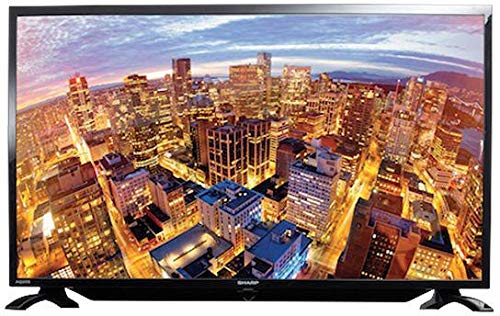
Figura 1.1: Frontal view of the Sharp 40-inch LED TV.
2. Informació de seguretat
Observeu sempre les següents precaucions de seguretat per evitar descàrregues elèctriques, incendis o lesions:
- No exposeu el televisor a la pluja o la humitat.
- No obriu el televisor casing. Demaneu totes les tasques de manteniment a personal qualificat.
- Assegureu-vos que la ventilació sigui adequada; no obstruïu les obertures de ventilació.
- Col·loqueu el televisor sobre una superfície estable i plana per evitar que caigui.
- Desendolleu el televisor durant tempestes o quan no l'utilitzeu durant períodes prolongats.
- Mantingueu el televisor allunyat de la llum solar directa, de fonts de calor i de camps magnètics forts.
3. Contingut del paquet
Verifiqueu que tots els elements siguin presents al paquet:
- Sharp 40-inch LED TV (Model LC-40LE185M)
- Control remot
- Cable d'alimentació
- Table-top Stand (including screws)
- Manual d'usuari (aquest document)
4. Configuració
4.1 Desembalatge
Traieu amb cura el televisor i tots els accessoris de l'embalatge. Conserveu els materials d'embalatge per a futurs transports o emmagatzematge.
4.2 Col·locació del suport
If using the table-top stand:
- Col·loqueu el televisor cara avall sobre una superfície suau i neta per evitar que es facin malbé la pantalla.
- Alineeu el suport amb els forats de muntatge de la part inferior del televisor.
- Fixeu el suport amb els cargols proporcionats. Assegureu-vos que el suport estigui ben fixat.
If wall-mounting, consult a professional installer. Nota: Some users have reported that the lower screw bracket hole for wall mounting may not be firmly attached, and the frame can be flimsy/wobbly. Exercise caution and ensure secure installation if wall mounting.

Figure 4.1: Illustration of the TV with its table-top stand.
4.3 Connexió de potència
Connecteu el cable d'alimentació a l'entrada d'alimentació del televisor i després a una presa de corrent.
4.4 Connexió de dispositius externs
Your TV supports various connections:
- HDMI: Connect Blu-ray players, gaming consoles, or set-top boxes using HDMI cables. The TV has HDMI ports for compatible devices.
- USB: Connecteu els dispositius d'emmagatzematge USB a view photos or other media. The TV has a USB port for compatible devices.
- MHL: Use MHL connectivity to connect your smartphone to the TV.
5. Instruccions de funcionament
5.1 Encès/Apagat
Press the Power button on the remote control or on the TV to turn the TV on or off. The TV automatically switches to standby mode when there is no signal, saving power consumption.
5.2 Controls bàsics
Use the remote control to navigate menus, adjust volume, and change channels. Refer to the remote control diagram (not included in this manual) for specific button functions.
5.3 Selecció d'entrada
Press the 'Input' or 'Source' button on your remote to select the desired input source (e.g., HDMI 1, USB, TV).
5.4 Configuració d'imatge i so
Access the TV's menu to adjust picture settings (brightness, contrast, color, sharpness) and sound settings (bass, treble, balance, sound mode). The Easy Colour Adjustment feature allows you to achieve ideal color tones.
5.5 Característiques especials
- Àguila View Tecnologia: Enhances your visual experience with improved display quality.
- AquoMotion Lite Technology: Reduces motion blur and distortions, improving transitions during fast-paced movements.
- Photo Frame Mode: Relive your special memories by displaying vibrant photos on the screen.
- Reproducció USB: Enjoy content stored on compatible USB devices directly on the TV screen.
- Connectivitat HDMI: Connect various compatible devices for an immersive viewing or gaming experience.
6. Especificacions
| Característica | Especificació |
|---|---|
| Marca | Afilat |
| Número de model | LC-40LE185M |
| Mida de la pantalla | 40 polzades |
| Tecnologia de visualització | LED |
| Resolució | 1366 x 768 píxels |
| Freqüència d'actualització | 60 Hz |
| Dimensions del producte | 40.8 x 29 x 2.8 cm |
| Pes | 5.8 kg |
| Tecnologia de connectivitat | HDMI, USB |
| Relació d'aspecte | 1.77:1 |
| Serveis d'Internet compatibles | YouTube |
| Característica especial | Amplia pantalla |
7. Solució De Problemes
Si teniu problemes amb el televisor, consulteu els problemes i solucions més comuns següents:
- Sense energia: Ensure the power cord is securely connected to both the TV and the wall outlet. Check if the outlet is functional.
- Sense imatge/so: Verify the correct input source is selected. Check all cable connections (HDMI, antenna).
- Mala qualitat d'imatge: Ajusteu la configuració de la imatge (brillantor, contrast, nitidesa). Assegureu-vos que la font d'entrada proporciona un senyal d'alta qualitat.
- El control remot no funciona: Check the batteries and ensure there are no obstructions between the remote and the TV's IR sensor.
- TV Automatically Switches to Standby: This is a power-saving feature that activates when no signal is detected. Ensure your input source is active.
Per a problemes persistents, contacteu amb l'atenció al client.
8. Manteniment
- Neteja de la pantalla: Gently wipe the screen with a soft, lint-free cloth. For stubborn marks, use a screen cleaner specifically designed for LED TVs. Do not spray cleaner directly onto the screen.
- Neteja de l'armari: Feu servir un drap suau i sec per netejar el moble del televisor. No utilitzeu productes de neteja abrasius ni dissolvents.
- Ventilació: Assegureu-vos que les obertures de ventilació de la part posterior del televisor no estiguin bloquejades per evitar el sobreescalfament.
9. Garantia i Suport
Your Sharp TV comes with a standard manufacturer's warranty. Please refer to the warranty card included in your product packaging for details regarding coverage, terms, and conditions. For technical support, service, or warranty claims, please contact Sharp customer service through their official weblloc web o la informació de contacte proporcionada amb la documentació de compra.


