1. Introducció
The Yamaha YDP144 Arius Series Digital Piano offers an authentic acoustic piano experience suitable for pianists of all levels. It features an 88-key Graded Hammer Standard (GHS) keyboard action, replicating the feel of an acoustic piano with heavier touch in the low keys and lighter touch in the high keys. The instrument incorporates new piano samples, including the expressive Yamaha CFX 9-foot concert grand piano voice, and Damper Resonance technology for realistic pedaling effects. With its furniture-style cabinet and advanced features, the YDP144 is designed to enhance your musical journey.

Image: The Yamaha YDP144 Arius Series Digital Piano in Dark Rosewood, accompanied by its matching bench.
2. Què hi ha a la caixa
Your Yamaha YDP144 Arius Series Digital Piano package includes the following components:
- Yamaha Arius Series YDP144 Digital Piano Console
- Matching Bench
- Furniture Stand
- Unitat de 3 pedals
- Descans musical
- Coberta de la clau
- 50 Classical Music Masterpieces Book
- Manual del propietari
- Guia de funcionament ràpid
- Adaptador d'alimentació
3. Configuració
Follow these steps to assemble and set up your Yamaha YDP144 Digital Piano:
- Desembalatge: Traieu amb cura tots els components de l'embalatge. Assegureu-vos que hi hagi totes les peces que figuren a la secció "Què hi ha a la caixa".
- Muntatge de l'estand: Assemble the furniture stand according to the detailed instructions in the Owner's Manual. This typically involves attaching the side panels to the crossbar and securing them with screws.
- Attach Pedal Unit: Connect the 3-pedal unit to the assembled stand. Ensure the cable from the pedal unit is routed correctly for connection to the piano console.
- Place Piano Console: Carefully place the main piano console onto the assembled stand. Align the console with the mounting points on the stand and secure it using the provided screws.
- Connectar els cables: Connect the pedal unit cable to the corresponding port on the underside of the piano console. Plug the power adapter into the DC input port on the back of the piano and then into a wall outlet.
- Install Music Rest & Key Cover: Insert the music rest into its designated slot on the piano. Place the key cover over the keys when not in use to protect them from dust.
For a visual guide on assembly, you may find the following video helpful:
Video: An unboxing and assembly guide for a digital piano, demonstrating the setup process. (Note: This video is from an influencer and may not feature the exact YDP144 model, but illustrates general assembly steps.)
4. Instruccions de funcionament
4.1 Engegada/Apagada i Volum
To power on the piano, press the power button located on the left side of the control panel. Adjust the master volume using the slider control to your desired level. To power off, press the power button again.
4.2 Selecció de veus
The YDP144 offers 10 distinct voices, including two variations of the CFX Premium Grand Piano Voice, electric pianos, organs, strings, harpsichords, and vibraphone. To select a voice, press the 'Grand Piano/Function' button and then press the corresponding key on the keyboard as indicated in the Quick Operation Guide or Owner's Manual. The CFX Premium Grand Piano Voice recreates the power and tone of Yamaha's flagship concert grand piano.
4.3 Keyboard Action
The Graded Hammer Standard (GHS) weighted action provides a realistic piano feel, with a heavier touch in the lower keys and a lighter touch in the higher keys, similar to an acoustic piano. The special matte black key tops are designed to absorb moisture and remain tactile for comfortable play during extended use.
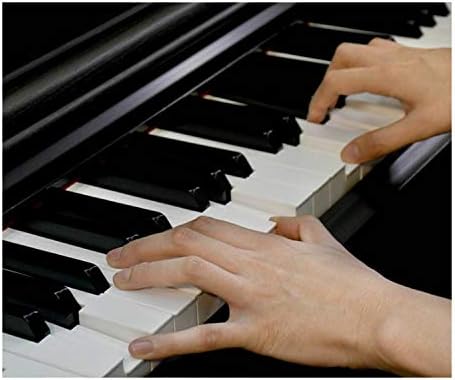
Imatge: Un primer pla view of hands playing the keys of the Yamaha YDP144, highlighting the realistic feel of the Graded Hammer Standard action.
4.4 Funcions del pedal
The YDP144 features a 3-pedal unit. The sustain pedal offers half-damper control, allowing for continuously increasing amounts of sustain as the pedal is depressed, digitally recreating the depth of tone found in acoustic pianos.
4.5 Enregistrament i reproducció
The piano includes built-in recording and playback capabilities. Refer to your Owner's Manual for detailed instructions on how to record your performances and play them back.
4.6 Ús d'auriculars
Connect headphones to one of the two standard stereo phone jacks for private practice. This allows you to play without disturbing others.
4.7 Connectivitat
The YDP144 supports various connectivity options including USB Type B for connection to computers or smart devices, and features Bluetooth and Wi-Fi for enhanced functionality with compatible applications.
Vídeo: Un review of the Yamaha Arius Series Piano, highlighting its features and sound quality.
5. Manteniment
To ensure the longevity and optimal performance of your Yamaha YDP144 Digital Piano, follow these maintenance guidelines:
- Neteja: Regularly wipe the piano's surface with a soft, dry cloth. For stubborn dirt, use a slightly damp drap i després eixugueu-lo bé. Eviteu productes de neteja o dissolvents abrasius.
- Atenció clau: Keep the keys clean by wiping them with a soft cloth. Do not use chemical cleaners on the keys, as this may damage the finish.
- Condicions ambientals: Avoid exposing the piano to direct sunlight, extreme temperatures, or high humidity, as these can cause damage to the instrument's components and finish.
- Protecció contra la pols: Use the provided key cover when the piano is not in use to prevent dust accumulation on the keys and internal mechanisms.
6. Solució De Problemes
If you encounter any issues with your Yamaha YDP144 Digital Piano, consider the following basic troubleshooting steps:
- Sense so: Comproveu si l'aparell està connectat i si el volum està alt. Assegureu-vos que no hi hagi auriculars connectats si espereu que sentiu so dels altaveus. Verifiqueu que tots els cables estiguin connectats correctament.
- So distorsionat: Lower the volume to see if the distortion resolves. Check for any loose connections or damaged cables.
- Les tecles no responen: Ensure the piano is powered on. If only specific keys are affected, consult the Owner's Manual for advanced diagnostics.
- Problemes amb els pedals: Check the pedal unit cable connection. Ensure the pedals are not obstructed.
For more detailed troubleshooting information and solutions, please refer to the comprehensive Owner's Manual included with your piano or visit the official Yamaha support weblloc.
7. Especificacions
| Característica | Especificació |
|---|---|
| Nom del model | Yamaha YDP144R Arius Series Digital Console Piano with Bench, Rosewood |
| Dimensions (A x A x P) | 53-7/16” W x 32-1/16” H x 16-5/8” D (53.44"D x 32.24"W x 16.61"H) |
| Pes de l'article | 83 lliures |
| Nombre de claus | 88 |
| Acció del teclat | Graded Hammer Standard (GHS) weighted action |
| Key Tops | Negre mat |
| Nombre de pedals | 3 (Sustain with half-damper control) |
| Max Polyphony | 192 |
| Nombre de veus | 10 |
| Auriculars | (2) Standard Stereo phone jack |
| Enregistrament i reproducció | Sí |
| Tecnologia de connectivitat | Bluetooth, USB, Wi-Fi |
| Tipus de connector | USB tipus B |
| Font d'alimentació | USB |
| Fabricant | Yamaha |
| UPC | 889025120388 |
| Color | Palisandre fosc |
| Nivell d'habilitat | Principiant |
| Característica especial | Gravació |
8. Garantia i Suport
For detailed information regarding the product warranty, including terms, conditions, and registration, please refer to the warranty card included in your product packaging or visit the official Yamaha website. For technical support, service, or additional assistance, please contact Yamaha Customer Support through their official channels.
Podeu trobar més informació i recursos de suport a Botiga Yamaha a Amazon.


