Introducció
The Nobsound G2 is a versatile mini mono power amplifier designed for both subwoofer and full-range applications. It delivers 100W of power, making it suitable for driving passive subwoofers or single-channel speakers in home theater setups. Its compact design and robust features provide a high-quality audio experience.
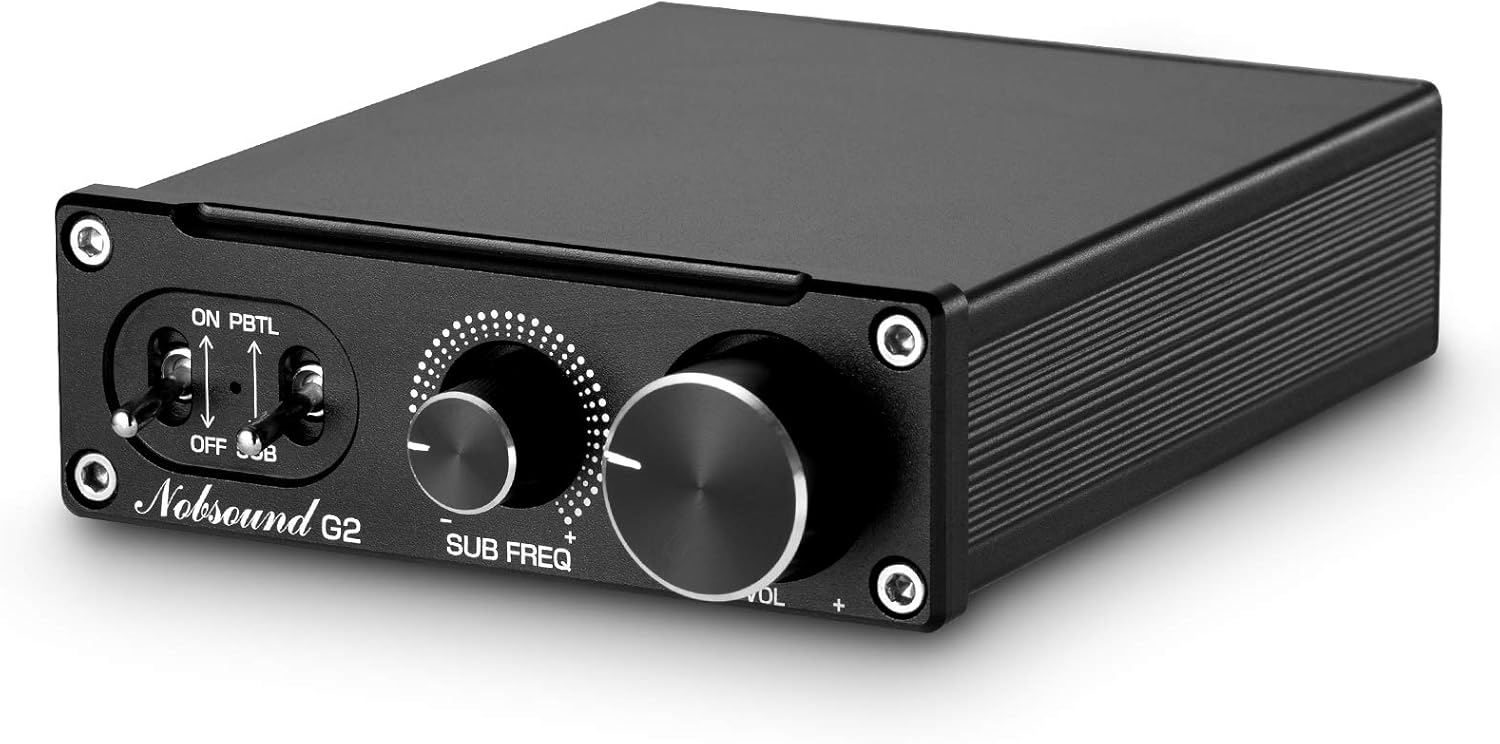
Figura 1: Frontal view of the Nobsound G2 Subwoofer Power Ampmés viu.
Característiques
- Can be used as a subwoofer amplifier for passive subwoofers or as a mono channel ampmés viu.
- Features a mode switcher to conveniently change between SUB (subwoofer) and PBTL (full-range/mono) modes.
- Equipped with a high-quality 19V 4.74A power supply.
- Offers a 4-level gain setting (20/26/32/36 dB) to maintain sound purity and avoid resistor influence.
- Includes a bass cutoff frequency control knob for precise audio tuning.
- Utilizes TI TPA3116 and NE5532 op-amp for 100W high power output.
- Optimized circuit design ensures minimal background noise.
- Built-in speaker protection circuit and low pass bass filter for enhanced safety and performance.
Contingut del paquet
Please check the package carefully upon receipt to ensure all items are present and undamaged.
- Nobsound G2 Amplificador x 1
- Power Adapter x 1 (19V 4.74A)

Figure 2: Contents of the Nobsound G2 package, including the amplifier unit and power adapter.
Producte acabatview
Panell frontal

Figura 3: Detallada view of the Nobsound G2 front panel, showing controls and indicators.
- Turn on/Off Switch: Toggles the power to the unit.
- Llum de potència: Indica l'estat de l'alimentació ampmés viu.
- Full Frequency/Bass Working Mode Switcher: Selects between SUB (subwoofer) mode and PBTL (full-range/mono) mode.
- Bass Cutoff Frequency Control Knob (SUB FREQ): Adjusts the low-pass filter frequency when in SUB mode.
- Volume Knob (VOL): Controla el volum de sortida general.
Panell posterior

Figura 4: Detallada view of the Nobsound G2 rear panel, showing input and output connections.
- Audio In (RCA L/R): Connect your audio source (e.g., MP3 player, phone, laptop, TV, desktop computer) using RCA cables.
- Speaker Out (+/-): Connect your passive subwoofer or mono speaker using speaker wire.
- Entrada de CC (12-24 V): Connecteu aquí l'adaptador de corrent proporcionat.
Configuració
- Connecta la font d'àudio: Using RCA cables, connect your audio source (e.g., smartphone, tablet, computer, TV) to the "AUDIO IN" ports on the rear panel of the Nobsound G2. Ensure correct left (L) and right (R) channel connections if applicable, though for mono output, either input can be used.
- Connect Speaker/Subwoofer: Connect your passive subwoofer or mono speaker to the "SPK OUT" terminals on the rear panel. Ensure correct polarity (+ to + and - to -) for optimal performance and to prevent damage.
- Connectar l'alimentació: Insert the DC plug of the provided 19V 4.74A power adapter into the "DC IN" port on the rear panel. Then, plug the power adapter into a suitable wall outlet.
- Encès: Flip the "Turn on/Off" switch on the front panel to the "ON" position. The power light will illuminate.
- Seleccioneu el mode: Choose the appropriate working mode using the "Full Frequency/Bass Working Mode Switcher".
- SUB: For connecting a passive subwoofer. This mode activates the low-pass filter, allowing only bass frequencies to pass through.
- PBTL: For connecting a full-range mono speaker. This mode bypasses the low-pass filter, allowing all frequencies to pass through.
- Adjust Gain (Optional): If necessary, adjust the gain setting switches on the rear of the unit (refer to "Operating Instructions - Gain Setting" section).
- Ajustar el volum: Start with the "VOL" knob at its minimum position and gradually increase it to a comfortable listening level after playing audio.
Instruccions de funcionament
Mode Selection (SUB / PBTL)
The Nobsound G2 features a toggle switch on the front panel to select its operational mode:
- SUB Mode: When set to SUB, the amplifier acts as a dedicated subwoofer amplifier. It applies a low-pass filter, meaning only frequencies below the set cutoff point (adjustable via the SUB FREQ knob) will be amplified and sent to the connected speaker. This is ideal for passive subwoofers.
- PBTL Mode: When set to PBTL (Parallel Bridge-Tied Load), the amplifier operates as a full-range mono amplifier. The low-pass filter is bypassed, allowing all frequencies from your audio source to be amplified. This mode is suitable for driving a single full-range speaker.

Figure 5: Close-up of the mode selection switch on the front panel.
Configuració del guany
The Nobsound G2 includes a gain setting switch on the rear panel, allowing for four levels of output adjustment (20dB, 26dB, 32dB, 36dB). This is not a traditional attenuator but adjusts the digital amplifier's IC parameter controlled by the MCU, preserving sound quality.

Figura 6: posterior view showing the gain setting switches (SW1, SW2) and their corresponding dB levels.
To adjust the gain, use a small tool to toggle the SW1 and SW2 switches according to the table below:
| Nivell de guany | SW1 | SW2 |
|---|---|---|
| 20 dB | ON | ON |
| 26 dB | ON | OFF |
| 32 dB | OFF | ON |
| 36 dB | OFF | OFF |
Choose a gain setting that matches the output level of your audio source and the sensitivity of your speaker/subwoofer to achieve optimal sound without distortion.
Bass Cutoff Frequency Control (SUB FREQ)
Quan el amplifier is in SUB mode, the "SUB FREQ" knob allows you to adjust the upper frequency limit for the subwoofer output. Turning the knob clockwise increases the cutoff frequency, allowing more mid-bass frequencies to pass. Turning it counter-clockwise lowers the cutoff frequency, focusing the output on deeper bass.

Figure 7: Close-up of the Bass Cutoff Frequency control knob.
Adjust this knob to seamlessly blend your subwoofer's output with your main speakers.
Control de volum (VOL)
The "VOL" knob on the front panel controls the overall output volume of the amplifier. Rotate clockwise to increase volume and counter-clockwise to decrease it. Always start with the volume low and gradually increase it to avoid sudden loud sounds.
2.0 Channel Setup (Using Two G2 Ampaixecadors)
For a stereo (2.0 channel) audio system, you can use two Nobsound G2 amplifiers. Each G2 unit will drive one channel (left or right) independently. This configuration can provide higher power output per channel and ensures minimal interference between the two channels, compared to a single 2.0 channel ampmés viu.

Figure 8: Diagram illustrating the connection of two Nobsound G2 units for a stereo (2.0 channel) setup.
To set up a 2.0 channel system:
- Connect the left channel output from your audio source to the "AUDIO IN" of the first Nobsound G2. Connect your left speaker to its "SPK OUT".
- Connect the right channel output from your audio source to the "AUDIO IN" of the second Nobsound G2. Connect your right speaker to its "SPK OUT".
- Ensure both G2 units are set to PBTL mode for full-range stereo sound.
- Power both units and adjust their respective volume and gain settings for balanced stereo output.
Manteniment
- Neteja: Utilitzeu un drap suau i sec per netejar l'exterior ampNo utilitzeu netejadors líquids ni aerosols, ja que poden danyar l'acabat o els components interns.
- Ventilació: Assegureu-vos el amplifier has adequate ventilation. Do not block the ventilation holes or place the unit in an enclosed space that could lead to overheating.
- Emmagatzematge: Si guardeu la unitat durant un període prolongat, desconnecteu-la de l'alimentació i guardeu-la en un lloc fresc i sec, allunyat de la llum solar directa i de temperatures extremes.
- Font d'alimentació: Always use the original power adapter provided with the unit. Using an incorrect power supply can damage the amplifier i anul·lar la garantia.
Resolució de problemes
| Problema | Causa possible | Solució |
|---|---|---|
| Sense poder | Power adapter not connected or faulty; Power switch off. | Ensure power adapter is securely connected to the unit and wall outlet. Check if the power switch is in the "ON" position. Try a different outlet. |
| Sense sortida de so | Incorrect audio input/output connections; Volume too low; Incorrect mode selected; Faulty speaker/subwoofer. | Verify all audio cables are correctly connected. Increase the volume knob. Ensure the mode switch (SUB/PBTL) is set correctly for your speaker type. Test with a different speaker/subwoofer if possible. |
| So distorsionat | Volume too high; Incorrect gain setting; Poor quality audio source; Speaker impedance mismatch. | Reduce the volume. Adjust the gain setting (refer to "Gain Setting" section). Test with a different audio source. Ensure your speaker/subwoofer impedance is compatible with the amplifier (typically 4-8 ohms). |
| Bass is too weak or too strong (in SUB mode) | SUB FREQ knob incorrectly set. | Adjust the "SUB FREQ" knob to find the optimal bass cutoff frequency for your subwoofer and listening preference. |
| Soroll de brunzit o brunzit | Ground loop issue; Interference from other electronics; Loose connections. | Ensure all connections are secure. Try plugging the amplifier into a different power outlet, preferably on a different circuit. Keep the amplifier away from other electronic devices that might cause interference. |
Si el problema persisteix després de provar aquestes solucions, poseu-vos en contacte amb l'atenció al client.
Especificacions
| Especificació | Valor |
|---|---|
| Marca | Douk Audio (Nobsound) |
| Número de model | 8541737971 |
| Potència de sortida | 100 watts |
| Nombre de canals | 1 (mono) |
| Voltage | 24 volts (CC) |
| Volum de subministrament màximtage | 24 Volts |
| Tipus de muntatge | Muntatge en superfície |
| Pes de l'article | 1.63 lliures (aprox. 739 g) |
| Dimensions del paquet | 10.04 x 8.54 x 2.52 polzades |
| Primera data disponible | 28 de desembre de 2018 |
Garantia i Suport
For warranty information and customer support, please refer to the terms and conditions provided at the time of purchase or contact Douk Audio Direct, the seller of this product. They can assist with any product-related inquiries, technical support, or warranty claims.
Contact information for Douk Audio Direct can typically be found on your purchase receipt or through the platform where the product was acquired.


