1. Introducció
This manual provides detailed instructions for the installation, operation, and maintenance of your Anlapus 8 Channel 720P DVR Security Camera System Recorder. Please read this manual thoroughly before using the product to ensure proper setup and optimal performance. Keep this manual for future reference.
2. Informació de seguretat
To prevent injury to yourself or others, or damage to your device, read all safety information before using the device. Failure to follow these instructions may result in electric shock, fire, or other hazards.
- Utilitzeu només l'adaptador d'alimentació subministrat amb el dispositiu.
- Do not expose the DVR to water, moisture, or extreme temperatures.
- Assegureu-vos una ventilació adequada per evitar el sobreescalfament.
- No intenteu obrir ni reparar el dispositiu vosaltres mateixos. Encarregueu totes les tasques de manteniment a personal qualificat.
- Mantingueu el dispositiu allunyat de camps magnètics forts.
3. Contingut del paquet
Please check the package contents upon opening. If any items are missing or damaged, contact customer support immediately.
- Anlapus 8 Channel 720P DVR Recorder (with pre-installed 1TB Hard Drive)
- Adaptador d'alimentació
- Ratolí USB
- Guia d'inici ràpid
- Screws for HDD (if applicable)
4. Producte acabatview
The Anlapus 8 Channel 720P DVR is a versatile security recording solution supporting multiple camera types including 960H Analog, 720P/1080P AHD, 720P/1080P TVI, and CVI cameras. It comes with a pre-installed 1TB hard drive for continuous recording.
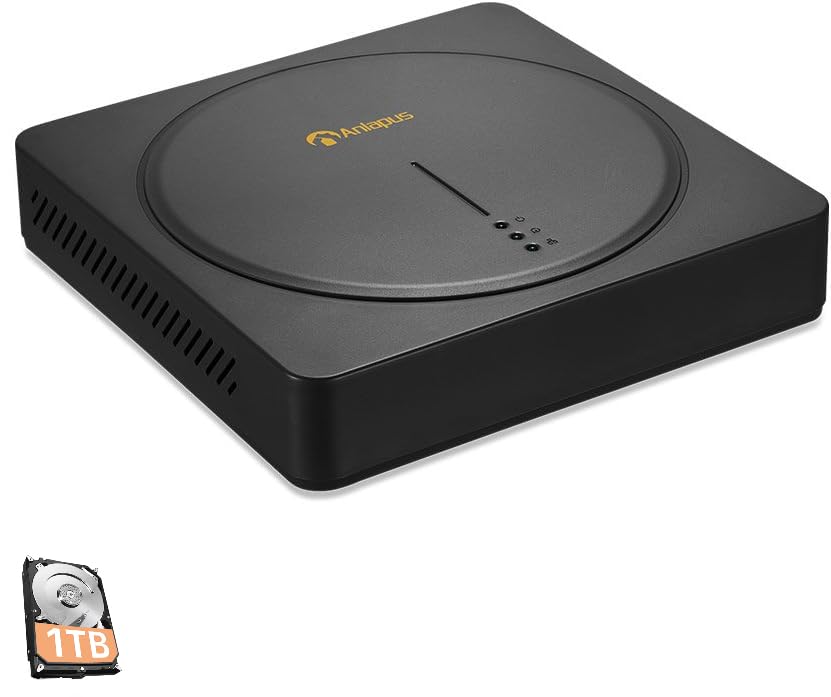
An image showing the Anlapus 8 Channel 720P DVR unit, a black square device with a circular indentation on top, featuring the Anlapus logo and indicator lights. A small icon of a 1TB hard drive is also visible in the bottom left corner.
Panell frontal
- Llums indicadores: Power, HDD activity, Network status.
Panell posterior
- Entrades de vídeo: 8 BNC ports for camera connections.
- Sortides de vídeo: HDMI, VGA for monitor connection.
- Entrades/sortides d'àudio: RCA ports for audio.
- Port de xarxa: RJ45 Ethernet port for internet connection.
- Ports USB: For mouse, USB backup, or Wi-Fi adapter (if supported).
- Entrada d'alimentació: DC 12V power jack.
5. Guia de configuració
5.1 Connexió de maquinari
- Connectar càmeres: Connect your security cameras to the BNC video input ports on the rear of the DVR.
- Connecta el monitor: Connect a monitor to the DVR using either the HDMI or VGA port.
- Connecta el ratolí: Plug the USB mouse into one of the USB ports.
- Connecta la xarxa (opcional però recomanat): Connect an Ethernet cable from the DVR's network port to your router or network switch for remote access and email alerts.
- Connectar l'alimentació: Connecteu l'adaptador de corrent a l'entrada d'alimentació del DVR i després a una presa de corrent. El DVR s'engegarà automàticament.
5.2 Configuració inicial
Upon first boot, the system will guide you through an initial setup wizard. Follow the on-screen prompts to:
- Set up a strong password for the administrator account.
- Configura la configuració de data i hora.
- Adjust network settings (DHCP is usually sufficient).
- Format the pre-installed 1TB hard drive if prompted (this will erase any existing data).
5.3 Configuració de l'aplicació mòbil
Per a comandament a distància viewing and alerts, download the free Anlapus mobile application (available for Android and iOS devices).
- Download the app from your device's app store by searching for "Anlapus" or by scanning the QR code displayed on the DVR's monitor under the network settings or P2P menu.
- Creeu un compte o inicieu sessió.
- Add your DVR device by scanning the device's QR code (usually found on a sticker on the DVR or in the network settings menu) or by manually entering the device ID.
- Un cop afegit, podeu view viu footage, play back recordings, and receive alerts from your smartphone or tablet.
6. Instruccions de funcionament
6.1 Viu View
After successful setup, the DVR will display live video feeds from all connected cameras on the monitor. You can switch between single-camera view i una graella multicàmera view utilitzant els controls en pantalla o el ratolí.
6.2 Modes d'enregistrament
The DVR supports various recording modes:
- Gravació contínua: Registres 24/7.
- Gravació de detecció de moviment: Records only when motion is detected, saving hard drive space.
- Enregistrament programat: Registres durant períodes de temps específics.
- Enregistrament manual: Inicia/atura l'enregistrament manualment.
Configure recording schedules and settings via the DVR's main menu (right-click with mouse).
6.3 Reproducció
Per tornarview foo gravattage:
- Al menú principal, seleccioneu "Reproducció".
- Choose the date and camera channel you wish to review.
- Feu servir la línia de temps per navegar per les gravacions. Els diferents colors de la línia de temps indiquen diferents tipus de gravació (per exemple, contínua, moviment).
6.4 Detecció de moviment i alertes per correu electrònic
The DVR features customizable motion detection with instant email alerts.
- Navigate to the "Alarm" or "Motion Detect" settings in the main menu.
- Enable motion detection for desired channels.
- Adjust sensitivity and define detection areas.
- Configure email settings under "Network" or "Alarm" to receive alerts with images when motion is detected. Ensure your network settings are correct for email functionality.
6.5 Còpia de seguretat de dades
You can back up recorded footage to a USB flash drive.
- Insert a USB flash drive into a USB port on the DVR.
- Al menú principal, seleccioneu "Còpia de seguretat".
- Choose the camera channel, time range, and file type for backup.
- Start the backup process.
7. Manteniment
- Gestió del disc dur: The 1TB hard drive will automatically overwrite the oldest footage when full. Regularly check the HDD status in the system settings.
- Actualitzacions de firmware: Periodically check the Anlapus official website for firmware updates. Updates can improve performance and add new features. Follow the instructions provided with the firmware carefully.
- Neteja: Use a soft, dry cloth to clean the exterior of the DVR. Do not use liquid cleaners or aerosols. Ensure ventilation openings are free from dust.
- Seguretat de contrasenya: Regularly change your DVR and app passwords to maintain security.
8. Solució De Problemes
Aquesta secció tracta problemes comuns que podeu trobar.
- Sense sortida de vídeo:
- Check power connection to DVR and monitor.
- Ensure HDMI/VGA cable is securely connected.
- Verify monitor input source is correctly selected.
- Sense pantalla de càmera:
- Check camera power supply.
- Ensure BNC cables are securely connected to both camera and DVR.
- Verify camera compatibility with the DVR (960H Analog, 720P/1080P AHD, TVI, CVI).
- Remot Viewing Not Working:
- Ensure DVR is connected to the internet (check network status light).
- Verify network settings (DHCP enabled or static IP configured correctly).
- Check if the device is added correctly in the mobile app.
- Ensure your router's firewall is not blocking the connection (port forwarding may be required for advanced setups).
- Sense gravació:
- Check if the hard drive is detected and formatted.
- Verify recording schedules are set correctly.
- Ensure motion detection is configured if using that mode.
- Email Alerts Not Received:
- Comproveu la connexió de xarxa.
- Verify email server settings (SMTP, port, encryption) are correct in the DVR.
- Revisa la carpeta de correu brossa del teu correu electrònic.
Per obtenir més ajuda, consulteu la secció Garantia i assistència.
9. Especificacions
| Característica | Especificació |
|---|---|
| Model | B07MX7VHKT |
| Entrades de vídeo | 8 Channels (BNC) |
| Compatibilitat de vídeo | 960H Analog, 720P/1080P AHD, 720P/1080P TVI, CVI |
| Sortides de vídeo | HDMI, VGA |
| Disc dur | 1TB Security Grade (Pre-installed) |
| Resolució de gravació | Up to 720P on all 8 channels |
| Connectivitat | Ethernet (RJ45), USB |
| Detecció de moviment | Yes, with Email Alert |
| Suport d'aplicacions mòbils | Android, iOS (via QR Code Scan) |
| Font d'alimentació | DC 12V |
| Dimensions | 16.77 x 10.87 x 3.58 polzades (aprox.) |
| Pes | 3.7 lliures (aprox.) |
10. Garantia i Suport
Anlapus provides a 2 any de garantia for this product from the date of purchase. This warranty covers manufacturing defects and malfunctions under normal use. It does not cover damage caused by misuse, accidents, unauthorized modifications, or natural disasters.
For technical assistance, troubleshooting, or warranty claims, please contact Anlapus customer support. We offer suport tècnic de per vida to ensure your system operates smoothly.
Informació de contacte:
Please refer to the contact details provided on the Anlapus official website or your purchase documentation for the most current support channels (e.g., email, phone, online chat).
When contacting support, please have your product model (B07MX7VHKT) and purchase information ready.


