Introducció
Gràcies per la compraasing the Divoom Timebox Mobile Bluetooth Speaker. This manual provides essential information for setting up, operating, and maintaining your device. The Divoom Timebox is a versatile portable Bluetooth speaker featuring a unique pixel art display, offering both audio playback and visual entertainment.
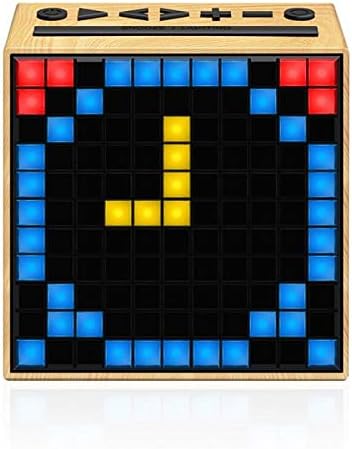
Imatge: Frontal view of the Divoom Timebox speaker, showcasing its pixel display with a digital clock. The speaker has a light wood-grain finish.
Informació de seguretat
Please read all safety instructions before using this product. Failure to follow these instructions may result in electric shock, fire, or other injuries.
- No exposeu el dispositiu a temperatures extremes, llum solar directa ni humitat elevada.
- No submergiu el dispositiu en aigua o cap altre líquid.
- Do not attempt to disassemble, repair, or modify the device. Refer all servicing to qualified personnel.
- Feu servir només el cable de càrrega i l'adaptador de corrent especificats.
- Mantingueu el dispositiu allunyat dels nens i de les mascotes.
- Eviteu deixar caure o sotmetre el dispositiu a forts impactes.
Configuració
1. Desembalatge i càrrega inicial
Carefully remove the Divoom Timebox speaker and all accessories from the packaging. Before first use, it is recommended to fully charge the speaker. Connect the provided USB charging cable to the speaker's charging port and the other end to a USB power source (e.g., computer USB port or USB wall adapter).
2. Encès / apagat
To power on the speaker, press and hold the power button located on the top panel for a few seconds until the pixel display illuminates. To power off, press and hold the power button again until the display turns off.
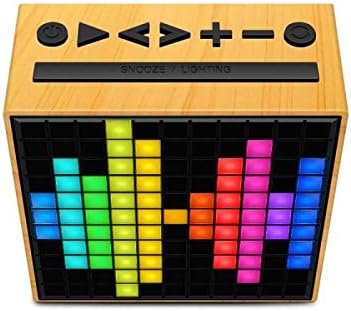
Imatge: Superior view of the Divoom Timebox speaker, highlighting the control buttons including power, volume, and playback controls. The pixel display shows a colorful pattern.
3. Emparellament Bluetooth
- Ensure the Divoom Timebox is powered on. It will automatically enter Bluetooth pairing mode, indicated by a blinking Bluetooth icon on the display.
- Al dispositiu mòbil (telèfon intel·ligent, tauleta, etc.), activeu el Bluetooth.
- Cerca available Bluetooth devices. Select "Divoom Timebox" from the list.
- Once connected, the speaker will emit a confirmation sound, and the Bluetooth icon on the display will become solid.
- Your device is now paired and ready for audio playback.
Instruccions de funcionament
Reproducció d'àudio
- Reproduir/pausa: Press the Play/Pause button on the top panel.
- Pujar/baixar el volum: Press the '+' or '-' buttons to adjust the volume.
- Seguiment anterior / següent: Press the 'Next' or 'Previous' track buttons.
- Mode d'entrada auxiliar: Connecteu un dispositiu d'àudio amb un cable d'àudio de 3.5 mm al port d'entrada AUX. L'altaveu canviarà automàticament al mode AUX.
Pixel Display Functions
The Divoom Timebox features a customizable pixel display. To fully utilize its features, download the official Divoom app from your device's app store. The app allows you to:
- Create and display custom pixel art.
- Choose from pre-set animations and designs.
- Set alarms and timers with custom pixel animations.
- Display notifications from your phone.
- Access various pixel games.
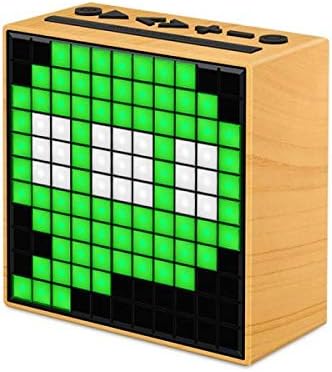
Imatge: Lateral view of the Divoom Timebox speaker, showcasing a vibrant green pixel art design on its display. The speaker maintains its light wood-grain aesthetic.
Manteniment
- Neteja: Use a soft, dry, lint-free cloth to clean the speaker's surface. Do not use abrasive cleaners, waxes, or solvents.
- Emmagatzematge: Quan no l'utilitzeu durant períodes prolongats, guardeu l'altaveu en un lloc fresc i sec, allunyat de la llum solar directa i de temperatures extremes.
- Cura de la bateria: To prolong battery life, avoid fully discharging the battery frequently. Charge the speaker regularly, even if not in active use.
Resolució de problemes
| Problema | Causa possible | Solució |
|---|---|---|
| L'altaveu no s'encén. | Bateria baixa; el botó d'engegada no s'ha mantingut premut prou estona. | Carregueu l'altaveu completament. Premeu i manteniu premut el botó d'engegada durant 3-5 segons. |
| No hi ha so de l'altaveu. | Volum massa baix; Dispositiu no connectat; Mode d'entrada incorrecte. | Increase speaker and device volume. Re-pair Bluetooth. Ensure AUX cable is fully inserted if using AUX mode. |
| La connexió Bluetooth falla. | Speaker not in pairing mode; Device Bluetooth off; Interference. | Ensure speaker is in pairing mode. Turn device Bluetooth off and on. Move speaker closer to device. Forget device on phone and re-pair. |
| Pixel display not working. | Error de programari; Bateria baixa. | Restart the speaker. Ensure battery is charged. Check Divoom app for updates. |
Especificacions
| Característica | Detall |
|---|---|
| Marca | Divoom |
| Número de model | N12107 |
| Tipus d'altaveu | Altaveus Bluetooth |
| Tecnologia de connectivitat | Bluetooth |
| Nominal Output / Speaker Maximum Output Power | 5 watts |
| Tipus de port | Jack d'àudio |
| Pes del producte | 383 g |
| Dimensions (Depth x Height x Width) | 114 mm x 115.8 mm x 55 mm |
| Font d'alimentació | Electricity (Rechargeable Battery) |
| Primera data disponible | 28 de gener de 2019 |
Garantia i Suport
For warranty information and technical support, please refer to the documentation included with your product or visit the official Divoom weblloc web. Conserveu el rebut de compra com a comprovant de compra per a reclamacions de garantia.
Fabricant: Divoom


