1. Introducció
This manual provides detailed instructions for the installation, operation, and maintenance of your Lorex 2K Wi-Fi Smart Lightbulb Camera. Please read this manual thoroughly before using the product to ensure proper functionality and safety. This camera is designed for both indoor and outdoor use, offering 2K resolution, pan-tilt functionality, color night vision, and smart detection features.
2. Informació de seguretat
- Seguretat elèctrica: Ensure the power is off at the circuit breaker before installing or removing the camera from any light socket.
- Ubicació de la instal·lació: Install the camera in a standard E26 or E27 light socket. For outdoor use, ensure the socket is covered and protected from direct weather exposure.
- Temperatura de funcionament: The camera is rated for outdoor conditions from approximately -4°F to 122°F (-20°C to 50°C).
- Resistència a l'aigua: The camera has an IP65 rating, indicating it is weatherproof and protected against dust and low-pressure water jets. However, it is not submersible.
- Font d'alimentació: Use only the specified power source (110-220Vac / 0.06A).
- Nens i animals de companyia: Keep the device out of reach of children and pets to prevent accidental damage or injury.
3. Què hi ha a la caixa
El paquet inclou els components següents:
- 1 x Lorex 2K Wi-Fi Smart Lightbulb Camera
- 1 x Light Socket Adapter (for initial setup/testing)
- 1 x Guia d'inici ràpid
4. Producte acabatview
The Lorex 2K Wi-Fi Smart Lightbulb Camera integrates a security camera into a standard lightbulb form factor, allowing for discreet and easy installation. It features a pan-tilt lens for wide coverage and an integrated LED light.
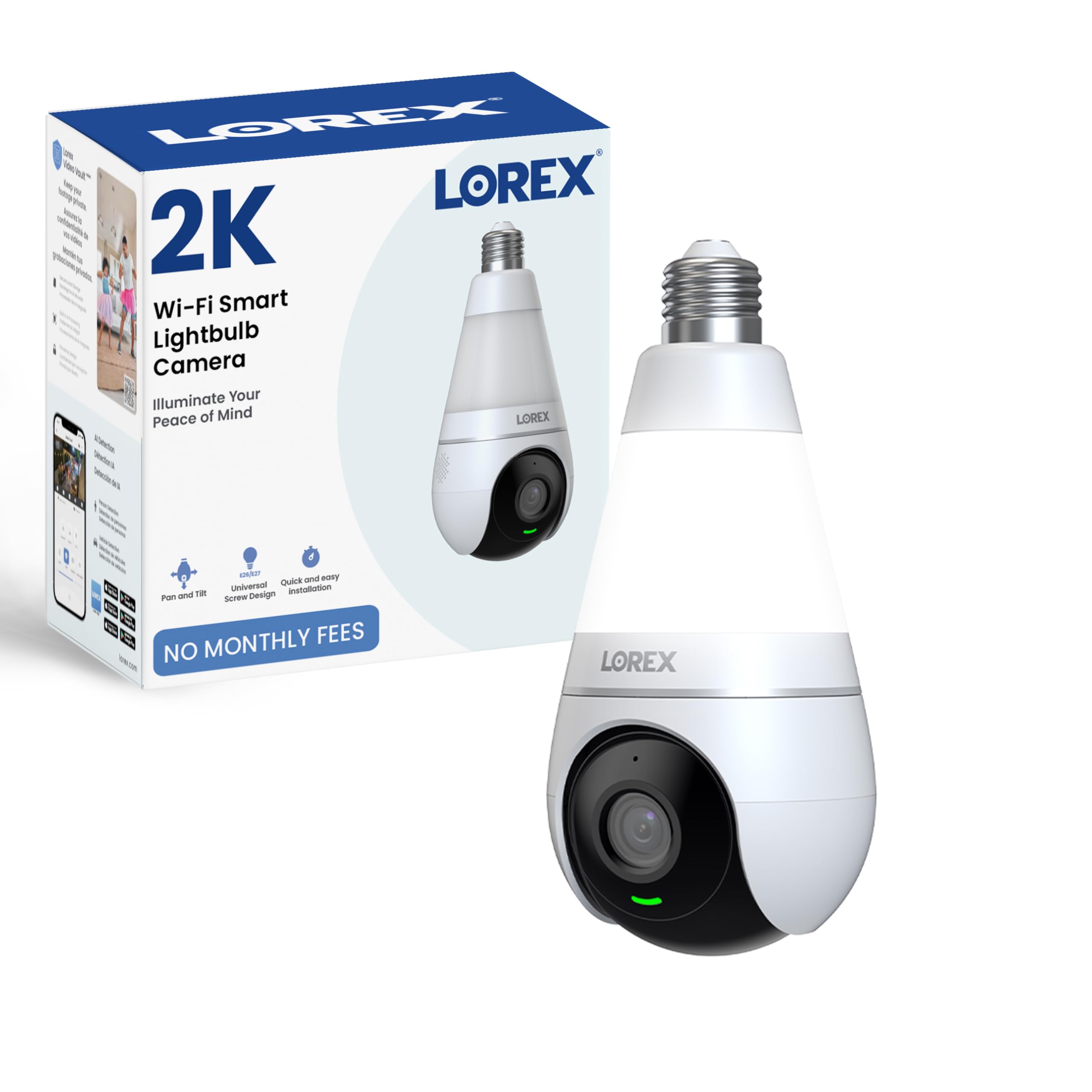
Figure 4.1: Lorex 2K Wi-Fi Smart Lightbulb Camera (Front View)

Figura 4.2: Esquena view of the camera showing model number and specifications.
5. Configuració
Setting up your Lorex Lightbulb Camera is a straightforward process. Follow these steps for quick installation and configuration.
5.1. Instal·lació física
- Apagar: Before installation, ensure the power to the light socket is turned off at the circuit breaker to prevent electrical shock.
- Enroscar: Carefully screw the Lorex Lightbulb Camera into a standard E26 or E27 light socket. Ensure it is securely fastened but do not overtighten. If the socket is recessed or requires more clearance, use the provided light socket adapter.
- Encès: Restore power to the light socket from the circuit breaker. The camera's LED indicator will light up, indicating it is powering on.

Figure 5.1: The camera screws directly into a standard lightbulb socket for easy installation.
5.2. Descàrrega de l'aplicació i connexió Wi-Fi
- Descarrega l'aplicació: Download the 'Lorex Home' app from your smartphone's app store (available for Android and iOS).
- Crea un compte: Open the app and follow the on-screen instructions to create a new Lorex account or log in if you already have one.
- Afegeix un dispositiu: Tap the '+' icon in the app to add a new device. Select the 'Lightbulb Camera' from the list of devices.
- Connecta't a Wi-Fi: Follow the app's prompts to connect the camera to your home Wi-Fi network. Ensure your phone is connected to a 2.4GHz Wi-Fi network during the setup process, as the camera supports both 2.4GHz and 5GHz bands but initial setup often requires 2.4GHz.
- Maridatge: The app will guide you through the pairing process, which may involve scanning a QR code or listening for an audible prompt from the camera.
Video 5.1: Official Lorex video demonstrating the setup process for the 2K Wi-Fi Smart Lightbulb Camera, including app pairing and initial configuration.
6. Instruccions de funcionament
Once installed and connected, you can access and control your Lorex Lightbulb Camera through the Lorex Home app.
6.1. En directe View i control de panoràmica i inclinació
- Open the Lorex Home app and select your camera to view el feed en directe.
- Use the on-screen controls to pan (horizontal) and tilt (vertical) the camera lens, providing 360° coverage of the area.

Figure 6.1: The camera offers 360-degree pan and tilt functionality for comprehensive area coverage.
6.2. Qualitat de vídeo i visió nocturna
- The camera records in 2K resolution (2560 x 1440 pixels) for clear video. You can adjust the resolution settings within the app.
- Visió nocturna en color: The camera features enhanced color night vision, providing full-color footagi fins i tot en condicions de poca llum.
- Visió nocturna per infrarojos: For complete darkness, the camera utilizes infrared light, which is invisible to the human eye, to provide clear black and white video.

Figure 6.2: The camera delivers crisp 2K resolution video.

Figura 6.3: Example of Color Night Vision in action.
6.3. Smart Motion Detection
- The camera is equipped with smart motion detection, capable of distinguishing between people and vehicles.
- Configure detection zones and sensitivity settings within the app to minimize false alerts.
- Rep notificacions en temps real al teu telèfon intel·ligent quan es detecta moviment.

Figure 6.4: The app interface showing options for Person and Vehicle Detection.
6.4. Two-Way Talk and Quick Replies
- Utilize the built-in microphone and speaker for two-way audio communication through the app.
- Send pre-recorded quick replies to visitors or deter intruders remotely.

Figure 6.5: Interacting with visitors using the two-way talk feature.
6.5. Integrated LED Light Functions
The camera features a dimmable 400 Lumen LED light (6500K Cool White) with multiple operating modes:
- Mode manual: Turn the light on or off directly from the Lorex app.
- Activat per moviment: The light automatically turns on when motion is detected.
- Programació intel·ligent: Set custom schedules for the light to turn on/off at specific times or based on sunrise/sunset.
- Mode de vacances: Simulate occupancy by having the light turn on and off at randomized intervals.

Figura 6.6: Mésview of the four unique light modes.
6.6. Opcions d'emmagatzematge
La teva càmera ofereix solucions d'emmagatzematge flexibles per a vídeos gravatstage:
- Emmagatzematge local: Insert a microSD card (up to 256GB, sold separately) into the camera for continuous 24/7 recording.
- Emmagatzematge al núvol: Optional cloud storage plans are available for remote backup of your recordings.
- Gravadores Lorex Fusion: The camera can be integrated with compatible Lorex Fusion recorders for expanded storage and system management.

Figure 6.7: Visual representation of local (microSD) and cloud storage options.
6.7. Mode de privadesa
- Activate Privacy Mode via the app to physically hide the camera lens, ensuring privacy when needed.

Figure 6.8: Privacy Mode physically conceals the camera lens.
7. Manteniment
- Neteja: Netegeu suaument la lent i el cos de la càmera amb un drap suau i sec. No utilitzeu productes químics agressius ni netejadors abrasius.
- Actualitzacions de firmware: Consulteu regularment l'aplicació Lorex Home per obtenir actualitzacions de firmware disponibles per garantir un rendiment i una seguretat òptims.
- Targeta MicroSD: If using local storage, periodically check the microSD card for errors or fill status. Replace if necessary.
8. Solució De Problemes
| Problema | Causa possible | Solució |
|---|---|---|
| La càmera no es connecta a la Wi-Fi | Incorrect Wi-Fi password; Camera too far from router; 5GHz network selected during initial setup. | Verify Wi-Fi password. Move camera closer to router. Ensure your phone is connected to a 2.4GHz network during initial setup. Reset camera and try again. |
| Poca qualitat de vídeo | Weak Wi-Fi signal; App resolution settings too low; Dirty lens. | Improve Wi-Fi signal strength. Adjust video resolution to 2K in app settings. Clean the camera lens. |
| Alertes freqüents de moviment fals | High motion sensitivity; Wide detection zones. | Adjust motion sensitivity in the app. Configure specific detection zones to exclude irrelevant areas (e.g., moving trees). |
| Àudio bidireccional poc clar | Weak network connection; Environmental noise. | Ensure a stable Wi-Fi connection. Reduce background noise if possible. |
| Light not turning on/off as expected | Incorrect light mode settings; Scheduling conflicts. | Check the light mode settings (Manual, Motion-activated, Smart Scheduling, Vacation Mode) in the app and adjust as needed. |
9. Especificacions
| Característica | Detall |
|---|---|
| Resolució de captura de vídeo | 2K (2560 x 1440) |
| Protocol de connectivitat | Wi-Fi (2.4GHz & 5GHz compatible) |
| Font d'alimentació | Light Socket (E26/E27) |
| Tipus de muntatge | Presa de llum |
| Viewangle ing | 360 Degrees (Pan-Tilt) |
| Gamma de visió nocturna | Fins a 33 peus (10 metres) |
| Tecnologia de poca llum | Visió nocturna en color |
| Característiques especials | 2-Way Audio, Local Recording, Motion Sensor, PTZ Technology, Person & Vehicle Detection |
| Llum integrada | Dimmable LED, 6500K Cool White, 400 Lumens |
| Opcions d'emmagatzematge | MicroSD (up to 256GB), Cloud Storage, Lorex Fusion Recorders |
| Nivell de resistència a l'aigua | IP65 resistent a la intempèrie |
| Dimensions (L x A x A) | 9.84 x 3.94 x 3.94 polzades |
| Pes de l'article | 12.3 unces |
| Número de model | Lightbulb Camera |
10. Garantia i Suport
Lorex products are designed for reliability and performance. For warranty information, technical support, and additional resources, please visit the official Lorex weblloc web o poseu-vos en contacte amb el seu servei d'atenció al client. Conserveu el rebut de compra com a comprovant de compra per a reclamacions de garantia.
Assistència en línia: www.lorex.com/support


