1. Introducció
This manual provides detailed instructions for the installation, configuration, and operation of the Ubiquiti UAP-IW-HD UniFi in-Wall 802.11ac Wave2 Wi-Fi Access Point. The UAP-IW-HD is designed to deliver high-performance Wi-Fi coverage within indoor environments, integrating discreetly into standard in-wall electrical junction boxes. It supports the latest 802.11ac Wave2 Wi-Fi standard, offering fast wireless speeds and improved efficiency.
2. Informació de seguretat
Please read, follow, and keep these instructions. Heed all warnings. Only use attachments/accessories specified by the manufacturer.
- Ventilació: No bloquegeu cap obertura de ventilació. Instal·leu-ho d'acord amb les instruccions del fabricant.
- Font d'alimentació: Only use power supplies specified by the manufacturer. This device is designed to be powered by Power over Ethernet (PoE).
- Instal·lació: Installation should be performed by qualified personnel. Ensure proper grounding.
- Medi ambient: No instal·leu a prop de cap font de calor com ara radiadors, registres de calor, estufes o altres aparells (inclosos amplifiers) that produce heat. Do not expose to dripping or splashing.
3. Contingut del paquet
Verifiqueu que els elements següents s'inclouen al vostre paquet:
- Ubiquiti UAP-IW-HD UniFi in-Wall 802.11ac Wave2 Wi-Fi Access Point
- Placa de muntatge
- Cargols i ancoratges de paret
- Guia d'inici ràpid (no inclosa en aquest manual digital)
4. Producte acabatview
The UAP-IW-HD is designed for discreet in-wall installation, providing robust Wi-Fi and wired connectivity.

Figura 1: Frontal View. This image displays the front of the UAP-IW-HD, featuring its clean white design, a subtle blue LED indicator at the top, and the UniFi logo.

Figura 2: Angle View. An angled perspective of the device, highlighting its slim profile and the location of the reset button on the side.
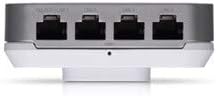
Figure 3: Bottom Ports. This image shows the bottom edge of the UAP-IW-HD, revealing four Gigabit Ethernet ports. One port supports PoE Passthrough (PoE OUT/LAN1), while the others are standard LAN ports.

Figura 4: posterior View. The back of the device, illustrating the mounting points and the primary 'PoE IN + DATA' Ethernet port used for power and uplink connection.
Indicador LED d'estat
- Blau: Device is powered on and operating correctly.
- Blau intermitent: Device is booting up or being located in the UniFi Controller.
- Apagat: Device is powered off or LED is disabled in UniFi Controller.
5. Configuració i instal·lació
The UAP-IW-HD is designed for in-wall installation, replacing a standard wall plate.
5.1. Requisits previs
- A standard single-gang or double-gang electrical junction box in the wall.
- An Ethernet cable run to the junction box, connected to a PoE+ (802.3at) compliant switch or PoE injector.
- A computer with the UniFi Network Controller software installed (available from ui.com/download/unifi).
5.2. Instal·lació de maquinari
- Prepare the Junction Box: Ensure power to the junction box is off. Remove the existing wall plate.
- Connecta Ethernet: Connect the Ethernet cable from your PoE+ source to the 'PoE IN + DATA' port on the back of the UAP-IW-HD (refer to Figure 4).
- Muntar el dispositiu: Align the UAP-IW-HD with the junction box. Secure it using the provided screws. Ensure the device is flush with the wall.
- Encès: Restore power to the junction box. The LED indicator on the UAP-IW-HD should illuminate blue (possibly flashing initially).
5.3. Software Configuration (UniFi Network Controller)
- Launch Controller: Open the UniFi Network Controller software on your computer.
- Descobriu el dispositiu: The UAP-IW-HD should appear in the 'Devices' section as 'Pending Adoption'.
- Adopt Device: Click 'Adopt' next to the UAP-IW-HD. The controller will provision the device. This may take a few minutes.
- Configura el Wi-Fi: Once adopted, navigate to 'Settings' > 'Wi-Fi' to create or modify your wireless networks (SSIDs).
- Configure LAN Ports: The LAN ports on the bottom of the UAP-IW-HD can be configured for network access. The 'PoE OUT/LAN1' port can provide PoE passthrough to power another device (e.g., a VoIP phone).
6. Funcionament del punt d'accés
Once configured, the UAP-IW-HD operates as a high-performance Wi-Fi access point and a wired network switch.
- Funcionament de doble banda: The device simultaneously broadcasts Wi-Fi networks on both 2.4 GHz and 5 GHz frequencies, allowing client devices to connect to the optimal band for performance.
- Connectivitat per cable: The four Gigabit Ethernet ports provide wired network access for devices such as computers, smart TVs, or other network-enabled equipment.
- PoE Passthrough: The 'PoE OUT/LAN1' port can deliver Power over Ethernet to compatible devices, simplifying cabling for certain installations.
- Gestió: All operational aspects, including Wi-Fi settings, client monitoring, and firmware updates, are managed through the UniFi Network Controller.
7. Manteniment
Regular maintenance ensures optimal performance and longevity of your UAP-IW-HD.
- Actualitzacions de firmware: Regularly check for and apply firmware updates via the UniFi Network Controller to ensure security and access to new features.
- Neteja: Gently wipe the exterior of the device with a soft, dry cloth. Do not use liquid cleaners or aerosol sprays.
- Control ambiental: Ensure the area around the device remains free from obstructions to maintain proper ventilation.
8. Solució De Problemes
If you encounter issues with your UAP-IW-HD, refer to the following common solutions:
- El dispositiu no s'encén:
- Verify the Ethernet cable is securely connected to the 'PoE IN + DATA' port.
- Ensure the PoE source (switch or injector) is providing 802.3at compliant power.
- Check the power supply to the PoE source.
- Device Not Adopted in Controller:
- Ensure the UAP-IW-HD and the UniFi Controller are on the same network segment or that routing is correctly configured.
- Try restarting the UniFi Network Controller software.
- Perform a factory reset on the UAP-IW-HD by pressing and holding the reset button (refer to Figure 2) for approximately 10 seconds.
- Poor Wi-Fi Performance:
- Comproveu si hi ha possibles interferències d'altres dispositius o xarxes sense fil.
- Assegureu-vos que el firmware del dispositiu estigui actualitzat.
- Adjust Wi-Fi channel and power settings in the UniFi Controller.
9. Especificacions
| Nom del model | UAP-IW-HD-US |
| Marca | Ubiquiti |
| Tecnologia de connectivitat | 802.11ac, Ethernet, Wi-Fi |
| Comunicació sense fils estàndard | 2.4 GHz Radio Frequency, 5 GHz Radio Frequency, 802.11ac Wave2 |
| Classe de banda de freqüència | Doble banda |
| Tipus d'antena | Interna |
| Ports Ethernet | 4 x Gigabit Ethernet (1 x PoE IN + Data, 3 x LAN, 1 x PoE OUT/LAN1) |
| Característiques especials | Access Point Mode, WPS (Wi-Fi Protected Setup) |
| Cobertura | Indoor single-room coverage |
| Mètode de potència | 802.3 a PoE+ |
| Sistema operatiu | UniFi OS |
| Dimensions (A x A x P) | Approximately 4 in x 3.5 in x 1.5 in (102.9 x 89.5 x 32.2 mm) |
| Pes | Aproximadament 0.5 lliures (8 unces) |
10. Garantia i Suport
Ubiquiti products are covered by a limited warranty. For detailed warranty information, please refer to the official Ubiquiti website. For technical support, documentation, and community forums, visit community.ui.com or help.ui.com.


