1. Introducció
Gràcies per la compraasing the Promate Silox True Wireless Stereo Speaker. This manual provides detailed instructions for setting up, operating, and maintaining your speaker. Please read this manual thoroughly before use to ensure optimal performance and safety.

Image 1.1: Promate Silox True Wireless Stereo Speaker. This image displays the cylindrical blue speaker from a front-side angle, highlighting its mesh fabric exterior and rubberized ends.
2. Informació de seguretat
- Do not expose the speaker to extreme temperatures or direct sunlight.
- Eviteu deixar caure o sotmetre l'altaveu a forts impactes.
- Mantingueu l'altaveu allunyat de l'aigua i els líquids, tot i la seva classificació IPX6, per evitar danys als components interns.
- Do not attempt to disassemble or repair the speaker yourself. Contact authorized service personnel.
- Feu servir només el cable de càrrega i l'adaptador proporcionats.
- Mantenir fora de l'abast dels nens.
3. Contingut del paquet
Si us plau, comproveu el paquet per veure si hi ha els elements següents:
- Promate Silox True Wireless Stereo Speaker
- Cable de càrrega (USB)
- Cable d'àudio auxiliar
- Manual d'usuari

Image 3.1: Promate Silox Speaker Packaging. This image shows the retail box of the Promate Silox speaker, illustrating the speaker itself and icons representing its key features like Bluetooth, TWS, IPX6 water resistance, and multiple connectivity options.
4. Producte acabatview
4.1 Controls i indicadors

Image 4.1: Promate Silox Speaker Controls. This image shows the top panel of the speaker with clearly labeled buttons for power, play/pause, volume up/next track, volume down/previous track, mode, and EQ.
- Botó d'encesa: Manteniu premut per encendre/apagar.
- Botó Reproduir/Pausa: Premeu per reproduir o posar en pausa la música.
- Botó Pujar volum / Pista següent: Press to increase volume. Hold to skip to the next track.
- Botó per baixar el volum / pista anterior: Press to decrease volume. Hold to go to the previous track.
- Botó Mode (M): Press to switch between Bluetooth, FM Radio, Micro SD, USB, and AUX modes.
- Botó EQ: Press to cycle through equalizer presets.
- Botó de trucada: Press to answer/end calls. Hold to reject calls.
- Indicador LED: Mostra l'estat de l'alimentació, l'estat de la càrrega i l'estat de l'emparellament Bluetooth.
4.2 Ports

Image 4.2: Promate Silox Speaker Connectivity Ports. This image highlights the various input ports on the speaker, including Bluetooth, 3.5mm Audio Jack (AUX), Micro SD Card Slot, and USB Slot, all protected under a rubber flap.
- Port de càrrega micro USB: Per carregar l'altaveu.
- Entrada AUX (3.5 mm): Per connectar dispositius d'àudio externs mitjançant un cable d'àudio.
- Ranura per a targetes Micro SD: Per reproduir música directament des d'una targeta Micro SD.
- Port USB: For playing music directly from a USB flash drive.
5. Configuració
5.1 Càrrega de l'altaveu
- Connect the Micro USB end of the charging cable to the speaker's charging port.
- Connecteu l'extrem USB-A a un adaptador de corrent USB (no inclòs) o al port USB d'un ordinador.
- L'indicador LED s'il·luminarà per mostrar l'estat de càrrega. S'apagarà o canviarà de color quan estigui completament carregat.
- Una càrrega completa proporciona aproximadament 7 hores de reproducció.

Image 5.1: Promate Silox Speaker Long Playback Time. This image illustrates the speaker's 7-hour playback capability, showing the speaker with a clock icon indicating extended battery life.
5.2 Engegada/apagada
- Per engegar, premeu i manteniu premut el botó d'engegada fins que l'indicador LED s'encengui.
- Per apagar l'aparell, premeu i manteniu premut el botó d'engegada de nou fins que l'indicador LED s'apagui.
5.3 Vinculació Bluetooth
- Ensure the speaker is powered on and in Bluetooth mode (the LED indicator will flash, indicating it's ready for pairing). If not, press the 'M' button to switch to Bluetooth mode.
- Activeu el Bluetooth al vostre telèfon intel·ligent, tauleta o altre dispositiu compatible amb Bluetooth.
- Cerca "Promate Silox" in the list of available devices.
- Select "Promate Silox" to connect. Once connected, the LED indicator will stop flashing and remain solid.
- Ara pots reproduir àudio des del teu dispositiu a través de l'altaveu.
5.4 Emparellatge estèreo sense fil veritable (TWS)
TWS allows you to pair two Promate Silox speakers together for a true stereo sound experience.
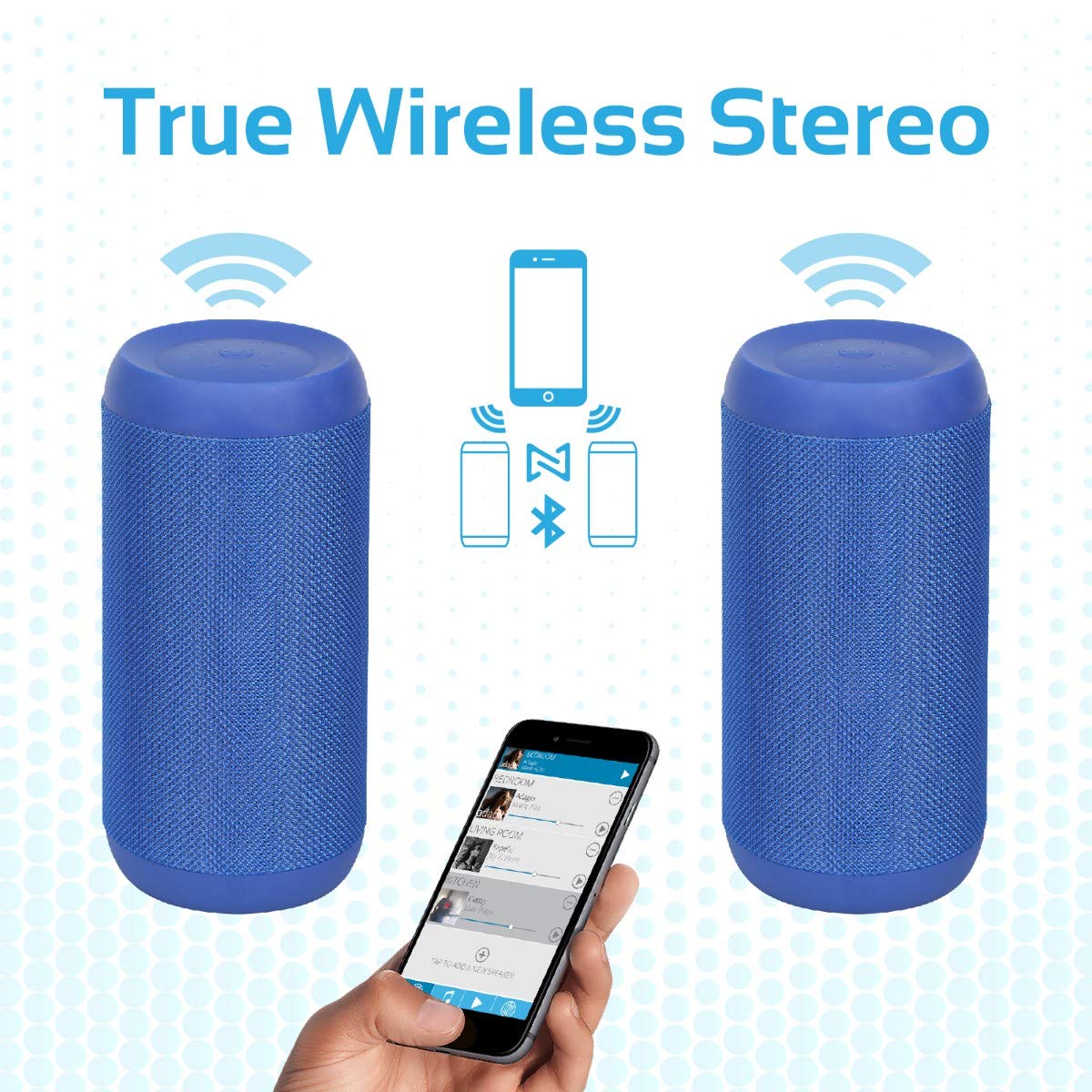
Image 5.2: Promate Silox True Wireless Stereo Pairing. This image visually explains the TWS function, showing two Promate Silox speakers wirelessly connected to a single smartphone, creating a stereo sound setup.
- Ensure both Promate Silox speakers are powered on and in Bluetooth pairing mode (LED flashing).
- On one of the speakers (this will be the primary speaker), double-press the Power button. The speaker will emit a sound indicating it's searching for another TWS speaker.
- The two speakers will automatically connect to each other. Once connected, the primary speaker's LED will flash slowly, and the secondary speaker's LED will remain solid.
- Now, connect your Bluetooth device to the primary speaker as described in "5.3 Bluetooth Pairing".
- L'àudio ara es reproduirà en estèreo pels dos altaveus.
6. Instruccions de funcionament
6.1 Mode Bluetooth
- After successful pairing (see 5.3), play music from your connected device.
- Use the Play/Pause button on the speaker to control playback.
- Press Volume Up/Down buttons to adjust volume.
- Hold Volume Up/Down buttons to skip tracks.

Image 6.1: Promate Silox Speaker Music Amplified. This image shows the speaker placed on a sofa armrest, playing music from a tablet, illustrating its use in a home environment.
6.2 Mode de ràdio FM
- Press the 'M' (Mode) button repeatedly until you hear the FM radio prompt.
- Premeu el botó Reproduir/Pausa una vegada per escanejar automàticament i desar les emissores FM disponibles.
- Use the Volume Up/Down buttons to navigate between saved stations.
- Press and hold Volume Up/Down buttons to fine-tune the frequency.
Reproducció de targeta Micro SD 6.3
- Insert a Micro SD card (with MP3/WMV audio files) a la ranura per a targetes Micro SD.
- The speaker will automatically switch to Micro SD mode and begin playing music. If not, press the 'M' button to select Micro SD mode.
- Use the Play/Pause, Volume Up/Down, and track skip buttons as in Bluetooth mode.
Reproducció USB 6.4
- Insert a USB flash drive (with MP3/WMV audio files) al port USB.
- The speaker will automatically switch to USB mode and begin playing music. If not, press the 'M' button to select USB mode.
- Use the Play/Pause, Volume Up/Down, and track skip buttons as in Bluetooth mode.
6.5 Entrada AUX
- Connecteu un extrem del cable d'àudio de 3.5 mm al port d'entrada AUX de l'altaveu.
- Connecteu l'altre extrem a la sortida d'àudio del vostre dispositiu extern (per exemple, reproductor MP3, ordinador portàtil).
- Press the 'M' button to switch to AUX mode.
- Controla la reproducció i el volum des del teu dispositiu extern.
6.6 Trucades de mans lliures
- When a call comes in while connected via Bluetooth, the music will pause.
- Press the Call button once to answer the call.
- Press the Call button again to end the call.
- Press and hold the Call button to reject an incoming call.
- El micròfon integrat permet una comunicació clara.
7. Manteniment
- Neteja: Netegeu l'altaveu amb un drap suau i sec. No utilitzeu productes de neteja abrasius ni dissolvents.
- Emmagatzematge: Guardeu l'altaveu en un lloc fresc i sec quan no l'utilitzeu durant períodes prolongats.
- Cura de la bateria: To prolong battery life, charge the speaker fully before storing it for a long time and recharge it every 3-6 months.
- Resistència a l'aigua: The speaker is IPX6 water-resistant, meaning it can resist gentle water spray and splashes. Do not submerge it in water. Ensure the port cover is securely closed to maintain water resistance.

Image 7.1: Promate Silox Speaker IPX6 Water-Resistant. This image shows the speaker with water splashing on it, accompanied by an IPX6 water-resistant logo, demonstrating its durability against splashes.
8. Solució De Problemes
| Problema | Causa possible | Solució |
|---|---|---|
| L'altaveu no s'encén. | Bateria baixa. | Carregueu l'altaveu completament. |
| No es pot emparellar per Bluetooth. | L'altaveu no està en mode d'emparellament; el Bluetooth del dispositiu està desactivat; massa lluny. | Ensure speaker is in Bluetooth pairing mode (flashing LED). Turn on Bluetooth on your device. Move device closer to speaker (within 10 meters). |
| Sense so. | Volum massa baix; mode incorrecte seleccionat; dispositiu no reprodueix. | Increase speaker and device volume. Ensure correct mode (Bluetooth, AUX, SD, USB) is selected. Check if music is playing on the source device. |
| Mala recepció de ràdio FM. | Senyal feble; interferències ambientals. | Move the speaker to a different location. Perform auto-scan again. |
| L'emparellament TWS falla. | Altaveus massa separats; un altaveu ja està connectat a un dispositiu. | Ensure both speakers are in pairing mode and close to each other. Disconnect any Bluetooth devices from both speakers before initiating TWS pairing. |
9. Especificacions
- Model: Silox
- Tipus d'altaveu: Exterior, portàtil
- Tecnologia de connectivitat: Bluetooth 4.2, Auxiliary (3.5mm), USB, Micro SD Card
- Potència de sortida màxima dels altaveus: 20 watts
- Mode de sortida d'àudio: Estèreo (amb TWS)
- Resistència a l'aigua: IPX6
- Durada de la bateria: Approximately 7 hours (playback time)
- Mètode de control: Botons tàctils
- Micròfon integrat: Yes (for hands-free calls)
- Ràdio FM: Sí
- Dispositius compatibles: Laptop, Smartphone, Tablet, Music Players
- Dimensions del producte: 11.9 x 15.4 x 26.7 cm
- Pes de l'article: 1 kg
- Color: Blau

Image 9.1: Promate Silox Speaker 20W Output. This image emphasizes the speaker's powerful 20-watt audio output, showing the speaker with visual effects representing sound waves and a "20 Watt Hi-Definition Stereo Quality Sound" label.
10. Garantia i Suport
The Promate Silox True Wireless Stereo Speaker comes with a 2 any de garantia des de la data de compra. Aquesta garantia cobreix els defectes de fabricació i la mà d'obra en condicions d'ús normal.
For technical support, warranty claims, or further assistance, please visit the official Promate website or contact your local Promate customer service.
You can visit the Promate Store for more information: Promate Store on Amazon


