1. Introducció
Gràcies per la compraasing the OMRON BF-212 Body Composition Monitor. This device is designed to provide precise measurements of body weight, body fat percentage, skeletal muscle mass percentage, and Body Mass Index (BMI). It utilizes bioelectrical impedance analysis (BIA) technology for accurate readings. Please read this manual thoroughly before using the device to ensure correct operation and to understand its features and functions.
2. Informació important de seguretat
To ensure safe and effective use of the OMRON BF-212, please observe the following precautions:
- No utilitzeu aquest dispositiu si teniu un marcapassos o un altre dispositiu mèdic implantat.
- This device is not intended for use by pregnant women.
- Do not use this device on wet or slippery surfaces to prevent falls.
- Mantingueu el dispositiu fora de l'abast dels nadons i els nens petits.
- Do not disassemble or attempt to repair the device. Refer to qualified service personnel.
- Use only the specified battery type (AAA) and ensure correct polarity.
- Avoid placing the device in direct sunlight, high temperatures, or high humidity.
- The device is for personal use and not intended for medical diagnosis or treatment. Consult a healthcare professional for any health concerns.
3. Producte acabatview
The OMRON BF-212 Body Composition Monitor features a sleek design with a clear LCD display and intuitive controls. Below are the main components:

Figura 3.1: superior view of the OMRON BF-212 Body Composition Monitor, showing the display, control buttons, and foot electrodes.
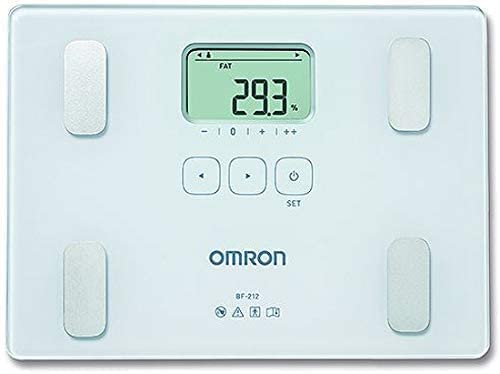
Figura 3.2: Primer pla view of the OMRON BF-212 display and control buttons (left arrow, right arrow, SET, power button).
Components:
- Pantalla LCD: Shows weight, body fat percentage, percentatge del múscul esquelètictage, BMI, and user number.
- Elèctrodes de peu: Four metal pads for bioelectrical impedance analysis.
- Botons de control:
- Left Arrow (<): S'utilitza per navegar pels menús o disminuir valors.
- Right Arrow (>): S'utilitza per navegar pels menús o augmentar valors.
- Botó SET: Confirma les seleccions i introdueix les dades de l'usuari.
- Botó d'engegada (⏻): Turns the device on/off and initiates measurement.
- Compartiment de la bateria: Located on the underside of the device.
4. Configuració
4.1 Instal·lació de la bateria
- Turn the monitor over and open the battery compartment cover.
- Insert four (4) AAA alkaline batteries, ensuring correct polarity (+/-) as indicated inside the compartment.
- Tanqueu bé la tapa del compartiment de la bateria.
4.2 Initial User Registration
The OMRON BF-212 can store data for up to 4 users. Follow these steps to register a new user:
- Press the Power button (⏻) to turn on the device.
- The display will show a blinking user number (e.g., "P1"). Use the Left (<) or Right (>) arrow buttons to select an empty user number (P1, P2, P3, or P4).
- Press the SET button to confirm the user number.
- Set Personal Data:
- Alçada: Use arrow buttons to adjust height (in cm or inches, depending on unit setting), then press SET.
- Edat: Use arrow buttons to adjust age, then press SET.
- Gènere: Use arrow buttons to select Male or Female, then press SET.
- Once all data is entered, the device is ready for measurement.
5. Instruccions de funcionament
5.1 Taking a Measurement (Registered User)
- Place the monitor on a hard, flat surface.
- Premeu el botó d'engegada (⏻).
- Select your registered user number (P1-P4) using the arrow buttons, then press SET.
- Step onto the monitor barefoot, ensuring your feet are positioned correctly on the electrodes. Stand still.
- The monitor will display your weight, followed by body fat percentage, percentatge del múscul esquelètictage i IMC.
- The results will be automatically stored for your user profile. The monitor will turn off automatically after a few seconds.
5.2 Guest Mode Measurement
Use Guest Mode for measurements without storing data or for users not registered on the device.
- Premeu el botó d'engegada (⏻).
- When the user number blinks, press the Right (>) arrow button until "GUEST" appears on the display.
- Premeu SET.
- Enter the guest's height, age, and gender as prompted, pressing SET after each entry.
- Step onto the monitor barefoot and stand still.
- The measurements will be displayed. These results will not be stored.
5.3 Newborn Mode
The OMRON BF-212 includes a Newborn Mode for weighing infants. This mode measures only weight and does not perform body composition analysis.
- Premeu el botó d'engegada (⏻).
- When the user number blinks, press the Right (>) arrow button until "NEWBORN" appears on the display.
- Premeu SET.
- Step onto the monitor with the infant in your arms. The monitor will first measure your combined weight.
- Step off the monitor, then step back on alone. The monitor will calculate the infant's weight by subtracting your weight.
- The infant's weight will be displayed.
6. Manteniment
6.1 Neteja
- Wipe the monitor with a soft, dry cloth.
- Si cal, utilitzeu un drap lleugerament sec.ampened with water or a mild detergent, then wipe dry immediately.
- No utilitzeu netejadors abrasius, alcohol, benzè ni dissolvents, ja que poden danyar el dispositiu.
- Do not wash the device or immerse it in water.
6.2 Emmagatzematge
- Store the monitor in a clean, dry place away from direct sunlight, extreme temperatures, and high humidity.
- No col·loqueu objectes pesats sobre el monitor.
- Si no heu d'utilitzar el dispositiu durant un període prolongat, traieu-ne les piles per evitar fuites.
7. Solució De Problemes
If you experience issues with your OMRON BF-212, refer to the following common problems and solutions:
| Problema | Causa possible | Solució |
|---|---|---|
| No display or weak display | Les piles estan baixes o instal·lades incorrectament. | Replace all four AAA batteries with new ones, ensuring correct polarity. |
| "Err" or inaccurate readings | Feet not properly positioned on electrodes; standing still not maintained; unit on uneven surface; personal data incorrect. | Ensure bare feet are centered on electrodes. Stand still during measurement. Place monitor on a hard, flat surface. Verify registered personal data. |
| Cannot register new user | All 4 user slots are occupied. | Use Guest Mode or overwrite an existing user profile if no longer needed. |
| Measurements vary significantly | Measurements taken at different times of day; hydration levels vary; recent exercise or meal. | For consistent results, measure at the same time each day (e.g., morning before breakfast/exercise). |
If the problem persists after trying these solutions, please contact Omron customer support.
8. Especificacions
| Característica | Detall |
|---|---|
| Nom del producte | OMRON Body Composition Monitor BF-212 |
| Número de model | HBF-212-EW |
| Mostra | LCD |
| Capacitat de pes | 2 to 150 kg (0.1 kg increments) |
| Percentatge de greix corporaltage Rang | 5.0 a 60.0% (increments de l'0.1%) |
| Skeletal Muscle Mass Percentage Rang | 5.0 a 50.0% (increments de l'0.1%) |
| Rang IMC | 7.0 a 90.0 (increments de 0.1) |
| Classificació IMC | - (subweight) / 0 (normal) / + (overweight) / ++ (Obese) |
| Memòria | 4 users + Guest Mode; stores last measurement for each user. |
| Font d'alimentació | 4 x AAA Alkaline batteries (included) |
| Dimensions (aprox.) | 21 x 28.5 x 2.8 cm |
| Pes (aprox.) | 1.3 kg |
| Material | Estirol acrilonitril butadiè |
| Característiques especials | Lightweight, Basal Metabolic Rate (BMR calculation implied by body composition) |
9. Garantia i Suport
OMRON products are manufactured to the highest quality standards. For information regarding the warranty period and terms for your OMRON BF-212 Body Composition Monitor, please refer to the warranty card included with your purchase or visit the official OMRON Healthcare weblloc.
For technical support, troubleshooting assistance beyond this manual, or service inquiries, please contact OMRON Healthcare customer support. Contact details can typically be found on the OMRON Healthcare weblloc web o a l'embalatge del producte.
Nota: Conserveu el rebut de compra com a comprovant de compra per a reclamacions de garantia.


