1. Introducció
Gràcies per la compraasing the Infocus 24-inch 720p LED TV, model IM24ED800. This manual provides essential information for setting up, operating, and maintaining your television. Please read this manual thoroughly before using the product and retain it for future reference.
Informació de seguretat
- No exposeu el televisor a la pluja o la humitat.
- No bloquejar les obertures de ventilació.
- Assegureu-vos que la font d'alimentació adequada voltage.
- Eviteu que el cable d'alimentació sigui trepitjat o pessigat.
- Demaneu tot el servei a personal de servei qualificat.
- Mantingueu el televisor allunyat de la llum solar directa, de fonts de calor i de camps magnètics forts.
2. Contingut del paquet
Marqueu la casella per als elements següents:
- Infocus 24-inch 720p LED TV (IM24ED800)
- Remote Control (with batteries, if included)
- Cable d'alimentació
- Moble per a TV (2 peces)
- Cargols per a suport de TV
- Manual d'usuari (aquest document)
3. Configuració
3.1 Fixació del suport de TV
To attach the stand to your Infocus TV:
- Col·loqueu amb cura la pantalla del televisor amb la pantalla cap avall sobre una superfície suau i neta per evitar ratllades.
- Alineeu cada peça del suport amb les ranures corresponents de la part inferior del televisor.
- Fixeu cada peça del suport amb els cargols proporcionats. Assegureu-vos que estiguin ben ajustats.
- Aixequeu el televisor amb cura i col·loqueu-lo sobre una superfície estable i plana.
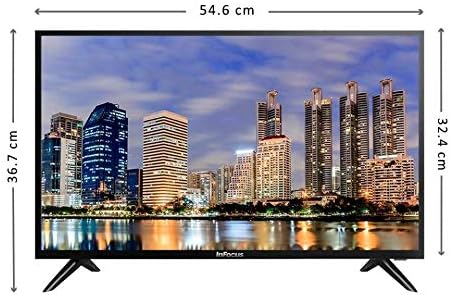
Imatge: Frontal view of the Infocus 24-inch LED TV with dimensions indicated. The TV measures approximately 54.6 cm in width and 36.7 cm in height with the stand.
3.2 Connexió de dispositius
Your Infocus TV features multiple input ports for connecting external devices.

Imatge: Part posterior view of the Infocus 24-inch LED TV, highlighting the location of various input ports including HDMI and USB.
- Connexions HDMI: Connect Blu-ray players, game consoles, or cable/satellite boxes to the HDMI ports. The TV has 2 HDMI inputs.
- Connexions USB: Connect USB flash drives for media playback to the USB ports. The TV has 2 USB inputs.
- Antena/cable: Connect an antenna or cable TV signal to the RF input (if available, not explicitly listed but standard for TVs).
- Potència: Connecteu el cable d'alimentació a l'entrada d'alimentació del televisor i després a una presa de corrent.
3.3 Encès inicial
Després de connectar tots els cables necessaris:
- Ensure the power cord is securely plugged into both the TV and a power outlet.
- Premeu el botó d'engegada del comandament a distància o del televisor mateix.
- Follow the on-screen instructions for initial setup, which may include language selection, time zone, and channel scanning.
4. Funcionament del televisor
4.1 Control remotview
The remote control allows you to access all TV functions. While specific button layouts may vary, common functions include:
- Potència: Encén o apaga el televisor.
- Entrada/Font: Selects the input source (HDMI 1, HDMI 2, USB, TV).
- Pujar/baixar el volum: Ajusta el nivell de so.
- Canal amunt/avall: Canvia els canals de televisió.
- Silenciar: Silencia l'àudio del televisor.
- Menú: Obre el menú principal per ajustar la configuració.
- Botons de navegació (amunt/avall/esquerra/dreta/d'acord): S'utilitza per navegar pels menús i confirmar seleccions.
- Sortida/Enrere: Torna a la pantalla anterior o surt del menú.
4.2 Funcions bàsiques
- Canvi de la font d'entrada: Premeu el botó Entrada or Font button on your remote control. Use the navigation buttons to select the desired input (e.g., HDMI 1, USB) and press OK.
- Ajust de volum: Utilitza el Puja el volum (+) or Baixar el volum (-) botons.
- Canvi de canals: Utilitza el Channel Up (CH+) or Channel Down (CH-) botons.
4.3 Reproducció multimèdia USB
Per reproduir mitjans files from a USB flash drive:
- Insert a USB flash drive into one of the TV's USB ports.
- Premeu el botó Entrada or Font botó del comandament a distància i seleccioneu USB.
- The TV's media browser should appear. Navigate through your files (photos, music, videos) using the remote control.
- Seleccioneu a file i premeu OK per jugar-hi.
5. Manteniment
5.1 Neteja de la pantalla
- Turn off the TV and unplug the power cord before cleaning.
- Use a soft, lint-free cloth (e.g., microfiber cloth) to gently wipe the screen.
- Per a marques difícils, esbandiu lleugeramentampNetegeu el drap amb aigua o amb un netejador de pantalles especialitzat. No ruixeu mai el netejador directament sobre la pantalla.
- Avoid using abrasive cleaners, alcohol, benzene, or thinners, as these can damage the screen.
5.2 Atenció general
- Keep the TV in a well-ventilated area.
- Eviteu col·locar objectes pesats a sobre del televisor.
- Desendolleu el televisor durant les tempestes o quan no el feu servir durant períodes prolongats.
6. Solució De Problemes
Si teniu problemes amb el televisor, consulteu els problemes i solucions més comuns següents:
| Problema | Causa possible | Solució |
|---|---|---|
| Sense poder | Power cord not connected; power outlet issue | Assegureu-vos que el cable d'alimentació estigui ben connectat. Proveu la presa de corrent amb un altre dispositiu. |
| No hi ha imatge, però hi ha so | Incorrect input source selected; loose video cable | Premeu el botó Entrada/Font button to select the correct input. Check video cable connections. |
| No hi ha so, però hi ha imatge | Volume muted or too low; audio cable issue | Premeu el botó Silenciar botó o augmentar el volum. Comproveu les connexions del cable d'àudio. |
| El comandament a distància no funciona | Batteries depleted; obstruction; remote sensor blocked | Replace batteries. Remove any obstructions between the remote and TV. Ensure the TV's remote sensor is clear. |
| Missatge "Sense senyal" | Incorrect input source; device not powered on; cable issue | Verify the correct input source is selected. Ensure the connected device is powered on. Check all cable connections. |
7. Especificacions
The following are the technical specifications for the Infocus 24-inch 720p LED TV model IM24ED800:
| Característica | Detall |
|---|---|
| Número de model | IM24ED800 |
| Mida de la pantalla | 24 polzades (61 cm) |
| Tecnologia de visualització | LED |
| Resolució | 1366 x 768 (720p HD) |
| Freqüència d'actualització | 60 Hz |
| Entrades HDMI | 2 |
| Entrades USB | 2 |
| Connectivitat | HDMI, USB |
| Tipus de muntatge | Suport de taula |
| Dimensions del paquet | 60.8 x 37.8 x 12 cm |
| Pes del paquet | 5 kg |
8. Garantia i Suport
This Infocus TV is sold as a renewed product, which typically comes with a limited warranty provided by the seller or refurbisher. Please refer to your purchase documentation or contact your retailer for specific warranty terms and conditions.
For technical support or service inquiries, please contact the customer support channel provided by your retailer or the Infocus support weblloc.


