1. Introducció
The DELUX KM06 is a high-performance mechanical gaming keyboard designed for durability and responsiveness. It features Outemu Blue mechanical switches, a 104-key English layout, 12 multimedia keys, N-key rollover, and customizable rainbow LED backlighting. This manual provides instructions for setting up, operating, maintaining, and troubleshooting your keyboard.
2. Contingut del paquet
- DELUX KM06 Gaming Mechanical Keyboard
- Manual d'usuari
3. Configuració
3.1 Connexió del teclat
- Localitzeu un port USB disponible al vostre ordinador.
- Plug the USB connector of the DELUX KM06 keyboard into the USB port.
- Your operating system will automatically detect and install the necessary drivers. No additional software installation is typically required for basic functionality.
3.2 Ús inicial
Once connected, the keyboard is ready for immediate use. The default rainbow LED backlight will activate upon connection.
4. Instruccions de funcionament
4.1 Característiques clau
The KM06 keyboard features 104 standard keys and 12 multimedia keys, along with N-key rollover for precise input during gaming.
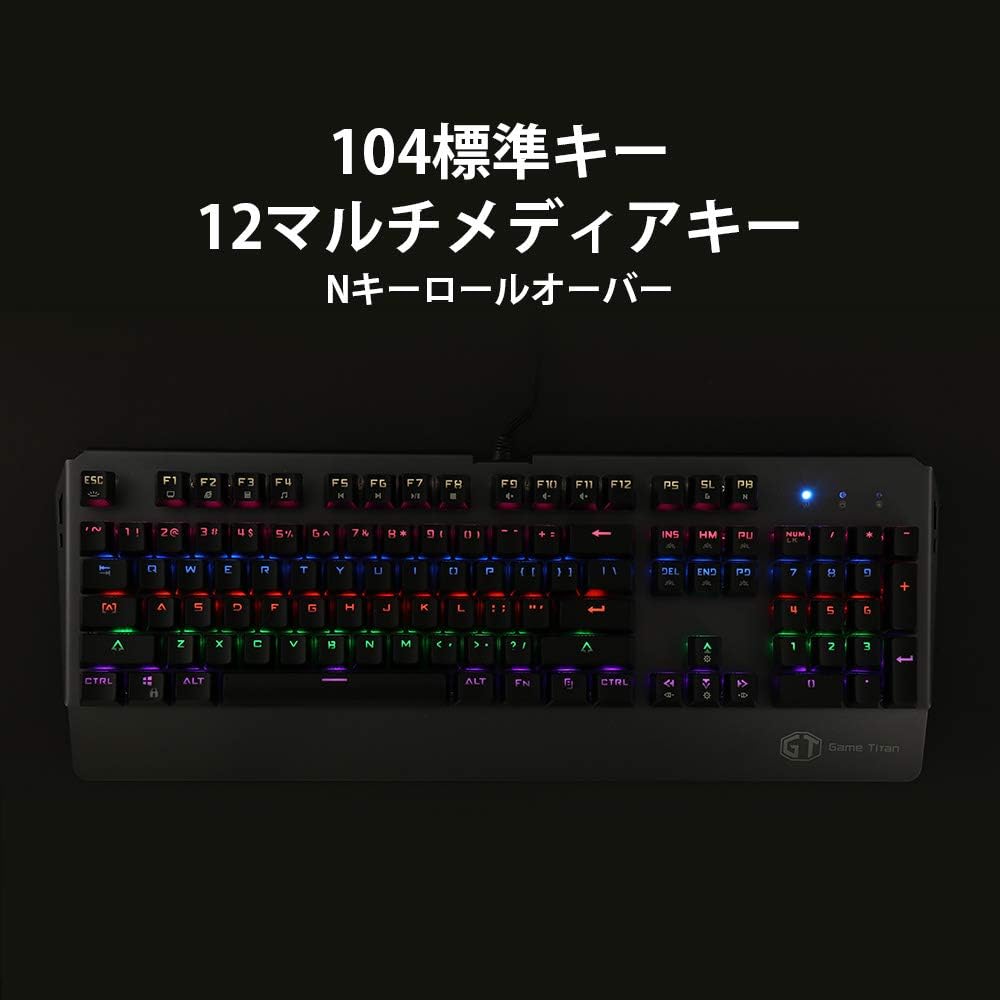
Imatge: Completa view of the DELUX KM06 mechanical keyboard, illustrating the 104-key English layout and the placement of multimedia keys.
4.2 Multimedia Keys (Fn Combinations)
Accediu a les funcions multimèdia prement la tecla Fn key simultaneously with the corresponding F-keys (F1-F12).
- Fn + F1: El meu ordinador
- Fn + F2: Cerca
- Fn + F3: Calculadora
- Fn + F4: Reproductor multimèdia
- Fn + F5: Pista anterior
- Fn + F6: Pista següent
- Fn + F7: Reproduir/Pausa
- Fn + F8: Atura
- Fn + F9: Mut
- Fn + F10: Baixar el volum
- Fn + F11: Pujar el volum
- Fn + F12: Bloquejar el teclat
4.3 N-Key Rollover
The KM06 supports N-key rollover, meaning every key press is registered independently, regardless of how many keys are pressed simultaneously. This prevents ghosting and ensures accurate input, especially during fast-paced gaming.
Control de retroiluminació 4.4
The keyboard features rainbow LED backlighting with various effects. Use the following key combinations to control the backlight:
- Fn + INS: Cycle through backlight modes.
- Fn + ↑: Augmenta la brillantor de la retroiluminació.
- Fn + ↓: Redueix la brillantor de la retroiluminació.
- Fn + ←: Redueix la velocitat de retroiluminació.
- Fn + →: Augmenta la velocitat de la retroiluminació.

Imatge: Lateral view of the DELUX KM06 keyboard, highlighting the ergonomic key tilt designed for comfortable typing and the vibrant rainbow backlighting.
4.5 tecles programables
The DELUX KM06 supports key programming via dedicated software. Please refer to the official DELUX website for the latest software download and detailed instructions on creating custom macros and key assignments.
5. Manteniment
5.1 Neteja del teclat
- Desconnecteu el teclat de l'ordinador abans de netejar-lo.
- Utilitzeu un suau, damp cloth to wipe the surface of the keyboard. Avoid harsh chemicals or abrasive materials.
- Per netejar entre les tecles, feu servir aire comprimit per eliminar la pols i les restes.
- Keycaps can be carefully removed for deeper cleaning using a keycap puller (not included).

Imatge: Primer pla view of the DELUX KM06 keyboard with several keycaps removed, revealing the Outemu Blue mechanical switches underneath. This illustrates the switch type and construction.
5.2 Atenció general
- Eviteu vessar líquids sobre el teclat.
- No exposeu el teclat a temperatures extremes ni a la llum solar directa.
- Manipuleu el cable USB amb cura per evitar danys.
6. Solució De Problemes
6.1 El teclat no respon
- Assegureu-vos que el cable USB estigui ben connectat tant al teclat com a l'ordinador.
- Prova de connectar el teclat a un port USB diferent de l'ordinador.
- Reinicieu l'ordinador.
- Prova el teclat en un altre ordinador per determinar si el problema és del teclat o de l'ordinador.
6.2 La retroiluminació no funciona o és incorrecta
- Assegureu-vos que el teclat estigui connectat correctament i que rebi alimentació.
- Utilitza el Fn + ↑ combination to increase brightness.
- Canvieu pels modes de retroiluminació mitjançant Fn + INS.
- If using custom software, ensure settings are correctly applied.
6.3 Les tecles no es registren o es teclegen dues vegades
- Clean the affected key(s) as described in the Maintenance section. Debris under the keycap can interfere with switch operation.
- Ensure no software conflicts are present (e.g., other keyboard drivers or macro programs).
7. Especificacions
| Marca | DELUX |
| Nom del model | KM06 |
| Tecnologia de connectivitat | USB |
| Descripció del teclat | Mecànica |
| Característica especial | Retroil·luminat |
| Color | Negre |
| Tipus de canvi | Tactile (Outemu Blue) |
| Orientació de la mà | Ambidextre |
| Nombre de botons | 104 |
| Dimensions del producte | 50.2 x 21.8 x 5.2 cm |
| Pes de l'article | 1.28 quilos |

Imatge: Primer pla view of the DELUX KM06 keyboard, highlighting its durable aluminum alloy frame construction.
8. Garantia i Suport
For warranty information and technical support, please refer to the documentation provided with your purchase or visit the official DELUX weblloc web. Conserveu el comprovant de compra per a reclamacions de garantia.


