1. Introducció
The Walfront Digital 3 Phase Ammeter Voltmeter is a sophisticated multifunction AC power meter designed for precise measurement and monitoring of electrical parameters. This device is ideal for comprehensive management of various incoming loops and large-capacity distribution output loops in electrical panels.
It provides real-time data for three-phase voltage, current, active power, reactive power, power factor, grid frequency, active energy, and reactive energy. Its high accuracy and stability, combined with an intuitive LCD display, make it an essential tool for electrical professionals.

Figura 1: Frontal view of the Walfront Digital 3 Phase Ammeter Voltmeter, showing the LCD display and control buttons.
2. Característiques clau
- Mesura multifuncional: Measures three-phase voltage, current, active power, reactive power, power factor, grid frequency, active energy, and reactive energy.
- High Accuracy and Stability: Designed for precise readings and consistent performance.
- Interfície fàcil d'utilitzar: Features a four-button design for convenient and flexible operation.
- Seguiment integral: Suitable for complete monitoring and management of electrical parameters in various incoming loops and large-capacity distribution output loops.
- Construcció duradora: Premium ABS housing offers superior flame retardant properties and ensures safety.
- Pantalla LCD clara: High brightness LCD digital display presents three-phase current or voltage values simultaneously for easy reading.
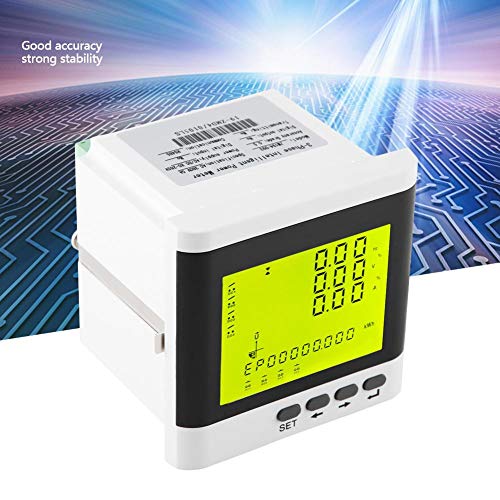
Figura 2: Angle view emphasizing the meter's accuracy and stability.
3. Especificacions tècniques
| Paràmetre | Valor |
|---|---|
| Dimensions del producte | 3.94 x 3.94 x 3.94 polzades |
| Pes de l'article | 0.39 quilograms (13.76 unces) |
| Número de model | 0736342551428 |
| Fabricant | Walfront |
| Font d'alimentació | Elèctric amb cable |
| Color | Gris |
| Cablejat | 3-phase 4-wire / 3-wire 3-phase |
| Voltage Rang | 380V / 100V |
| Overload (Continuous) | 1.2 vegades |
| Overload (Instant) | 2 vegades |
4. Configuració i instal·lació
Proper installation is crucial for the accurate and safe operation of the Walfront Digital 3 Phase Ammeter Voltmeter. It supports both 3-phase 4-wire and 3-wire 3-phase wiring configurations.
4.1 Connexions de cablejat
Refer to the wiring diagrams provided on the back of the unit for specific connection details. Ensure all connections are secure and comply with local electrical codes.
- Font d'alimentació: Connect the auxiliary power supply to the designated terminals (L, N).
- Voltage Entrades: Connect the three-phase voltage lines (A, B, C) to the corresponding voltage terminals d'entrada.
- Entrades de corrent: Connect the current transformer (CT) secondary wires to the current input terminals (Ia*, Ia, Ib*, Ib, Ic*, Ic). Ensure correct polarity.
- Comunicació (opcional): If using RS485 communication, connect the A and B terminals to your communication network.
- Switch Inputs/Outputs (Optional): Connect external switches or control devices to the digital input (DI) and digital output (DO) terminals as required.

Figura 3: posterior view of the meter with detailed wiring diagrams for 3-phase 4-wire and 3-phase 3-wire configurations.
4.2 Muntatge
The meter is designed for panel mounting. Ensure adequate space for ventilation and access to wiring terminals. Secure the meter using the provided mounting clips or screws.
5. Funcionament
The Walfront Digital 3 Phase Ammeter Voltmeter features a clear LCD display and four control buttons for easy navigation and parameter viewing.
5.1 Mostra finalview
The LCD displays various electrical parameters simultaneously. Typically, it shows frequency (Hz), voltage (V), and current (A) on the upper lines, and active energy (kWh) on the bottom line. Indicators for phase status (L1, L2, L3) and other parameters may also be present.

Figure 4: Close-up of the LCD display showing various electrical readings.
5.2 Funcions dels botons
- Botó SET: Used to enter or exit the parameter setting mode. Press and hold to access advanced settings.
- Left Arrow Button (←): Used to navigate left through menus or decrease values during setting.
- Right Arrow Button (→): Used to navigate right through menus or increase values during setting.
- Enter Button (↵): Used to confirm selections or move to the next parameter during setting.
A view different parameters, use the arrow buttons to scroll through the available displays. Consult the full product manual (if provided separately by the manufacturer) for detailed instructions on parameter configuration, such as CT ratio settings, which may require a specific protection code (e.g., "0001").
6. Manteniment
The Walfront Digital 3 Phase Ammeter Voltmeter is designed for long-term, reliable operation with minimal maintenance. Follow these guidelines to ensure optimal performance:
- Neteja: Regularly wipe the display and housing with a soft, dry cloth. Do not use abrasive cleaners or solvents.
- Inspecció: Periodically inspect wiring connections to ensure they remain secure and free from corrosion.
- Medi ambient: Ensure the operating environment is within the specified temperature and humidity ranges to prevent damage.
- Apagar: Always disconnect power to the unit before performing any maintenance or wiring adjustments.
7. Solució De Problemes
This section addresses common issues you might encounter with your Walfront Digital 3 Phase Ammeter Voltmeter.
| Problema | Causa possible | Solució |
|---|---|---|
| Display is blank or not lighting up. | No power supply, incorrect wiring, or internal fault. | Verify power connections (L, N). Check circuit breaker. Ensure auxiliary power is within specified range. |
| Incorrect readings (voltage, corrent, potència). | Incorrect CT ratio setting, incorrect wiring polarity, or sensor issue. | Check CT wiring polarity. Verify CT ratio settings in the meter's configuration menu. Ensure voltage inputs are correct. |
| Cannot change parameters (e.g., CT ratio). | Protection code enabled, or incorrect access procedure. | Some settings require a protection code. Try "0001" as a common default. Refer to the manufacturer's detailed manual for specific access procedures and codes. |
| No digital output (if applicable). | Model variant does not include digital output, or configuration issue. | Verify your specific model's specifications for digital output capabilities. If present, check configuration settings and wiring. |
If the problem persists after attempting these solutions, contact Walfront customer support for further assistance.
8. Garantia i Suport
Walfront products are manufactured to high quality standards. For specific warranty terms and conditions, please refer to the documentation included with your purchase or visit the official Walfront weblloc.
For technical support, troubleshooting assistance, or inquiries regarding your Walfront Digital 3 Phase Ammeter Voltmeter, please contact Walfront customer service through their official channels. Be prepared to provide your product model number (0736342551428) and a detailed description of the issue.
Fabricant: Walfront
Data de primera disponibilitat: 19 de març de 2019
