Introducció
This manual provides comprehensive instructions for the Hoco ES20 Original Series Wireless V5.0 Earphones. Please read this manual carefully before using the product to ensure proper operation and to maximize your user experience. Keep this manual for future reference.
Producte acabatview
The Hoco ES20 earphones are designed for wireless audio playback and hands-free communication. The package includes two wireless earphones and a portable charging case.

Imatge 1: Hoco ES20 Wireless Earphones. This image displays both the left and right earphones, highlighting their in-ear design and compact form factor.
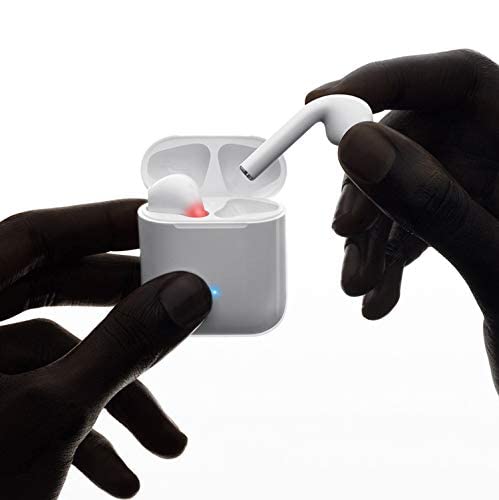
Imatge 2: Hoco ES20 Earphones in Charging Case. The earphones are shown placed inside their charging case, indicating the charging status with an illuminated LED.
Especificacions
| Característica | Detall |
|---|---|
| Versió sense fil | V5.0 |
| Protocols compatibles | Headset, Hands-free, A2DP, Avrcp |
| Freqüència de transmissió | 2.4 GHz |
| Rang de transmissió | 10 metres |
| Vol. De càrregatage | DC5V |
| Temps de càrrega (auriculars) | Aproximadament 1 hora |
| Temps de conversa | 2 hores |
| Temps de reproducció de música | 2 hores |
| Caixa de càrrega Capacitat de la bateria | 400 mAh |
| Earphone Battery Capacity (Each) | 40 mAh |
| Temps d'espera | 200 hores |
| Pes total (amb estoig) | 44.8 g |
| Pes d'un sol auricular | 3.8 g |
| Components inclosos | Bluetooth Headphones, 1 Charging Cable |
Configuració
1. Càrrega dels auriculars i l'estoig
- Col·loca els dos auriculars a l'estoig de càrrega. Assegura't que estiguin correctament col·locats.
- Connect the charging cable to the charging port on the case and to a DC5V power source (e.g., USB wall adapter, computer USB port).
- The indicator light on the charging case will show charging status. A full charge for the earphones takes approximately 1 hour. The charging case itself has a 400mAh battery capacity.
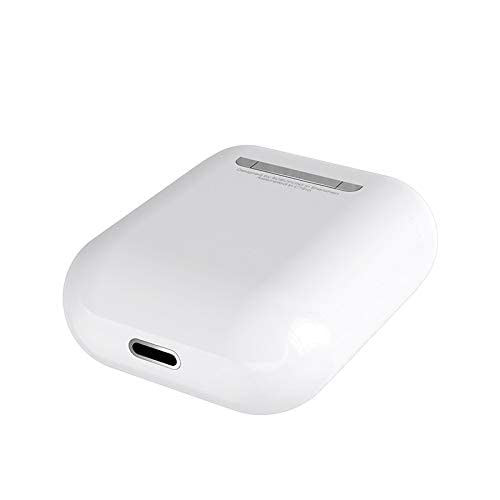
Imatge 3: Hoco ES20 Charging Case Port. This image shows the charging port located at the bottom of the charging case, where the charging cable is connected.
2. Vinculació amb un dispositiu
- Assegureu-vos que els auriculars estiguin carregats.
- Obre l'estoig de càrrega. Els auriculars entraran automàticament en mode d'emparellament.
- Al telèfon intel·ligent o a un altre dispositiu amb Bluetooth, aneu a la configuració de Bluetooth.
- Cerca available devices and select "Hoco ES20" (or similar name) from the list.
- Un cop connectats, els auriculars indicaran que l'emparellament s'ha realitzat correctament (per exemple, un missatge d'àudio o un canvi de LED).
- For Apple phones and some Android phones, the battery level of the earphones may be displayed on your device.
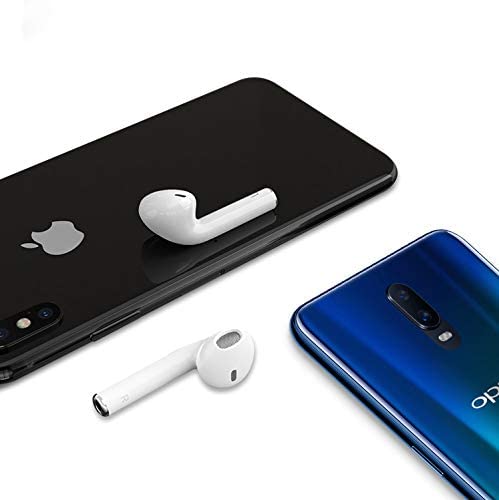
Imatge 4: Hoco ES20 Earphones with Smartphones. This image illustrates the earphones positioned near two different smartphones, demonstrating their compatibility with various mobile devices.
Instruccions de funcionament
Funcions bàsiques (control tàctil)
- Encès: Earphones power on automatically when removed from the charging case.
- Apagar: Earphones power off automatically when placed back into the charging case.
- Reproduir/pausa: Tap the touch area on either earphone once.
- Respondre/Finalitzar la trucada: Tap the touch area on either earphone once during an incoming call or an active call.
- Rebutja la trucada: Press and hold the touch area on either earphone for approximately 2 seconds during an incoming call.
- Pista següent: Fes doble toc a l'àrea tàctil de l'auricular dret.
- Pista anterior: Fes doble toc a l'àrea tàctil de l'auricular esquerre.
- Activa l'Assistent de veu: Triple-tap the touch area on either earphone.
Manteniment
- Mantingueu els auriculars i l'estoig de càrrega nets i secs.
- Avoid exposing the product to extreme temperatures, humidity, or corrosive substances.
- No intenteu desmuntar ni modificar els auriculars ni l'estoig de càrrega, ja que això anul·larà la garantia i pot causar danys.
- Feu servir un drap suau i sec per netejar els auriculars i els contactes de càrrega.
- Guarda els auriculars a la seva funda de càrrega quan no els facis servir per protegir-los i mantenir-los carregats.
Resolució de problemes
Problemes comuns i solucions
- Els auriculars no s'emparellan:
- Assegureu-vos que tots dos auriculars estiguin carregats.
- Place earphones back in the case, close it, then open it again.
- Desactiva i activa el Bluetooth al dispositiu.
- Delete "Hoco ES20" from your device's Bluetooth list and try pairing again.
- Només funciona un auricular:
- Assegureu-vos que tots dos auriculars estiguin carregats.
- Place both earphones back in the charging case, close the lid, wait a few seconds, then open the lid and remove them together.
- If the issue persists, try resetting the earphones (refer to manufacturer's website if a specific reset procedure is not in this manual).
- Sense so o volum baix:
- Comproveu el nivell de volum tant del dispositiu com dels auriculars.
- Assegureu-vos que els auriculars estiguin connectats correctament al dispositiu.
- Prova de reproduir àudio des d'una altra aplicació o font.
- Problemes de càrrega:
- Assegureu-vos que el cable de càrrega estigui connectat correctament tant a la carcassa com a la font d'alimentació.
- Comproveu si el port de càrrega de la carcassa està net i lliure de residus.
- Proveu d'utilitzar un cable de càrrega o un adaptador d'alimentació diferent.
- Poor connection/intermittent audio:
- Ensure your device is within the 10-meter transmission range.
- Avoid obstacles between your device and the earphones.
- Minimitzar les interferències d'altres dispositius sense fil.
Garantia i Suport
The Hoco ES20 Wireless Earphones come with a 6 mesos de garantia des de la data de compra. Aquesta garantia cobreix els defectes de fabricació. Si us plau, conserveu el comprovant de compra per a reclamacions de garantia.
For technical support or warranty inquiries, please contact your retailer or the official Hoco support channels. Refer to the product packaging or Hoco's official weblloc per obtenir informació de contacte.


