Introducció
This manual provides comprehensive instructions for the setup, operation, and maintenance of your Bewinner LCD Digital Weather Station. Please read this manual thoroughly before using the device to ensure proper function and longevity.
Producte acabatview
The Bewinner LCD Digital Weather Station is designed to provide accurate indoor and outdoor temperature and humidity readings, along with weather forecasts and other useful information. It features a clear LCD display and a wireless outdoor sensor.
Característiques principals:
- Temperature and humidity trend display for both indoor and outdoor environments.
- 5-level indoor climate comfort indicator.
- Past 24-hour air pressure trend display.
- Outdoor high and low temperature and frost point alarm functions.
- Time display (12-hour/24-hour format), date, and day of the week (7 languages).
- Alarm clock with 5 to 60-minute snooze function.
- 12-month moon phase display.
- Records maximum and minimum indoor and outdoor temperature and humidity values.
- 6 weather forecasts (sunny, cloudy, overcast, light rain, heavy rain, snowy) and weather trends.
- 4-level adjustable backlight (high, medium, low, off).
- Wall-mounted or upright outdoor sensor with 60-meter sensing range and IPX4 grade waterproof rating.
Components inclosos:
- 1 x Bewinner Weather Station Main Unit
- 1 x Sensor exterior sense fil
- 1 cable d'alimentació USB
- 1 x Manual d'instruccions (aquest document)

Figure 1: Main unit, wireless sensor, and USB power cord.
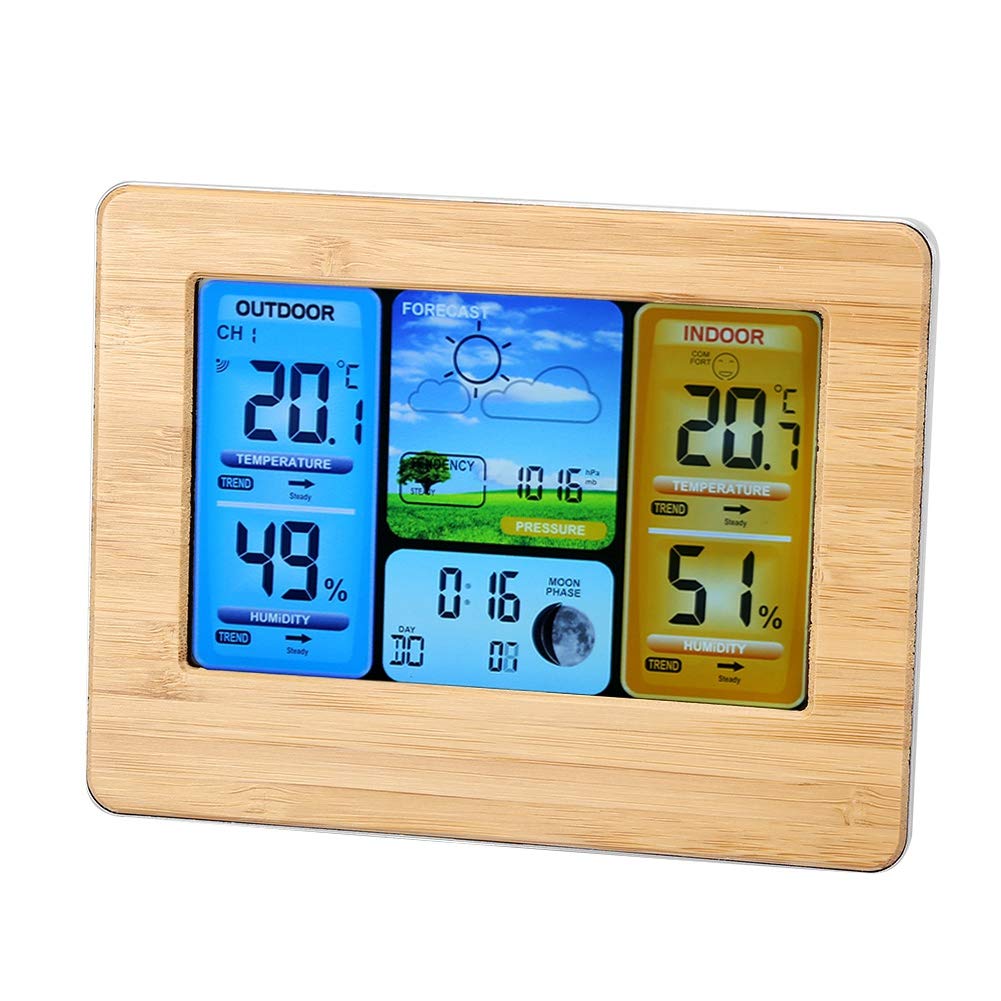
Figura 2: Frontal view of the weather station display.
Configuració
1. Powering the Main Unit:
The main unit can be powered by either 2 x AA batteries (not included) or the provided DC 5V USB power cord.
- Instal·lació de la bateria: Open the battery compartment on the back of the main unit. Insert 2 AA batteries, ensuring correct polarity (+/-).
- Potència USB: Connect the USB power cord to the main unit and a suitable USB power adapter (not included).

Figure 3: Battery compartment and backlight button.
2. Powering the Outdoor Sensor:
The outdoor sensor requires batteries for operation. Open the battery compartment on the back of the sensor and insert 2 AA batteries, ensuring correct polarity (+/-).
3. Col·locació del sensor:
Place the wireless outdoor sensor in a location that provides accurate readings and is protected from direct sunlight and heavy rain. The sensor has an IPX4 waterproof rating, meaning it is resistant to splashing water. It can be wall-mounted or placed upright. Ensure it is within 60 meters (197 feet) of the main unit for optimal signal reception.

Figure 4: Main unit and outdoor sensor placement example.

Figure 5: Wall hanging option for the main unit.
4. Initial Synchronization:
After powering both units, the main unit will automatically attempt to connect with the outdoor sensor. This may take a few minutes. Once connected, outdoor temperature and humidity readings will appear on the display.
Instruccions de funcionament
1. Mostra mésview:
The LCD display is divided into several sections showing outdoor temperature/humidity, indoor temperature/humidity, weather forecast, air pressure, time, date, and moon phase.

Figure 6: Display showing various readings and weather forecast.
2. Configuració de l'hora i la data:
Refer to the specific buttons on your device (usually labeled "MODE", "SET", or similar) to enter time/date setting mode. Follow the on-screen prompts to adjust hours, minutes, year, month, and day. You can also select the 12-hour or 24-hour format and the language for the day of the week.
3. Alarm and Snooze Function:
To set the alarm, typically press a dedicated "ALARM" or "MODE" button until the alarm time is displayed. Use adjustment buttons to set the desired alarm time. The snooze function can usually be activated by pressing a specific button (often labeled "SNOOZE" or "LIGHT") when the alarm sounds, providing a 5 to 60-minute delay.
4. Ajust de la retroiluminació:
If powered by DC, the backlight has four levels: high, medium, low, and off. A dedicated button (often combined with "SNOOZE") controls the backlight intensity. Press repeatedly to cycle through the brightness levels.
5. Temperature and Humidity Trends:
The display shows arrows next to temperature and humidity readings, indicating whether the values are rising, falling, or remaining steady.
6. Previsió meteorològica:
The weather station predicts future weather conditions based on changes in atmospheric pressure. The display will show one of six icons: sunny, cloudy, overcast, light rain, heavy rain, or snowy. These are forecasts and may not always be 100% accurate.
7. Moon Phase Display:
The device displays the current moon phase. This feature can be adjusted for positive or negative display via a jumper setting (advanced users only, refer to detailed internal diagrams if available).
8. Max/Min Temperature and Humidity:
The weather station automatically records the maximum and minimum indoor and outdoor temperature and humidity values. Typically, a "MAX/MIN" button allows you to view these recorded values. Pressing it again may clear the records or cycle through them.
Manteniment
- Neteja: Netegeu la unitat principal i el sensor amb un drap suau i sec.amp tela. No utilitzeu netejadors abrasius ni dissolvents.
- Substitució de la bateria: Replace batteries in both the main unit and the outdoor sensor when the low battery indicator appears on the display. Ensure to use new AA batteries and dispose of old batteries responsibly.
- Cura del sensor: Periodically check the outdoor sensor for any debris or obstructions that might affect its readings. Ensure its placement continues to be optimal for signal and protection.
Resolució de problemes
- Sense pantalla / Pantalla tènue:
Check if batteries are correctly installed and not depleted. If using USB power, ensure the cable is securely connected and the power source is active. Adjust backlight settings if the display is faint.
- Outdoor Readings Not Appearing:
Ensure the outdoor sensor has fresh batteries and is within the 60-meter range of the main unit. Reduce obstacles between the sensor and the main unit. Try re-synchronizing by removing and reinserting batteries in both units.
- Lectures inexactes:
Ensure the outdoor sensor is not in direct sunlight or near heat sources, which can skew temperature readings. For indoor readings, ensure the main unit is not near vents, windows, or appliances that generate heat or cold.
- Previsió meteorològica incorrecta:
Weather forecasts are based on atmospheric pressure changes and are predictions. They may not always align with local weather conditions, especially during rapidly changing weather patterns. Allow the unit time to calibrate to local pressure.
Especificacions
| Marca | Guanyador |
| Número de model | Bewinnere4d0hk8nmi-01 |
| Font d'alimentació | Battery Powered (2 x AA for main unit, 2 x AA for sensor) / DC 5V USB Power Supply (main unit) |
| Característiques especials | Adjustable Brightness, Alarm, Thermometer, Hygrometer, Weather Forecast, Moon Phase |
| Material | Vidre, plàstic |
| Color | groc |
| Dimensions del producte | 1.2"D x 6.7"W x 5.1"H (Main Unit) |
| Precisió de la temperatura | ±1 °C |
| La tecnologia de sensors | Termistor |
| Tipus de visualització | LCD |
| Gamma de sensors exteriors | Fins a 60 metres (197 peus) |
| Outdoor Sensor Waterproof Rating | IPX4 |

Figura 7: Dimensions del producte.
Garantia i Suport
This product comes with a manufacturer's warranty. For specific warranty details, please refer to the product packaging or contact your retailer. For any quality problems or questions regarding this product, Bewinner offers a 24-hour online professional customer service team. Please refer to the contact information provided with your purchase or on the official Bewinner weblloc de suport.
Vídeo del producte
Video 1: A short demonstration of the Bewinner Weather Station display, showing various readings and features. This video highlights the dynamic nature of the display and its informational capabilities.


