Introducció
This manual provides detailed instructions for the IPEGA PG-9068 Bluetooth Wireless Game Controller Gamepad. It covers setup, operation, maintenance, and troubleshooting to ensure optimal performance and longevity of your device. This gamepad is designed for use with Android, iOS, and PC systems, as well as Smart TVs and set-top boxes.
Producte acabatview

Figura 1: Frontal view of the IPEGA PG-9068 Bluetooth Wireless Game Controller, showing the dual analog sticks, D-pad, action buttons (A, B, X, Y), and central function buttons.

Figura 2: Angle view of the IPEGA PG-9068, highlighting the ergonomic grip and shoulder buttons.
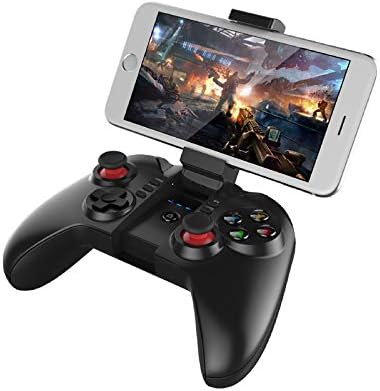
Figure 3: The IPEGA PG-9068 with a smartphone securely mounted in its integrated holder, demonstrating its mobile gaming capability.
Configuració i connexió
Carregant el Gamepad
Before initial use, fully charge the gamepad. Connect the provided USB charging cable to the gamepad's charging port and to a DC5V power source (e.g., computer USB port, USB wall adapter). The charging indicator light will show the charging status.
- Vol. De càrregatage/Actual: DC5V/500mA
- Capacitat de la bateria: 350 mAh
- Ús continu: Approximately 10 hours on a full charge
- Temps d'espera: Up to 30 days when fully charged
Instruccions de vinculació de Bluetooth
The PG-9068 supports various connection modes for different devices. Ensure the gamepad is sufficiently charged before attempting to pair.
- Encès: Manteniu premut el botó CASA button for 3 seconds to power on the gamepad.
- Introduïu el mode de vinculació:
- Mode estàndard d'Android: Mantén premut X + INICI fins que el llum indicador parpellegi ràpidament.
- iOS Standard Mode: Mantén premut Y + HOME fins que el llum indicador parpellegi ràpidament.
- PC/Direct Play Mode: Mantén premut A + CASA fins que el llum indicador parpellegi ràpidament.
- Activate Bluetooth on Device: On your smartphone, tablet, or PC, go to Bluetooth settings and enable Bluetooth.
- Cerca Dispositius: Scan for available Bluetooth devices. The gamepad will appear as "PG-9068" or "IPEGA-9068".
- Connectar: Select "PG-9068" to pair. Once connected, the indicator light on the gamepad will become solid.
- Voltage: DC3.7V
- Distància de transmissió Bluetooth: ≤8 metres
If pairing fails, turn off the gamepad, disable Bluetooth on your device, and repeat the steps. For PC connection, a Bluetooth adapter may be required if your PC does not have built-in Bluetooth.
Instruccions de funcionament
Game Modes and Compatibility
The IPEGA PG-9068 supports various gaming platforms and modes:
- Android: Compatible with most Android smartphones, tablets, Smart TVs, and set-top boxes. Supports games that have native gamepad support.
- iOS: Compatible with iOS devices (iPhone, iPad). Supports MFi (Made For iPhone/iPad) games and other games with gamepad compatibility.
- PC: Supports Windows and Mac OS X systems. May require specific drivers or software for certain games, though many modern games support XInput or DirectInput controllers natively.
Disseny i funcions dels botons
Familiaritzeu-vos amb la disposició dels botons del gamepad:
| Botó/Component | Funció |
|---|---|
| Stick analògic esquerre | Movement, camera control (game dependent) |
| Stick analògic dret | Camera control, aiming (game dependent) |
| D-Pad (coixinet direccional) | Directional input, menu navigation |
| Botons A, B, X, Y | Action buttons (jump, attack, interact, etc.) |
| L1/R1 (Shoulder Buttons) | Commonly used for actions like shooting, aiming, or menu navigation |
| L2/R2 (Triggers) | Analog input for acceleration, braking, or precise actions |
| SELECT/BACK Button | Menu, map, or specific game functions |
| Botó INICI | Pause, start game, confirm actions |
| Botó HOME | Power on/off, return to home screen (device dependent), pairing mode activation |
| Botó TURBO | Enables rapid fire for selected action buttons. Press TURBO + Action Button to activate/deactivate. |
Manteniment i cura
Proper maintenance ensures the longevity and optimal performance of your IPEGA PG-9068 gamepad.
- Neteja: Feu servir un drap suau i sec per netejar la superfície del gamepad. Per a la brutícia persistent, netegeu lleugerament.ampRenta el drap amb aigua. Evita fer servir productes químics agressius, dissolvents o netejadors abrasius.
- Emmagatzematge: Guardeu el gamepad en un lloc fresc i sec, allunyat de la llum solar directa, temperatures extremes i humitat elevada.
- Cura de la bateria:
- Eviteu descarregar completament la bateria amb freqüència.
- If storing for extended periods, charge the battery to about 50% to prevent deep discharge.
- No exposeu la bateria al foc o a una calor extrema.
- Manipulació: Avoid dropping the gamepad or subjecting it to strong impacts. Do not attempt to disassemble the gamepad, as this will void the warranty.
Resolució de problemes
If you encounter issues with your IPEGA PG-9068, refer to the following common problems and solutions:
| Problema | Causa possible | Solució |
|---|---|---|
| Gamepad does not power on. | Bateria baixa. | Carrega completament el gamepad. |
| No es pot emparellar amb el dispositiu. | Incorrect pairing mode; Bluetooth off on device; interference. | Ensure correct pairing mode (X+HOME for Android, Y+HOME for iOS, A+HOME for PC). Verify Bluetooth is enabled on your device. Move closer to the device. Restart both gamepad and device. |
| El gamepad es desconnecta sovint. | Bateria baixa; massa lluny del dispositiu; interferències. | Recharge the gamepad. Stay within 8 meters of the connected device. Reduce wireless interference from other devices. |
| Buttons/sticks are unresponsive. | Error de programari; danys físics. | Restart the gamepad and the connected device. Test in a different game or application. If problem persists, contact customer support. |
| Gamepad not recognized by PC. | Missing Bluetooth adapter/drivers; incorrect mode. | Ensure PC has Bluetooth and drivers are installed. Try A+HOME pairing mode. Some games may require specific controller emulation software. |
Especificacions tècniques
| Paràmetre | Valor |
|---|---|
| Model | PG-9068 |
| Marca | Ipega |
| Connectivitat | Bluetooth sense fil |
| Voltage | DC3.7V |
| Corrent de treball | <10 mA |
| Temps d'ús continu | Aprox. 10 hores |
| Corrent latent | <10uA |
| Volum de càrregatage / Actual | DC5V/500mA |
| Distància de transmissió Bluetooth | ≤8 metres |
| Capacitat de la bateria | 350 mAh |
| Temps d'espera | Up to 30 days (full power) |
| Sistemes compatibles | Android, iOS, Windows, Mac OS X |
| Dispositius compatibles | Smartphones, Tablets, Smart TVs, Set-top Boxes, PC Computers |
Garantia i Suport
For warranty information or technical support, please refer to the documentation provided with your purchase or visit the official Ipega weblloc web. Conserveu el comprovant de compra per a reclamacions de garantia.


