Introducció
This manual provides comprehensive instructions for the setup, operation, and maintenance of your Calvas AXD7622 Replacement Remote Control. This remote is designed to be compatible with various Pioneer AV Receiver models, including VSX-521, AXD7660, VSX-422-K, and AXD7662. Please read this manual thoroughly before using the remote control to ensure optimal performance and longevity.
Producte acabatview
The Calvas AXD7622 is an infrared (IR) replacement remote control, offering a direct functional substitute for the original remote controls of compatible Pioneer AV receivers. It operates on a 433 MHz frequency for signal transmission.

Imatge 1: Davant view of the Calvas AXD7622 replacement remote control. This image displays the full layout of the remote's buttons, including power, input selection, volume, navigation, and various function keys, all clearly labeled.
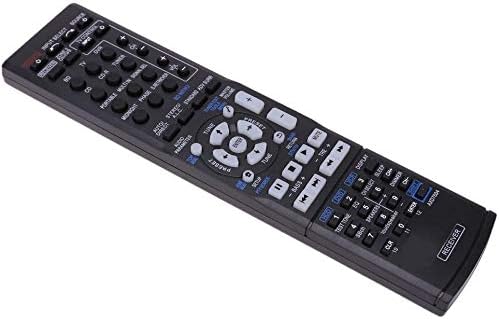
Imatge 2: En angle view of the Calvas AXD7622 replacement remote control. This perspective showcases the remote's ergonomic shape and button arrangement, providing a better understanding of its physical form.
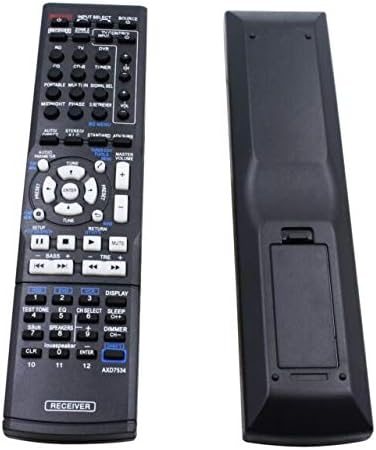
Imatge 3: Davant i darrere view of the Calvas AXD7622 replacement remote control. This image provides a clear view of both sides of the remote, including the battery compartment cover on the rear.
Configuració
1. Instal·lació de la bateria
- Locate the battery compartment on the back of the remote control. Refer to Image 3 for assistance.
- Feu lliscar la tapa del compartiment de la bateria cap avall o en la direcció indicada per una fletxa per obrir-la.
- Introduïu dues (2) piles AAA, assegurant-vos que els terminals positiu (+) i negatiu (-) s'alineïn correctament amb les marques de l'interior del compartiment.
- Tanqueu la tapa del compartiment de la bateria fent-la lliscar de nou al seu lloc fins que faci clic de manera segura.
Nota: Batteries are not included with the remote control. Always use new batteries and replace both batteries at the same time.
2. Compatibilitat
This remote control is pre-programmed and designed for direct use with the following Pioneer AV Receiver models:
- Pioneer VSX-521
- Pioneer AXD7660
- Pioneer VSX-422-K
- Pioneer AXD7662
No additional programming or setup is required. Simply install the batteries, and the remote is ready for use with your compatible Pioneer AV receiver.
Instruccions de funcionament
Point the remote control directly at the infrared sensor on your Pioneer AV receiver. Ensure there are no obstructions between the remote and the receiver.
Key Functions (Refer to Image 1 for button layout):
- POWER (On/Standby): Turns the AV receiver on or off (standby mode).
- INPUT SELECT / SOURCE: Cycles through available input sources (e.g., BD, CD, TV, DVR, Tuner).
- VOLUM (+/-): Adjusts the master volume level of the AV receiver.
- MUT: Silencia temporalment la sortida d'àudio. Premeu de nou per restaurar el so.
- NAVIGATION (Up/Down/Left/Right/ENTER): Used to navigate menus and confirm selections on the AV receiver's display.
- CONFIGURACIÓ: Accesses the receiver's main setup menu.
- TORNADA: Torna al menú o pantalla anterior.
- TUNER (Up/Down): For radio tuning functions.
- AUDIO PARAMETER: Adjusts various audio settings.
- LISTED SOURCE BUTTONS (BD, CD, TV, DVR, etc.): Directly selects the corresponding input source.
- PLAYBACK CONTROLS (Play, Pause, Stop, Skip, Fast Forward/Rewind): Controls playback of connected media devices.
- MOSTRA: Changes the information displayed on the receiver's front panel.
- DIMMER: Ajusta la brillantor de la pantalla del receptor.
- NUMBER BUTTONS (0-9, CLR, ENTER): Used for direct input, such as channel numbers or menu selections.
For detailed functionality of specific buttons and advanced features, please refer to the original user manual of your Pioneer AV receiver model.
Manteniment
Canvi de bateria
If the remote control's range decreases or it becomes unresponsive, the batteries may need to be replaced. Follow the battery installation steps outlined in the "Setup" section. Always replace both AAA batteries simultaneously with new ones.
Neteja
Per netejar el comandament a distància, netegeu suaument la superfície amb un drap suau i sec. Per a la brutícia resistent, netegeu lleugeramentampen the cloth with water or a mild, non-abrasive cleaner. Avoid using harsh chemicals, solvents, or abrasive materials, as these can damage the remote's finish or internal components.
Emmagatzematge
Store the remote control in a cool, dry place away from direct sunlight, extreme temperatures, and high humidity. If the remote will not be used for an extended period, it is recommended to remove the batteries to prevent leakage and potential damage.
Resolució de problemes
| Problema | Causa possible | Solució |
|---|---|---|
| El comandament a distància no respon. |
|
|
| Remote functions intermittently. |
|
|
| Specific buttons do not work. |
|
|
Especificacions
| Característica | Detall |
|---|---|
| Número de model | AXD7622 |
| Marca | Calbes |
| Compatibilitat | Pioneer VSX-521, AXD7660, VSX-422-K, AXD7662 AV Receivers |
| Comunicació sense fils | Infrarojos (IR) |
| Freqüència | 433 MHz |
| Font d'alimentació | 2 piles AAA (no incloses) |
| Material | ABS |
| Dimensions (L x A x A) | 5.51 x 1.57 x 0.39 polzades (14 x 4 x 1 cm) |
| Característica especial | Disseny ergonòmic |
Limited Guarantee and Support
All Calvas merchandise is subject to quality examination before shipment to ensure functionality. In the event of workmanship or material defects, please contact the seller directly for assistance. The seller aims to provide solutions such as exchanges or other resolutions to address product issues.
For further support or inquiries, please refer to your purchase documentation or contact the retailer from whom the product was acquired.