1. Introducció
This manual provides essential information for the safe and efficient operation of your Vonyx CDJ450 DJ Workstation. Please read it thoroughly before using the device and retain it for future reference. The Vonyx CDJ450 is a versatile DJ workstation featuring dual CD/MP3 players, Bluetooth connectivity, two USB ports, and a 2-channel mixer, designed for comprehensive audio control.
2. Instruccions de seguretat
- Assegureu-vos que la font d'alimentació coincideixi amb el voltage especificat a la unitat.
- No exposeu la unitat a la pluja ni a la humitat per evitar descàrregues elèctriques.
- Eviteu col·locar la unitat a prop de fonts de calor o sota la llum solar directa.
- No obriu la c.asing; demaneu totes les tasques de manteniment a personal qualificat.
- Mantingueu les obertures de ventilació netes per evitar el sobreescalfament.
- Desconnecteu el cable d'alimentació durant tempestes amb llamps o quan no l'utilitzeu durant períodes prolongats.
3. Producte acabatview
The Vonyx CDJ450 integrates two media players and a central mixer into a single unit, offering a compact and powerful solution for DJs.

Figura 3.1: De dalt a baix view of the Vonyx CDJ450 DJ Workstation, showing the dual players and central mixer controls.

Figura 3.2: En angle view of the workstation, highlighting its compact design and accessible controls.

Figura 3.3: Close-up of the central mixer and player controls, including jog wheels, pitch faders, and display screens.

Figura 3.4: USB ports located on the top panel, demonstrating USB drive connectivity for MP3 playback.

Figura 3.5: Davant view with both CD trays open, ready for disc insertion.

Figura 3.6: Detallada view of a player's display, showing track information, and associated playback controls.
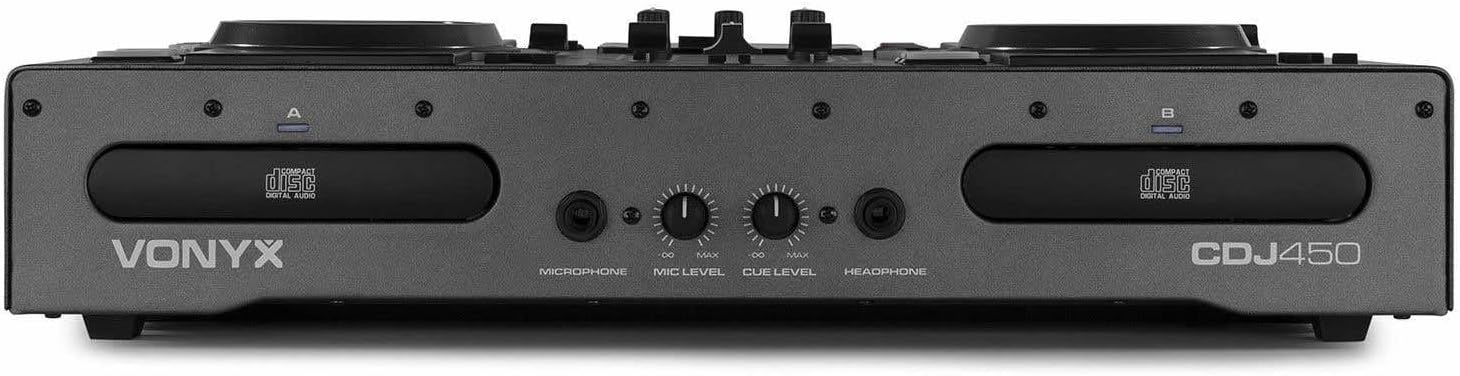
Figura 3.7: Front panel featuring microphone input, microphone level control, cue level, and headphone output.

Figura 3.8: Rear panel showing power input, main outputs (XLR, RCA), record output, USB Type-B port, and switchable Phono/Line inputs.
4. Configuració
- Col·locació: Place the CDJ450 on a stable, flat surface with adequate ventilation.
- Connexió d'alimentació: Connect the included power cable to the unit's power input and then to a suitable wall outlet. Ensure the power switch is in the OFF position before connecting.
- Sortida d'àudio: Connect the main outputs (XLR or RCA) to your ampamplificador, altaveus autoamplificats o sistema de PA.
- External Devices (Optional): Connect external audio sources (e.g., turntables, additional CD players) to the Phono/Line inputs on the rear panel. Use the switches to select the correct input type.
- Microphone/Headphones: Connect your microphone to the XLR-DJ input or the 6.3mm jack on the front. Plug your headphones into the 3.5mm jack on the front.
- Connexió USB (opcional): For computer control or recording, connect a USB Type-B cable from the unit to your computer.
5. Instruccions de funcionament
5.1. Encendre/apagar
Flip the power switch on the rear panel to the 'ON' position. The displays will illuminate. To power off, flip the switch back to 'OFF'.
5.2. Media Playback (CD/USB)
- Reproducció de CD: Insert an audio CD or MP3 CD into one of the CD trays. The unit will automatically read the disc.
- Reproducció USB: Inseriu una unitat flash USB que contingui MP3 files into one of the USB ports on the top panel.
- Selecció de la font: Use the 'SOURCE' button above each player to switch between CD and USB input.
- Selecció de pistes: Use the navigation buttons or the numeric keypad to select tracks. The integrated folder search function allows quick access to files on USB drives.
- Control de reproducció: Use the 'PLAY/PAUSE' and 'CUE' buttons for standard playback control.
5.3. Connectivitat Bluetooth
- Activate Bluetooth on your smartphone, tablet, or laptop.
- Select 'Bluetooth' as the source on the desired player.
- Cerca available devices on your external device and select 'Vonyx CDJ450'.
- Once paired, you can stream audio wirelessly to the workstation.
5.4. Mixer Functions
- Faders de canals: Adjust the volume level for each player (Channel A and B).
- Controls d'equalització: Use the HIGH, MID, and LOW knobs for each channel to adjust the frequency response.
- Gain/Level: Adjust the input gain for each channel to match levels.
- Crossfader: Blend between Channel A and Channel B.
- Sortida mestra: Control the overall volume of the mix.
- Micròfon: Adjust microphone volume using the 'MIC LEVEL' knob on the front panel.
- Auriculars: Use the 'CUE LEVEL' knob to adjust headphone volume and the 'CUE' buttons on each channel to monitor specific sources.
5.5. Característiques especials
- Scratch: Use the jog wheels for scratching effects.
- Revers: Play audio in reverse.
- Pausa: Create a brake effect on playback.
- Pitch: Adjust the playback speed and pitch using the pitch faders.
- Bucle: Use 'LOOP IN', 'LOOP OUT', and 'RELOOP' buttons to create and manage seamless loops.
6. Connexions
The CDJ450 offers a variety of input and output options:
- Sortides:
- 2 x XLR Speaker Outputs
- 1 x RCA Master Output
- 1 x RCA Recorder Output
- Entrades:
- 2 x Switchable Phono/Line RCA Inputs (for external devices)
- 1 x XLR-DJ Microphone Input
- 1 x 6.3mm Jack Microphone Input (front)
- Digital/Control:
- 2 x USB Ports (Type-A, top panel, for media playback)
- 1 x USB Type-B Port (rear, for computer connection)
- Connectivitat Bluetooth
- Seguiment:
- 1 x 3.5mm Jack Headphone Output (front)
7. Manteniment
- Neteja: Feu servir un drap suau i sec per netejar l'exterior de la unitat. No utilitzeu productes de neteja abrasius ni dissolvents.
- CD Trays: Keep CD trays free of dust and debris. Avoid touching the lens inside the CD player.
- Emmagatzematge: Quan no l'utilitzeu, guardeu la unitat en un lloc fresc i sec, allunyat de la llum solar directa i de temperatures extremes.
8. Solució De Problemes
| Problema | Causa possible | Solució |
|---|---|---|
| Sense poder | Power cable disconnected; power switch off; faulty outlet. | Check power cable connection; ensure power switch is ON; try a different outlet. |
| Sense sortida de so | Volume levels too low; incorrect input/output connections; external ampmés viu. | Increase master/channel volumes; verify all audio connections; ensure external ampel lifier està encès. |
| CD not playing/reading | Disc dirty or scratched; incorrect disc format; source not selected. | Clean or replace disc; ensure disc is audio CD or MP3 CD; select 'CD' source. |
| No es reprodueix l'USB | Unitat USB no formatada correctament; no compatible file type; source not selected. | Ensure USB is FAT32 formatted; only MP3 files supported; select 'USB' source. |
| Bluetooth no connectat | Bluetooth not enabled on external device; unit not in pairing mode; interference. | Enable Bluetooth on your device; select 'Bluetooth' source on CDJ450; try re-pairing. |
9. Especificacions
- Nom del model: CDJ450
- Tecnologia de connectivitat: Bluetooth, USB
- Nombre de discos: 2
- Formats d'àudio compatibles: CD, MP3, USB, AAC (Bluetooth)
- Tipus de connector: Bluetooth, Jack 6.35 mm, RCA, USB, XLR 3-pin
- Nombre de canals: 2
- Pes de l'article: 7.8 quilos
- Dispositius compatibles: Auriculars, altaveus
- Fabricant: Vonyx
10. Garantia i Suport
For warranty information, please refer to the documentation provided at the time of purchase or contact your retailer. For technical support, please visit the official Vonyx weblloc o poseu-vos en contacte amb el seu departament d'atenció al client.


