1. Introducció
The Walfront IR01D is a non-contact digital infrared thermometer designed for industrial applications. It provides quick and accurate temperature measurements of surfaces from a distance. This manual provides essential information for the safe and effective operation, maintenance, and troubleshooting of your device.
Nota important: This device is intended for industrial use only and is not suitable for measuring human body temperature.
2. Informació de seguretat
- Always read and understand this manual before operating the device.
- Do not point the laser directly at eyes or reflective surfaces, as this may cause eye damage. The laser is Class 2 (<1mW/630-670nm).
- Do not use the thermometer in environments with explosive gas, vapor, or dust.
- Mantingueu el dispositiu allunyat de camps electromagnètics forts.
- No submergiu el dispositiu en aigua o altres líquids.
- If the device is damaged, do not attempt to repair it yourself. Contact qualified personnel.
- Eliminar les bateries segons la normativa local.
3. Contingut del paquet
Verifiqueu que tots els elements estiguin presents i no estiguin danyats en obrir el paquet:
- 1 x Walfront IR01D Digital Infrared Thermometer
- 1 x Manual d'instruccions (aquest document)
Note: 1.5V*2 AAA Batteries are not included and must be purchased separately.
4. Producte acabatview

Figura 4.1: Frontal view of the Walfront IR01D Infrared Thermometer, showing the trigger and measurement lens.

Figure 4.2: Close-up of the IR01D's LCD display, showing temperature readings, emissivity, and humidity.
4.1 Components
- Measurement Lens: Collects infrared radiation from the target.
- Punter làser: Helps in aiming at the target (Class 2 laser).
- Pantalla LCD: Shows temperature readings, settings, and other indicators.
- Activador: Activates measurement and laser.
- Botó de mode: Cycles through different settings and modes.
- Botons amunt / avall: Adjust settings like emissivity and alarm limits.
- Compartiment de la bateria: Conté dues piles AAA.
4.2 Indicadors de la pantalla LCD
The LCD display provides various pieces of information:
- Lectura de temperatura: Displays the measured temperature in Celsius (℃) or Fahrenheit (℉).
- Emissivity (E): Indicates the current emissivity setting (0.1 to 1.0).
- Humitat: Shows the environmental humidity percentage.
- Temperatura ambiental: Mostra la temperatura ambient.
- Laser Indicator: Icon indicating the laser is active.
- Indicador de bateria: Mostra la durada restant de la bateria.
- Indicadors d'alarma: Icons for high or low temperature alarms.
- Conservació de dades: Icon indicating the last reading is held on the display.
5. Configuració
5.1 Instal·lació de la bateria
The IR01D thermometer requires two 1.5V AAA batteries (not included).
- Locate the battery compartment cover on the handle of the device.
- Gently slide or open the battery compartment cover.
- Introduïu dues piles AAA, assegurant-vos de la polaritat correcta (+ i -) tal com s'indica a l'interior del compartiment.
- Tanqueu la tapa del compartiment de la bateria de manera segura fins que encaixi al seu lloc.

Figura 5.1: View of the battery compartment with the cover open, showing where to insert AAA batteries.
6. Instruccions de funcionament
6.1 Prendre una mesura
- Point the thermometer at the target surface. Ensure the target is within the device's D:S (Distance to Spot) ratio of 12:1. For example, at 12 inches distance, the measurement spot is 1 inch in diameter.
- Press and hold the trigger. The laser pointer will activate to help you aim, and the display will show the real-time temperature reading.
- Release the trigger to hold the last measured temperature on the display. The device will automatically shut down after 30 seconds of inactivity to conserve battery life.
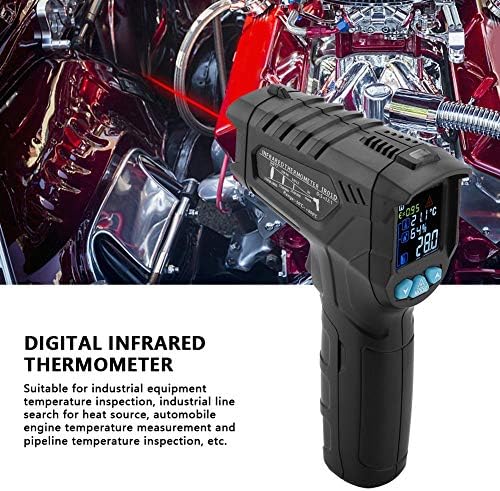
Figure 6.1: The thermometer being held, demonstrating the laser pointer for accurate targeting of the measurement area.
6.2 Ajust de l'emissivitat
Emissivity (E) is a measure of an object's ability to emit infrared energy. Different materials have different emissivity values. The IR01D allows adjustment from 0.1 to 1.0 for accurate readings on various surfaces.
- Amb el dispositiu encès, premeu el botó MODE button until the emissivity (E) indicator flashes on the display.
- Utilitza el UP i ABAIX buttons to adjust the emissivity value. Refer to common emissivity tables for typical materials.
- Premeu el botó MODE button again to confirm the setting and exit emissivity adjustment mode.
6.3 Temperature Difference Alarm
The device features a temperature difference alarm, allowing you to set upper and lower temperature limits. If the measured temperature falls outside these limits, an alarm will sound or an indicator will appear.
- Premeu el botó MODE button repeatedly until the alarm setting mode is active (e.g., HI or LO alarm indicator flashes).
- Utilitza el UP i ABAIX buttons to set the desired high or low temperature limit.
- Continueu prement MODE to set the other limit or exit the alarm setting mode.
6.4 Unit Conversion (Celsius/Fahrenheit)
The IR01D can display temperatures in both Celsius (℃) and Fahrenheit (℉).
- Mentre el dispositiu està encès, premeu el botó MODE button until the temperature unit flashes.
- Utilitza el UP or ABAIX button to toggle between ℃ and ℉.
- Premeu MODE de nou per confirmar.
7. Manteniment
- Neteja: Netegeu el dispositiu amb un drap suau iamp cloth. Do not use abrasive cleaners or solvents. Ensure the lens is clean for accurate readings.
- Emmagatzematge: Store the thermometer in a dry place, away from direct sunlight and extreme temperatures. The recommended storage temperature is -10℃ to 60℃ (14℉ to 140℉).
- Substitució de la bateria: Canvieu les piles quan aparegui l'indicador de bateria baixa a la pantalla. Traieu les piles si no fareu servir el dispositiu durant un període prolongat per evitar fuites.
8. Solució De Problemes
| Problema | Causa possible | Solució |
|---|---|---|
| El dispositiu no s'encén. | Les bateries estan esgotades o instal·lades incorrectament. | Comproveu la polaritat de la bateria. Substituïu-la per piles AAA noves. |
| Lectures inexactes. | Dirty lens; incorrect emissivity setting; target too far or too small. | Clean the lens. Adjust emissivity for the target material. Ensure target fills the measurement spot. |
| Laser not working. | Laser function disabled; device malfunction. | Ensure laser is enabled in settings (if applicable). If not, contact support. |
| Display shows "OL" or "LO". | Temperature is outside the measurement range. | Ensure the target temperature is within -50℃ to 800℃. |
9. Especificacions
| Paràmetre | Valor |
|---|---|
| Model | IR01D |
| Interval de mesura de temperatura | -50 ℃ a 800 ℃ (-58 ℉ a 1472 ℉) |
| Interval de temperatura ambiental | -10 ℃ a 60 ℃ (14 ℉ a 140 ℉) |
| Environment Humidity Range | 0% a 100% HR |
| Relació distància-punt (D:S) | 12:1 |
| Emissivitat | 0.1 a 1.0 (ajustable) |
| Espectre de resposta | 8 a 14 µm |
| Posicionament | 12-point ring indicating temperature sensitive zone |
| Potència làser | <1mW/630-670nm (Class 2) |
| Temps de resposta | <0.5 segons |
| Apagat automàtic | 30 segons (aprox.) |
| Retenció de dades | Sí |
| Temperatura de servei | 0 ℃ a 40 ℃ (32 ℉ a 104 ℉) |
| Temperatura d'emmagatzematge | -10 ℃ a 60 ℃ (14 ℉ a 140 ℉) |
| Font d'alimentació | 2 piles AAA d'1.5 V (no incloses) |
| Pes | Aprox. 204 g (7.2 oz) |
| Dimensions (L x A x A) | Aprox. 140 x 95 x 42 mm (5.5 x 3.7 x 1.7 polzades) |
| Tipus de visualització | LCD (amb llum de fons) |
| Material | Plàstic |
10. Garantia i Suport
Walfront products are designed for reliability and performance. For any questions, technical support, or warranty inquiries, please contact your retailer or visit the official Walfront store for assistance.
Official Walfront Store: Botiga Walfront d'Amazon

