Introducció
This manual provides detailed instructions for the installation, operation, and maintenance of your Topvision Top808 8-Camera 1080P Lite DVR Security System. Please read this manual thoroughly before using the product to ensure proper setup and functionality. Keep this manual for future reference.
The Topvision Top808 system includes an 8-channel 1080P Lite DVR and eight 2MP 1080P bullet cameras, designed for both indoor and outdoor surveillance with night vision capabilities.
Contingut del paquet
Verifiqueu que tots els elements siguin presents al vostre paquet:
- 1x Topvision XDVR-1008 8-Channel 1080P Lite DVR
- 8x Topvision TCB200 2MP 1080P Bullet Cameras (Indoor/Outdoor)
- 8x 18-meter BNC Video/Power Cables
- 1x Power Adapter for DVR
- 1x Power Adapter for Cameras
- 1x 8-way Power Splitter for Cameras
- 1 x ratolí USB
- Manual d'usuari (aquest document)
- Cargols i taps de muntatge per a càmeres

Imatge: Més deview of the Topvision Top808 security system kit, showing the DVR, eight cameras, cables, power adapters, and a mouse. Icons indicate 2MP resolution, indoor/outdoor use, mobile app compatibility, and night vision.
Configuració i instal·lació
1. Hard Drive Installation (Optional, Not Included)
The DVR requires a 3.5-inch SATA hard drive (up to 8TB, WD Purple recommended) for recording. If you plan to record video, install a hard drive before powering on the DVR.
- Desenrosqueu i retireu la coberta superior del DVR.
- Connect the SATA data cable and power cable from the DVR to the hard drive.
- Fixeu el disc dur al xassís del DVR amb els cargols proporcionats.
- Torneu a col·locar la coberta superior i fixeu-la amb cargols.
2. Connecting the DVR

Imatge: Davant i darrere views of the Topvision DVR, highlighting BNC video inputs, audio inputs/outputs, HDMI, VGA, LAN, and USB ports.
- Connectar càmeres: Attach one end of each 18-meter BNC cable to a camera and the other end to a BNC video input port on the back of the DVR.
- Connect Power to Cameras: Connect the camera power cables to the 8-way power splitter, then connect the power splitter to the camera power adapter. Plug the adapter into a power outlet.
- Connecta el monitor: Connect a monitor to the DVR using either an HDMI or VGA cable (cables not included).
- Connecta el ratolí: Connecteu el ratolí USB a un dels ports USB del DVR.
- Connecta la xarxa (opcional): Per a comandament a distància viewing, connect an Ethernet cable from the DVR's LAN port to your router.
- Power On DVR: Connect the DVR power adapter to the DVR and then to a power outlet. The system will boot up.
3. Col·locació de la càmera

Imatge: Primer pla view of multiple Topvision 1080P bullet cameras, emphasizing their 2MP resolution and night vision capabilities for indoor/outdoor use.
- Mount cameras in desired locations, ensuring a clear field of view.
- The cameras are designed for both indoor and outdoor use.
- Adjust the camera angle and focus as needed after installation.
Instruccions de funcionament
1. Assistent de configuració inicial
Upon first boot, the DVR will guide you through an initial setup wizard. Follow the on-screen prompts to:
- Set language, date, and time.
- Create an administrator password.
- Configure network settings (DHCP recommended for ease of use).
- Format the hard drive (if installed).
2. En directe View
Després de la configuració, el DVR mostrarà la imatge en directe view from all connected cameras on the monitor. You can switch between single-camera view, multi-camera view, and sequence display using the on-screen menu or mouse controls.
3. Gravació
The DVR supports continuous recording, scheduled recording, and motion-detection recording. Configure recording settings via the DVR's main menu:
- Vés a Main Menu > Record > Record Schedule to set up recording times.
- Vés a Main Menu > Alarm > Motion Detect to enable and configure motion detection for specific cameras.
4. Reproducció
Per tornarview foo gravattage:
- Vés a Menú principal > Reproducció.
- Select the date and time range, and the cameras you wish to view.
- Use the playback controls (play, pause, fast forward, rewind) to navigate through the footage.
5. Remot Viewing (Mobile App)
To access your security system remotely via a smartphone or tablet:
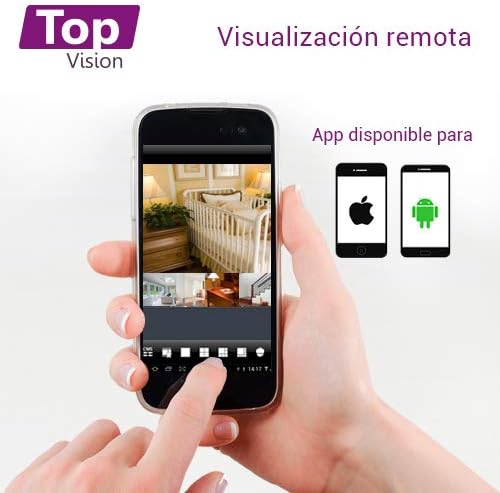
Image: A smartphone screen displaying live camera feeds, illustrating the remote viewing capability of the Topvision security system via a mobile application available for both Android and iOS.
- Ensure the DVR is connected to your network via an Ethernet cable.
- Download a compatible third-party surveillance app (e.g., XMEye, Danale, or similar apps recommended by Topvision support) from your device's app store (Android or iOS).
- Registreu un compte a l'aplicació.
- Add your DVR device to the app using its serial number or QR code (found in the DVR's network settings).
- Un cop afegit, podeu view live feeds, playback recordings, and receive alerts remotely.
Manteniment
- Neteja: Gently wipe cameras and DVR with a soft, dry cloth. Avoid harsh chemicals.
- Actualitzacions de firmware: Periodically check the Topvision website or contact support for available firmware updates to ensure optimal performance and security.
- Estat del disc dur: Monitor the hard drive status through the DVR's menu. Replace if errors are detected.
- Connexions de cable: Periodically inspect all cable connections for secure fit and signs of wear or damage.
Resolució de problemes
- Sense senyal de vídeo:
- Check all BNC cable connections between cameras and DVR.
- Ensure cameras are receiving power from the power adapter and splitter.
- Verify the monitor is correctly connected to the DVR via HDMI/VGA and is set to the correct input.
- DVR Not Recording:
- Confirm a hard drive is installed and properly connected.
- Check if the hard drive has been formatted (Main Menu > HDD > HDD Manage).
- Verify recording schedules are configured correctly (Main Menu > Record > Record Schedule).
- Check hard drive status for errors or full capacity.
- Remot Viewing Not Working:
- Ensure the DVR is connected to the internet via an Ethernet cable.
- Check network settings on the DVR (Menú principal > Xarxa) to ensure it has an IP address.
- Verify the mobile app is correctly configured with the DVR's device ID.
- Check your router's firewall settings if connection issues persist.
- Mala qualitat d'imatge:
- Clean camera lenses if dirty.
- Ensure sufficient lighting for optimal day vision.
- For night vision, ensure no obstructions are blocking the infrared LEDs.
Especificacions
| Component | Especificació |
|---|---|
| DVR Model | XDVR-1008 |
| Entrada de vídeo | 8 Channels (BNC) + 1 IP Channel |
| Resolució de vídeo | 1080P Lite |
| Model de càmera | TCB200 |
| Resolució de la càmera | 2MP (1080P) |
| Lent | 2.8 mm |
| Visió nocturna | LED infrarojos |
| Emmagatzematge | Supports 1x SATA HDD up to 8TB (not included) |
| Sortida de vídeo | HDMI, VGA (simultaneous) |
| Connectivitat | Wired (Ethernet for network) |
| Dimensions (DVR) | 30 x 25 x 7 cm |
| Weight (System) | 5.85 kg |
Informació de la garantia
Topvision products are covered by a limited warranty. Please refer to the warranty card included with your product or visit the official Topvision weblloc web per conèixer els termes i condicions detallats. Conserveu el comprovant de compra per a reclamacions de garantia.
Atenció al client
For technical assistance, troubleshooting, or product inquiries, please contact Topvision customer support. Refer to the contact information provided in your product packaging or on the official Topvision weblloc.
Online resources such as FAQs and video tutorials may also be available on the Topvision support page.


