1. Introducció
This manual provides detailed instructions for the installation, operation, and maintenance of your Anpviz 1080P HD 4-in-1 Analog CCTV Dome Turret Security Camera. Please read this manual thoroughly before using the product to ensure proper functionality and safety.
1.1 Producte acabatview
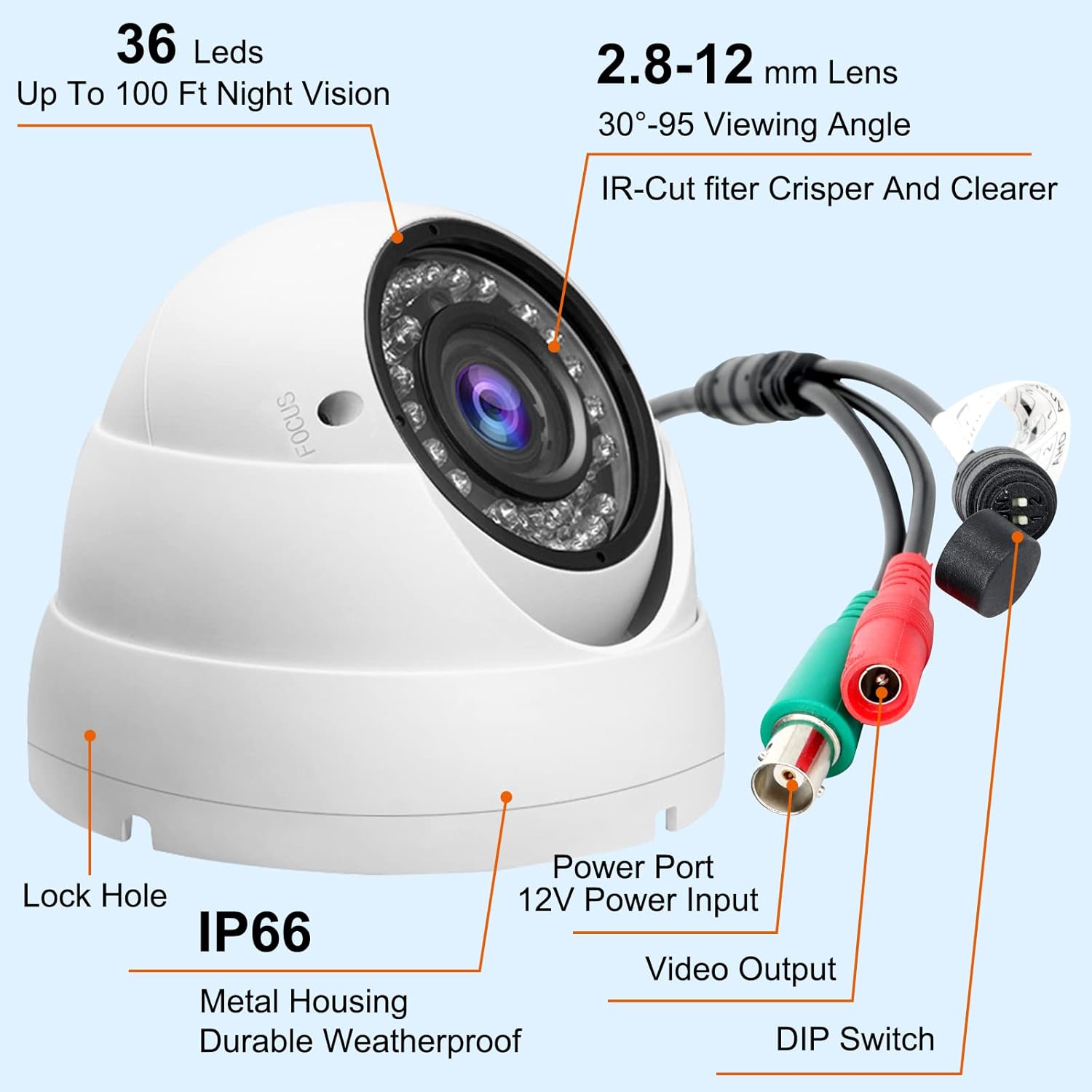
The Anpviz HD-D3222B is a versatile 1080P HD dome camera designed for both indoor and outdoor surveillance. It supports four different video output formats (TVI, AHD, CVI, and 960H CVBS) and features a 2.8-12mm manual varifocal lens for adjustable focus and zoom. Equipped with 36 IR-LEDs, it provides clear night vision up to 100 feet. Its IP66-rated full-metal housing ensures durability in various weather conditions.
1.2 Què hi ha a la caixa
- 1 x Anpviz 2MP Analog CCTV Camera
- 1 x Manual d'usuari ràpid
- 1 x Zoom Adjust Tool
- 1 x cargols
- 1 x Targeta postvenda

The package includes the Anpviz 2MP Analog CCTV Camera, a quick user manual, a zoom adjustment tool, mounting screws, and an after-sale service card.
This video provides an unboxing and initial overview of the Anpviz 2MP 1080p CCTV Security Camera (AC3222), showcasing the camera and its included accessories.
2. Configuració i instal·lació
2.1 Components i connexions de la càmera
Familiarize yourself with the camera's components and connection points before installation.

This image illustrates the key features and connection points of the Anpviz dome camera, including the 36 IR LEDs for night vision, the 2.8-12mm varifocal lens, the IP66 weatherproof metal housing, the power input, video output, and the DIP switch for video format selection.
2.2 Video Output Mode Switching
The camera supports TVI, AHD, CVI, and 960H CVBS video formats. The default mode is 2MP TVI. To switch between modes, use the DIP switch located on the camera's cable. Ensure your DVR is compatible with the selected video format.

This image details how to switch the video output mode using the DIP switch. Each mode (TVI, AHD, CVI, 960H CVBS) has a specific switch configuration. Connect the power cable, move the joystick (DIP switch) in the right direction, and press for 5 seconds to confirm the change.
This video demonstrates how to connect the Anpviz analog camera to a DVR system and switch between different video output modes (TVI, CVI, AHD, CVBS) using the DIP switch for compatibility.
2.3 Muntatge de la càmera
The camera can be mounted on a wall or ceiling. Use the provided screws and mounting template for secure installation.

The Anpviz dome camera supports both wall and ceiling mounting. Ensure the mounting surface is stable and use appropriate hardware for secure installation.
This video provides a visual guide on how to mount the Anpviz analog camera securely on a surface.
3. Funcionament
3.1 Manual Focus and Zoom Adjustment
The camera features a 2.8-12mm varifocal lens, allowing for manual adjustment of focus and optical zoom (1X-4X). Use the included zoom adjust tool to fine-tune the view.

To achieve a clear image, manually adjust the focus ring. For wider or narrower views, rotate the zoom ring. The camera offers 1X to 4X optical zoom.

The 4X varifocal lens allows for flexible viewing angles. At 1X (2.8mm), the camera provides a 110° view. Zooming in to 4X (12mm) narrows the view to 36°, providing more detail for distant objects.
3.2 Day and Night Vision
The camera automatically switches between day and night modes. With 36 IR-LEDs, it provides clear black and white images in low-light conditions up to 100 feet.

The camera provides clear, colorful images during the day. In low-light conditions, it automatically activates its infrared night vision, offering clear black and white surveillance up to 98 feet.

This comparison highlights the camera's ability to capture full-color video during the day and automatically switch to infrared night vision for clear monochrome images in darkness.
4. Manteniment
4.1 Disseny resistent a la intempèrie
The Anpviz camera features an IP66 weatherproof full-metal housing, protecting it from dust, sand, rain, and snow. This design ensures reliable operation in various outdoor environments, with an operating temperature range of -4°F to 140°F (-20°C to 60°C).
The camera's robust IP66-rated housing makes it suitable for both indoor and outdoor use, capable of withstanding harsh weather conditions like rain and snow.

The camera's durable full-metal housing and IP66 waterproof rating allow it to function reliably in diverse environments, from indoor offices to outdoor settings with temperatures ranging from -4°F to 140°F.
4.2 Neteja
To maintain optimal image quality, periodically clean the camera lens with a soft, dry cloth. Avoid using harsh chemicals or abrasive materials that could damage the lens or housing.
5. Solució De Problemes
If you encounter issues with your Anpviz camera, refer to the following common troubleshooting steps:
- Sense senyal de vídeo:
- Ensure the camera is properly powered and connected to the DVR.
- Verify that the video output mode (TVI/AHD/CVI/CVBS) is correctly set using the DIP switch to match your DVR.
- Comproveu totes les connexions dels cables per si hi ha fluïdesa o danys.
- Confirm your DVR supports 1080P resolution for HD modes.
- Mala qualitat d'imatge:
- Adjust the manual focus and zoom on the camera lens until the image is clear.
- Clean the camera lens if it appears dirty or smudged.
- Ensure adequate lighting for optimal performance, especially in low-light conditions.
- Problemes de visió nocturna:
- Check for obstructions blocking the IR-LEDs.
- Ensure the camera is receiving sufficient power.
- Verify that the IR-cut filter is functioning correctly (you should hear a click when it switches between day/night mode).
- La càmera no s'encén:
- Confirm the power adapter is correctly connected and providing 12V DC power.
- Test the power adapter with another device if possible, or try a different compatible power adapter.
6. Especificacions
Detailed technical specifications for the Anpviz HD-D3222B camera:
| Característica | Detall |
|---|---|
| Nom del model | Anpviz Analog CCTV Camera 1080P HD 4-in-1(TVI/AHD/CVI/960H CVBS) |
| Número de model de l'article | HD-D3222B |
| Resolució de captura de vídeo | 1080p |
| Resolució de fixes efectius | 2 MP |
| Tecnologia de connectivitat | TVI/AHD/CVI/960H CVBS |
| Protocol de connectivitat | TVI/AHD/CVI/960H CVBS 4 in 1 |
| Lent | Varifocal de 2.8-12 mm |
| Zoom òptic | 4x |
| Tipus d'enfocament | Enfocament manual |
| Viewangle ing | 110 Degrees (at 2.8mm) |
| Gamma de visió nocturna | 100 Feet (36 IR-LEDs) |
| Ús interior/exterior | Interior, Exterior |
| Classificació de protecció internacional | Impermeable IP66 |
| Material | Full-Metal |
| Font d'alimentació | Corded Electric, DC 12V |
| Voltage | 110 volts (CA) |
| Wattage | 5 watts |
| Temperatura de funcionament | -4 °F a 140 °F (-20 °C a 60 °C) |
| Dimensions de l'article (L x A x A) | 10 x 10 x 8.5 polzades |
| Pes de l'article | 1.45 lliures |
| Fabricant | Anpviz |
7. Garantia i Suport
Anpviz is committed to providing reliable security solutions. For any issues or support needs, please contact us immediately.
- Suport per correu electrònic: support@AnpvizSecurity.com
- Weblloc: www.anpvizsecurity.com
- Suport telefònic: 008613902436139
- Xarxes socials:
- Facebook: @AnpvizSecurity
- Twitter: @AnpvizTech
- YouTube: Anpvizsupport
Anpviz was established in 2014 and focuses on customer satisfaction and innovation, providing convenient and reliable security protection.


