Introducció
This manual provides comprehensive instructions for the safe and efficient operation of your OneDer V6 Wireless Portable Bluetooth Speaker. The OneDer V6 is a versatile audio device featuring Bluetooth connectivity, an integrated microphone for hands-free calls, and support for various media inputs including TF card, USB drive, AUX, and FM radio. It also includes clock and alarm functions, powered by a rechargeable Li-ion battery.
Please read this manual thoroughly before using the product to ensure proper usage and to maximize its lifespan.
Producte acabatview

Figura 1: Angle frontal view of the OneDer V6 Bluetooth Speaker, showcasing el seu vintage design and front grille.
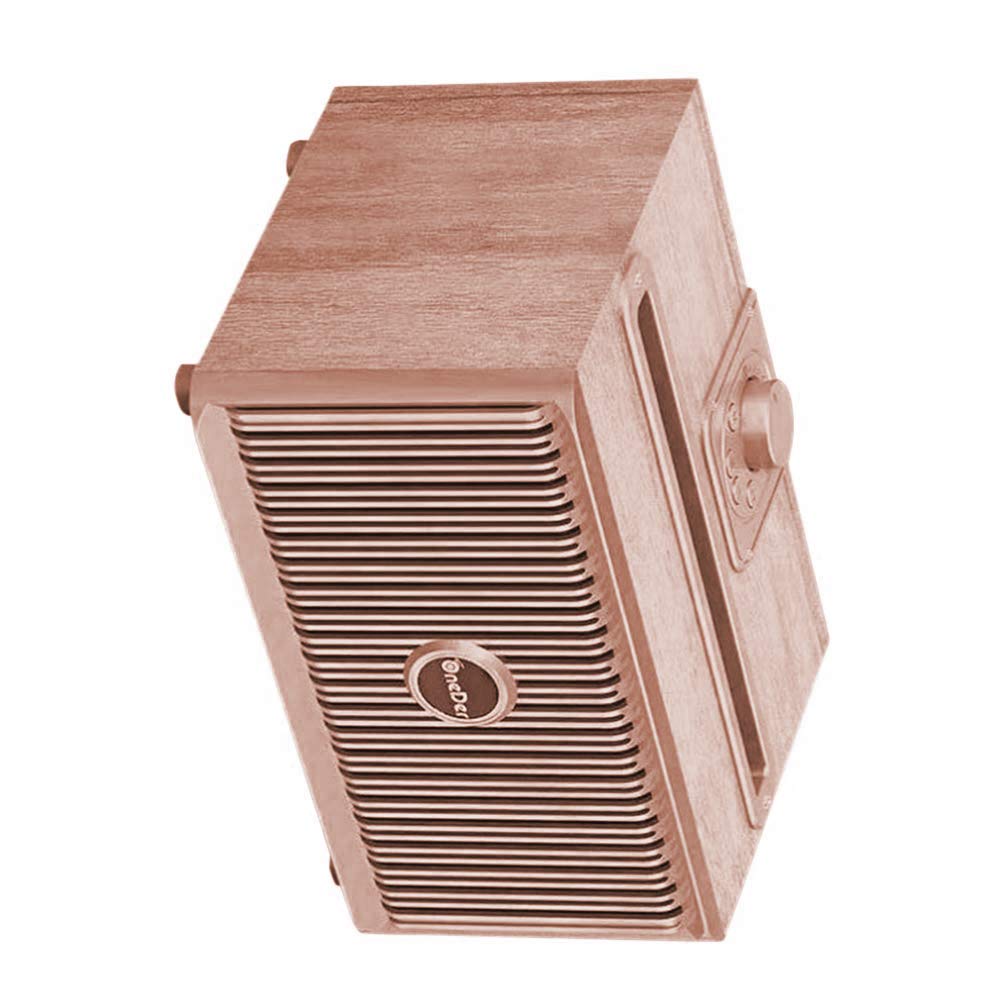
Figura 2: Angle de dalt a baix view of the OneDer V6 Bluetooth Speaker, highlighting the control knob and top slot.
Característiques principals:
- Connectivitat sense fil Bluetooth: Connecta't perfectament als teus dispositius.
- Micròfon integrat: Permet trucades amb mans lliures.
- Multi-Input Support: Play audio from TF Card, USB drive, AUX input, and FM radio.
- Clock and Alarm Functions: Added utility for daily use.
- Bateria recarregable: Built-in Li-ion battery for portable use.
- Càrrega micro USB: Convenient charging port.
- Temps de joc ampliat: Provides 4-8 hours of audio playback on a single charge.
- Vintage Collection Design: Estèticament agradableasindisseny g.
Contingut del paquet
Upon opening the package, verify that all items are present and in good condition. The standard package for the OneDer V6 speaker typically includes:
- OneDer V6 Wireless Portable Bluetooth Speaker
- Cable de càrrega micro USB
- Manual d'usuari (aquest document)
- (Optional: AUX cable, depending on specific package variant)

Figure 3: The OneDer V6 speaker alongside its retail packaging, demonstrating the product's presentation.
Configuració
1. Carregant l’altaveu
Before first use, fully charge the speaker. Connect the provided Micro USB charging cable to the speaker's charging port and the other end to a USB power adapter (not included) or a computer's USB port. The charging indicator light will illuminate during charging and turn off or change color when fully charged.
Port de càrrega: Micro USB
Charging Time: Approximately 2-3 hours (may vary).
2. Encès / apagat
To power on the speaker, press and hold the Power button (location typically on the back or top panel) for a few seconds until you hear an audible prompt or see an indicator light. To power off, repeat the same action.
3. Emparellament Bluetooth
- Assegureu-vos que l'altaveu estigui encès i en mode d'emparellament Bluetooth. Normalment, l'indicador lluminós Bluetooth parpellejarà ràpidament.
- Al dispositiu mòbil (telèfon intel·ligent, tauleta, etc.), activeu el Bluetooth i cerqueu els dispositius disponibles.
- Select "OneDer V6" from the list of found devices.
- Un cop emparellat, l'altaveu emetrà una confirmació audible i el llum indicador de Bluetooth s'il·luminarà fixament.
- Si se us demana una contrasenya, introduïu "0000" (quatre zeros).
The speaker will automatically attempt to reconnect to the last paired device when powered on, if that device is within range and has Bluetooth enabled.
Instruccions de funcionament
1. Mode Bluetooth
After successful pairing, you can play audio from your connected device. Use your device's controls for playback (play/pause, next/previous track) and volume adjustment. The speaker may also have physical buttons for these functions.
Trucades mans lliures: When a call comes in, press the Play/Pause button to answer. Press again to end the call. Press and hold to reject a call.
2. TF Card / USB Drive Mode
Insert a TF (MicroSD) card or USB flash drive into the corresponding slot on the speaker. The speaker will automatically switch to the appropriate mode and begin playing audio files (MP3, WAV, etc.) stored on the media.
- Utilitza el Següent/Anterior botons per navegar per pistes.
- Utilitza el Reproduir/Pausa botó per controlar la reproducció.
3. Mode AUX
Connect an external audio device (e.g., MP3 player, laptop) to the speaker's AUX input port using a 3.5mm audio cable (not included). The speaker will automatically switch to AUX mode. Control playback and volume from the connected device.
4. Mode de ràdio FM
Switch the speaker to FM radio mode (often by pressing a "Mode" button). For best reception, extend the antenna if available, or ensure the charging cable is connected as it can act as an antenna.
- Escaneig automàtic: Premeu i manteniu premut el botó Reprodueix/Pausa per iniciar una cerca automàtica d'emissores de FM disponibles. L'altaveu desarà les emissores detectades.
- Sintonització: Use the Next/Previous buttons to switch between saved stations.
5. Funcions de rellotge i alarma
Refer to the specific button layout on your speaker for setting the clock and alarm. Typically, there will be dedicated buttons or a combination of existing buttons used for these functions. Consult the quick start guide often included with the product for precise instructions on setting time and alarms.
Manteniment
- Neteja: Use a soft, dry cloth to clean the speaker's surface. Do not use abrasive cleaners, alcohol, or chemical solvents, as these may damage the finish.
- Emmagatzematge: Quan no l'utilitzeu durant períodes prolongats, guardeu l'altaveu en un lloc fresc i sec, allunyat de la llum solar directa i de temperatures extremes.
- Cura de la bateria: Per allargar la durada de la bateria, eviteu descarregar-la completament amb freqüència. Carregueu l'altaveu regularment, fins i tot si no l'esteu fent servir, per mantenir la bateria en bon estat.
- Resistència a l'aigua: The product is listed as "Is Waterproof: TRUE" in specifications. However, this typically refers to splash resistance (e.g., IPX4) and not full submersion. Avoid exposing the speaker to heavy rain or submerging it in water. Always ensure charging port covers are securely closed if present.
Resolució de problemes
| Problema | Causa possible | Solució |
|---|---|---|
| L'altaveu no s'encén. | Bateria baixa. | Carregueu l'altaveu completament. |
| No es pot emparellar per Bluetooth. | L'altaveu no està en mode d'emparellament; el Bluetooth del dispositiu està desactivat; massa lluny. | Ensure speaker is in pairing mode. Turn Bluetooth on/off on your device. Move devices closer. |
| Sense so. | Volume too low; incorrect mode; media issue. | Increase volume on speaker and device. Ensure correct mode (BT, AUX, TF, USB). Check media files. |
| La recepció de ràdio FM és deficient. | Weak signal; no antenna. | Relocate the speaker. Ensure charging cable is connected (acts as antenna). Perform auto-scan again. |
| Speaker freezes or becomes unresponsive. | Error de programari. | Press and hold the Power button for 10-15 seconds to force a restart. If issue persists, allow battery to fully drain then recharge. |
Especificacions
| Nom del model | OneDer V6 |
| Marca | OneDer |
| Tipus d'altaveu | Subwoofer |
| Característica especial | Radio, Subwoofer |
| Usos recomanats | A l'aire lliure |
| Dispositius compatibles | Smartphone, tauleta |
| Color | Bronze |
| Durada de la bateria | 8 hores |
| Impermeable | TRUE (Note: Typically splash resistant, not submersible) |
| Tecnologia de connectivitat | Auxiliary, Bluetooth, USB, Wireless |
| Mode de sortida d'àudio | estèreo |
| Tipus de muntatge | Muntatge de taula |
| Pes de l'article | 1 kg 60 g |
| Dimensions del paquet | 21.4 x 15.6 x 12.9 cm |
Garantia i Suport
Specific warranty information for the OneDer V6 Wireless Portable Bluetooth Speaker is not provided within this manual. For details regarding warranty coverage, return policies, or technical support, please refer to the product packaging, the retailer's website where the product was purchased, or contact OneDer customer service directly.
Es recomana conservar el tiquet de compra com a comprovant de compra per a qualsevol reclamació de garantia.


