Introducció
This manual provides detailed instructions for the proper use and maintenance of your OneDer V06 Bluetooth Speaker. Please read this manual thoroughly before operating the device to ensure optimal performance and longevity. The OneDer V06 is a versatile audio device featuring Bluetooth connectivity, FM radio, USB/TF card playback, a digital clock, and an integrated mobile stand.
Informació important de seguretat
- No exposeu el dispositiu a temperatures extremes, llum solar directa ni humitat elevada.
- Eviteu deixar caure o sotmetre el dispositiu a forts impactes.
- No desmunteu ni intenteu reparar el dispositiu vosaltres mateixos. Envieu totes les tasques de manteniment a personal qualificat.
- Mantingueu el dispositiu allunyat de l'aigua i altres líquids.
- Feu servir només el cable de càrrega i l'adaptador de corrent especificats.
- Eliminar les bateries segons la normativa local.
Contingut del paquet
Si us plau, comproveu el paquet per veure si hi ha els elements següents:
- OneDer V06 Bluetooth Speaker
- Cable de càrrega USB
- Cable d'àudio (AUX)
- Manual d'usuari (aquest document)
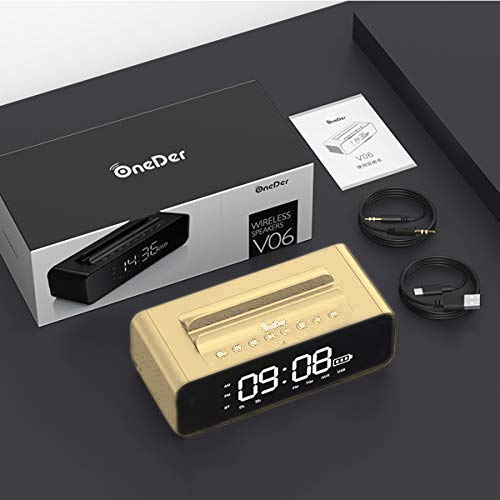
Image: The OneDer V06 speaker, USB charging cable, and audio cable neatly packaged in its box, alongside the user manual.
Producte acabatview
Familiarize yourself with the various parts and controls of your OneDer V06 speaker.
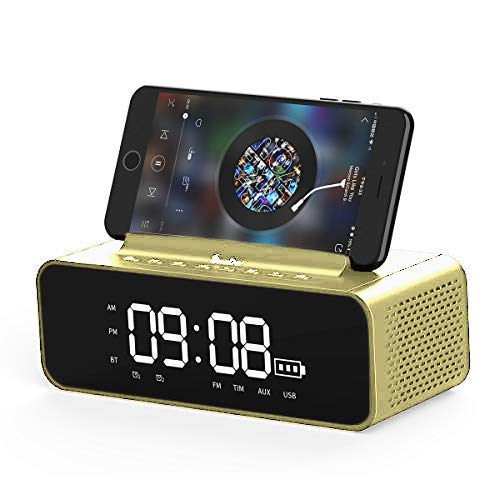
Imatge: Frontal view of the OneDer V06 Bluetooth Speaker in gold, displaying the digital clock, battery indicator, and a mobile phone placed in its integrated stand.
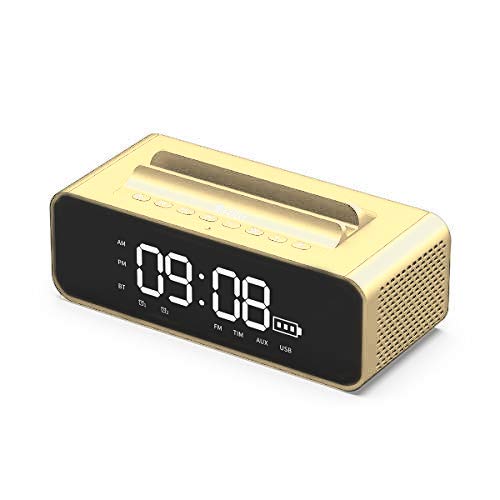
Imatge: Frontal view of the OneDer V06 Bluetooth Speaker in gold, showing the digital clock display and control buttons on top, without a phone in the stand.
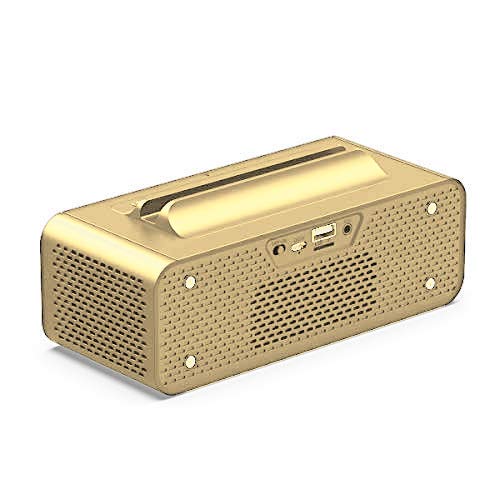
Imatge: Part posterior view of the OneDer V06 Bluetooth Speaker, highlighting the various input ports including USB, TF card slot, and AUX input.
Botons de control (panell superior)
- Botó d'encesa: Press and hold to power on/off. Short press to switch modes (Bluetooth, FM, AUX, USB/TF).
- Botó Reproduir/Pausa: Play or pause audio. In FM mode, short press to auto-scan stations.
- Pujar volum (+)/Pista següent: Short press for next track/station. Long press to increase volume.
- Baixar volum (-)/Pista anterior: Short press for previous track/station. Long press to decrease volume.
- M Button (Mode/Menu): Short press to cycle through modes. Long press to enter clock/alarm settings.
Ports del panell posterior
- Port USB: For USB flash drive playback or charging external devices (if supported).
- Ranura per a targetes TF: For TF/MicroSD card playback.
- Entrada AUX: Per connectar dispositius d'àudio externs mitjançant un cable d'àudio de 3.5 mm.
- Port de càrrega DC 5V: Per carregar la bateria interna de l'altaveu.
Configuració
1. Carregant l’altaveu
- Connect the provided USB charging cable to the DC 5V charging port on the rear of the speaker.
- Connecteu l'altre extrem del cable USB a un adaptador de corrent USB (no inclòs) o al port USB d'un ordinador.
- The charging indicator on the display will show charging status. A full charge typically takes 3-4 hours.
- Desconnecteu el cable un cop carregat completament per estalviar bateria.
2. Encès / apagat
- Per encendre, premeu i manteniu premut Botó d'engegada fins que la pantalla s'il·lumini.
- Per apagar-lo, manteniu premut el botó Botó d'engegada de nou fins que la pantalla s'apagui.
3. Configuració del rellotge
- En qualsevol mode, premeu llargament el botó Botó M to enter clock setting mode. The hour digits will flash.
- Utilitza el Puja el volum (+) i Baixar el volum (-) botons per ajustar l'hora.
- Premeu breument Botó M to switch to minute setting. The minute digits will flash.
- Utilitza el Puja el volum (+) i Baixar el volum (-) botons per ajustar els minuts.
- Premeu breument Botó M again to confirm and exit clock setting.
Instruccions de funcionament
1. Mode Bluetooth
- Power on the speaker. It will automatically enter Bluetooth pairing mode, indicated by a flashing "BT" icon on the display.
- Al dispositiu mòbil, activeu el Bluetooth i cerqueu els dispositius disponibles.
- Selecciona "OneDer V06" de la llista.
- Once paired, the "BT" icon will stop flashing and a confirmation tone may sound.
- You can now play audio from your device through the speaker. Use the speaker's Reproduir/Pausa, Pista següent/anterior, i Volum botons per controlar la reproducció.
2. Mode de ràdio FM
- Premeu breument Botó d'engegada or Botó M to switch to FM mode. The display will show "FM" and a frequency.
- To auto-scan and save available stations, short press the Botó Reproduir/Pausa. The speaker will scan and store stations automatically.
- Utilitza el Pista següent/anterior botons per navegar entre les emissores desades.
- For better reception, ensure the speaker is placed in an open area.
3. Reproducció de targetes USB/TF
- Insert a USB flash drive or TF (MicroSD) card into the corresponding slot on the rear panel.
- L'altaveu canviarà automàticament al mode USB o targeta TF i començarà a reproduir àudio files. If not, short press the Botó d'engegada or Botó M per seleccionar el mode correcte.
- Utilitza el Reproduir/Pausa, Pista següent/anterior, i Volum botons per controlar la reproducció.
4. Mode d'entrada AUX
- Connecteu un extrem del cable d'àudio de 3.5 mm al port d'entrada AUX de l'altaveu.
- Connect the other end to the headphone jack of your external audio device (e.g., MP3 player, laptop).
- Premeu breument Botó d'engegada or Botó M to switch to AUX mode. The display may show "AUX".
- Controla la reproducció i el volum des del teu dispositiu d'àudio extern.
5. Using the Mobile Stand
The integrated groove on top of the speaker serves as a convenient stand for your smartphone or small tablet, allowing for hands-free viewing while enjoying audio.
Image: The OneDer V06 speaker with a smartphone securely placed in its top-mounted stand, demonstrating its dual functionality.
6. Configuració d'una alarma
- Premeu llargament el botó Botó M to enter clock setting mode. Continue pressing Botó M until the alarm time digits flash (e.g., "AL").
- Utilitza el Puja el volum (+) i Baixar el volum (-) botons per ajustar l'hora de l'alarma.
- Premeu breument Botó M to switch to alarm minute setting.
- Utilitza el Puja el volum (+) i Baixar el volum (-) botons per ajustar els minuts de l'alarma.
- Premeu breument Botó M again to confirm and activate the alarm. An alarm icon may appear on the display.
- To disable the alarm, repeat the process and set the alarm time to "--:--" or press a specific button (refer to device display for specific icon).
Manteniment
- Neteja: Use a soft, dry cloth to wipe the surface of the speaker. Do not use abrasive cleaners, alcohol, or chemical solvents.
- Emmagatzematge: Quan no l'utilitzeu durant períodes prolongats, guardeu l'altaveu en un lloc fresc i sec, allunyat de la llum solar directa i de temperatures extremes.
- Cura de la bateria: Per allargar la durada de la bateria, eviteu descarregar-la completament amb freqüència. Carregueu el dispositiu regularment, fins i tot si no l'esteu fent servir.
Resolució de problemes
| Problema | Causa possible | Solució |
|---|---|---|
| L'altaveu no s'encén. | Bateria baixa. | Carregueu l'altaveu durant almenys 30 minuts. |
| Sense so. | Volume too low; incorrect mode; device not paired. | Increase volume. Ensure correct mode is selected. Re-pair Bluetooth device. |
| L'aparellament de Bluetooth falla. | L'altaveu no està en mode d'emparellament; el dispositiu és massa lluny; interferències. | Ensure speaker is in Bluetooth mode and "BT" is flashing. Move devices closer. Turn off other Bluetooth devices. |
| La recepció de ràdio FM és deficient. | Senyal feble; interferències ambientals. | Relocate the speaker to an open area. Perform auto-scan again. |
| La targeta USB/TF no funciona. | Incorrecte file format; card not inserted correctly; corrupted files. | Assegureu-vos files are in supported formats (MP3/WAV/WMA). Reinsert card. Try another card/USB drive. |
Especificacions
| Característica | Detall |
|---|---|
| Model | OneDer V06 |
| Versió sense fil | 4.2 |
| Suport Profile | MP3/WMA/WAV |
| abast sense fils | 10 metres |
| Bateria | 2400 mAh |
| Sortida de l'altaveu | 2 x 5W (10W en total) |
| Font d'alimentació | Battery, AC (via USB charging) |
| Material | Metall |
| Tipus de visualització | Digital |
| Característiques especials | Bluetooth, Wireless, FM Radio, USB/TF Card Playback, Mobile Stand, Digital Clock, Alarm Clock |
| Dimensions del producte | L180mm x W78mm x H73mm (approx.) |
| Pes del producte | 632 g (aprox.) |
| Dimensions del paquet | 23.6 x 11.2 x 8.3 cm |
| Pes de l'article (paquet) | 880 g |
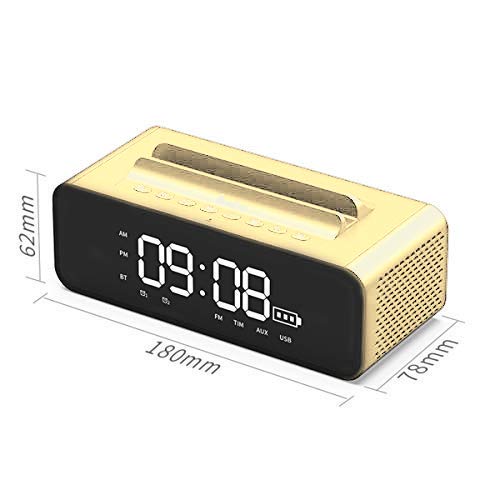
Image: Diagram illustrating the dimensions of the OneDer V06 Bluetooth Speaker: 180mm length, 78mm width, and 62mm height.
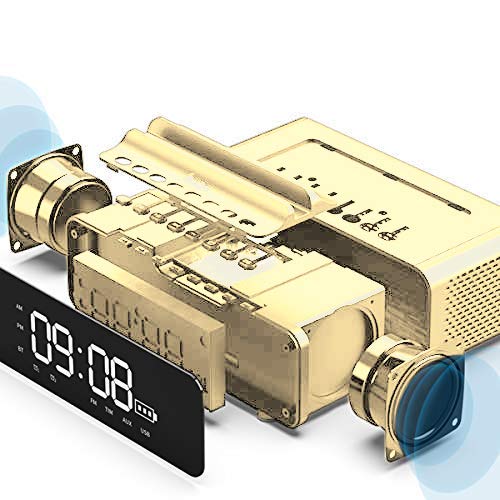
Image: An exploded diagram showing the internal components of the OneDer V06 speaker, including the main circuit board, battery, and speaker drivers.
Garantia i Suport
The OneDer V06 Bluetooth Speaker comes with a standard manufacturer's warranty. Please refer to the warranty card included in your package for specific terms and conditions, including warranty duration and coverage details.
For technical support, troubleshooting assistance, or warranty claims, please contact OneDer customer service through the contact information provided on the product packaging or the official OneDer weblloc.
Nota: Conserveu el tiquet de compra com a comprovant de compra a efectes de garantia.


