1. Configuració
1.1 Desembalatge
Carefully unpack all components from the box. Ensure all items listed in the package contents are present and undamaged.

Figure 1: Package Contents. Includes the A03 amplifier, user manual, DC 24V power adapter, and Bluetooth antenna.
1.2 Connectar altaveus
Connect your passive speakers to the speaker output terminals on the rear panel of the A03 amplifier. Ensure correct polarity (red to red, black to black) for optimal sound quality.
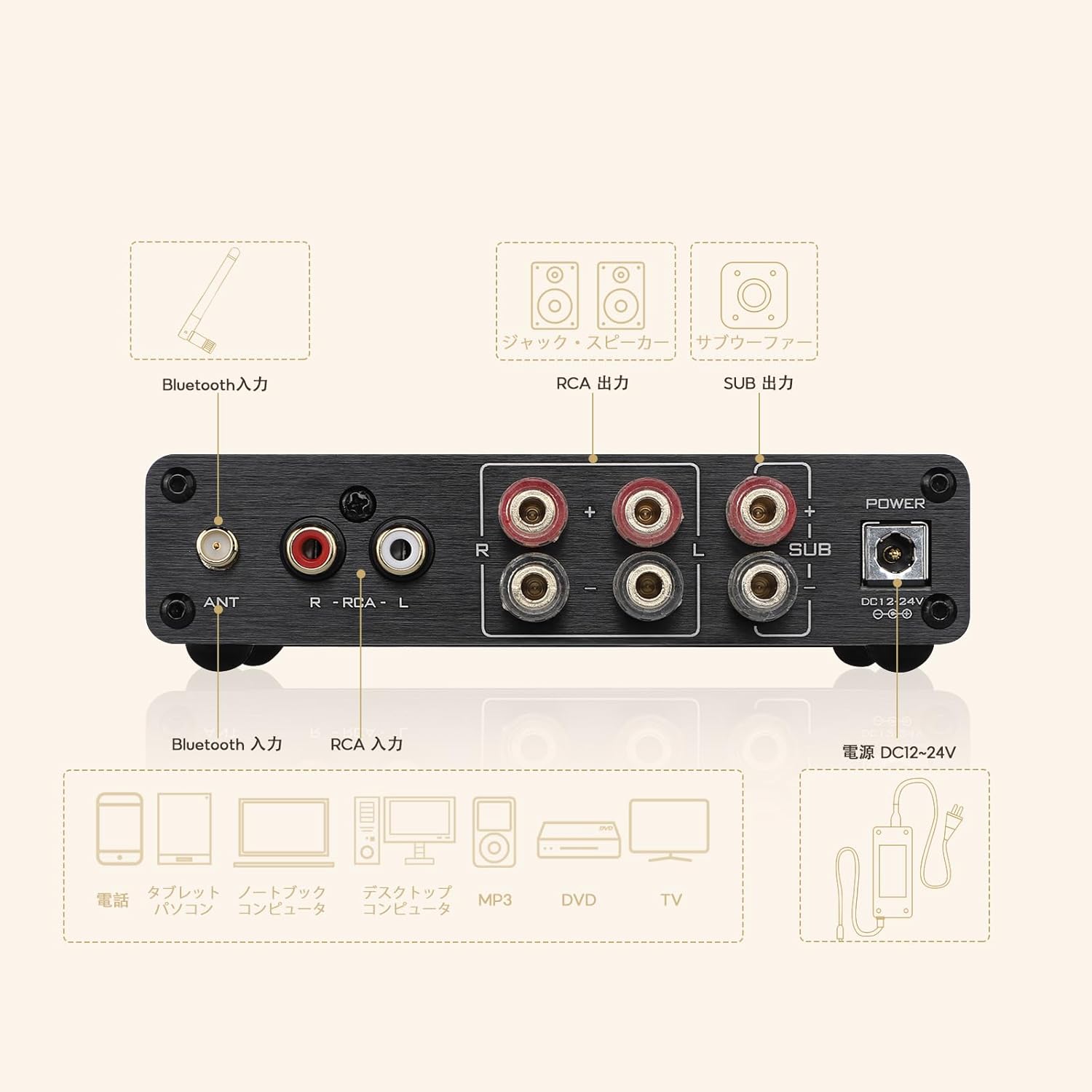
Figure 2: Rear Panel Connections. Speaker terminals are located on the right side of the rear panel.
1.3 Connecting Audio Input
The AIYIMA A03 supports two input modes: AUX (wired) and Bluetooth (wireless).
- Entrada AUX: Connect your audio source (e.g., CD player, PC, smartphone via 3.5mm to RCA cable) to the RCA input jacks labeled 'RCA' on the rear panel.
- Entrada Bluetooth: For wireless connection, ensure the Bluetooth antenna is securely attached to the 'ANT' connector on the rear panel.
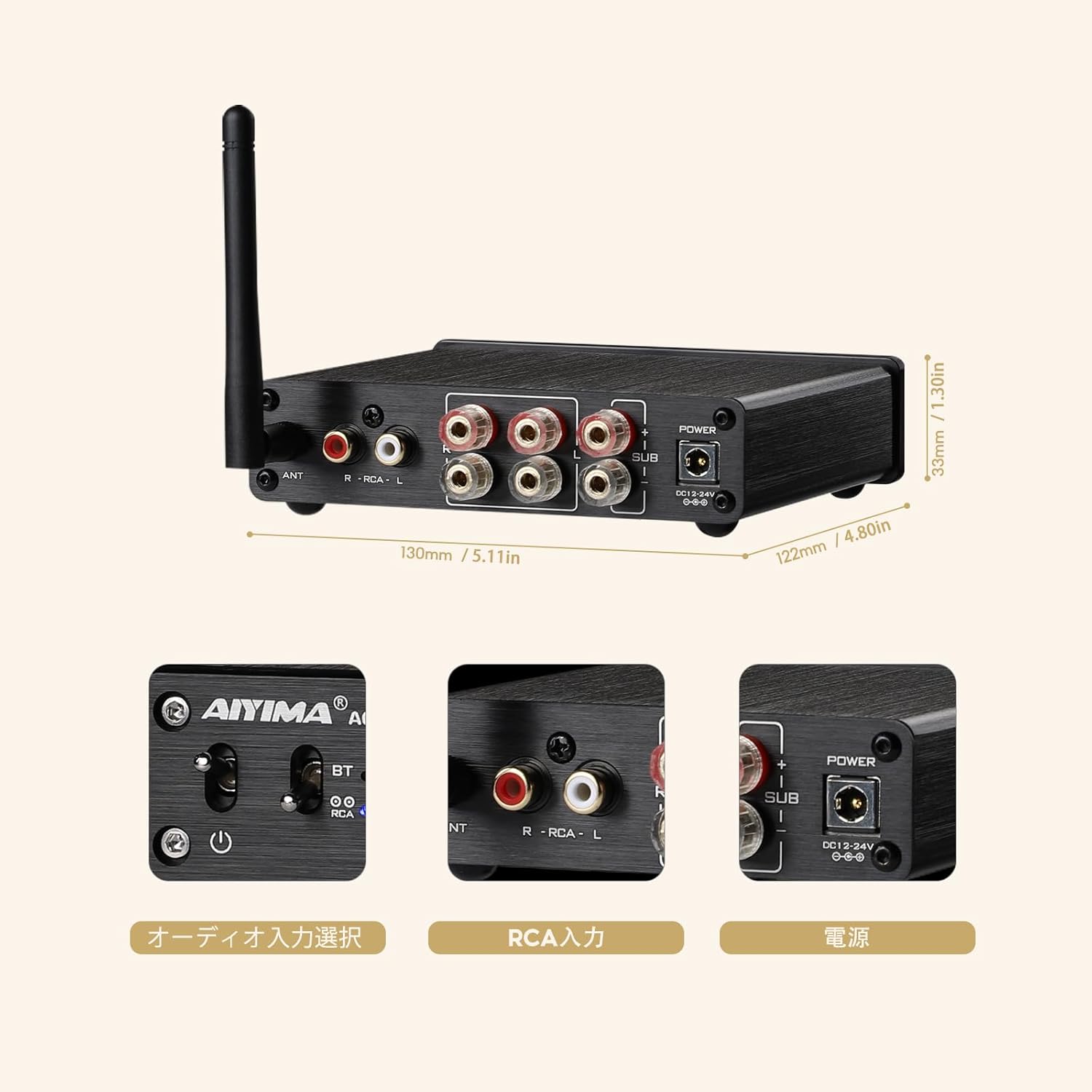
Figura 3: lateral View highlighting input and output ports. The RCA input and Bluetooth antenna port are visible.
1.4 Connexió de potència
Connect the provided DC 24V power adapter to the 'DC 12-24V' power input jack on the rear panel. Then, plug the power adapter into a suitable wall outlet.
Video 1: AIYIMA D03 Ampmés viuview. This video demonstrates the connections and features of the AIYIMA D03, a similar 2.1 channel amplifier. Please note that some features or port layouts may differ slightly from the A03 model.
2. Funcionament
2.1 Encès/Apagat
Locate the power switch on the front panel. Flip the switch to the 'ON' position to power on the amplifier. The status indicator light will illuminate. Flip to 'OFF' to power down.
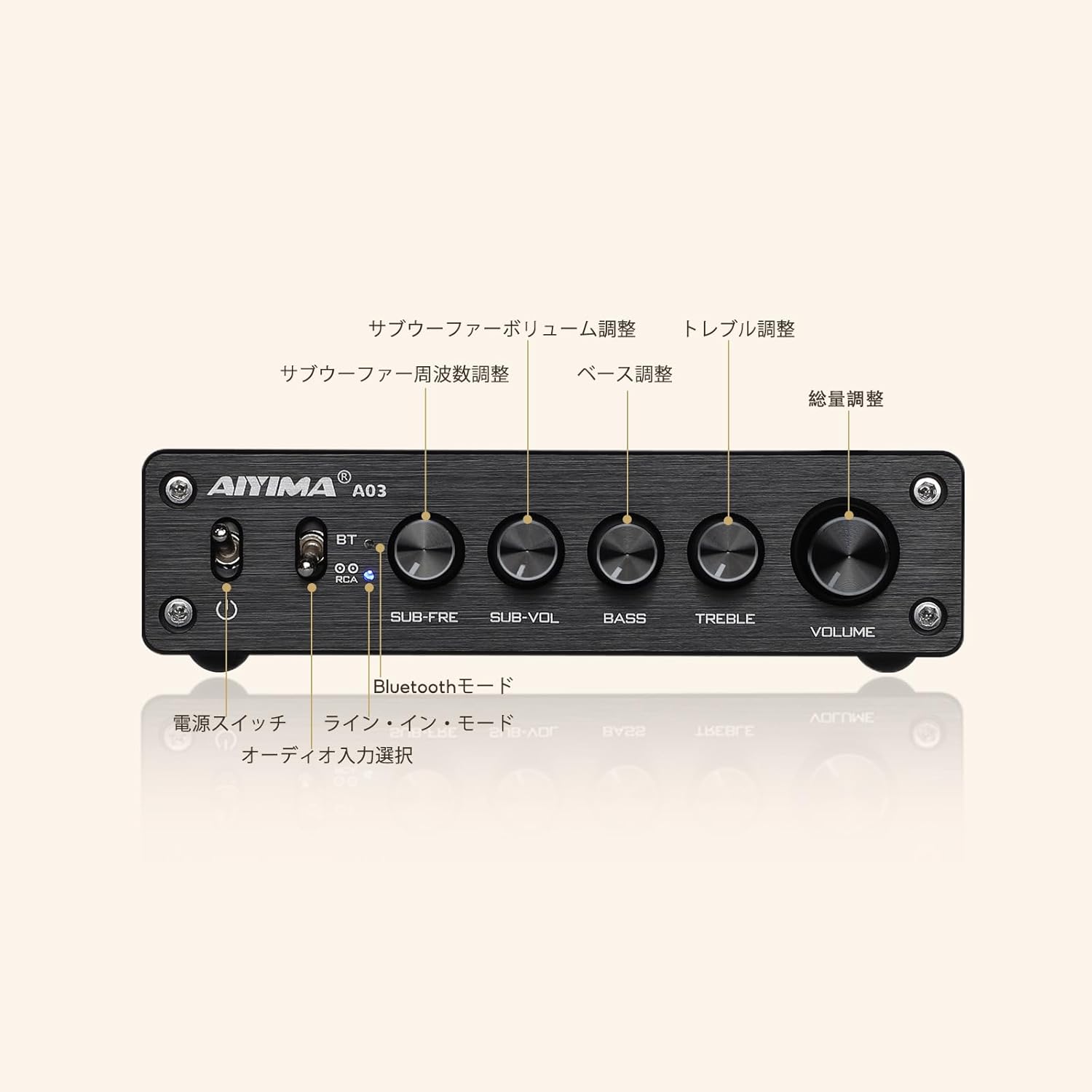
Figure 4: Front Panel Controls. The power switch is on the far left.
2.2 Selecció d'entrada
Use the input selector switch on the front panel to choose between 'BT' (Bluetooth) and 'RCA' (AUX wired input).
2.3 Control de volum
Adjust the main 'VOLUME' knob on the front panel to control the overall output level of the ampmés viu.
Control de 2.4 tons
L'A03 amplifier features several tone control knobs:
- BAIX: Ajusta la resposta de baixa freqüència.
- AGUTS: Ajusta la resposta d'alta freqüència.
- SUB-VOL: Controls the volume level of the connected subwoofer.
- SUB-FRE: Adjusts the crossover frequency for the subwoofer output.
2.5 Vinculació Bluetooth
1. Switch the input selector to 'BT'. The status indicator light will blink, indicating it's in pairing mode.
2. On your audio device (e.g., smartphone, tablet), enable Bluetooth and search for 'BT HIFI AUDIO'.
3. Select 'BT HIFI AUDIO' to connect. The status indicator light will turn solid blue once connected.
4. If you need to connect a new device or clear the current pairing, press and hold the 'VOLUME' knob for 5 seconds until the light blinks again.
3. Manteniment
To ensure the longevity and optimal performance of your AIYIMA A03 amplificador, seguiu aquestes pautes de manteniment:
- Neteja: Utilitzeu un drap suau i sec per netejar l'exterior amplifier. Avoid using liquid cleaners or solvents, as they may damage the finish or internal components.
- Col·locació: Col·loca el amplifier in a well-ventilated area, away from direct sunlight, heat sources, and moisture. Ensure there is adequate space around the unit for proper airflow.
- Manipulació: Manejar el ampl'electrodomèstic amb cura. Eviteu deixar-lo caure o sotmetre'l a impactes forts.
- Apagar: When not in use for extended periods, power off the amplifier and disconnect it from the power outlet.
4. Solució De Problemes
If you encounter any issues with your AIYIMA A03 amplifier, consulteu els següents problemes i solucions habituals:
- Sense so:
- Assegureu-vos el amplifier is powered on and the status indicator light is active.
- Check all cable connections (audio input, speaker output, power) for secure fit and correct polarity.
- Verify the correct input mode (BT or RCA) is selected.
- Augmenta el volum en tots dos amplificador i el dispositiu font d'àudio.
- Test with a different audio source or speakers to isolate the problem.
- So distorsionat:
- Redueix el volum en tots dos amplificador i el dispositiu font d'àudio.
- Check speaker impedance compatibility (2-8 ohms).
- Ensure speaker wires are not frayed or short-circuiting.
- Adjust BASS and TREBLE tone controls to neutral (12 o'clock) position.
- Problemes de connexió Bluetooth:
- Assegureu-vos el amplifier is in Bluetooth input mode and the indicator light is blinking.
- Clear previous pairings by pressing and holding the 'VOLUME' knob for 5 seconds.
- Desactiva i torna a activar el Bluetooth al dispositiu d'àudio.
- Move your audio device closer to the amplificador per reduir les interferències.
5. Especificacions
The AIYIMA A03 amplifier is designed with high-quality components for superior audio performance. Key specifications include:
- AmpXip lificador: 2x TPA3116D2
- Xip Bluetooth: QCC304X (Bluetooth 5.2)
- Còdecs Bluetooth compatibles: AAC, SBC, aptX, aptX-LL, APTX-HD
- Canals de sortida: Canal 2.1
- Modes d'entrada: AUX (RCA), Bluetooth
- Entrada d'alimentació: DC 12-24V
- Dimensions: Aproximadament 130 x 122 x 33 mm
- Pes: Aproximadament 650 g
5.1 Power Output Table
The following table details the power output capabilities of the AIYIMA A03 under various conditions:

Figure 5: Power Output Specifications. This table shows the output power for left/right channels and bass channel at different power supply voltages and speaker impedances.
6. Garantia i Suport
6.1 Informació de la garantia
The AIYIMA A03 amplifier ve amb a 24 mesos de garantia des de la data de compra. Aquesta garantia cobreix defectes de fabricació i avaries en condicions d'ús normal. Conserveu el comprovant de compra per a reclamacions de garantia.
6.2 Atenció al client
For any questions, technical assistance, or warranty inquiries, please contact the AIYIMA customer support team. Refer to the contact information provided on the product packaging or the official AIYIMA weblloc.