1. Introducció
The ATN Auxiliary Ballistic Smart Laser Rangefinder 1000 (ABL 1000) is designed to seamlessly integrate with your ATN Smart HD optics, providing precise range measurements and ballistic calculations to enhance your shooting accuracy. This device offers unmatched accuracy up to 1000 yards, simplifying target engagement by automatically adjusting your scope's point of impact.
This manual provides comprehensive instructions for the setup, operation, and maintenance of your ABL 1000. Please read it thoroughly before using the device to ensure optimal performance and safety.

Figure 1: ATN Auxiliary Ballistic Smart Laser Rangefinder 1000.
2. Contingut del paquet
Verifiqueu que tots els elements siguin presents al vostre paquet:
- Auxiliary Ballistic Laser Rangefinder 1000 unit
- Mounting adapters (various sizes for compatibility with ATN Smart HD scopes)
- Bateria de liti CR123A
- Allen keys for installation
- Manual d'usuari (aquest document)

Figura 2: Mésview of the ABL 1000/1500 unit and its components, including dimensions and Bluetooth connectivity icon.
3. Configuració
3.1 Instal·lació de la bateria
- Locate the battery compartment on the ABL 1000 unit.
- Descargoleu el tap de la bateria.
- Insert one CR123A Lithium Battery, ensuring correct polarity (+/-).
- Torneu a cargolar fermament la tapa de la bateria.
3.2 Mounting the ABL 1000
The ABL 1000 is designed to attach to the objective lens of compatible ATN Smart HD scopes (X-Sight II, X-Sight 4K, ThOR 4 series).
- Select the appropriate mounting adapter for your ATN Smart HD scope's objective lens diameter.
- Screw the ABL 1000 unit onto the front of your Smart Sight's objective lens using the chosen adapter. Ensure it is firmly attached but do not overtighten.

Figure 3: Illustration of the simple and quick attachment process: Mount, Pair, and Zero-in the ABL 1000 to your ATN Smart Sight.
3.3 Pairing with ATN Smart HD Scope (Bluetooth)
The ABL 1000 connects to your ATN Smart HD scope via Bluetooth for seamless data transfer.
- Ensure your ATN Smart HD scope is powered on and Bluetooth is enabled in its settings.
- Turn on the ABL 1000 unit using its power switch.
- On your Smart HD scope, navigate to the Bluetooth pairing menu.
- Select the ABL 1000 from the list of available devices to initiate pairing.
- Once successfully paired, the Bluetooth icon on your scope's display will change to a solid blue circle, indicating a stable connection.
- NOTA: There will be no visible indication that the ABL 1000 device is powered ON other than the Bluetooth icon in the scope changing to a solid blue circle and the rangefinder function being responsive when used.
3.4 Zeroing the ABL 1000
Accurate zeroing is crucial for the ABL 1000 to provide correct ballistic adjustments.
- NOTA: The screw covering the zeroing laser must be removed to zero the ABL 1000.
- With the screw removed, a red laser will be visible.
- Align the ABL 1000's laser with a known target spot.
- Adjust the rangefinder reticle you see in the Smart HD scope screen to align with that same spot. This ensures the rangefinder is centered and working properly relative to your scope's view.
4. Funcionament
4.1 Ranging a Target
Once the ABL 1000 is mounted, paired, and zeroed, ranging is a simple one-button operation through your ATN Smart HD scope.
- Aim your Smart HD scope at the desired target.
- Press the designated range button on your Smart HD scope (refer to your scope's manual for specific button assignment).
- The ABL 1000 will emit a laser, measure the distance, and transmit the data to your scope.
- The range will be displayed on your scope's screen.
4.2 Smart Ballistic Calculator Integration
The ABL 1000 integrates directly with your Smart HD scope's internal ballistic calculator.
- After ranging a target, the Smart HD scope will instantaneously adjust its reticle to the new Point of Impact (POI) based on the measured distance and your pre-programmed ballistic profile.
- This eliminates the need for manual adjustments, allowing for quicker and more accurate shots.
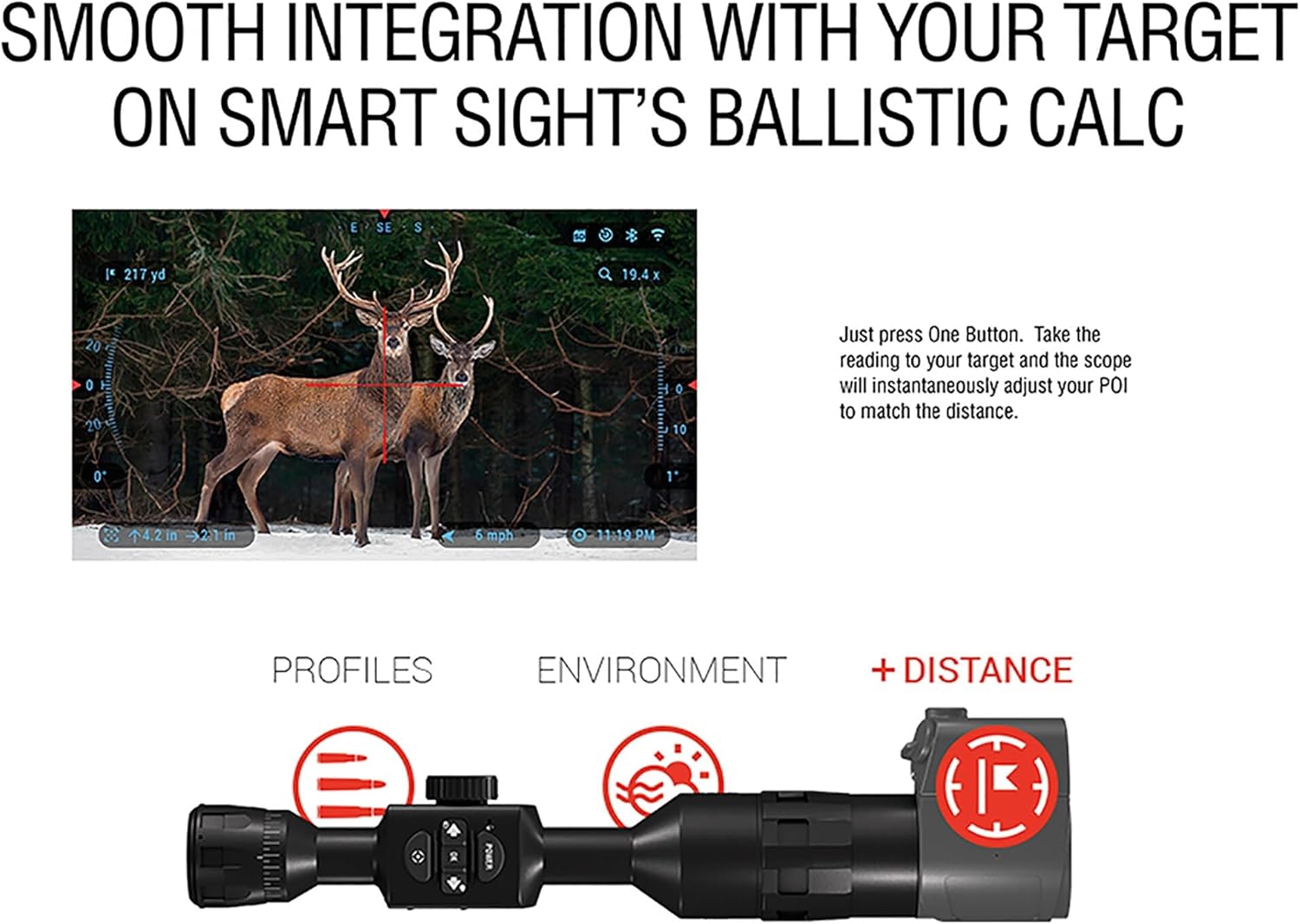
Figure 4: The ABL 1000 seamlessly integrates with your Smart Sight's ballistic calculator, providing instant POI adjustments based on measured distance.
4.3 Video Recording with Range Tag
When recording videos with your ATN Smart HD scope, the ABL 1000 can embed the range data directly into the video footage.
- Aquesta característica us permet tornarview your shots and confirm the exact distance to the target at the moment of impact.
- No more guessing how far you were when you made that perfect shot; your video will have the range tag sobre ell.

Figure 5: The ABL 1000 allows you to record videos with the target distance clearly displayed, enhancing post-shot analysis.
5. Manteniment
5.1 Neteja
- Keep the lenses and body of the ABL 1000 clean. Use a soft, lint-free cloth for cleaning.
- For lenses, use a lens cleaning solution and a microfiber cloth specifically designed for optics.
- Avoid using abrasive materials or harsh chemicals that could damage the finish or optical coatings.
5.2 Cura de la bateria
- Replace the CR123A battery when the low battery indicator appears on your Smart HD scope.
- If storing the ABL 1000 for an extended period, it is recommended to remove the battery to prevent leakage and potential damage to the unit.
- NOTA IMPORTANT: If the battery goes too low or becomes completely drained while in the unit, or if the unit is turned on with low voltage, it may scramble the device and prevent it from connecting. Always ensure a fresh, above-spec voltage battery is installed before use, and consider removing the battery after each use to prevent this issue.
6. Solució De Problemes
| Problema | Causa possible | Solució |
|---|---|---|
| ABL 1000 not powering on. | Bateria morta o mal instal·lada. | Check battery polarity. Replace with a fresh CR123A battery. |
| Cannot pair with Smart HD scope. | Bluetooth off on scope, ABL 1000 not on, or pairing issue. | Ensure Bluetooth is enabled on your scope. Turn ABL 1000 off and on. Re-initiate pairing process from scope's menu. Ensure ABL 1000 battery is not low. |
| Inaccurate range readings. | ABL 1000 not properly zeroed or dirty lenses. | Perform the zeroing procedure again. Clean the ABL 1000 lenses. Ensure the target is within the specified measuring range (5-1000 y/m). |
| No red laser visible during zeroing. | Screw covering the laser is still in place. | Remove the screw covering the zeroing laser. |
7. Especificacions
| Característica | Detall |
|---|---|
| Marca | ATN |
| Nom del model | ACMUABL1000 |
| Interval de mesura | 5-1000 anys/m |
| Tipus de bateria | CR123A Lithium (1x) |
| Connectivitat | Bluetooth |
| Material | Aliatge d'alumini |
| Color | Negre |
| Pes de l'article | 12.7 unces |
| Dimensions del producte (LxWxH) | 7 cm de llargada x 6 cm d'amplada x 4 cm d'alçada |
| Nivell de resistència a l'aigua | Impermeable |
| Classificació de protecció internacional | IP54 |
| UPC | 658175115205 |
| Components inclosos | Auxiliary Ballistic Laser Rangefinder 1000 |

Figure 6: Physical dimensions of the ABL 1000 unit.
8. Garantia i Suport
8.1 Informació de la garantia
The ATN Auxiliary Ballistic Smart Laser Rangefinder 1000 comes with a manufacturer's warranty. For detailed information regarding warranty terms, coverage, and duration, please refer to the official ATN website or contact ATN customer service directly. The warranty description states "See manufacturer".
8.2 Atenció al client
For technical assistance, troubleshooting, or any inquiries regarding your ABL 1000, please contact ATN customer support. Contact details can typically be found on the official ATN weblloc o a l'embalatge del producte.
It is recommended to have your product model name (ACMUABL1000) and serial number ready when contacting support.


