1. Introducció
This manual provides essential information for the safe and effective use of your NEDIS WIFICBO10WT IP Camera. Please read these instructions carefully before operating the device and retain them for future reference. This camera is designed for outdoor surveillance, offering wireless connectivity, battery power, and PIR motion detection.
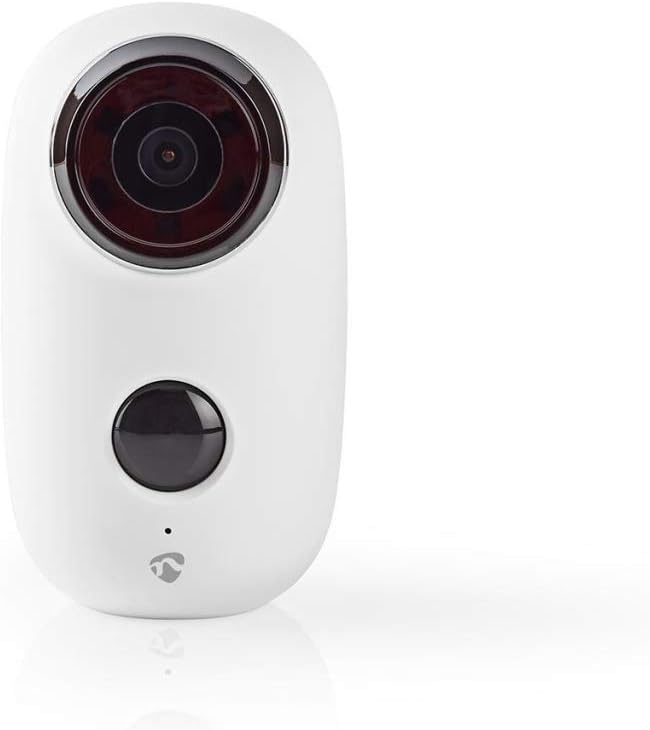
Figura 1: Frontal view of the NEDIS WIFICBO10WT IP Camera, showing the lens and a control button.
2. Informació de seguretat
- Ensure the camera is installed in a location where it is protected from extreme temperatures and direct sunlight.
- Do not expose the camera to fire or heat sources.
- Feu servir només el cable de càrrega i l'adaptador de corrent especificats.
- Mantingueu la càmera i els seus accessoris fora de l'abast dels nens.
- No intenteu desmuntar ni modificar la càmera. Això anul·larà la garantia.
- The camera is IP65 waterproof; however, avoid submerging it in water.
3. Contingut del paquet
Verifiqueu que tots els elements siguin presents al paquet:
- NEDIS WIFICBO10WT IP Camera
- Guia ràpida
- Cable USB
- Camera Mount (Wall Mount)
4. Producte acabatview
The NEDIS WIFICBO10WT IP Camera features a robust design suitable for outdoor use. Key components include:
- Lent de la càmera: Captures 1080p video.
- Sensor de moviment PIR: Detects movement for event-triggered recording.
- Micròfon i altaveu: Per a comunicació d'àudio bidireccional.
- Llum indicador d'estat: Provides operational feedback.
- Port de càrrega USB: For battery recharging.
- Ranura per a targeta MicroSD: For local storage of recordings.
- Botó de restabliment: Per restaurar la configuració de fàbrica.

Figura 2: Esquena view of the camera, showing the magnetic mount base and speaker grille.
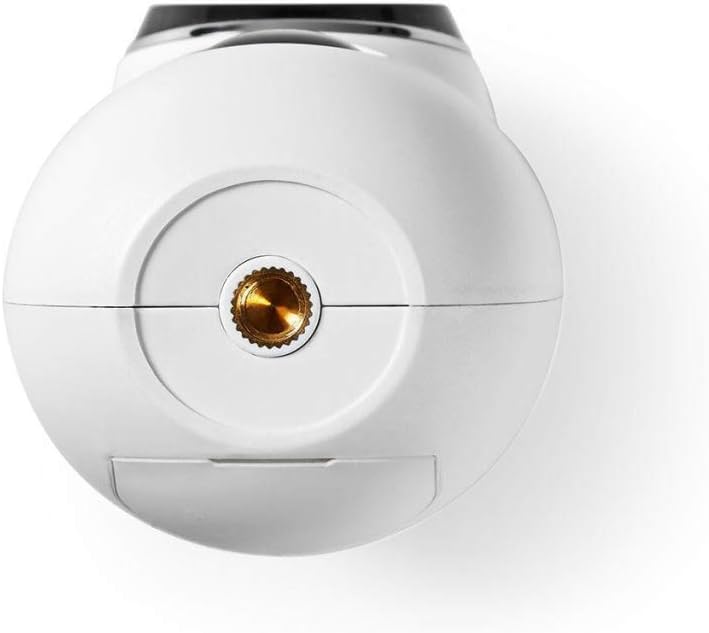
Figura 3: A baix view of the camera, revealing the tripod screw mount and a protective cover, typically housing the USB charging port, MicroSD card slot, and reset button.
5. Configuració
5.1. Carregant la bateria
Before initial use, fully charge the camera's integrated 6000mAh Lithium Ion battery. Connect the provided USB cable to the camera's charging port and a compatible USB power adapter (not included). The status indicator light will show charging progress and completion. A full charge can last up to 10 months depending on usage.
5.2. Installing the MicroSD Card
The camera supports local storage via a MicroSD card (not included). Locate the MicroSD card slot, usually under a protective cover on the bottom of the camera. Insert the MicroSD card with the contacts facing the correct direction until it clicks into place. Ensure the cover is securely closed to maintain water resistance.
5.3. Instal·lació i emparellament de l'aplicació
- Download the 'Nedis SmartLife' app from your smartphone's app store (iOS or Android).
- Registra't per obtenir un compte nou o inicia la sessió si ja en tens un.
- Follow the in-app instructions to add a new device. Select 'Security Camera' or similar.
- Power on the camera. The status indicator light will flash, indicating it's ready for pairing.
- Scan the QR code displayed in the app with the camera lens, or follow alternative pairing methods if prompted.
- Once paired, you can configure camera settings, view live feed, and access recordings through the app.
5.4. Muntatge de la càmera
The camera comes with a wall mount for flexible installation. Choose a suitable outdoor location that provides the desired viewing angle and strong Wi-Fi signal. The camera's IP65 rating ensures protection against dust and water jets.
- Mark the drilling points on the wall using the mount as a template.
- Perfora forats i insereix tacs de paret si cal.
- Fixeu el suport a la paret amb cargols.
- Attach the camera to the mount. The magnetic base allows for easy adjustment of the camera's angle.
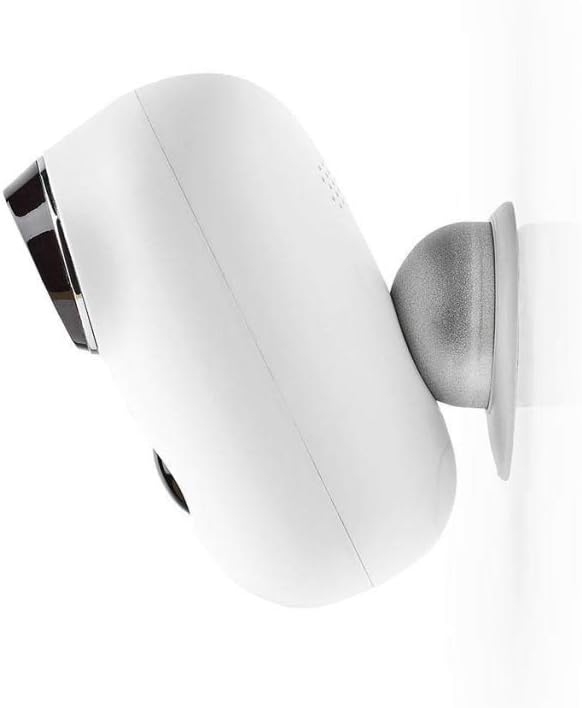
Figura 4: lateral view of the camera demonstrating its attachment to the wall mount, allowing for angle adjustment.
6. Funcionament de la càmera
6.1. En directe View i àudio bidireccional
Open the Nedis SmartLife app on your smartphone. Select your camera from the device list to access the live video feed. From the live view interfície, podeu:
- View Vídeo en directe: Monitor your property in real-time.
- Àudio bidireccional: Tap the microphone icon to speak through the camera's speaker, and listen to audio from the camera's microphone.
- Take Screenshots/Record Manually: Capture images or video clips directly to your phone.
6.2. Detecció de moviment i notificacions
The integrated PIR motion sensor detects movement and triggers recordings. When motion is detected:
- The camera automatically starts recording video to the installed MicroSD card.
- A push notification is sent to your smartphone via the Nedis SmartLife app.
- You can customize motion detection sensitivity and notification settings within the app.
6.3. Gravació i reproducció
Recordings are stored on the MicroSD card. To access and play back recorded footage:
- In the Nedis SmartLife app, navigate to the camera's settings or playback section.
- Browse through the timeline or event list to find specific recordings.
- You can download recordings to your smartphone if needed.

Figure 5: The camera installed in an outdoor environment, demonstrating its intended use for property surveillance.
7. Manteniment
- Neteja: Use a soft, dry cloth to clean the camera lens and body. Do not use harsh chemicals or abrasive cleaners.
- Cura de la bateria: Recharge the camera's battery approximately every 10 months, or as indicated by the app, to ensure continuous operation. Avoid completely draining the battery frequently to prolong its lifespan.
- Actualitzacions de firmware: Periodically check the Nedis SmartLife app for available firmware updates to ensure optimal performance and security.
- Resistència a l'aigua: Ensure all covers and seals are properly closed to maintain the IP65 water resistance rating.
8. Solució De Problemes
| Problema | Causa possible | Solució |
|---|---|---|
| La càmera no s'encén | Bateria baixa | Charge the camera fully using the provided USB cable. |
| No es pot connectar a la Wi-Fi | Contrasenya Wi-Fi incorrecta; Càmera massa lluny del router; Problemes amb el router | Verify Wi-Fi password. Move camera closer to router. Restart router. Ensure 2.4GHz Wi-Fi is used. |
| Sense notificacions de detecció de moviment | Motion detection disabled; App notifications off; Low sensitivity | Enable motion detection in app. Check phone notification settings. Adjust sensitivity. |
| No es desen les gravacions | No MicroSD card; Full MicroSD card; Faulty MicroSD card | Insert a MicroSD card. Format or replace the MicroSD card. |
| L'àudio bidireccional no funciona | Microphone/speaker muted in app; Network latency | Ensure audio is enabled in the app. Check network connection stability. |
9. Especificacions tècniques
| Característica | Especificació |
|---|---|
| Número de model | WIFICBO10WT |
| Resolució de captura de vídeo | 1080p |
| Tecnologia de connectivitat | Sense fil (Wi-Fi) |
| Font d'alimentació | Funciona amb bateria |
| Tipus de bateria | 1 ió de liti (inclòs) |
| Capacitat de la bateria | 6000mAh (approx. 10 months without charging) |
| Característiques especials | PIR Motion Sensor, Two-Way Audio |
| Ús interior/exterior | A l'aire lliure |
| Nivell de resistència a l'aigua | IP65 |
| Emmagatzematge | MicroSD (not included) |
| Tipus de controlador | Control d'aplicacions |
| Dispositius compatibles | Smartphone |
| Material | Metall |
| Dimensions (L x A x A) | 6.5 x 12.5 x 14 cm |
| Pes | 1.2 kg |
10. Garantia i Suport
For warranty information and technical support, please refer to the official NEDIS website or contact your local retailer. Keep your purchase receipt as proof of purchase. Do not attempt to repair the device yourself, as this may void the warranty.


