1. Introducció i finalview
The DJI RS 2 is a professional-grade, 3-axis stabilizing gimbal system designed for dynamic cinematography. It provides unparalleled stabilization for DSLR and mirrorless cameras, enabling users to capture smooth, cinematic footage in various shooting scenarios. Its lightweight carbon fiber monocoque construction and high payload capacity make it a versatile tool for filmmakers.
Les característiques clau inclouen:
- Algoritme d'estabilització de Titan: Ensures smoother footagi que mai.
- Mode SuperSmooth: Compensates for micromovements and increases torque, stabilizing even 100mm zoom lenses.
- Lightweight Design, High Payload: Weighs only 1 kg but supports a payload of up to 4.5 kg, offering an industry-leading weight-to-payload ratio.
- Full-Color Touchscreen: Allows for quick parameter adjustments and access to Ronin app functions, including ActiveTrack 3.0.
- Multi-Shooting Functionality: RSA ports are NATO-compatible, allowing for external accessories and diverse mounting options.
- 3D Focus System: Utilizes ToF sensors for distance detection, enabling sharp focus even in low-light conditions and fast autofocus with manual, large-aperture lenses.
- Broad Camera Compatibility: Supports a wide range of DSLR and mirrorless cameras from major brands like Sony, Nikon, Canon, Panasonic, Fujifilm, and Blackmagic Design.
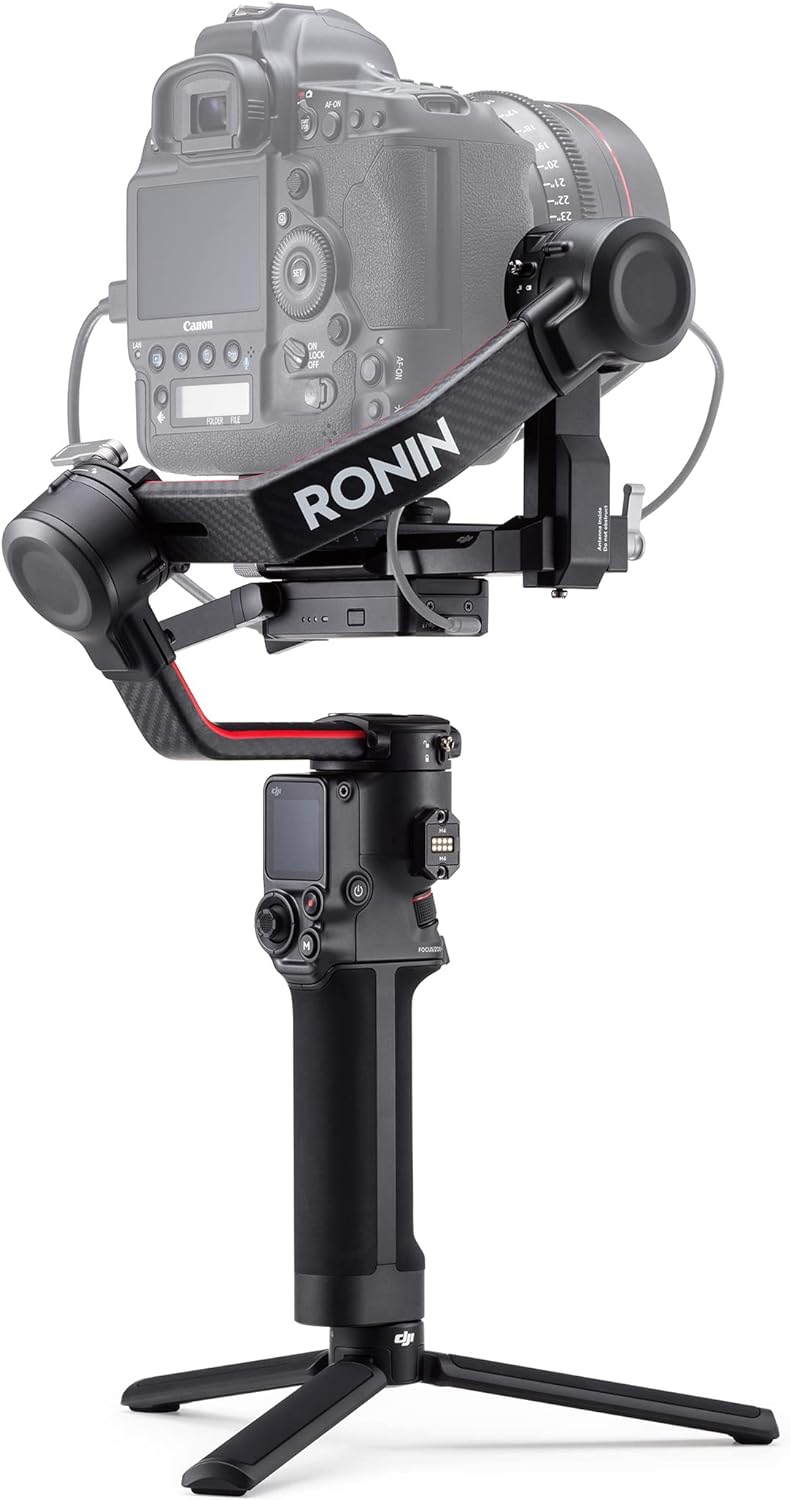
Figure 1.1: The DJI RS 2 Pro Combo with a camera attached, ready for operation.
2. Contingut del paquet
El paquet DJI RS 2 Pro Combo inclou els components següents:
- 1x DJI RS 2 Gimbal
- 1x estoig de transport
- 1x BG30 Grip (Built-in Battery)
- 1x USB-C Power Cable (40 cm)
- 1x Lens Support
- 1x Extended Grip/Tripod (Metal)
- 1x Quick Release Plate (Arca-Swiss/Manfrotto)
- 1x Briefcase Handle
- 1x Camera Riser
- 1x suport de telèfon
- 1x Focus Motor
- 1x Focus Motor Rod Mount Kit
- 1x Focus Gear Strip
- 1x RavenEye Image Transmitter
- 1x Cold Shoe to 1/4''-20 Adapter
- 1x USB-C Multi-Camera Control Cable (30 cm)
- 1x USB-C to USB-C Multi-Camera Control Cable (20 cm)
- 1x Mini-HDMI to HDMI Cable (20 cm)
- 1x Mini-HDMI to Mini-HDMI Cable (20 cm)
- 1x Mini-HDMI to Micro-HDMI Cable (20 cm)
- 3x Hook-and-Loop Strap
- 2x D-Ring Camera Mounting Screw (1/4'')
- 1x RSA Port Cover
- 1x Pan Axis Sleeve
- 1x 1/4''-20 Screw
- 6x M4 Screw (10mm)
- 1x Allen Wrench (3 mm)

Figura 2.1: Mésview of all items included in the DJI RS 2 Pro Combo package.
3. Guia de configuració
3.1 Càrrega de la bateria
Before first use, fully charge the BG30 grip. Connect the USB-C power cable to the charging port on the grip and a USB power adapter (not included). The battery level indicators will show charging progress.
3.2 Assembling the Gimbal
- Attach the BG30 grip to the gimbal body by aligning the mounting points and twisting until secure.
- Unfold the gimbal arms. Ensure the pan, tilt, and roll axes are unlocked.
- Attach the extended grip/tripod to the bottom of the BG30 grip for stable placement during balancing or for low-angle shots.

Figure 3.1: The DJI RS 2 gimbal assembled with its tripod base.
3.3 Mounting and Balancing Your Camera
Proper balancing is crucial for optimal performance and to prevent motor strain. Follow these steps carefully:
- Attach your camera to the quick release plate. If using a large lens, attach the lens support.
- Mount the quick release plate with the camera onto the gimbal's camera mounting plate.
- Balance the Tilt Axis (Vertical): Unlock the tilt axis. Adjust the vertical arm until the camera is balanced and does not tilt forward or backward.
- Balance the Tilt Axis (Depth): Unlock the tilt axis. Adjust the horizontal plate until the camera is balanced and does not tilt up or down when the gimbal is tilted.
- Balance the Roll Axis: Unlock the roll axis. Adjust the roll arm until the camera remains level when the gimbal is tilted sideways.
- Balance the Pan Axis: Unlock the pan axis. Adjust the pan arm until the gimbal remains stable when rotated.
- After balancing, lock all axes. Perform an auto-tune from the gimbal's touchscreen or the Ronin app for fine-tuning motor parameters.
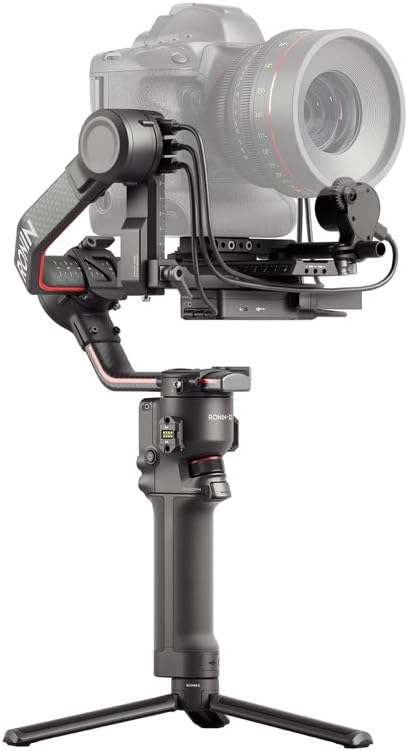
Figure 3.2: A camera properly mounted and balanced on the DJI RS 2 gimbal.
3.4 Connecting Accessories (Pro Combo Specific)
The Pro Combo includes several accessories to enhance your filmmaking experience:
- Motor de focus: Mount the focus motor to the camera plate using the rod mount kit. Attach the focus gear strip to your lens's focus ring. Connect the motor to the gimbal's RSS port.
- RavenEye Image Transmitter: Mount the RavenEye to the gimbal or camera cage. Connect it to your camera via HDMI and to the gimbal via USB-C for control and image transmission to your mobile device.
- Briefcase Handle: Attach to an RSA port for comfortable low-angle shooting.
- Titular del telèfon: Mount to the RavenEye or an RSA port to use your smartphone as a monitor.
4. Instruccions de funcionament
4.1 Engegada/apagada
Press and hold the power button on the BG30 grip for a few seconds to power on or off the gimbal. A single press will display the battery level.
4.2 Modes del cardan
The DJI RS 2 offers various operating modes, selectable via the touchscreen or the Ronin app:
- Seguiment panoràmic (PF): The camera only follows the pan movement of the gimbal. Tilt and roll axes are locked.
- Tilt Lock (TL): The camera follows the pan and roll movements, but the tilt axis is locked.
- FPV: All three axes follow the gimbal's movement, providing a first-person view perspectiva.
- 3D Roll 360 (Roll 360): Allows the camera to continuously rotate 360 degrees on the roll axis.
- Mode de retrat: Orients the camera vertically for social media content.
4.3 Ús de la pantalla tàctil
The 1.4-inch full-color touchscreen provides intuitive control over gimbal settings, mode selection, and intelligent features. Swipe and tap to navigate menus and adjust parameters.
4.4 Funcions intel·ligents
- ActiveTrack 3.0: Use the touchscreen to select a subject, and the gimbal will automatically track it. Requires the RavenEye Image Transmitter.
- Força Mòbil: Control the gimbal's movement by tilting your mobile device. Requires the Ronin app.
- Timelapse, Motionlapse, Hyperlapse: Create dynamic time-lapse videos with programmable movements.
- panorama: Capture high-resolution panoramic photos.

Figure 4.1: The DJI RS 2 in use with a two-handed grip for enhanced control and stability.
5. Manteniment
5.1 Neteja
Wipe the gimbal body with a soft, dry cloth. Do not use liquid cleaners or solvents. Keep the motor and sensor areas free of dust and debris.
5.2 Emmagatzematge
When not in use, store the DJI RS 2 in its carrying case in a cool, dry place. Ensure all axes are locked before storage to prevent damage. For long-term storage, charge the battery to approximately 50-60% every three months to maintain battery health.
5.3 Cura de la bateria
Avoid fully discharging the battery. If the battery level is low, charge it as soon as possible. Do not expose the battery to extreme temperatures.
6. Solució De Problemes
6.1 Gimbal Not Balancing Properly
- Ensure all axes are unlocked during the balancing process.
- Verify that the camera and lens are securely mounted and that the quick release plate is properly seated.
- Check for any cables or accessories obstructing the gimbal's movement.
- Perform an auto-tune calibration via the Ronin app or the gimbal's touchscreen.
6.2 Motors Overheating or Vibrating
- This often indicates improper balancing or an overloaded payload. Re-balance the camera carefully.
- Ensure your camera setup does not exceed the gimbal's maximum payload capacity (4.5 kg).
- Check motor stiffness settings in the Ronin app; adjust if too high or too low for your setup.
6.3 Connection Issues with Ronin App or RavenEye
- Ensure Bluetooth and Wi-Fi are enabled on your mobile device.
- Restart the gimbal and your mobile device.
- Verify that the Ronin app is updated to the latest version.
- For RavenEye, ensure all cables are securely connected between the camera, RavenEye, and gimbal.
7. Especificacions
| Característica | Especificació |
|---|---|
| Nom del model | DJI RS 2 Pro Combo |
| Pes | 960 Grams (Gimbal only) |
| Càrrega útil màxima | 4.5 kg (10 lliures) |
| Dimensions (plegades) | Aprox. 20 cm (llargada) x 15 cm (amplada) x 10 cm (alçada) |
| Dimensions (desplegada) | 19.5 x 41 x 26 cm |
| Tipus de bateria | BG30 Grip (Built-in) |
| Durada màxima de la bateria | Fins a 12 hores |
| Temps de càrrega | Approx. 1 hour (0-80%) |
| Freqüència de funcionament | 2.400-2.4835 GHz |
| Dispositius compatibles | DSLR and Mirrorless Cameras (Sony, Nikon, Canon, Panasonic, Fujifilm, Blackmagic Design, etc.) |
| Mostra | Pantalla tàctil a tot color d'1.4 polzades |
| Material | Carbon Fiber Monocoque |
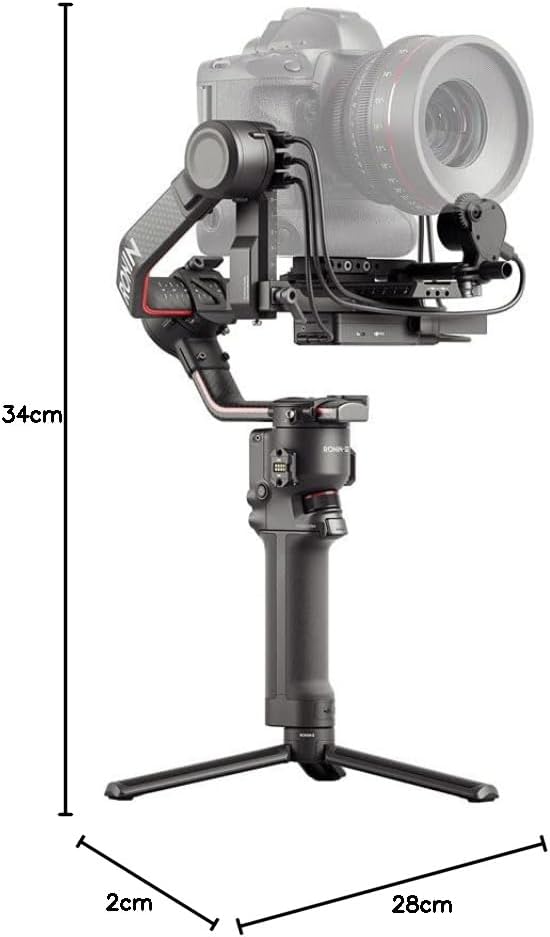
Figure 7.1: Approximate dimensions of the DJI RS 2 gimbal.
8. Garantia i Suport
The DJI RS 2 Pro Combo is covered by a standard manufacturer's warranty. For detailed warranty terms and conditions, please refer to the official DJI website or the warranty card included in your product packaging.
For technical support, firmware updates, and additional resources, please visit the official DJI Support page. You can also find comprehensive tutorials and FAQs to assist with setup, operation, and troubleshooting.
Recursos en línia: Suport oficial de DJI


