1. Introducció
This manual provides instructions for the installation, operation, and maintenance of the Teletek LCD63VG Remote LCD Keypad. This keypad is designed for use with the CA62 control panel, offering a clear blue icon display and advanced features for security system management.
2. Informació de seguretat
Read all instructions carefully before installation and operation. Failure to follow these instructions may result in damage to the device or personal injury. Keep this manual for future reference.
- Ensure power is disconnected from the control panel before installation or servicing.
- La instal·lació només l'ha de fer personal qualificat.
- No exposeu el dispositiu a la humitat, a temperatures extremes ni a la llum solar directa.
- No intenteu obrir ni reparar el dispositiu vosaltres mateixos. Envieu totes les tasques de manteniment a personal autoritzat.
3. Característiques del producte
The Teletek LCD63VG LCD Keypad offers the following key features:
- Blue LCD display with icon indicators.
- Voice guide functionality with 7 distinct voice messages.
- Supports 1 programmable zone.
- Display for up to 12 zones and 2 partitions.
- Quick button combination for sending PANIC alarm messages to a monitoring station.
4. Contingut del paquet
Verifiqueu que tots els elements siguin presents al paquet:
- Teletek LCD63VG LCD Keypad
- Materials de muntatge (cargols, tacs de paret)
- Manual d'usuari (aquest document)
5. Instal·lació i configuració
5.1 Muntatge del teclat numèric
- Choose a suitable indoor location, away from direct sunlight, moisture, and extreme temperatures.
- Mark the drilling points on the wall using the keypad's backplate as a template.
- Perfora forats i insereix tacs de paret si cal.
- Secure the keypad's backplate to the wall using the provided screws.
5.2 Connexions de cablejat
Connect the keypad to the CA62 control panel according to the wiring diagram provided in the CA62 control panel's manual. Ensure correct polarity for power connections and proper data line connections.
- Potència: Connect the keypad's power terminals to the control panel's auxiliary power output.
- Dades: Connect the keypad's data terminals to the control panel's data bus.
- Entrada de zona: If utilizing the programmable zone, connect the desired sensor to the keypad's zone input terminals.
5.3 Engegada i configuració inicials
- After all wiring is complete, apply power to the CA62 control panel.
- The keypad display should illuminate. Follow the instructions in the CA62 control panel manual for keypad enrollment and system programming.
- Configure the programmable zone and voice messages as required by your security system setup.
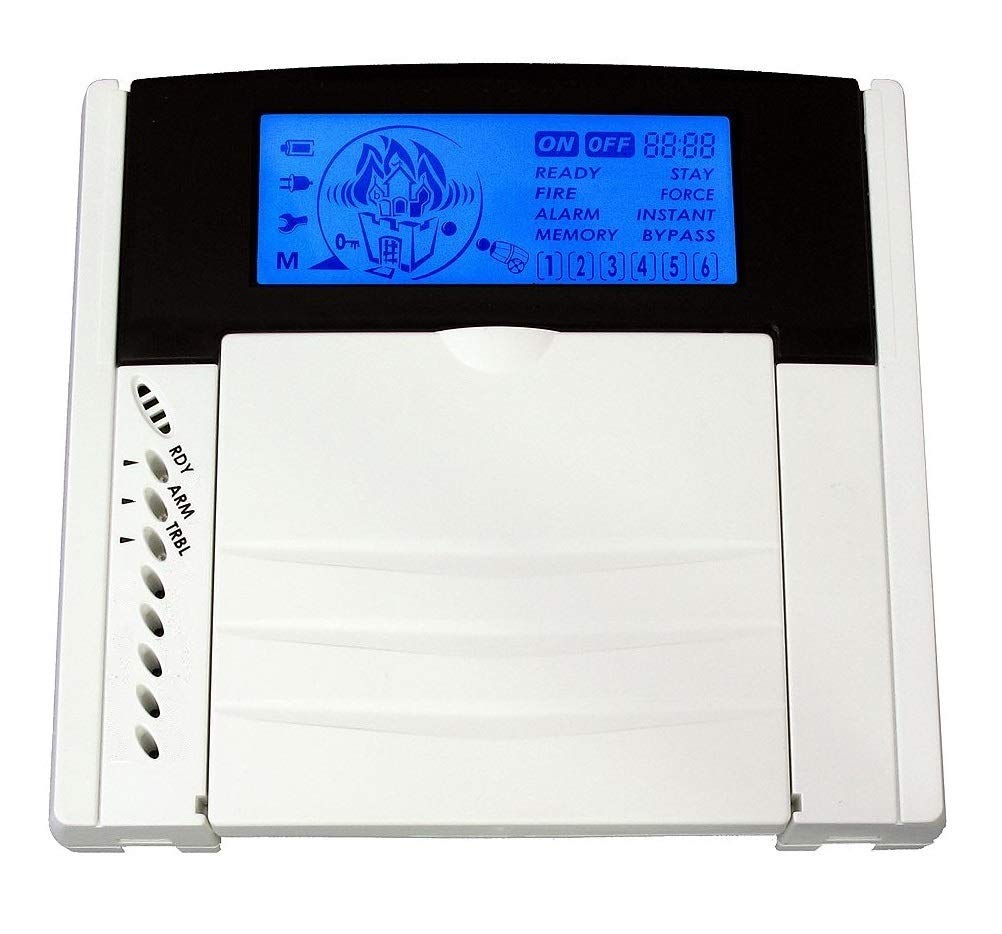
Figura 1: Frontal view of the Teletek LCD63VG LCD Keypad. This image shows the blue LCD screen and the numeric and function buttons.
6. Instruccions de funcionament
The LCD63VG keypad provides an interface for managing your CA62 security system. Refer to your CA62 control panel manual for specific system commands and programming details.
6.1 Armament i desarmament
- Per armar: Enter your user code followed by the ARM button (or equivalent as programmed in CA62).
- Per desarmar: Enter your user code followed by the DISARM button (or equivalent).
6.2 Zone Status Display
The LCD display shows the status of up to 12 zones and 2 partitions. Icons will indicate armed, disarmed, open, or alarm conditions. Consult the CA62 manual for icon interpretations.
6.3 Voice Guide
The keypad features a voice guide with 7 pre-recorded messages to assist with system operations and status notifications. These messages are activated during specific events or user interactions as configured in the control panel.
6.4 Panic Alarm
In an emergency, press the designated quick button combination (as specified in your CA62 manual) to send a PANIC alarm message to the monitoring station. This feature is typically activated by pressing two specific function keys simultaneously.
7. Manteniment
The Teletek LCD63VG LCD Keypad requires minimal maintenance.
- Neteja: Netegeu la superfície del teclat amb un drap suau i sec. No utilitzeu productes de neteja abrasius ni dissolvents.
- Inspecció: Periodically check the keypad for any signs of damage or loose connections.
- Actualitzacions de firmware: Any firmware updates for the keypad are typically managed through the connected CA62 control panel. Refer to the CA62 manual for details.
8. Solució De Problemes
If you encounter issues with your LCD63VG keypad, refer to the following common problems and solutions:
| Problema | Causa possible | Solució |
|---|---|---|
| La pantalla del teclat està en blanc. | Sense corrent o connexió fluixa. | Check power supply to the CA62 control panel. Verify keypad wiring connections. |
| Keypad not responding to input. | Keypad not enrolled or data line issue. | Ensure keypad is correctly enrolled in the CA62 system. Check data line connections. |
| Voice guide not working. | Feature disabled or volume too low. | Check CA62 control panel settings for voice guide activation and volume levels. |
| Incorrect zone status displayed. | Sensor issue or wiring problem. | Verify the sensor connected to the zone. Check wiring between the sensor and the keypad/control panel. |
If the problem persists after attempting these solutions, contact Teletek technical support or your security system installer.
9. Especificacions
| Paràmetre | Valor |
|---|---|
| Número de model | LCD63VG |
| Fabricant | Teletek |
| Tipus de visualització | Blue LCD with icons |
| Compatible Control Panel | CA62 |
| Zones compatibles | 12 (display), 1 (programmable) |
| Partitions Supported | 2 |
| Voice Guide Messages | 7 |
| Pes de l'article | 320 grams |
10. Garantia i Suport
10.1 Informació de la garantia
Teletek products are manufactured to high-quality standards. For specific warranty terms and conditions, please refer to the warranty card included with your product or visit the official Teletek weblloc web. Conserveu el comprovant de compra per a reclamacions de garantia.
10.2 Suport tècnic
For technical assistance, installation queries, or troubleshooting beyond the scope of this manual, please contact your authorized Teletek dealer or visit the Teletek official support portal. Ensure you have your product model number (LCD63VG) and serial number ready when contacting support.
Recursos en línia: For additional documentation and FAQs, please visit the Teletek Electronics weblloc.


