1. Introducció
El LAUNCH CR319 és un lector de codis de diagnòstic a bord II (OBD2) portàtil dissenyat per ajudar a diagnosticar problemes del motor del vehicle. Proporciona accés a diverses funcions de diagnòstic per ajudar els usuaris a identificar i esborrar codis d'error, controlar les dades de rendiment del vehicle i comprovar l'estat de preparació per a les emissions. Aquest manual proporciona instruccions detallades per a l'ús i manteniment adequats del dispositiu CR319.
2. Producte acabatview
2.1 Característiques clau
- Funcions OBD2 completes: Admet els 10 modes de prova OBD2.
- Biblioteca de cerca DTC: Base de dades integrada amb més de 3000 definicions de codi.
- Suport multilingüe: Disponible en anglès, portuguès, rus, italià, castellà, francès i alemany.
- Plug and Play: No calen bateries ni carregador; s'alimenta directament des del port OBD2 del vehicle.
- Disseny compacte: Fàcil de manejar i emmagatzemar.
2.2 Components del dispositiu
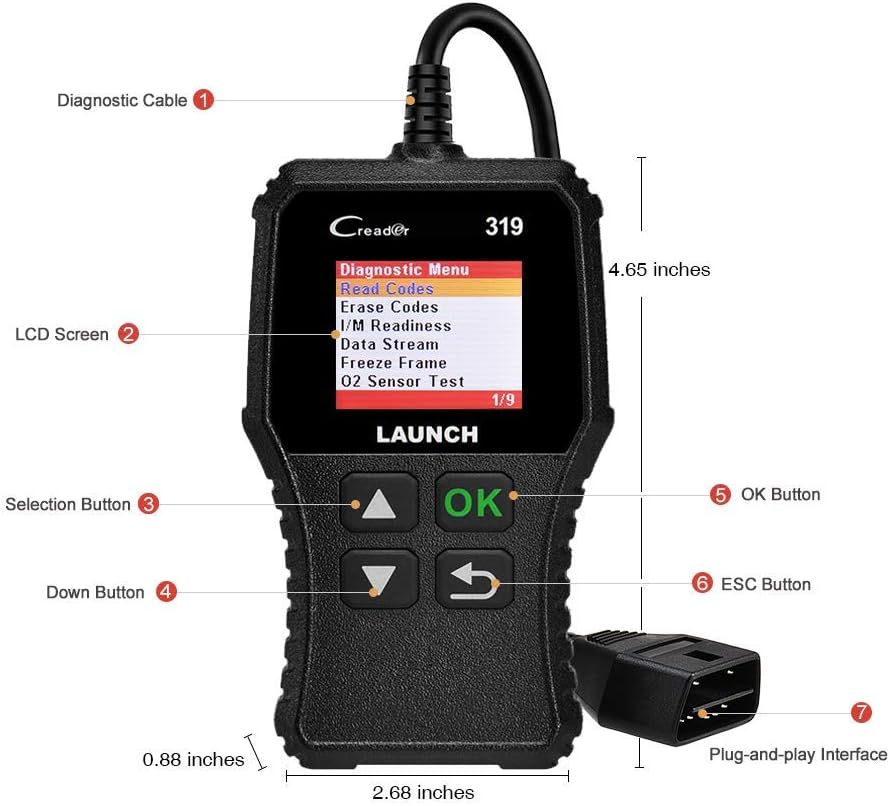
La imatge superior il·lustra els components principals de l'escàner OBD2 LAUNCH CR319. Les parts clau inclouen el cable de diagnòstic (1) per connectar-lo al vehicle, la pantalla LCD (2) per mostrar informació, els botons de selecció (3) per a la navegació, el botó avall (4), el botó OK (5) per a la confirmació, el botó ESC (6) per tornar a la pantalla anterior i la interfície Plug-and-Play (7), que és el connector OBD2.
3. Configuració
- Localitza el port OBD2: El port OBD2 normalment es troba sota el tauler de control, al costat del conductor del vehicle. Consulteu el manual del propietari del vostre vehicle si no el podeu localitzar.
- Connecteu l'escàner: Connecteu fermament el connector del cable de diagnòstic del CR319 al port OBD2 del vehicle. El dispositiu s'encendrà automàticament.
- Arrancar el vehicle: Gireu el contacte del vehicle a la posició "ON" (motor apagat) o engegueu el motor, segons la funció de diagnòstic que vulgueu realitzar.
4. Instruccions de funcionament
Després de connectar el CR319 al vehicle, apareixerà el menú principal. Utilitzeu els botons de selecció Amunt/Avall per navegar per les opcions i el botó D'acord per confirmar una selecció. El botó ESC torna a la pantalla anterior.
4.1 Llegiu els codis
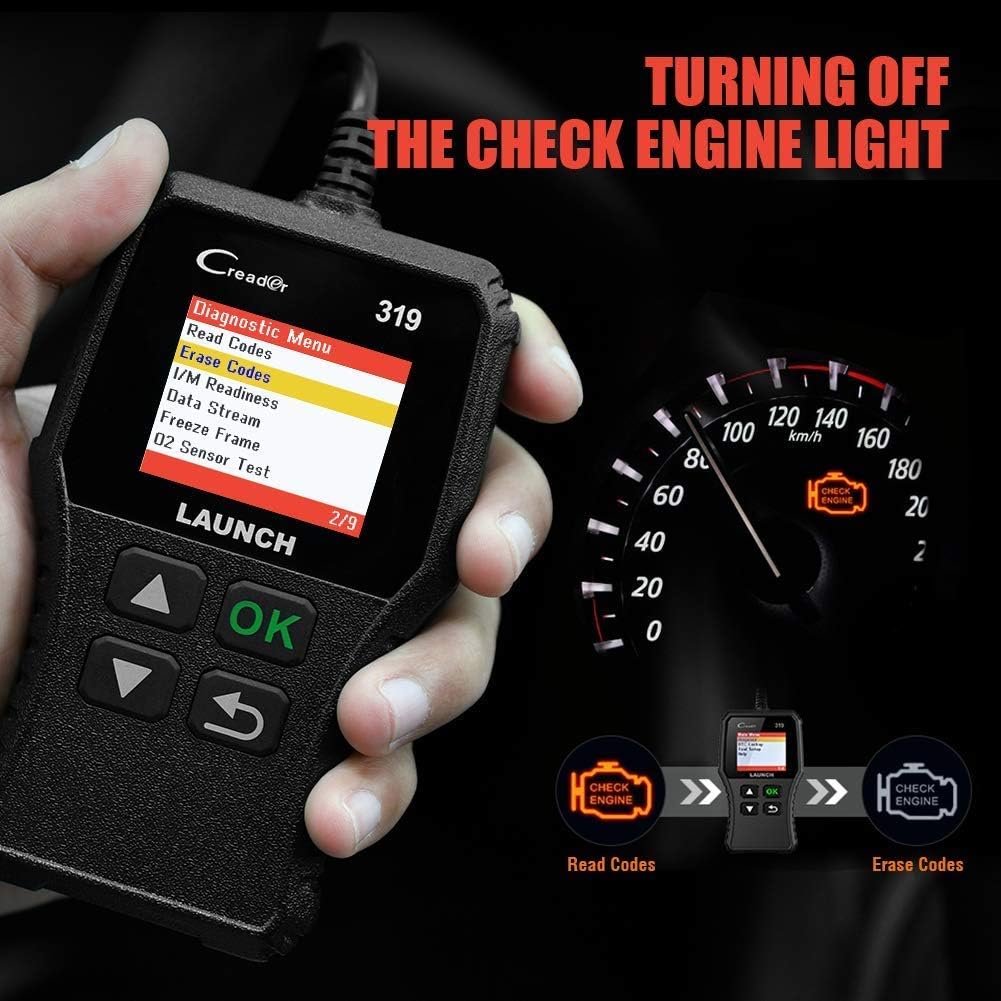
Aquesta funció recupera els codis de diagnòstic d'errors (DTC) de l'ordinador del vehicle. Aquests codis indiquen problemes específics detectats pel sistema d'autodiagnòstic del vehicle.
- Al menú principal, seleccioneu Diagnosticar.
- Seleccioneu Llegir codis.
- L'escàner mostrarà tots els codis emmagatzemats, pendents o permanents juntament amb les seves descripcions.
4.2 Esborra codis
Aquesta funció esborra els DTC de l'ordinador del vehicle i apaga el llum de revisió del motor (MIL). Assegureu-vos que qualsevol problema subjacent s'hagi resolt abans d'esborrar els codis, ja que poden reaparèixer.
- Al menú principal, seleccioneu Diagnosticar.
- Seleccioneu Esborrar codis.
- Confirmeu l'acció quan se us demani. El llum de revisió del motor s'hauria d'apagar.
4.3 Disponibilitat I / M
Aquesta funció comprova l'estat dels sistemes de monitorització relacionats amb les emissions del vehicle per determinar si estan preparats per a una prova d'emissions.
- Al menú principal, seleccioneu Diagnosticar.
- Seleccioneu "Preparació I/M".
- La pantalla mostrarà l'estat de diversos monitors (per exemple, monitor de fallades d'encesa, monitor del sistema de combustible). "D'acord" o "Completat" indica que el monitor s'ha executat i ha superat el diagnòstic; "INC" o "Incomplet" significa que el monitor encara no s'ha executat ni ha completat el seu cicle de diagnòstic.
4.4 Flux de dades (dades en directe)

Aquesta funció mostra dades operatives en temps real de la unitat de control del motor (ECU) del vehicle. Aquestes dades poden incloure les RPM del motor, la velocitat del vehicle, les lectures del sensor d'oxigen, la temperatura del refrigerant i més.
- Al menú principal, seleccioneu Diagnosticar.
- Seleccioneu Flux de dades.
- Utilitzeu els botons Amunt/Avall per desplaçar-vos pels diversos paràmetres de dades.
4.5 Congelar fotograma
Quan es produeix una avaria relacionada amb les emissions, l'ordinador del vehicle registra una instantània de les condicions de funcionament en el moment de l'avaria. Aquestes dades s'anomenen dades de fotograma fix.
- Al menú principal, seleccioneu Diagnosticar.
- Seleccioneu 'Imatge congelada'.
- Review els paràmetres enregistrats per comprendre les condicions en què es va produir l'error.
4.6 Cerca de DTC

Aquesta funció us permet introduir manualment un codi de diagnòstic d'error i view la seva definició a partir de la base de dades interna de l'escàner.
- Al menú principal, seleccioneu 'Consulta de DTC'.
- Utilitzeu els botons de navegació per introduir el DTC desitjat.
- Premeu D'acord a view la definició del codi.
4.7 Altres funcions OBD2
El CR319 també admet les funcions OBD2 següents, accessibles a través del menú "Diagnòstic":
- Prova del sensor d'O2: Recupera els resultats de les proves del monitor del sensor d'oxigen per a les proves completades més recentment.
- Prova del sistema EVAP (Mode 8): Inicia una prova del sistema de control d'emissions evaporatives.
- Prova del monitor a bord (mode 6): Recupera els resultats de les proves per a components i sistemes del tren motriu relacionats amb les emissions que no es controlen contínuament.
- Informació del vehicle: Mostra el número d'identificació del vehicle (VIN), l'ID de calibratge (CALID) i el número de verificació de calibratge (CVN).
5. Compatibilitat

L'escàner OBD2 LAUNCH CR319 és compatible amb la majoria de vehicles americans, europeus i asiàtics fabricats a partir del 1996 i posteriors que compleixen amb OBDII. Admet tots els protocols OBDII estàndard, inclosos KWP2000, ISO9141, J1850 VPW, J1850 PWM i CAN (Controller Area Network).
5.1 Vehicles compatibles
- Cotxes de gasolina de 12V.
- Vehicles que compleixen els estàndards OBDII (cotxes amb base als EUA del 1996, amb base a la UE del 2000 i cotxes asiàtics més nous).
5.2 Vehicles no compatibles
- Cotxes dièsel.
- Vehicles pesants de 24V.
- Vehicles híbrids.
- Vehicles elèctrics.
6. Especificacions
| Característica | Especificació |
|---|---|
| Model | CR319 |
| Mostra | LCD color |
| Vol. Operatiutage | 9-18V (via port OBD2) |
| Protocols compatibles | KWP2000, ISO9141, J1850 VPW, J1850 PWM, CAN |
| Dimensions (L x A x A) | 1.5 x 6 x 10.8 polzades |
| Pes | 7.4 unces |
| Temperatura de funcionament | De 0 °C a 50 °C (32 °F a 122 °F) |
| Temperatura d'emmagatzematge | -20 °C a 70 °C (-4 °F a 158 °F) |
| Idiomes admesos | Anglès, portuguès, rus, italià, castellà, francès, alemany |
7. Solució De Problemes
7.1 El dispositiu no s'encén
- Assegureu-vos que el cable de diagnòstic estigui connectat correctament al port OBD2 del vehicle.
- Verifiqueu que el contacte del vehicle estigui en la posició "ON" o que el motor estigui en marxa.
- Comproveu el fusible del vehicle per al port OBD2 (consulteu el manual del propietari del vehicle).
7.2 Error de comunicació amb el vehicle
- Confirmeu que el vehicle compleix amb la normativa OBDII (generalment, models de 1996 i posteriors per a vehicles de gasolina).
- Assegureu-vos que el cable de diagnòstic estigui connectat correctament.
- Apagueu el contacte, espereu 10 segons, torneu-lo a la posició "ON" i torneu-ho a intentar.
- Si és possible, prova l'escàner en un altre vehicle compatible per descartar un mal funcionament del dispositiu.
7.3 No es poden esborrar els codis
- Assegureu-vos que el contacte del vehicle estigui en la posició "ON" (motor apagat).
- Si l'error subjacent que va activar el codi encara és present, és possible que el codi no s'esborri o que torni a aparèixer immediatament. Primer solucioneu el problema del vehicle.
8. Manteniment
- Neteja: Feu servir un drap suau i sec per netejar el dispositiu. Eviteu productes de neteja o dissolvents abrasius.
- Emmagatzematge: Guardeu l'escàner en un entorn net i sec, allunyat de temperatures extremes i de la llum solar directa.
- Cura del cable: No estireu el cable amb força ni el doblegueu bruscament. Inspeccioneu el cable per detectar danys abans de cada ús.
9. Garantia i Suport
Per obtenir informació sobre la garantia, assistència tècnica o consultes sobre el servei, poseu-vos en contacte amb el servei d'atenció al client de LAUNCH. Consulteu l'embalatge del producte o la fitxa oficial de LAUNCH. weblloc web per obtenir les dades de contacte més actualitzades.


