1. Introducció
The Autel MaxiDiag MD906 PRO is a professional diagnostic scan tool designed for comprehensive vehicle system analysis and maintenance. This device offers full system diagnostics, a variety of service functions, and supports advanced vehicle communication protocols. This manual provides detailed instructions for setting up, operating, and maintaining your MD906 PRO scanner.
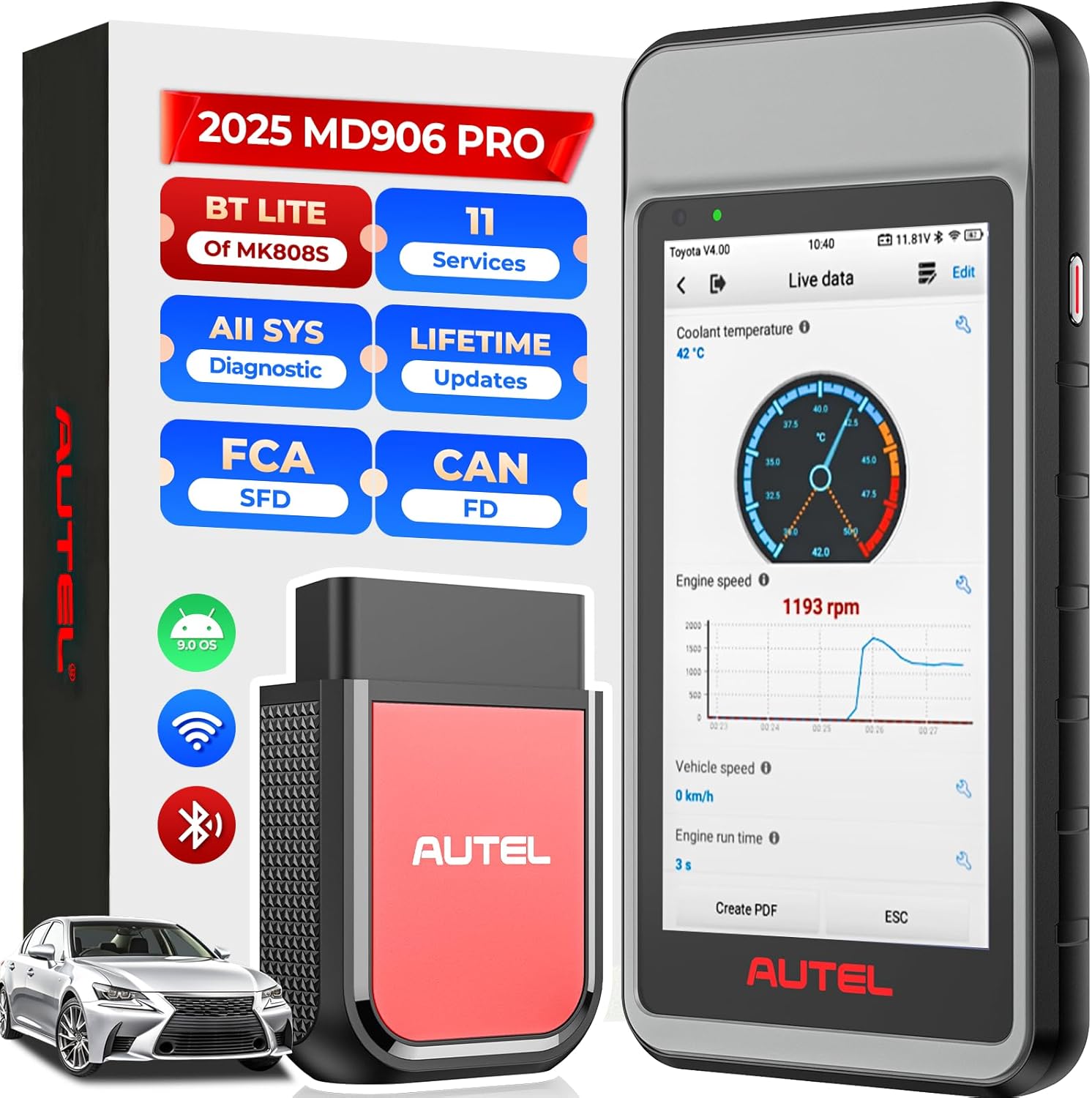
Figure 1: The Autel MaxiDiag MD906 PRO diagnostic tablet and its VCI (Vehicle Communication Interface) unit.
2. Contingut del paquet
Verifiqueu que tots els elements que s'enumeren a continuació s'inclouen al vostre paquet:
- Autel MaxiDiag MD906 PRO Diagnostic Tablet
- VCI150 Lite Bluetooth Vehicle Communication Interface
- Cable principal
- Cable USB
- Adaptador d'alimentació
- Manual d'usuari

Figure 2: Illustration of the items included in the MD906 PRO package.
3. Producte acabatview i Especificacions
The MD906 PRO is equipped with advanced hardware and software features to provide efficient and accurate vehicle diagnostics.
3.1 Característiques clau
- Full System Diagnostics: Accesses all available vehicle systems.
- 11+ Service Functions: Performs common maintenance and reset procedures.
- Enhanced OBD2 Modes: Supports all 10 OBD2 test modes.
- CAN FD Protocol Support: Compatible with newer vehicle models.
- FCA AutoAuth & VW-SFD Access: Enables secure gateway access for specific brands.
- Wireless VCI: Bluetooth connectivity for flexible operation.
- Wi-Fi Printing & Cloud Report: Facilitates report management and sharing.
- Lifetime Free Updates: Ensures continuous access to the latest software and vehicle coverage.
3.2 Especificacions de maquinari
- Sistema operatiu: Android 9.0
- Processor: Advanced Quad-core Processor
- Memòria: 2 GB de RAM, 64 GB de ROM
- Display: 5.5-inch LCD touchscreen with 1280x720 resolution
- Battery: 5000mAh Lithium-Polymer battery
- Connectivity: Bluetooth VCI150 Lite, Wi-Fi (2.4G)

Figura 3: Mésview of the MD906 PRO's hardware components and specifications.
4. Configuració
4.1 Càrrega del dispositiu
Before initial use, fully charge the MD906 PRO tablet using the provided power adapter. The 5000mAh battery provides extended operating time.
4.2 Engegada/apagada
- To Power On: Press and hold the Power button until the Autel logo appears.
- To Power Off: Press and hold the Power button, then select 'Power Off' from the options.
4.3 Initial Setup and VCI Connection
- Upon first startup, follow the on-screen prompts to select your preferred language and region.
- Connect the MD906 PRO to a Wi-Fi network for software updates and online features.
- Plug the VCI150 Lite unit into the vehicle's OBD2 port. The VCI will automatically establish a Bluetooth connection with the tablet. Ensure the VCI indicator light is solid blue, indicating a successful connection.
4.4 Actualitzacions de programari
The MD906 PRO includes lifetime free software updates. Regularly check for updates to ensure optimal performance and the latest vehicle coverage. To update, navigate to the 'Update' application on the tablet's main menu and follow the instructions.
5. Instruccions de funcionament
5.1 Connexió al vehicle
Locate the vehicle's 16-pin OBD2 Data Link Connector (DLC), typically found under the dashboard on the driver's side. Plug the VCI150 Lite unit into the DLC. Ensure the vehicle's ignition is in the 'ON' position or the engine is running, as required by the diagnostic procedure.
5.2 Diagnòstic complet del sistema
The MD906 PRO can perform OE-level diagnostics on all available electronic systems, including Engine, ABS, SRS, Transmission, EPB, HVAC, and more.
- Llegir/Esborrar DTC: Retrieve and erase Diagnostic Trouble Codes from all control modules.
- View Dades en directe: Display real-time data streams from various sensors and components.
- Congela les dades del fotograma: View a snapshot of vehicle conditions at the time a fault code was set.
- Recuperar informació de la ECU: Access specific information about the Electronic Control Unit.
- Escaneig automàtic 2.0: Automatically identify the vehicle and scan all systems for faults, providing a quick overview of vehicle health.

Figure 4: The MD906 PRO interface displaying an all-system diagnostic scan, showing various vehicle modules.
5.3 Special Service Functions
The MD906 PRO supports over 11 common maintenance and reset services. Note that the availability of specific functions may vary by vehicle make, model, and year.
- Reinicialització d'oli: Restableix el sistema de vida útil de l'oli després d'un canvi d'oli.
- Restabliment de l'EPB: Restableix el sistema de fre d'estacionament electrònic després de la substitució de les pastilles de fre.
- Restabliment de SAS: Calibra el sensor d'angle de direcció.
- Registre de bateries: Registers a new battery with the vehicle's ECU.
- Reaprenentatge de l'accelerador: Adapts the throttle position sensor.
- Sagnat de l'ABS: Performs brake bleeding procedures.
- Codificació de l'injector: Codifica els nous números d'injector a la ECU.
- Restabliment de TPMS: Resets Tire Pressure Monitoring System sensors.
- Capçalera AFSamp: Adapts the Adaptive Front Lighting System.
- A/F Adjustment: Ajusta els paràmetres de la relació aire/combustible.
- Regeneració del DPF: Inicia la regeneració del filtre de partícules dièsel.

Figure 5: A visual representation of the various service functions available on the MD906 PRO.
5.4 Modes de prova OBD2
The MD906 PRO supports all 10 modes of OBD2 tests for emissions-related diagnostics on most OBD2-compliant vehicles (1996 and newer).
- Read/Clear Codes
- Dades en directe
- Congela les dades del fotograma
- Estat de preparació I/M
- Prova del monitor O2
- Prova de monitor a bord
- Prova de components
- Informació del vehicle
- Mòduls presents
- Cerca DTC
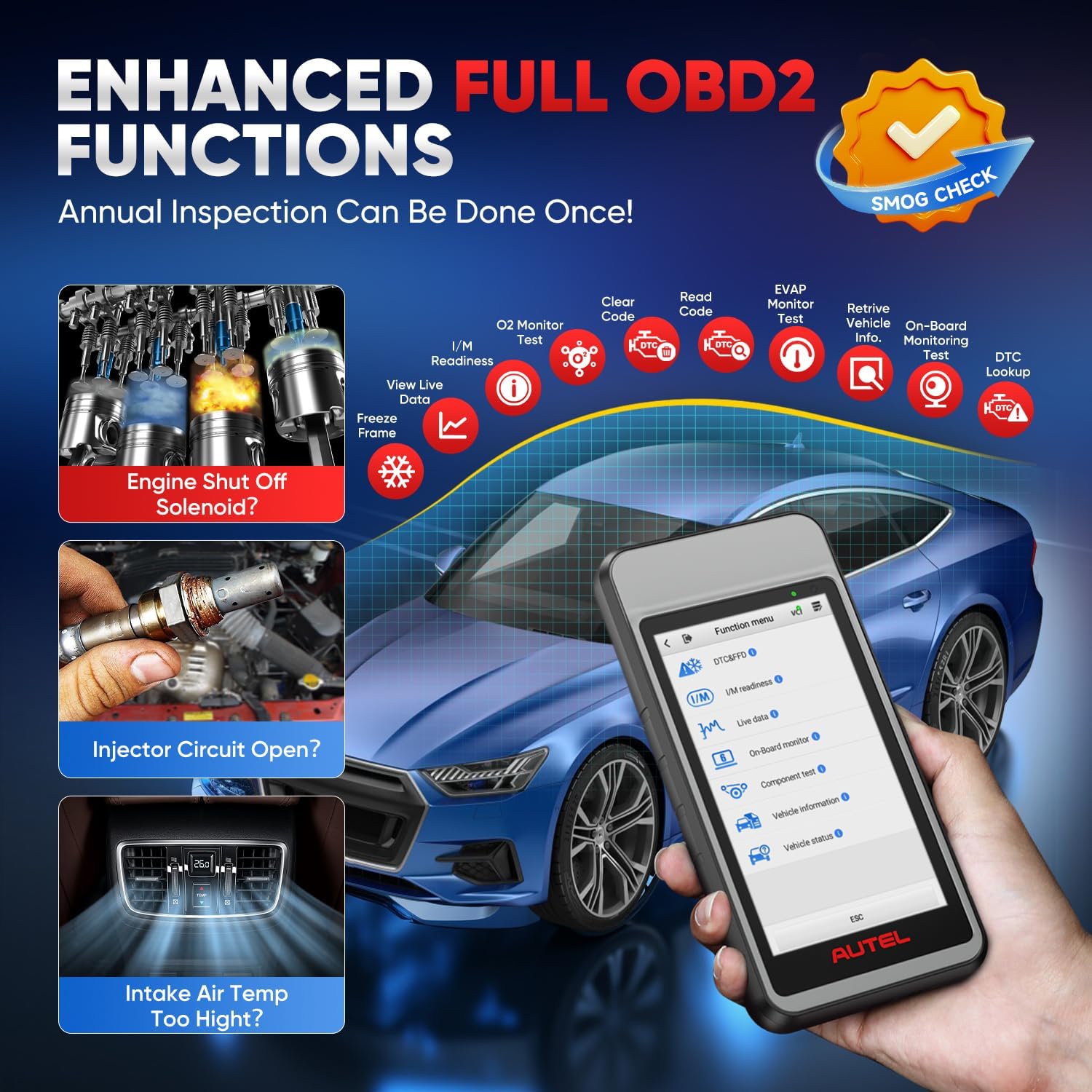
Figure 6: The MD906 PRO interface illustrating the various enhanced OBD2 functions available for vehicle inspection.
5.5 Live Data Display
The device offers multiple ways to view live data, aiding in the diagnosis of intermittent vehicle problems:
- Mode de text: Displays parameters as a list.
- Waveform Graph Mode: Presents data in waveform graphs for visual analysis and comparison.
- Analog Gauge Mode: Shows parameters in gauge charts.

Figura 7: Examples of live data display modes on the MD906 PRO, including text, graph, and analog gauge.
5.6 CAN FD and FCA AutoAuth Support
The MD906 PRO supports the latest CAN FD protocol, offering faster data transmission for newer vehicle models (e.g., 2020+ GM and 2021+ Chrysler vehicles). It also provides access to secure gateways for FCA (2018+ Chrysler/Dodge/Jeep/Alfa Romeo/Fiat) and VW-SFD (2020+ VAG models) vehicles. Access to these secure gateways typically requires an AutoAuth account.

Figure 8: Information on CAN FD protocol support and secure gateway access for FCA and VW-SFD vehicles.
5.7 Reporting and Printing
Diagnostic reports can be generated and managed directly from the device:
- Impressió per Wi-Fi: Print diagnostic reports directly to a Wi-Fi enabled printer.
- Upload Report to Cloud: Automatically synchronize diagnostic information to the cloud, allowing for easy access and sharing via SMS, QR codes, or email.

Figure 9: The MD906 PRO demonstrating its Wi-Fi printing capability for diagnostic reports.

Figure 10: The MD906 PRO's feature for uploading diagnostic reports to the cloud for storage and sharing.
6. Manteniment
6.1 Actualitzacions de programari
Regularly update the software to ensure the scanner operates with the latest vehicle data and features. Connect the device to Wi-Fi and use the 'Update' application.
6.2 Cura de la bateria
Per allargar la durada de la bateria, eviteu descarregar completament el dispositiu amb freqüència. Carregueu el dispositiu quan el nivell de bateria sigui baix. Guardeu el dispositiu en un lloc fresc i sec quan no l'utilitzeu durant períodes prolongats.
6.3 Neteja
Netegeu el dispositiu amb un suau, damp drap. Eviteu utilitzar productes de neteja abrasius o dissolvents que puguin danyar la pantalla o la casing.
7. Solució De Problemes
7.1 Cerca de DTC
The MD906 PRO includes a built-in DTC library. When a Diagnostic Trouble Code is displayed, use the 'DTC Lookup' function to retrieve detailed definitions and potential causes, facilitating faster diagnosis.
7.2 Problemes comuns
- El dispositiu no s'encén: Assegureu-vos que la bateria estigui carregada. Connecteu l'adaptador de corrent i torneu-ho a provar.
- VCI no es connecta: Verify the VCI is securely plugged into the vehicle's OBD2 port and the vehicle's ignition is on. Check Bluetooth settings on the tablet.
- Communication errors: Ensure the vehicle's ignition is on. Check for loose connections. Verify vehicle compatibility for the specific function being performed.
- Software freezing: Restart the device. Ensure the software is up to date.
8. Garantia i Suport
Autel provides comprehensive support for the MD906 PRO:
- Actualitzacions gratuïtes de per vida: Enjoy continuous software updates without additional cost.
- 1 any de garantia: The device is covered by a one-year warranty from the date of purchase.
- 30-Day Replacement/Return Policy: Refer to your purchase agreement for details on returns and replacements.
- Suport multilingüe: The MD906 PRO supports over 15 languages. To change the language, please contact Autel support with your device's serial number.
Figura 11: Mésview of Autel's commitment to customer support, including updates and warranty.


