Introducció
Thank you for choosing the ONIKUMA K1B Gaming Headset. This manual provides detailed instructions for setting up, operating, and maintaining your headset to ensure optimal performance and longevity. Please read this manual carefully before use.
Contingut del paquet
- 1 x ONIKUMA K1B Gaming Headset
- 1 x Conversion Line (Y-splitter cable)
- 1 x Manual d'usuari
Producte acabatview
The ONIKUMA K1B Gaming Headset is designed for an immersive gaming experience, featuring comfortable over-ear cups, an omnidirectional microphone, and LED lighting. It is compatible with various gaming consoles, including PS4 and Xbox One.

Figura 1: Frontal view of the ONIKUMA K1B Gaming Headset with its omnidirectional microphone extended. The headset features a camouflage design and comfortable ear cushions.
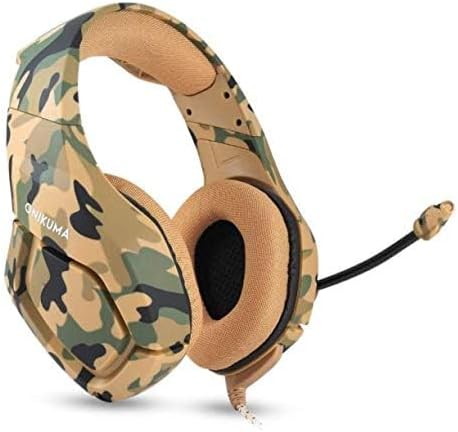
Figura 2: En angle view of the ONIKUMA K1B Gaming Headset, showing the camouflage pattern and the microphone in a retracted position. The headset is designed for over-ear comfort.
Instruccions de configuració
- Connecta't al dispositiu:
- For devices with a single 3.5mm audio jack (e.g., most laptops, newer controllers): Plug the 3.5mm jack directly into your device's audio port.
- For devices with separate audio and microphone jacks (e.g., older PCs): Use the included conversion line (Y-splitter cable) to connect the headset's 3.5mm jack to the separate audio and microphone ports on your device.
- For LED lighting: Plug the USB connector into an available USB port on your device (PC, console, or USB power adapter) to power the headset's LED lights. The USB connection is for lighting only, not for audio.
- Ajustar l'ajust dels auriculars: Extend or retract the headband to comfortably fit your head. Ensure the ear cups fully cover your ears for optimal sound isolation and comfort.
- Posició del micròfon: Adjust the flexible omnidirectional microphone to a suitable distance from your mouth for clear voice capture.
- Configura els paràmetres d'àudio: After connecting, navigate to your device's audio settings to ensure the ONIKUMA K1B headset is selected as the default output and input device. Adjust volume levels as needed.
Instruccions de funcionament
- Control de volum: The headset features an in-line volume control wheel on the cable. Rotate the wheel to increase or decrease the audio volume.
- Silència del micròfon: An in-line switch allows you to quickly mute or unmute the microphone. Ensure the microphone is unmuted when you wish to communicate.
- Il·luminació LED: The LED lights activate automatically when the USB cable is connected to a powered USB port. There is no separate switch for the LED lights.
- Control de soroll: The headset incorporates noise control features. For optimal performance, ensure the ear cups are properly seated over your ears.
Manteniment
- Neteja: Use a soft, dry cloth to clean the headset. For ear cushions, gently wipe with a slightly damp cloth if necessary, then dry thoroughly. Do not use harsh chemicals or abrasive cleaners.
- Emmagatzematge: Guardeu els auriculars en un lloc fresc i sec, allunyat de la llum solar directa i de temperatures extremes. Eviteu col·locar objectes pesats a sobre dels auriculars.
- Cura del cable: Avoid sharp bends or excessive pulling on the cables. Always grasp the plug, not the cable, when disconnecting.
- Resistència a l'aigua: While the product description mentions "Waterproof", it is generally recommended to avoid exposing electronic devices to liquids. Protect the headset from spills and moisture to prevent damage.
Resolució de problemes
| Problema | Possible solució |
|---|---|
| No hi ha so dels auriculars |
|
| El micròfon no funciona |
|
| Els llums LED no funcionen |
|
Especificacions
| Característica | Detall |
|---|---|
| Model | K1B |
| Diàmetre de l'altaveu | 50 mm |
| Impedància | 20Ω ± 15% |
| Sensibilitat | 117 dB ± 3 dB |
| Interval de freqüència | 20-20000 Hz |
| Mic Dimension | 6.0 mm x 2.7 mm |
| Sensibilitat del micròfon | -36 dB ± 1 dB |
| Impedància del micròfon | 2.2kΩ |
| Directivitat | Omni-direccional |
| LED de treball Voltage | DC5V ± 5% |
| Corrent de treball | Per sota de 100mA |
| Interfície d'auriculars | USB (for LED) + 3.5mm Stereo Audio and Mic Plug |
| Longitud del cable | 2.2 m |
| Material | Plàstic |
| Dispositius compatibles | Gaming Consoles (PS4, Xbox One), PC, etc. |
| Control de soroll | Cancel·lació activa del soroll |
Garantia i Suport
This product comes with a standard manufacturer's warranty. For specific warranty terms and conditions, please refer to the documentation provided at the time of purchase or contact your retailer. For technical support or further assistance, please reach out to the product seller or manufacturer's customer service.
Extended warranty options may be available from third-party providers. Please check with your retailer for details on such offerings.


