1. Introducció
This manual provides comprehensive instructions for the setup, operation, maintenance, and troubleshooting of your Canyon CNS-SW71SS Smartwatch. Please read this manual carefully before using your device to ensure proper function and longevity.
The Canyon CNS-SW71SS Smartwatch is designed to help you monitor your fitness activities and stay connected. It features a 1.22-inch color screen, multi-sport modes, heart rate monitoring, sleep tracking, and notification alerts. Its IP68 water resistance makes it suitable for various environments.
2. Producte acabatview
2.1 Característiques clau
- 1.22-inch color touch screen display.
- Multi-sport mode for tracking various activities.
- Daily activity monitoring: calories, steps, heart rate, and sleep.
- Notifications for incoming calls, SMS, emails, calendar events, and social media.
- Music control and remote camera function.
- Smart alarm and weather data display.
- Fins a 7 dies de durada de la bateria.
- IP68 water resistance (submersible up to 1 meter for 30 minutes).
- Connectivitat Bluetooth 4.0.
- Compatible with iOS and Android operating systems.
- Comes with two interchangeable wristbands: metal and TPU.
2.2 Components
The Canyon CNS-SW71SS Smartwatch consists of the main watch unit, interchangeable wristbands, and a charging cable.

Figura 1: Frontal view of the Canyon CNS-SW71SS Smartwatch, showing the display with steps, distance, calories, and heart rate data.

Figura 2: Angle view of the Canyon CNS-SW71SS Smartwatch, featuring a silver metal mesh strap and a round display.
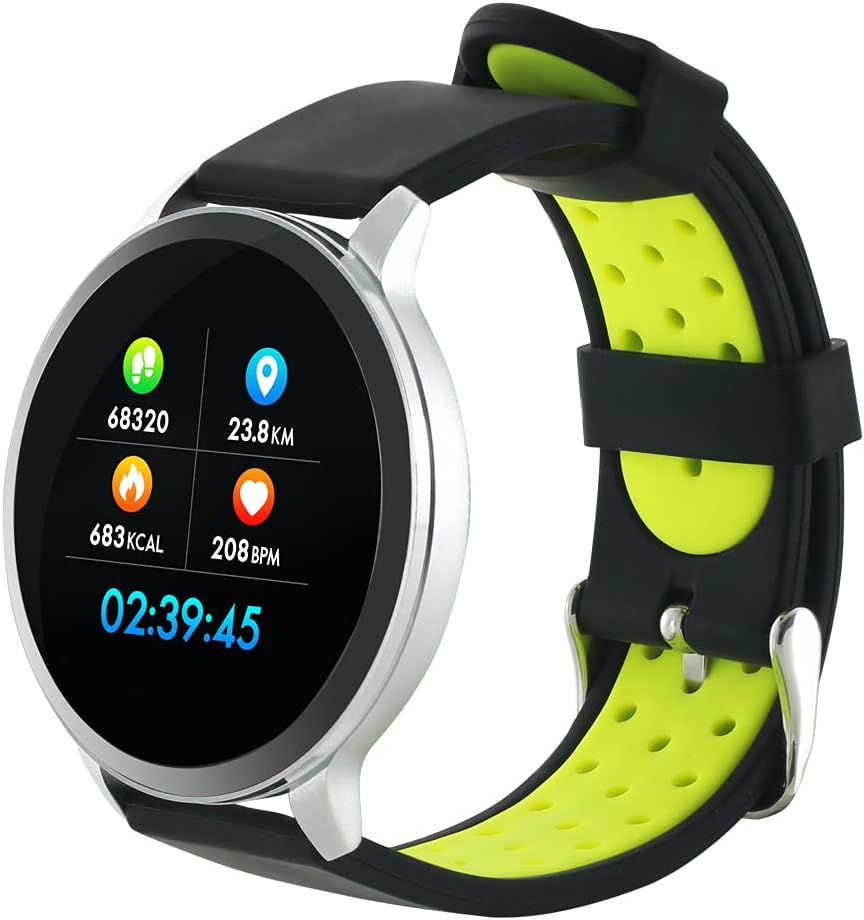
Figure 3: The Canyon CNS-SW71SS Smartwatch shown with an alternative black and lime green TPU strap, highlighting its interchangeable design.

Figura 4: posterior view of the Canyon CNS-SW71SS Smartwatch, displaying the optical heart rate sensor and magnetic charging contacts.

Figure 5: The retail packaging for the Canyon CNS-SW71SS Smartwatch, illustrating key features and the included two straps.
3. Configuració
3.1 Càrrega del rellotge intel·ligent
- Connecteu el cable de càrrega a un adaptador de corrent USB (no inclòs) o al port USB d'un ordinador.
- Align the magnetic charging pins of the cable with the charging contacts on the back of the smartwatch. The watch will vibrate and display a charging icon.
- Allow approximately 2-3 hours for a full charge. A full charge provides up to 7 days of usage.
3.2 Installing the Canyon Fit Application
- Scan the QR code provided in the packaging or search for "Canyon Fit" in your smartphone's app store (Google Play Store for Android, Apple App Store for iOS).
- Baixeu i instal·leu l'aplicació.
- Open the Canyon Fit app and follow the on-screen instructions to create an account and set up your profile.
3.3 Emparellament amb el telèfon intel·ligent
- Assegura't que el teu rellotge intel·ligent estigui carregat i encès.
- Activa el Bluetooth al teu telèfon intel·ligent.
- Open the Canyon Fit application.
- Navigate to the device pairing section within the app (usually found under 'Device' or 'Profile').
- Select your smartwatch (e.g., "CNS-SW71SS") from the list of available devices.
- Confirma la sol·licitud d'emparellament tant al teu telèfon intel·ligent com al rellotge intel·ligent si se't demana.
3.4 Attaching/Changing Wristbands
The smartwatch comes with two wristbands (metal and TPU) that can be interchanged. To attach or change a wristband, locate the quick-release pins on the underside of the strap. Slide the pin to detach the current strap and then align and slide the pin of the new strap into the corresponding holes on the watch body until it clicks into place.
4. Instruccions de funcionament
4.1 Navegació bàsica
- Pantalla tàctil: Swipe left/right to navigate through different functions and menus. Swipe up/down to view notificacions o configuracions ràpides.
- Botó lateral: Press the side button to return to the main watch face or to wake up the screen. A long press may access power options or specific features depending on the context.
4.2 Seguiment de l'aptitud física
- Mode multiesportiu: Access the 'Workout' or 'Sport' menu on your watch. Select your desired activity (e.g., running, cycling, walking) to start tracking. The watch will record duration, distance, calories burned, and heart rate.
- Activitat diària: The watch automatically tracks your steps, distance, and calories burned throughout the day. View these statistics on the watch face or in the Canyon Fit app.
- Monitorització de la freqüència cardíaca: The watch continuously monitors your heart rate. You can also manually initiate a heart rate measurement from the heart rate interface.
- Seguiment del son: Wear the smartwatch to bed, and it will automatically track your sleep patterns, including deep sleep, light sleep, and wake times. View detailed sleep analysis in the Canyon Fit app.
4.3 Notificacions
Once paired with your smartphone and with notification permissions granted in the Canyon Fit app, your smartwatch will display alerts for:
- Trucades entrants
- Missatges SMS
- Correus electrònics
- Calendari d'esdeveniments
- Social Media Apps (e.g., WhatsApp, Facebook, InstagRAM)
Llisca cap amunt a l'esfera del rellotge per view recent notifications. You can dismiss notifications from the watch.
4.4 Funcions addicionals
- Control de música: While music is playing on your phone, you can use the watch to play/pause, skip tracks, and adjust volume.
- Càmera remota: Open the camera function in the Canyon Fit app. Use your smartwatch as a remote shutter button to take photos on your phone.
- Alarma intel·ligent: Set alarms through the Canyon Fit app. The watch will vibrate to wake you up gently.
- Dades meteorològiques: Once connected to your phone, the watch will display current weather conditions and forecasts for your location.
5. Manteniment
5.1 Neteja
- Netegeu la pantalla i la carcassa del rellotge amb un drap suau iamp tela.
- For the metal strap, use a soft brush to gently clean any debris. For the TPU strap, wash with mild soap and water.
- Assegureu-vos que els contactes de càrrega estiguin nets i secs abans de carregar.
- Eviteu utilitzar productes químics o materials abrasius per netejar.
5.2 Resistència a l'aigua (IP68)
The Canyon CNS-SW71SS Smartwatch is IP68 rated, meaning it is resistant to dust and can be immersed in water up to 1 meter deep for a maximum of 30 minutes. While it can withstand splashes, rain, and brief immersion, it is not recommended for hot showers, saunas, or diving, as steam and high water pressure can compromise the seals.
- Do not press any buttons while the watch is submerged.
- Asseca bé el rellotge després de l'exposició a l'aigua.
5.3 Cura de la bateria
- Eviteu descarregar completament la bateria amb freqüència.
- Carregueu el dispositiu regularment, fins i tot si no l'esteu fent servir, per mantenir la bateria en bon estat.
- Guardeu el rellotge en un lloc fresc i sec quan no l'utilitzeu durant períodes prolongats.
6. Solució De Problemes
- El rellotge no s'encén: Assegura't que el rellotge estigui completament carregat. Connecta'l al carregador durant almenys 30 minuts.
- No es pot emparellar amb el telèfon intel·ligent:
- Assegureu-vos que el Bluetooth estigui activat al telèfon.
- Ensure the Canyon Fit app has necessary permissions.
- Reinicieu tant el telèfon com el rellotge intel·ligent.
- Prova de desvincular i tornar a vincular el dispositiu a través de l'aplicació.
- Notificacions que no apareixen:
- Check notification settings in the Canyon Fit app and your phone's system settings.
- Assegureu-vos que el rellotge estigui connectat per Bluetooth.
- Dades d'activitat/freqüència cardíaca inexactes:
- Assegureu-vos de portar el rellotge ben ajustat al canell, ni massa ajustat ni massa fluix.
- Netegeu el sensor de la part posterior del rellotge.
- Environmental factors or certain movements can affect accuracy.
- La pantalla no respon: Try restarting the smartwatch by holding down the side button. If unresponsive, allow the battery to fully drain and then recharge.
7. Especificacions
| Nom del model | CNS-SW71SS |
| Marca | CANYON |
| Mida de la pantalla | 1.22 polzades |
| Compatibilitat de sistemes operatius | Android, iOS |
| Tecnologia de connectivitat | Bluetooth 4.0 |
| Classificació de resistència a l'aigua | IP68 |
| Característiques especials | Wireless Charging (implied by product data), Multi-Sport Mode, Heart Rate Monitor, Sleep Tracker, Notifications |
| Dispositius compatibles | Smartphone |
| Bateria | Rechargeable (1 included) |
| Opcions de color | Black, Lime Green, Silver |
8. Garantia i Suport
For warranty information and technical support, please refer to the documentation included with your purchase or visit the official Canyon website. You can also contact Canyon customer service for assistance with product issues or inquiries.
Assistència en línia: https://canyon.eu/support/ (Exampl'enllaç, si us plau, verifiqueu la pàgina de suport oficial)


